
ASUS WRX90E Sage Review: The Ultimate Threadripper Pro Workstation Motherboard
Exploration of advanced cooling, power delivery, and server-grade controls integrated into this flagship workstation motherboard design.
Hardware by Masaru Hoshino on Dec 03, 2025
Building an extreme workstation around a $10,000 CPU comes with an equally intense search for the right motherboard. The board showcased here is built for users operating at the absolute top end of computing hardware, offering unmatched connectivity, cooling, power delivery, and expandability.
Most people will never need something like this, and its price tag alone will send many scrolling away. Still, its features open a window into truly uncompromising engineering. What follows is a full walk-through of what the motherboard includes, how it functions, and why it exists for the niche group that requires this level of performance.
Accessories and Included Components
When we open the box, we are greeted by a variety of accessories designed for builds that require serious power. There is a Y-cable with one end connected to the motherboard and two ends connected to the power supplies. There are 8-pin CPU-to-PCIe power cables intended for systems that pull power from multiple supplies.
We also get two mini DisplayPort cables, which are required for video output from the USB-C ports via GPU pass-through. Smaller accessories include M.2 screws, quick-release brackets, four SATA cables, fan headers for small fans, temperature probes, and rubber button caps.
We also receive 3 months of Adobe Creative Cloud membership, which adds a tiny bit of consolation for the price we've paid. The PCB is noticeably thick with several layers and densely populated SMDs on the back. Although the CPU region has a partial backplate, many components remain exposed, so handling requires care.
Cooling System and Integrated Fans
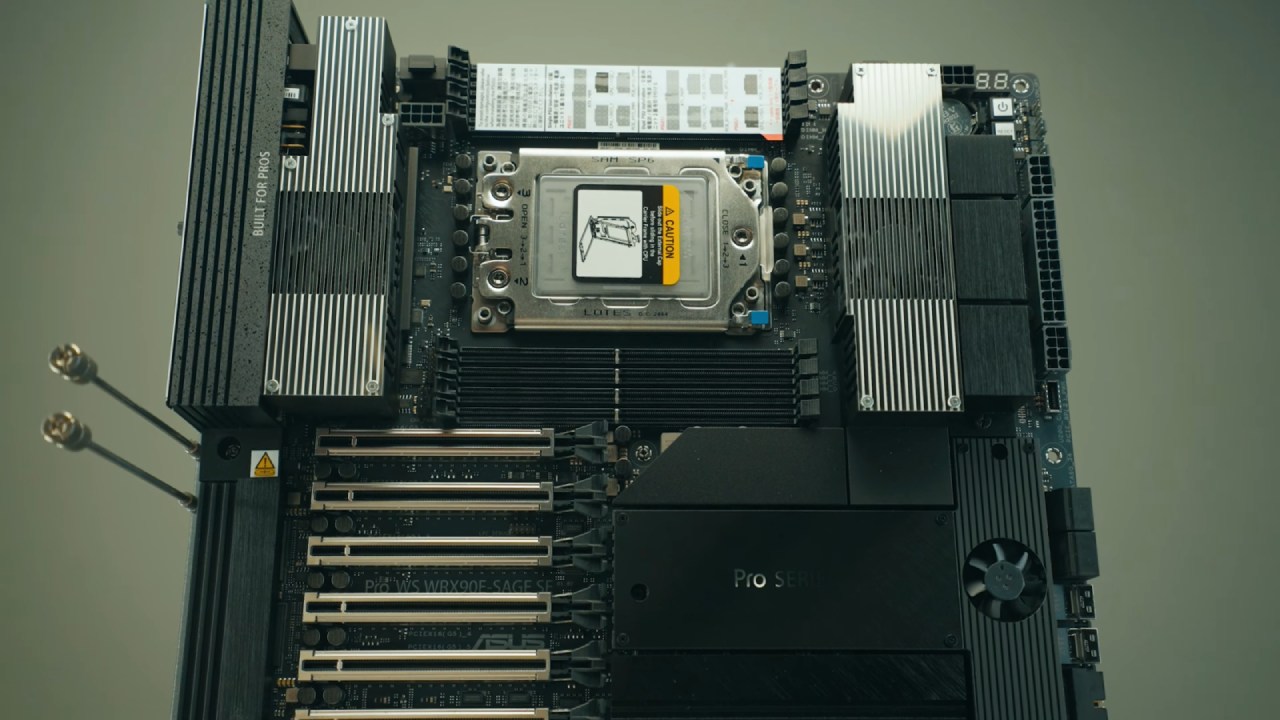
Cooling on this board is elaborate. A sideways-mounted fan blows over the USB4 heatsink, an area that requires cooling due to the USB4 controllers. The top section combines plastic and metal, with large heatsinks and two dedicated VRM fans. Although ventilation holes are intended to encourage airflow, cables routed across the motherboard may partially obstruct airflow into the case.
A fourth fan cools the chipset and blows air downward through internal channels. This airflow is directed across both the chipset and surrounding components. With workstation and server-class hardware, consistent airflow is crucial, and the motherboard design reflects that.
Power Delivery and Fan Headers
The top of the board includes dual CPU power connectors and additional headers for secondary PSU configurations. Fan headers support up to 3A, or 36W per header, compared to the usual 2A on standard consumer boards. There is a water pump header that always runs at 100%. The board includes Dr.Debug, power and reset buttons, a configurable Flex Key switch, and multiple temperature sensor headers.
We can connect our PSUs' SMB cables to monitor PSU-level telemetry when supported. There's also a power supply switch for selecting the PM bus version. The board features PCIe ATX power headers and a USB-C front-panel connector supplying 20GB speeds.
Voltage monitoring holes allow us to connect probes to measure Vcore, VDD, SOC, and other critical voltages directly. Four SATA ports and two slim SAS connectors provide storage expandability. Additional internal headers support intrusion detection, COM ports, Wi-Fi/Bluetooth add-ons, retry buttons for overclocking, and various specialized server-grade controls.
.jpg)
Overclocking Switches and Professional Controls
Despite being a workstation board, it includes LN2 mode pins, a slow mode switch for overclocking, BMC switches, VGA switches, and IP-fixed toggles. A microSD slot allows logging board management controller data.
There is a VPP I2C header for backplane storage sensor communication and chassis location LEDs for large server environments. TPM headers, chassis fans, and debug connectors further expand its management capabilities.
CPU and Memory Support
At the center sits the massive socket supporting Ryzen Threadripper Pro CPUs. Non-Pro chips are not compatible. The platform supports 4, 6, or 8 DIMM configurations, depending on the memory channel configuration. Since Threadripper Pro supports 8-channel memory, we can install up to 8 high-capacity RAM sticks. The sample build references 128GB modules, each costing more than the CPU itself.
GPU placement guidelines help us properly populate up to 4 GPUs, depending on their size, cooling, and airflow requirements.
PCIe Expansion and Bifurcation
There are seven PCIe expansion slots, nearly all of which support PCIe Gen5x16 speeds. Only slot six is PCIe Gen5x8. Full bifurcation is supported, except in that slot, where it is limited to 4+4. This allows us to split lanes for multi-drive carriers or expansion cards.
The GPU removal system is extremely convenient. Instead of latch mechanisms under the cards, we simply pull upward from the card's rear bracket area to release the GPU, a thoughtful touch for dense multi-GPU setups.
M.2 Storage Support
Removing the primary heatsink reveals four M.2 slots. Three of them provide PCIe Gen5x4 bandwidth, while the fourth also supports Gen5 but features a bottom heatsink plate.
Ventilation holes in the M.2 cover help air flow through, though a dedicated fan might have improved cooling further for high-speed Gen5 drives.
.jpg)
Rear I/O and Connectivity
The rear I/O includes a BIOS flashback USB port for easy firmware updates. Two USB-C ports support USB4 speeds and require DisplayPort pass-through via the included cables for video output. A dedicated management LAN port allows remote access to the onboard BMC.
Six USB-A 10GB ports provide high-speed connectivity. Two 10GB Ethernet ports offer robust networking. A VGA port feeds video output from the board's onboard management controller. Clear CMOS, line-in, and microphone jacks complete the back panel.
Final Thoughts
This motherboard is designed for demanding workloads because it supports multiple GPUs, offers high memory bandwidth, provides server-grade management, supports remote control, offers high-speed storage, and includes advanced overclocking features. It is built for scenarios where we might deploy four RTX 6000-class GPUs, need redundant PSUs, and require full PCIe Gen5 bandwidth across several slots.
It's a massive, extremely expensive board meant for those who need every millimeter of capability. If we want to build something more affordable, there are simpler options. But suppose we want to assemble an absolute beast before the next CPU generation arrives. In that case, this board provides everything we need to do it.
Also, check our other AMD articles below:
- AMD Ryzen 9 9950X3D Review: Setting The Standard For 2025 Gaming CPU
- AMD Ryzen 7 9800X3D Review: 3D V-Cache Goes God Mode with Stunning Gaming Performance
- AMD RX 9070 Performance Review: Thermals, Clocks, and Real-World FPS
- AMD Ryzen 5 7600 Review: Best Budget Gaming CPU of 2025?
- AMD Radeon RX 7800 XT Review: RDNA 3 Power For Midrange Gaming
- Sapphire NITRO+ AMD Radeon RX 9070 XT Review: The Ultimate 4K Gaming GPU
- AMD Ryzen 7 7800X3D: Delivers Gaming Performance Far Beyond Expectations
- AMD Ryzen 9 7900X Review: Powering the AM5 Era with DDR5 & PCIe 5.0
- Intel Core i9‑14900K vs. AMD Ryzen 7 7800X3D: Power Profiles & Gaming Benchmarks
Editor, NoobFeed
Gaming Hardware Updates
No Data.