
Dell Alienware AW3425DWM Review: Affordable 34-inch Ultrawide Gaming Monitor
Budget-focused ultrawide offering that balances strong contrast, modern design, and expected VA panel limitations.
Hardware by Masaru Hoshino on Dec 16, 2025
Over the last few years, most of the attention has been on expensive ultrawide monitors with fancy OLED panels. Affordable ultrawide monitors, on the other hand, have not been in the news. Those displays are cool, but they also cost a lot of money; they often start at prices well above what many buyers are willing to pay.
For those working with roughly half that budget, more traditional LCD-based ultrawides remain the primary option. One such monitor is the Dell Alienware AW3425DWM, which targets buyers looking for the ultrawide experience at a much lower cost.
.jpg)
Positioning and Core Specifications
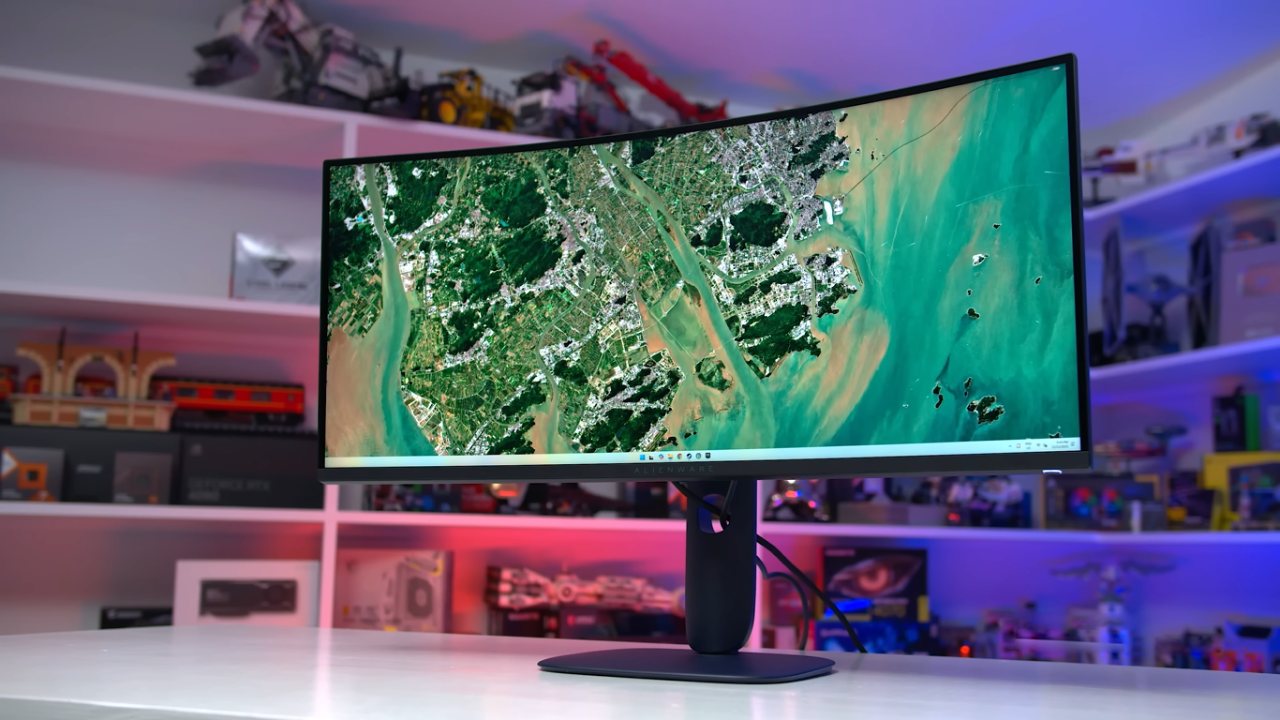
Dell Alienware AW3425DWM is a 34-inch ultrawide that has a 3440x440 screen and a VA LCD panel that can reach up to 180Hz. It has a 1500R curve, support for adjustable sync, and the newest look from Dell's Alienware.
The prices in this group are very competitive, around 350 but sometimes closer to 300 during sales. VA panels with similar specifications have existed for quite some time, so expectations for major breakthroughs are modest. Still, there is value in seeing what a modern, budget-focused ultrawide delivers today.
Design and Build Quality
From a design standpoint, the AW3425DWM closely resembles Dell's flagship ultrawide, the AW3425DW. The higher-end model uses a QD OLED panel and is slightly thinner. Still, otherwise, the design language is nearly identical. This is good news for the more affordable variant, as the 2025 Alienware design is excellent. The monitor looks premium, feels solid, and gives off a high-end impression despite its lower price point.
The rear design is clean and minimalist, while the stand pillar has a smooth, rounded shape. The base is a compact square that sits flat, maximizing usable desk space. One thing to be aware of is Dell's “interstellar indigo" color choice for most of the outer plastic surfaces. In marketing images, the monitor can appear black, but in reality, it is a blue-tinted black. We think it looks great, though how well it fits your setup will depend on personal taste.
Ergonomics and Panel Finish
The stand is sturdy and supports height, tilt, and swivel adjustments. The maximum height range is reasonable and sufficient for most desks. On the front, the 1500R curved panel feels appropriate and natural for a 34-inch ultrawide. The screen has a dark finish, which is common for LCD displays.
This helps the screen display clear images by reducing glare and spreading light across the screen. Clarity stays strong because of this.
Ports and Connectivity
AW3425DWM has great port choices. It has two HDMI 2.1 ports, one DisplayPort 1.4 port, and a hub with two ports that each support 5 Gbps USB connections. All the ports are lined up along the bottom edge, making them easy to reach.
DisplayPort relies on DSC to achieve 10-bit at 180Hz, though it can also run at 8-bit 180Hz with DSC disabled. The HDMI ports provide the full 48 Gbit bandwidth and support 10-bit 180Hz without DSC. This is a welcome improvement over older HDMI 2.0 ultrawides that were limited to much lower refresh rates.
OSD and Feature Set
There is a directional toggle under the Alienware badge that controls the on-screen display. Dell's well-known interface is there, with a good selection of features, including color controls, a refresh rate display, timers, shadow boosting, and AlienVision options such as crosshairs and ways to adjust the picture.
Overall, the feature set is competitive for the price, with no major omissions or usability issues.
Response Times and Overdrive Performance
Using a VA LCD panel means motion performance will always be a key concern. VA technology is not known for fast response times, though tuning has improved over the years. At 180Hz, the Fast overdrive mode delivers an average response time of 11.22ms. Overshoot is not an issue, but dark smearing is clearly visible, with dark transitions averaging 18ms.
Switching to Super Fast improves the average response time by about 1ms, but refresh compliance remains lacking, and dark smearing persists.
Cumulative deviation is also unimpressive. Extreme mode gives the best speed, with an average response time of 8.88 ms. Here, the dark smearing is still visible, and the total deviation improves only slightly. The differences between Fast, Super Fast, and Extreme are small and hard to see in reality.
At 180 Hz, reaction times are just barely okay, but 144 Hz gaming is better overall. Extreme is the best mode for adjustable sync because it keeps the performance level pretty steady across the refresh range.
Variable Refresh Rate Behavior
At lower frame rates, performance gets better. The screen gets a little faster at 120Hz, and response times keep getting better down to 60Hz. This comes with more overshoot, but you can lower inverse ghosting by changing to Super Fast at lower frame rates. It's not that hard to ignore inverse ghosting, even with Extreme turned on at 60Hz. Dark smearing is also far less problematic at lower refresh rates, as overall panel behavior improves.
The result is a fairly pleasant adaptive sync experience, with near single-mode usability across most of the refresh range. However, the underlying limitation remains that overall panel speed is not particularly fast, and 180Hz pushes VA technology close to its limits.
Comparative Performance
AW3425DWM is in the middle of this type of screen for VA ultrawides, with an average response time of 8.88 ms. It's better than older models like the Samsung Odyssey G5, Xiaomi Mi Curved, and Gigabyte G34WQC, but not as good as newer miniLEDs and better-tuned VA screens.
IPS ultrawides like the Gigabyte M34WQ and LG 34GN850 are clearly faster, as expected given IPS's advantages in response time.
Cumulative deviation results at the highest refresh rate show the DWM performing respectably within the VA category, though still behind IPS alternatives. Averaged across the refresh range, the DWM does better and ranks among the better VA ultrawides tested. However, it remains slower than modern IPS displays.
Dark Smearing and Motion Clarity
Dark smearing is a persistent issue, with an average dark transition time of around 14ms. This is not the worst result seen on a VA LCD, but it is far from ideal. Some newer VA implementations do better, while certain Samsung Odyssey models still lead in dark transition performance. This remains a known and unavoidable drawback of VA technology.
At 120Hz and 60Hz, motion performance is acceptable and better than many older VA ultrawides, though still behind IPS displays. Overall motion clarity is serviceable but not impressive by modern standards.
Input Lag and Power Consumption
Input lag is standard, and the processing delay is about 1 ms. The 180Hz refresh rate makes the panel a bit more responsive than 165Hz models, but the difference is too small to justify the extra cost. Pixel transitions are slower, especially on darker material, which reduces responsiveness.
Power consumption is typical for a VA ultrawide and slightly lower than some competing models. VA LCDs are generally efficient and consume less power than OLEDs during gaming.
Color Gamut and Accuracy
AW3425DWM is a wide-gamut display that covers 95% of DCI-P3 and around 73% of Rec2020. This is in line with most modern gaming monitors. Out of the box, accuracy is decent, with good grayscale performance and solid gamma tracking. There is no default sRGB emulation, so some oversaturation is present, which many users actually prefer.
With operating system-level color management enabled, oversaturation is reduced, and sRGB performance improves. The built-in sRGB mode, which locks some settings and is still not as good as true factory calibration, further improves color accuracy. The color checker shows average results, but using an ICC profile to calibrate delivers great results thanks to its stable gamma and wide range.
.jpg)
Brightness, Contrast, and Uniformity
Maximum SDR brightness reaches 462nits, which is higher than many VA ultrawides and more than sufficient for most environments. Minimum brightness drops to 41nits, offering an excellent adjustment range. Native contrast is strong at over 4000:1, a major advantage over IPS LCDs that results in deeper blacks, especially in darker rooms.
Viewing angles are typical for a VA panel. The 1500R curve helps mitigate horizontal viewing angle issues, but vertical viewing angles require proper positioning to avoid gamma shift. Panel uniformity on our unit was good, with only minor edge fall-off.
HDR Limitations
Despite being marketed as DisplayHDR400 certified, the AW3425DWM is poorly suited for HDR. The panel uses only eight edge-lit dimming zones, leading to severe blooming and elevated blacks in HDR content.
In practice, HDR looks worse than high-brightness SDR, and anyone interested in HDR performance should look elsewhere.
Final Thoughts
The Dell Alienware AW3425DWM can best be described as a perfectly fine budget ultrawide gaming monitor. It doesn't have great screen quality or motion performance, but it does have pretty good VA LCD performance for its class.
It's good that the default calibration is okay, the SDR brightness is high, and the contrast is great. The style is a big deal; it makes the monitor look a lot more expensive than it really is by matching Dell's high-end ultrawide screens.
The cons are mostly linked to VA technology. It's not great at motion performance, it has dark smearing, restricted viewing angles, and a chance of slight flicker or pixel inversion. The 180 Hz refresh rate makes the screen work hard, and the clarity of motion is not as good as it is on modern IPS displays.
But price and competition are important. At its current pricing, the AW3425DWM is competitive in a market dominated almost entirely by VA ultrawides. IPS ultrawides are increasingly rare at this size and price, and OLED options remain far more expensive. If you are buying your first ultrawide and OLED is out of reach, this monitor delivers a solid, familiar ultrawide experience with good contrast, decent color, and an excellent design.
Also, check our other Monitor articles:
- ASUS ROG Strix XG27AQWMG Review: 280Hz 1440p OLED Gaming Performance
- Samsung Odyssey OLED G81SF Review 2025: Ultimate 32-Inch QD-OLED Gaming Monitor
- Adaptive Sync Explained: FreeSync vs. G-Sync for Modern Gaming Monitors
- Gigabyte MO27Q2 QD OLED Review: Performance, HDR, and Gaming Experience
- ASUS ROG Swift PG27UCDM Review: Blazing Fast 240hz 4K OLED Performance
Editor, NoobFeed
Gaming Hardware Updates
No Data.