

Lenovo Legion Go S Z2 Go SteamOS Edition Review: A Balanced Handheld Gaming Experience
Lenovo Legion Go S delivers refined performance and design upgrades powered by Steam OS for seamless handheld gaming experiences.
Hardware by Katmin on Oct 07, 2025
Lenovo Legion Go S Z2 Go SteamOS Edition is the newest handheld gaming device from Lenovo. It has a better experience thanks to the Z2 Go chip and SteamOS. Compared to the older Windows version, the purple version looks better and is easier to use.
While the Windows version was initially difficult to recommend, this SteamOS model delivers smoother performance, improved optimization, and a more balanced gaming experience overall. Priced at $599, it aims to compete with devices like the $550 Steam Deck OLED, sitting comfortably between the Steam Deck and more powerful Z1 Extreme handhelds in terms of capability.

Design and Build Quality
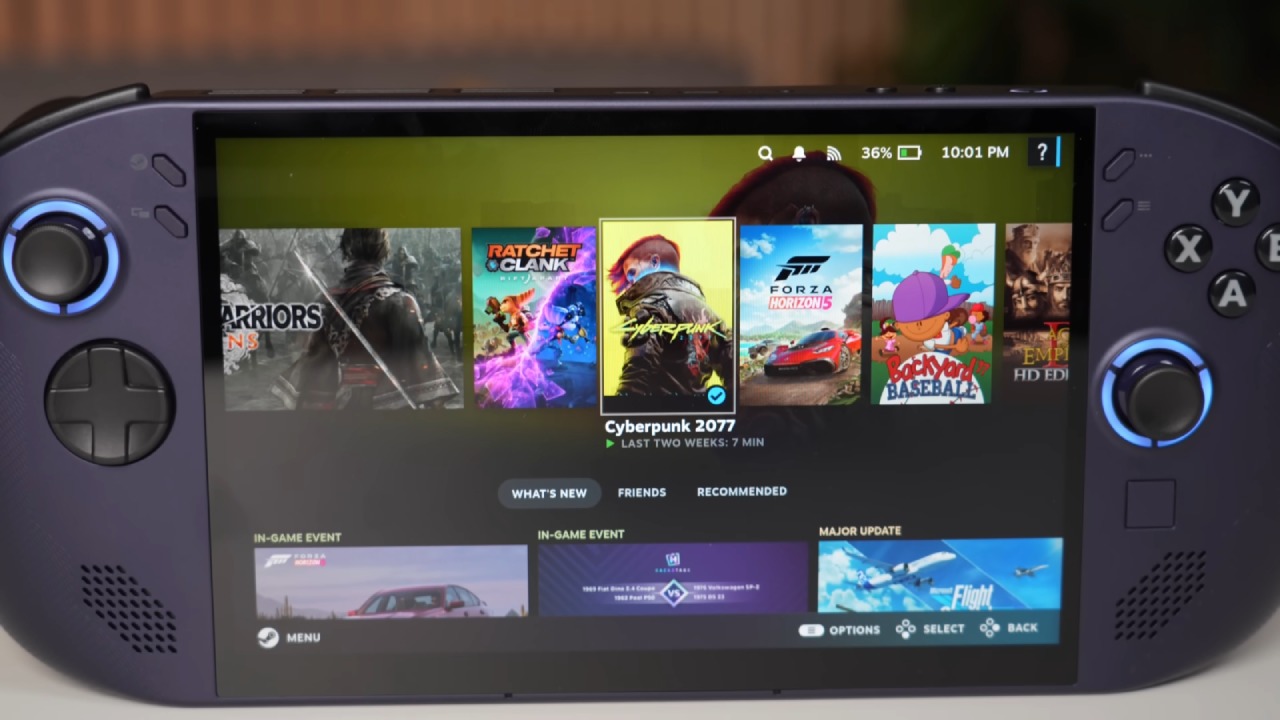
We must give Lenovo credit for the design of the Legion Go S. The device's look and feel are excellent, combining comfort with modern aesthetics. After spending many hours gaming on it, the overall ergonomics remain impressive and comfortable for extended play sessions.
The purple nebula color gives it a distinctive identity, setting it apart from other handheld devices on the market.
The Legion Go S features an 8-inch 1200p IPS 120hz VRR 500nit touchscreen that delivers crisp visuals and smooth motion. The display size strikes the perfect balance, offering an immersive experience without adding excessive bulk.
Lenovo includes two USB-C ports on the top and a microSD card reader at the bottom, enhancing functionality and convenience. The front-facing speakers are better than the ones on the original Legion Go because they make sound crisper and louder.
In general, the Legion Go S is a well-made, robust, and stylish device. Even though it doesn't come with a carrying case, it's comfortable to handle and use because of its ergonomic grip, snappy controls, and exquisite finish.
Display Quality
One of the best things about the Legion Go S Z2 Go Steam OS Edition is its display. The 8-inch 1200p IPS 120hz panel isn't an OLED, but it has great brightness, contrast, and color accuracy. We like that it supports VRR, which makes gameplay smoother and cuts down on screen tearing.
While the screen doesn't quite match the premium display on the original Legion Go, it still delivers a top-tier visual experience for its price. When compared to the Steam Deck, the Legion Go S stands out with its larger and higher refresh rate screen—two features that may sway many gamers toward this model.

SteamOS Experience
SteamOS is where the Legion Go S truly shines. Compared to its Windows equivalent, the operating system feels fast, responsive, and well set up for gaming. The same Z2 Go chip felt slow and not very useful on Windows. Still, SteamOS makes the most of its features by improving resource management and overall performance.
We appreciate how SteamOS integrates game libraries, system settings, and performance tweaks into a cohesive, console-like interface. The official partnership between Lenovo and Valve ensures stability, support, and a refined user experience.
SteamOS proves to be a great match for lower-powered devices like the Legion Go S, where every bit of optimization helps. It's intuitive, fast, and built for seamless gaming, making it a perfect fit for this handheld.
Performance and Gaming
Under the hood, the Legion Go S packs the Z2 Go APU, based on the older Zen 3 architecture, with four cores and eight threads, paired with a 680M GPU and 16GB of LPDDR5X RAM at 6400MHz. It comes with a 512GB PCIe Gen4 SSD and a 55.5Wh battery, offering a decent balance between speed, capacity, and efficiency.
In real-world performance, the Legion Go S positions itself between the Steam Deck and Z1 Extreme-powered devices. Games like Cyberpunk 2077 and similar demanding titles run reasonably well, especially when using FSR upscaling at 1200p or 800p.
Thanks to Steam OS optimization, overall gameplay feels smoother and more consistent than on the Windows variant.
However, this device is better suited for less demanding or older titles. While modern AAA games are playable, users may need to lower settings or utilize upscaling to maintain stable frame rates.
Controls and Usability
While the Legion Go S impresses in comfort and design, the controls leave a bit to be desired. The shoulder buttons and triggers feel overly clicky and lack the satisfying depth found in higher-end handhelds. The D-pad also feels cheap, resembling a budget toy texture rather than a premium finish.
The joysticks themselves are Hall effect and perform well. The rubber grip on top still seems slick, which makes it easy for thumbs to slide when the game becomes heated. Most people can live with these problems, but players who are used to high-end handhelds may notice them.
The ergonomics, location of controls, and overall handling of the gadget are still good, making it easy to play for long periods of time.
Battery Life and Thermals
Battery performance varies depending on usage. With its 55.5Wh battery, users can expect around 2–3 hours of gameplay under standard settings. Increasing TDP to 35W for higher performance reduces battery life to around 1.5 hours or less, depending on the game.
Thermal performance, however, is impressive. The Legion Go S stays relatively cool under heavy load. The fan is audible at higher wattages, but it's not too noisy.
In 25W performance mode with smart fan turned on, the device does a fantastic job of balancing noise and temperature.
Pricing and Value
The Legion Go S Z2 Go Steam OS Edition costs $599, which puts it in a crowded market. The price rise affects the entire value offer because it was originally going to cost $499 to $549. At this price point, it competes directly with the $549 Steam Deck OLED and several discounted Z1 Extreme handhelds.
We think the Legion Go S's larger screen and slightly stronger performance make it an appealing option. However, the Steam Deck still wins in terms of button quality, build refinement, and software maturity. However, Lenovo handhelds often go on sale, and a future discount could make the Legion Go S a more compelling purchase.
.jpg)
Final Thoughts
Lenovo Legion Go S Z2 Go Steam OS Edition delivers a significantly improved experience compared to its Windows-based predecessor. With its larger 8-inch screen, SteamOS optimization, and solid mid-tier performance, it provides an enjoyable and efficient handheld gaming experience.
We appreciate its ergonomic design, vivid display, and the stability of SteamOS. While the controls could be refined and the pricing slightly lower, the Legion Go S remains a strong contender in the portable gaming space.
For those deciding between the Legion Go S and the Steam Deck OLED, the choice comes down to priorities: the Legion Go S offers a larger, sharper display and slightly better performance. At the same time, the Steam Deck provides superior controls and a more polished user interface.
Ultimately, the Lenovo Legion Go S Z2 Go SteamOS Edition stands as a well-crafted, comfortable, and capable handheld that showcases how far SteamOS handheld gaming has come—and how promising the future continues to look.
Check our Other Handheld Articles :
- ASUS ROG Ally X Handheld Review: Double the Battery, Double the Comfort
- Nintendo Switch 2 Vs. Original Switch 1: A Full Comparison
- How To Connect A Camera And Join Voice Chat With Nintendo Switch 2
- Nintendo Switch 2 Review: Handheld Performance, Features & Value Breakdown
- ROG Xbox Ally X Vs. ROG Ally X: Display, Battery & Controls
- ASUS ROG Ally X vs. Steam Deck OLED: Display, Battery & Gaming Benchmarks
- MSI Claw 8 AI+ Review: Display, Controls & Gaming
- Nintendo Switch 2 vs. Steam Deck OLED: Gaming, Performance, Battery, Display and Value
- PlayStation Portal Review: Remote Play, Cloud Streaming & Travel Gaming
- PlayStation Portal vs. Lenovo Legion Go: Best Portable Gameplay
- Cyberpunk 2077 Patch 2.3 FPS Test on MSI Claw 8 AI+
Senior Editor, NoobFeed
Latest Articles
No Data.