
ROG Raikiri II Wireless Controller Review with 1000hz Polling and Tri-Mode Connectivity
A wireless gaming controller designed for precision, low latency, and flexible connectivity across PC and console platforms.
Hardware by Shinji Okazaki on Jan 15, 2026
Mouse and keyboard have long been the go-to for gaming for their accuracy and control, but not all games work well with that setup. A controller typically makes sports, racing, and story-driven games feel better.
ROG Raikiri II Xbox wireless controller from ASUS gives you more options. It has anti-drift TMR joysticks, a 1000Hz polling rate on PC, and three connection options, so it's good for both casual and competitive gaming.
What You Get in the Box
The kit comes with a case that may be used for both charging and traveling. It keeps the controller charged while you're on the go. The case has a cutout for charging the controller without removing it. It also has a USB-C controller stand. You may also put the stand on a desk to utilize it every day.
The stand acts as a wireless extender. You can reduce interference by connecting it to a PC and plugging the 2.4 GHz dongle into the front USB port. This keeps the signal closer to the controller.
There are two extra joystick caps in the box for people who like bigger sticks, as well as two feet for the charging port.
Design and Construction
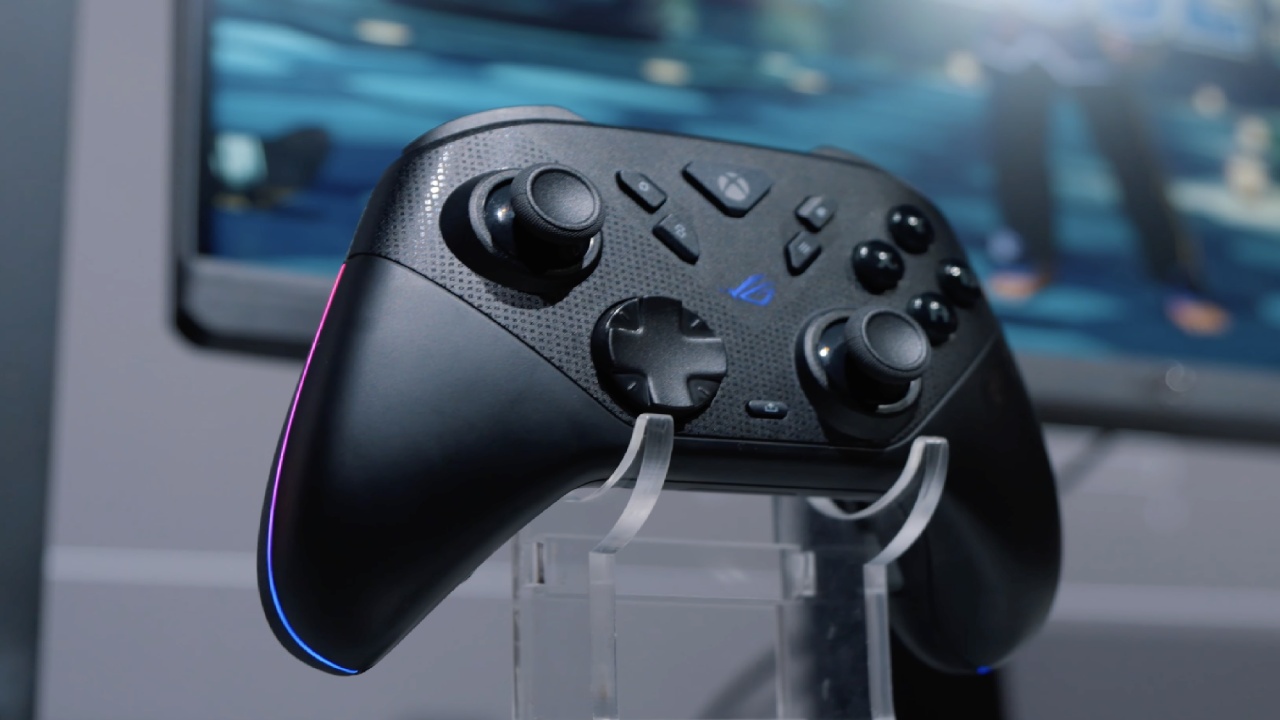
The controller has a layout similar to an Xbox controller, making it easy to hold. The handles are painted with a safe-for-skin paint, and the rear is made of double-shot injection TPE for a stronger grip.
There is some RGB illumination near the edges of the handles, and the ROG logo lights up when the controller is turned on. You can change the lighting or turn it off with Gear Link. When vibration and sound are also turned off, the battery can last up to 50 hours.
There are small Xbox and ROG emblems on the body that add to the design.
Triggers, Buttons, and Joysticks
The buttons are decently spaced, and the triggers can be set to two modes using a switch on the back. Micro-switch triggers give you quick clicks with tactile feedback in short mode, which is great for FPS and competitive games. In full mode, analog triggers let you input gradually, which makes them preferable for racing games that require throttle control.
The tops of the TMR joysticks are concave and feature anti-friction rings to ensure smooth operation. For gamers who want a different sensation, taller joystick caps can be put on.
Integration with ROG Ally
Raikiri II and the ROG Xbox Ally handheld are meant to function well together. Two buttons at the top let you quickly go to the command center and game library, making it easy to navigate the console's menus.
Control Switches and Buttons on the Back
There are four buttons on the back of the controller. Some players could hit them by accident while playing because their fingertips are close to the triggers. These buttons don't have any default settings, but you can change them using the Gear Link web app.
There are two switches next to the buttons on the back. One of them can switch between Bluetooth, dongle, and cable modes. The other one goes back and forth between PC and Xbox. The wireless dongle fits in a little compartment on the rear. It may be hooked into a PC, Xbox, or ROG Ally.
Latency and Performance Over Wireless
Raikiri II has a polling rate of 1000 Hz, which makes wireless input feel immediate even in fast-paced FPS games. Movement, reflexes, and aiming stay the same with very little input latency.
The wired option still has the least lag, but the 2.4GHz wireless connection is only about 1ms slower, which isn't perceptible while you play.
.jpg)
Web Customization for Gear Link
You don't need to install any program to customize. Gear Link is a web-based platform that ASUS uses. When the controller is plugged into a PC, you can change all of its settings through a web browser.
You can change the trigger pressure in real time using on-screen sliders or the controller's buttons.
Final Thoughts
Raikiri II costs more, but its features make it worth the money. A lot of other wireless controllers only work with 1000 Hz polling when they're plugged in; the Raikiri II works wirelessly.
It works well as a main wireless controller for gaming setups because it offers strong wireless performance, can be customized in many ways, and integrates well with the ROG Ally.
Also, check our other handheld articles below:
- ASUS ROG Ally X Handheld Review: Double the Battery, Double the Comfort
- Nintendo Switch 2 Vs. Original Switch 1: A Full Comparison
- How To Connect A Camera And Join Voice Chat With Nintendo Switch 2
- Nintendo Switch 2 Review: Handheld Performance, Features & Value Breakdown
- ROG Xbox Ally X Vs. ROG Ally X: Display, Battery & Controls
- ASUS ROG Ally X vs. Steam Deck OLED: Display, Battery & Gaming Benchmarks
- MSI Claw 8 AI+ Review: Display, Controls & Gaming
- Nintendo Switch 2 vs. Steam Deck OLED: Gaming, Performance, Battery, Display and Value
- PlayStation Portal Review: Remote Play, Cloud Streaming & Travel Gaming
- PlayStation Portal vs. Lenovo Legion Go: Best Portable Gameplay
- Cyberpunk 2077 Patch 2.3 FPS Test on MSI Claw 8 AI+
Editor, NoobFeed
Latest Articles
No Data.