
Facts Behind Steam Machine Performance and Pricing
Steam Machine delivers a balanced combination of CPU, GPU, and memory specifications targeting the majority of PC gamers.
Hardware by Tanvir Kabbo on Nov 17, 2025
The conversation surrounding the new Steam Machine has been dominated by loud criticism. Still, the broader data behind PC gaming paints a different picture. Many assumptions made by enthusiasts overlook the most important factor influencing Valve's decisions—the real-world hardware owned by the majority of Steam users.
By comparing the Steam Machine's specifications with the current Steam hardware survey, the intent behind Valve's design becomes clear.
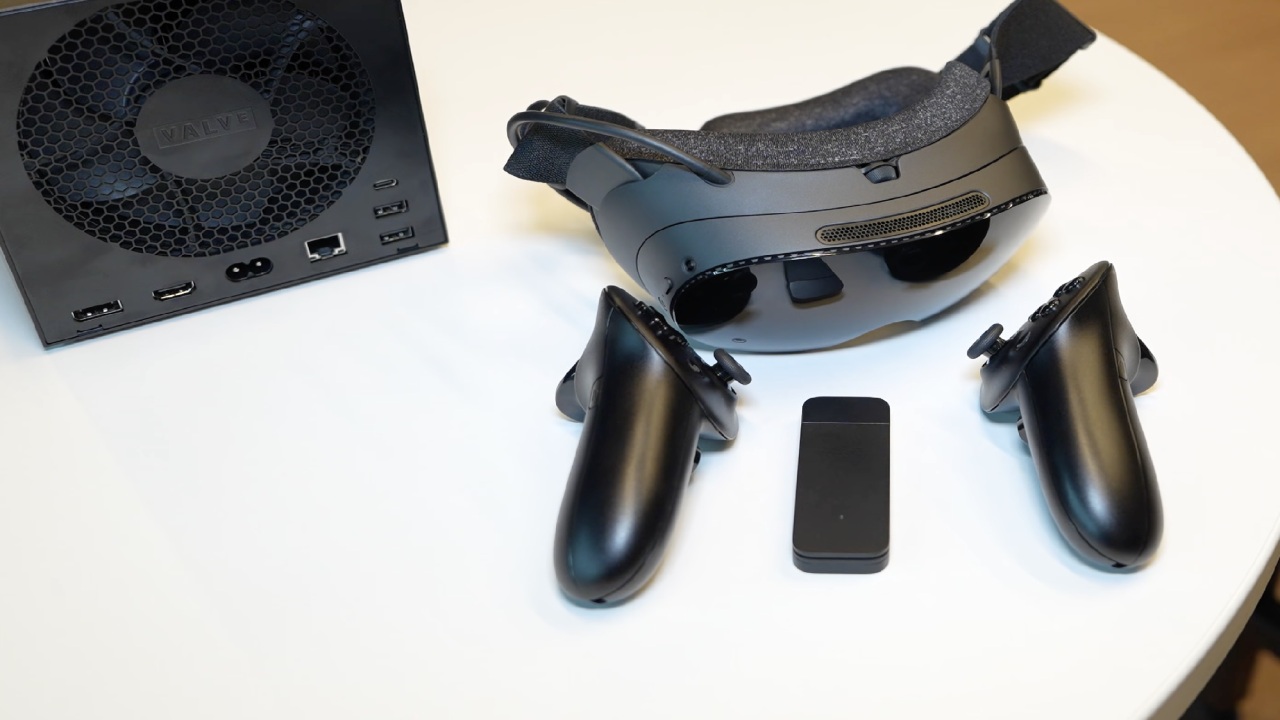
Understanding the Steam Machine's Design Philosophy
We see the elite crowd claiming the CPU is weak, the 16GB of RAM is barely enough, and the 8GB of VRAM is essentially e-waste. Still, upon examining the actual Steam data, the claims fall apart. You get a compact cube-like PC powered by a custom AMD Zen4 6-core/12-thread CPU paired with an RDNA 3 GPU featuring 28 compute units, backed by unified 16GB DDR5 and 8GB GDDR6 VRAM. You get a quiet, sleek device designed to run SteamOS while maintaining broad compatibility.
When people say it looks like a mid-range laptop, you have to look at Valve's actual goal. The mandate was simple: deliver enough performance to play every game on Steam at 4K60Hz using upscaling. We understand that the mission was never to brute-force Cyberpunk 2077 at native 4K, but rather to offer phenomenal living-room performance with FSR.
Why Valve Targeted the Actual Majority
We see a lot of enthusiast frustration, but Valve's approach is rooted entirely in real user data. Engineer Yazison explained that based on their numbers, the Steam Machine matches or beats 70% of PCs used by Steam customers. Valve doesn't need marketing fluff. They build hardware grounded in what millions of players actually own.
The most popular CPU configuration on Steam is 6 cores, accounting for nearly 30%. So choosing a 6-core processor isn't cutting corners—it mirrors the most common CPU layout in the ecosystem. When critics complain about 8GB of VRAM, you can refer to the survey again. The single largest VRAM capacity remains 8GB, accounting for over 33%. Add the massive population on 6GB or even 4GB, and you quickly see that 8GB is still the majority standard.
Why 4K60hz Upscaling Isn't a Limitation
We understand that some users think upscaling means compromise, but 55% of Steam players are still using 1080p displays, with a large portion on 1440p. For over half of all gamers, this cube is overkill.
The ability to hit 4K60Hz with upscaling simply future-proofs the system for when more people upgrade. If someone demands native 4K ultra at 120fps, we know that person isn't the target audience.
Docked Steam Deck Data That Inspired the Steam Machine
We see critics assuming Valve is chasing a console fantasy, but the strongest evidence for this device already existed. Steam Deck analytics showed that 10-15% of all Decks at any given moment were connected to an external display. Millions of players organically tried to use their Steam Deck as a living-room PC.
Valve listened to the feedback from those users. Many said the UI, connection experience, and docking workflow worked great—they just wanted more graphical power. So Valve built the Steam Machine as the ultimate living-room evolution of the Steam Deck, delivering around six times the Deck's GPU performance.
Effortless Interoperability With the Steam Deck
We appreciate how powerful interoperability is. You can take your catalog from the Steam Deck to the Steam Machine with no friction. You can remove a microSD card from the Deck, insert it into the Steam Machine, and continue playing instantly without needing to redownload anything. The convenience here is massive. You get fast suspend/resume, background updates, and an intuitive console-style SteamOS interface.
You can still switch to KDE Plasma desktop mode, install apps, or install Windows if a specific game requires a different kernel environment. As Gabe Newell emphasized, openness is the PC ecosystem's superpower. You can attach any hardware, install any store, or run any software.
Built for the Majority, Not the Elite
A lot of folks seem to demand top-notch enthusiast specs. The Steam Machine is not meant to be a replacement for a high-end gaming PC, though. It's meant to be an easy-to-use living room PC for individuals who still have 4-core CPUs, 8GB of RAM, and outdated GPUs.
It is meant to make it easy to get into the PC environment by giving you a simple, powerful, and cheap console-like experience.
Price Expectations and Market Position
We know that consumers demand prices like those of consoles, but Valve has made it plain that they won't pay for the hardware. A similar DIY PC with Zen 4, RDNA 3, and 16GB DDR5 costs between $750 and $800.
If Valve hits a $600-$800 price range for a compact, quiet, pre-built machine with an internal PSU, that's genuinely competitive. The mistake some critics make is comparing the Steam Machine to PlayStation or Xbox, rather than actual PC builds.
.jpg)
Steam Deck 2 and Future Linux Growth
We see the big question hovering over all of this: if the Steam Machine is here, what about the Steam Deck 2? Valve won't release a successor until a major generational leap occurs—something beyond 20-50% improvements. The original Deck still hits the sweet spot of cost and performance.
With SteamOS adoption on the rise and Linux recently reaching 3% of Steam users, it will be interesting to see how much this increases once the Steam Machine launches. We may see Linux rise to 5% or even 10% depending on adoption.
A Device for 70% of Gamers
We understand why enthusiasts refer to it as e-waste or 'dead on arrival,' but they miss the point entirely. It's not built for them.
It's built for the millions still using modest hardware who want effortless access to their PC library on a living-room TV with no headaches. It's the console for the other 70% of gamers.
Also, check our other hardware articles:
- AMD Ryzen 9 9950X3D Review: Setting The Standard For 2025 Gaming CPU
- Amazon Luna 2025 Review: Is Prime Gaming's Cloud Service Your Go-To For Casual Fun?
- AMD RX 9070 XT Review: AMD's RDNA 4 Champion for 1440p Gaming
- GeForce Now Ultimate: Ditching Your Gaming PC For Cloud RTX 4080 Power?
- NVIDIA GeForce RTX 5080 Review (2025): Still A 4K Gaming Powerhouse?
- Intel Core Ultra 9 285K Review And Performance Breakdown (2025)
- AMD Ryzen 7 9800X3D Review: 3D V-Cache Goes God Mode with Stunning Gaming Performance
- Intel Core Ultra 9 285K vs AMD Ryzen 7 9800X3D: In-Depth Gaming Performance and Benchmark Comparison
- NVIDIA GeForce RTX 5080 Super Performance In Cyberpunk 2077: Path Tracing & DLSS 4.0 Tested
- AMD Radeon RX 9070 XT In Cyberpunk 2077: Ray Tracing & FSR 4.0 Tested
- Intel Arc B580 Review: The $250 GPU Revolutionizing 1440p Gaming
- Intel Arc B570 Vs. B580: Value, Specs, And Real-World Gaming Performance
- RTX 5090 Laptop Vs. M4 Max MacBook Pro: Ultimate Raw Performance Vs. Battery Endurance
- Intel Arc b580 Vs. RTX 4060: Game Performance And Value Analysis
- RTX5090 Hell Is Us Demo 4K Ultra Benchmark: DLSS Vs. Native Performance Guide
- NVIDIA RTX 5070 Review: Mid-Range Muscle or Marketing Hype?
- Nintendo Switch 2 Review: Handheld Performance, Features & Value Breakdown
- RTX 5070 Ti Review: Performance, Thermals & Power Efficiency Tested
- Samsung Odyssey OLED G81SF Review 2025: Ultimate 32-Inch QD-OLED Gaming Monitor
- AMD RX 9070 Performance Review: Thermals, Clocks, and Real-World FPS
- AMD Ryzen 5 7600 Review: Best Budget Gaming CPU of 2025?
- AMD Radeon RX 7800 XT Review: RDNA 3 Power For Midrange Gaming
- Asus ROG RTX 5090 Astral OC Vs. Founders Edition: The 4K Gaming Benchmark
- Intel Core i5-13400F Gaming Performance: Still Worth It in 2025?
- ASUS GeForce RTX 5090 LC Liquid Cooled GPU Review: Unmatched Silence & Speed
- ASUS ROG Ally X Handheld Review: Double the Battery, Double the Comfort
- Lenovo Legion Go S Review: The Ultimate Steam Deck 2 Alternative
- Sapphire NITRO+ AMD Radeon RX 9070 XT Review: The Ultimate 4K Gaming GPU
- Alienware 16 Area 51 Review: The Ultimate 2025 Gaming Laptop
- Alienware Area-51 Review: Unmatched 4K, Thermal, and Acoustic Performance
- AMD Ryzen 7 7800X3D: Delivers Gaming Performance Far Beyond Expectations
- AMD Ryzen 9 7900X Review: Powering the AM5 Era with DDR5 & PCIe 5.0
- Intel Core i9‑14900K vs. AMD Ryzen 7 7800X3D: Power Profiles & Gaming Benchmarks
- Intel Core i9 14900K: Specs, Benchmarks, and Competitor Comparison
- ASRock Radeon RX 7800 XT Challenger OC Review: Best Price-to-Performance GPU of 2025
Senior Editor, NoobFeed
Gaming Hardware Updates
No Data.