
Minisforum MS-A2 Review: Ryzen 9 9955HX Mini PC Performance, Cooling, and Homelab
Compact workstation mini PC designed for heavy CPU workloads, networking, and professional homelab deployments.
Hardware by Tanisha Aria on Dec 16, 2025
Minisforum asked for a full performance deep dive of the MS-A2, a small, work-related mini PC intended for fast connectivity and high-core-count CPU performance.
It is mostly designed for home lab, professional, and server-type tasks instead of gaming or content creation, which are areas where other mini PCs might work better. Here, the main concerns in a small-form-factor system are speed, cooling, fan noise, expandability, and general ease of use.
.jpg)
Design, Specs, and Core Hardware
The MS-A2 is very similar to the older MS-01. They are both small, and the MS-A2 has the same mostly metal body and plastic front panel as the MS-01. The two methods look and work in almost the same way. The processor makes the most important change.
AMD's Ryzen 9 9955HX is inside the MS-A2. This CPU is close to the top of the line for AMD's mobile CPUs in terms of raw speed. With 16 cores and 32 threads, this chip is great for heavy multitasking, virtualization, and server-style tasks.
The integrated graphics aren't very good because this CPU is meant to work with a separate GPU rather than a large iGPU. Because of this design choice, most small PCs don't usually have processors like this one, but they deliver a lot of power for their size.
Minisforum offers the MS-A2 in three configurations. The most basic one costs $879, and the most advanced one, with 96GB of RAM and a 2TB SSD, costs about $1500.
First Impression
The package includes a U.2 SSD conversion plate and a power wire specifically for it. An HDMI cord and a big 19V 240W external power brick are also included. The power brick's size makes it very noticeable.
Ports and Connectivity
The MS-A2 has a power button, a 3.5mm audio jack, two USB-A 5Gb ports, and one USB port for wireless devices on the front. An included M.2 Wi-Fi 6 card with Bluetooth support handles wireless connectivity.
The back is where the method stands out from the rest. You get two 10Gb SFP+ ports, two 2.5Gb RJ45 Ethernet ports, two USB-C ports that can handle display output, one HDMI 2.1 port, one USB-A port with 10Gb speeds, and one more USB-A port with 5Gb speeds. The MS-A2 is especially well-suited for networking, routing, and homelab use thanks to its SFP+-equipped quad-LAN setup.
Opening the System and Internal Layout
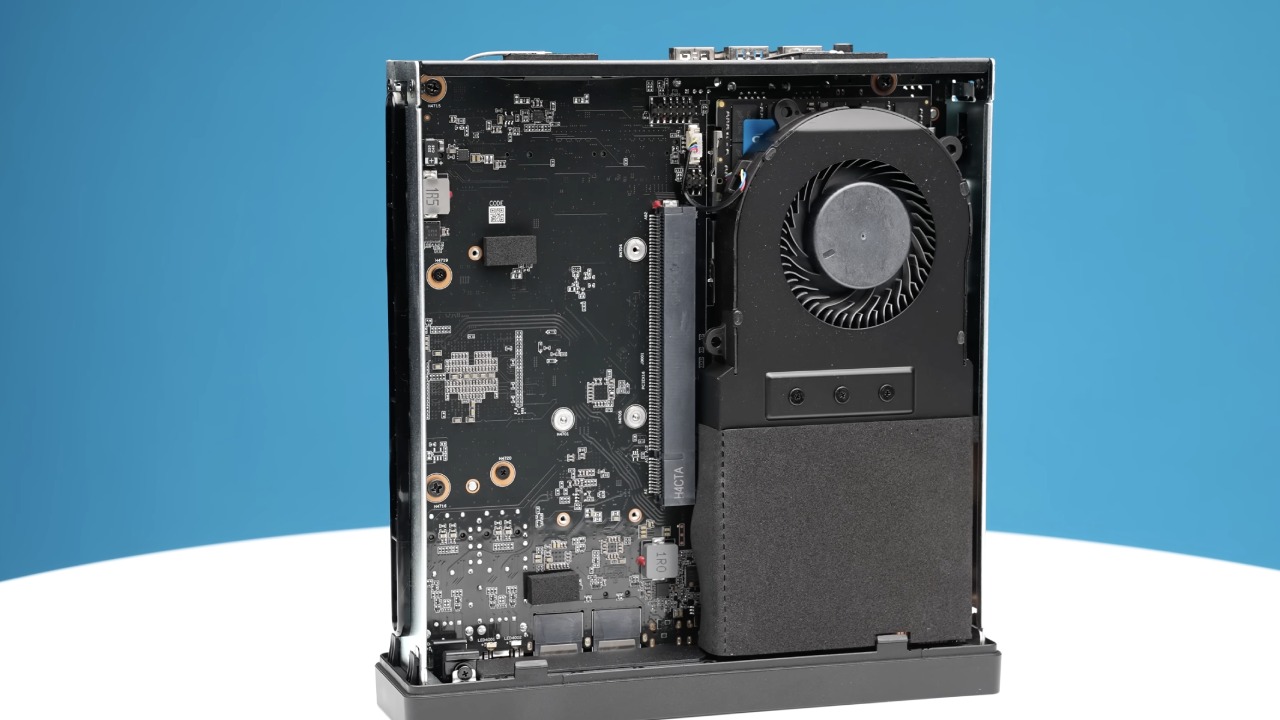
The MS-A2 is easy to open. The frame can slide open easily when the release latch is pressed. There is a PCIe Gen4x8 slot inside that supports split. The GPU support is not very broad, though. Any supported card must have only one slot, be shorter than 170mm, and not require additional power ports. Because the airflow is limited, a blower-style GPU is highly suggested.
To access the RAM, you have to remove the screws and lift the CPU cooler. The system uses DDR5-5600 memory and can officially handle up to 96GB. The unit that was examined had Crucial DDR5 memory installed.
Removing the cooler reveals three M.2 slots, where you can add storage. One of these can be used with U.2 drives or longer 22110 business M.2 SSDs through the included adapter. All three slots can run at PCIe Gen4x4 speeds, but the 2280 slots run at Gen3 speeds by default and have to be set to Gen4 in the BIOS.
Operating System Support
Windows 11 Pro is preinstalled on the machine, and no malware was found. We tried Ubuntu too, and it worked just like we thought it would, including finding all the network ports. Right away, it looks like Linux support is great.
Benchmark Performance Overview
The Ryzen 9 9955HX is usually used with a separate GPU, so we included the MS-A2 in test comparisons with systems that had dedicated GPUs or similar integrated graphics.
In Cinebench single-core tests, the MS-A2 outperforms the Atom G7 PT. This is what you'd expect from a newer CPU. The change is most obvious when performance mode is turned on in the BIOS. In multi-core tests, the gains are smaller, just a bit better than the G7, and with performance mode on, both systems are almost the same, which is a little disappointing.
The 9955HX performed about the same as the Core Ultra 9275HX in Geekbench single-core tests, but the 9955HX pulled ahead a little when performance mode was turned on. In multi-core, it still falls behind Intel's best chips, but it does beat the Ryzen 9 7945HX in both normal and performance modes.
When it comes to H.264 video encoding, Intel still has the upper hand, and this situation doesn't change the trend. In shorter tests, performance mode doesn't make a big difference in how long it takes to encode. AV1 encoding shows a similar trend, but longer tasks benefit a little from shorter completion times.
The 9955HX's built-in GPU is very basic and can't do AV1 hardware decoding. The MS-A2 performs best on Geekbench AI tests that use the CPU, but when GPU tests are run, the iGPU's lack of support makes performance very poor.
The Fire Strike, Time Spy, and Steel Nomad Light benchmarks all show that this GPU's speed is far behind even older mobile discrete GPUs. Anyone who needs GPU acceleration will have to buy a separate graphics card that works with their system.
Productivity, Coding, and Creative Workloads
Compile time is only average, slower than the other two methods we looked at. The Ryzen AI Max Plus 395 performs much better than the 9955HX and the MS-A2 in Photoshop tests. In Adobe Premiere tests, the opposite occurs: the MS-A2 takes the lead when speed mode is enabled.
Storage, Power Consumption, and Thermals
The 2TB model reviewed has a very fast Crucial SSD and earns one of the best scores we've ever seen in the 3DMark storage test. The drive, on the other hand, gets very hot, up to 73 °C, when in use.
The Wi-Fi performance is good, with a stable connection at distances of up to 12m on the 5GHz band, and the Bluetooth range is a little above average.
The idle power use of a system without a GPU is higher than expected. It uses as much power as a system with a mobile standalone GPU. The MS-A2 draws about 148W from the wall when fully loaded, rising to about 160W in performance mode.
CPU temperatures reach about 90 °C, and thermal throttling occurs under heavy, sustained load. It is definitely hard to keep such a power-hungry CPU cool in a chassis that is less than 1.8L.
The MS-A2 has many problems, and fan noise is among the worst. This mini PC makes more idle noise than most others, especially when performance mode is enabled.
.jpg)
BIOS Features and Configuration
When you start your computer, pressing the Delete key takes you into the BIOS. RAID0 and RAID1 support are advanced settings for onboard devices. ACPI settings let you change Wake-on-LAN and power limit options.
Graphics configuration (which comes with warnings about the risk of overheating) lets you set PCIe bifurcation and Gen4 speeds manually, and hardware tracking enables limited fan control. Also, there are overclocking options that aren't common for a mini PC like this one.
Final Thoughts
The MS-A2 is well-built out of metal, connects easily to other devices, and can be expanded in ways that are amazing for its size. But the prices are high, particularly compared to the MS-01, which has a similar CPU that's slower but easier to use. Before memory prices went up, the most basic choice would have been more attractive.
Some big problems are the power brick, which is too big, the noisy cooling system, and the absence of USB4. There's no doubt the Ryzen 9 9955HX is powerful, but its cooling system struggles to keep it in check. This leads to thermal throttling and louder fans, especially when the computer is idle and in performance mode.
Even with these problems, the MS-A2 remains a great home lab and networking option because it's small yet powerful. Not many competitors offer this level of CPU performance, storage flexibility, and quad-LAN connectivity in such a small form factor.
For what it's meant to do, it probably won't be under full load for long periods of time very often. This helps reduce some of its heat and sound problems.
Also, check our other hardware articles:
- AMD Ryzen 9 9950X3D Review: Setting The Standard For 2025 Gaming CPU
- Amazon Luna 2025 Review: Is Prime Gaming's Cloud Service Your Go-To For Casual Fun?
- AMD RX 9070 XT Review: AMD's RDNA 4 Champion for 1440p Gaming
- GeForce Now Ultimate: Ditching Your Gaming PC For Cloud RTX 4080 Power?
- NVIDIA GeForce RTX 5080 Review (2025): Still A 4K Gaming Powerhouse?
- Intel Core Ultra 9 285K Review And Performance Breakdown (2025)
- AMD Ryzen 7 9800X3D Review: 3D V-Cache Goes God Mode with Stunning Gaming Performance
- Intel Core Ultra 9 285K vs AMD Ryzen 7 9800X3D: In-Depth Gaming Performance and Benchmark Comparison
- NVIDIA GeForce RTX 5080 Super Performance In Cyberpunk 2077: Path Tracing & DLSS 4.0 Tested
- AMD Radeon RX 9070 XT In Cyberpunk 2077: Ray Tracing & FSR 4.0 Tested
- Intel Arc B580 Review: The $250 GPU Revolutionizing 1440p Gaming
- Intel Arc B570 Vs. B580: Value, Specs, And Real-World Gaming Performance
- RTX 5090 Laptop Vs. M4 Max MacBook Pro: Ultimate Raw Performance Vs. Battery Endurance
- Intel Arc b580 Vs. RTX 4060: Game Performance And Value Analysis
- RTX5090 Hell Is Us Demo 4K Ultra Benchmark: DLSS Vs. Native Performance Guide
- NVIDIA RTX 5070 Review: Mid-Range Muscle or Marketing Hype?
- Nintendo Switch 2 Review: Handheld Performance, Features & Value Breakdown
- RTX 5070 Ti Review: Performance, Thermals & Power Efficiency Tested
- Samsung Odyssey OLED G81SF Review 2025: Ultimate 32-Inch QD-OLED Gaming Monitor
- AMD RX 9070 Performance Review: Thermals, Clocks, and Real-World FPS
- AMD Ryzen 5 7600 Review: Best Budget Gaming CPU of 2025?
- AMD Radeon RX 7800 XT Review: RDNA 3 Power For Midrange Gaming
- Asus ROG RTX 5090 Astral OC Vs. Founders Edition: The 4K Gaming Benchmark
Contributor, NoobFeed
Gaming Hardware Updates
No Data.