
MSI MEG X870E Godlike X Review: Extreme AM5 Motherboard With VRM and Seven M.2 Slots
MSI MEG X870E Godlike X Marks A Decade Of Godlike Motherboards With An Extreme Anniversary Design.
Hardware by Tanisha Aria on Dec 16, 2025
MSI Godlike processors are released only once a year, and this time, a holiday theme has been added. The MSI MEG X870E Godlike X is an evolution of last year's Godlike and continues the tradition with even more ambition.
This is not an ordinary processor; right away, the 8 kg weight when boxed, about the same as a baby reindeer, tells you so. The opening experience sets the mood for the review right from the start.
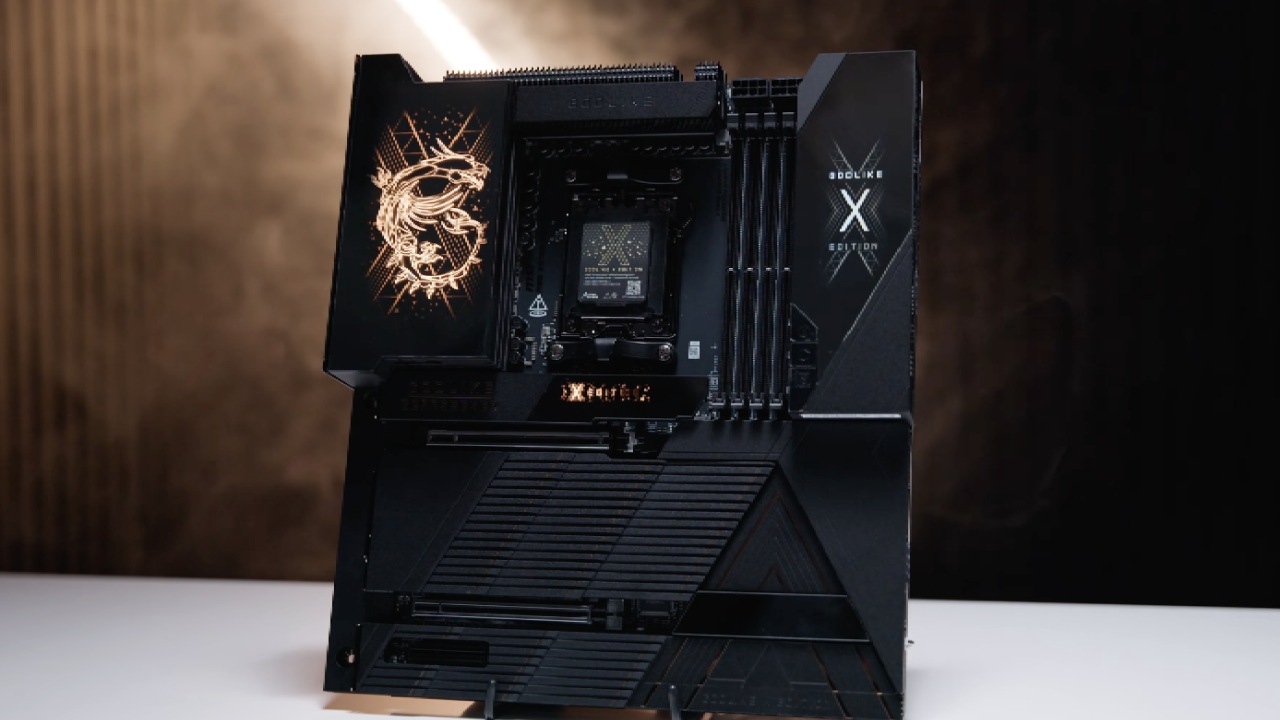
A Decade of Godlike and Pricing Context
In 2015, MSI showed the X99A, the first-ever Godlike processor. It was based on Intel's X99 processor, as the name suggested, and was first shown at Computex. Back then, everyone was amazed that the price was about £500 and included RGB lights. Now, almost ten years later, the MEG X870E Godlike X marks the 10th anniversary of the Godlike family. This board, worthy of being given as a present on an anniversary, now costs £1,250 including VAT. This price puts it well above anything else of its kind for sale.
First Impression
The opening is truly a big deal. The cardboard sleeve almost reaches the ceiling, and inside is a fancy-looking package with the Godlike X logo. It must be a lot of work to pack this at the mill. The motherboard and an amazing array of accessories meet us as soon as we go inside.
A smart external control hub that moves many different ports off the board is among them. Even though the board is very large and has many headers, MSI clearly wants to avoid a lot of cables by placing connections on the outside of the board. Along with the branding M.2 heatsink, there is also an M.2 expander card, a Wi-Fi antenna, and some other accessory boxes. The contents of these boxes are revealed gradually during the opening.
The CPU is huge, and at that price, it's reasonable to expect such a fancy display. The next extension choices include USB-C-connected display parts and gold-finger contacts designed to power and light up parts. Still, not all of the lighting functions are available right away.
Easy Control Hub and Storage Expansion
We find that the Easy Control Hub is full of ports and connectors designed to connect to the motherboard via a bridge wire. This makes it possible to handle fan headers, front-panel connectors, and other important things away from the main PCB. It's an odd but good idea, especially since the board itself already has a lot of surface area.
Storage expansion is a top concern. The motherboard has five built-in M.2 slots. With the two extra slots from the included expander card, there are now seven M.2 drives overall. We think it's a good move for MSI to focus specifically on M.2 storage rather than SATA. In reality, seven M.2 slots are more than most people need, but they're available for those who want them.
Mystery Boxes and Personalization
The innards of one sealed box are just as classy as you'd expect for a top-of-the-line product. This accessory box is a nice touch that shows how much work MSI has put into the total experience. The board feels high-quality and well-made.
It's important to keep in mind that this model is a limited edition. Each of the 1,000 retail units will be numbered and recognized. In addition to that allotment, reviewer samples, like ours, are made.
Dynamic Dashboard III and EZ Bridge
When the Dynamic Dashboard III is turned on, it should light up and display useful system information, not just look pretty. The whole dashboard piece can be removed with a magnet, revealing the CMOS battery and other connectors below. This flexible design encourages closer inspection before the system is put together.
Bridge cables, temperature monitors, and front-panel extensions can all be connected through this interface. This part works perfectly with USB 2.0 headers and other connections. The design lets users keep ports out of sight when not in use, while still making them easy to access when needed. Four ports along the edges of the board support a SATA connection.
Heatsinks, Expansion Slots, and Layout
The board's actual size is now visible, with the M.2 screens and VRM heat sinks removed. The VRM heatsinks are very big and look like they will work well. The expansion layout has a PCIe5x16 slot for graphics, a PCIe5x8 slot that is probably meant for the M.2 expander, and a PCIe4x4 slot that works at x2 for add-in cards.
There are two M. 2 Gen5x4 slots, two M. 2 Gen4x4 slots, one M. 2 Gen4x2 slot, and four SATA ports for onboard storage. There are so many functions that it's clear no compromises were made.
.jpg)
VRM Design and Technical Details
The VRM setup is just as intimidating. It uses a Renesas device with doublers set up in 24 + 2 + 1. There are 24 Renesas 110A smart power stages for Vcore, 2 for the SoC, and more for other tasks. When used with a 10-layer PCB, the engineering feels more like industrial gear than a regular consumer motherboard.
Rear I/O and Connectivity
The back I/O screen is totally full. It has two USB4 Type-C ports rated at 40 Gbits, five USB3.2 Type-C ports at 10 Gbits, and support for USB3.2 Type-C at 20 Gbits and one at 10 Gbits on the front panel. On the back, there are 8 USB 3.2 Type-A ports at 10 Gbps. On the front, there are headers for four USB Type-A ports at 5 Gbps and four USB 2.0 ports.
The networking is just as amazing, with Wi-Fi 7 with Bluetooth 5, Realtek 5 Gbps Ethernet, and Marvell 10 Gbps Ethernet 4.
Tuning Controller Support
Before we did speed tests, we added a tuning controller that came with a different MSI motherboard. Once hooked up, it lets people outside the system access its power, reset, overclocking, retry, and clear CMOS features. It's easy to see why people who do extreme overclocking would really like this tool, especially for LN2sessions.
Even though there's a connector for it, the Godlike X doesn't come with a tuning tool. MSI says that people who own Godlike X are unlikely to do hardcore overclocking and can instead rely on BIOS features. We think this logic is a bit unclear, especially at this price.
Test System Configuration
We used the best tools to test the Godlike X against the best. The CPU is an AMD Ryzen 9 9950X 3D, and the memory is a G.Skill Trident Z5 Royal Neo set at DDR5 8000. An MSI RTX 4090 Ventus 3X handles the graphics work, as it aligns with the current test data. An MSI MPG Core Liquid K360 360mm AIO is used to cool this system.
BIOS and Software Experience
The BIOS screen is standard but well-designed, with Godlike X branding throughout. We let EXPO run the memory at full speed and enabled GameBoost to enable PBO. Instead of BIOS settings, MSI Center was used to control the fan. ARGBlighting is handled by Mystic Light, and the AIOcooler and Dynamic Dashboard III are handled by separate modules.
.jpg)
Performance Results
In Geekbench 6 multicore, the Godlike X is the best, using 242W at 5.2 GHz compared to 200W at 4.9 GHz on a lower-level board. In terms of single-core speed, Geekbench 6 also shows that it is just barely in the lead. The same thing happens with Cinebench R23 multicore.
The results for memory bandwidth show that Intel platforms remain in the lead with higher-speed configurations. However, the Godlike X does very well with DDR58000, beating out other Zen5 systems that use DDR56000.
Gaming scores are just as competitive. In Far Cry 6 at 1080p, the Godlike X and Ryzen 9 9950X 3D are the best. At 1440p, the numbers are very close. Assassin's Creed Mirage has similar gaps, with Godlike X always near the top but not always in first place.
Final Thoughts
The MSI MEG X870E Godlike X features a 10-layer PCB and a massive VRM for battleship-level performance. You get a ton of I/O/optionsI/O options, a great Dynamic Dashboard III, a lot of DIY-friendly features, and a lot of other extras. It's easy to install M.2 drives, the quick-release GPU is nice, and the microbuttons on the board make things easier.
It's easy to see what the bad things are. The price is extremely high, and the tuning controller is enabled but not included. This motherboard is definitely not for you if you think £430 to £450 is too much to spend on one. But if you're already okay with spending a ton of money on CPUs, GPUs, and memory, the Godlike X makes a lot of sense. For that group, it is a truly interesting, high-quality product.
Also, check our other hardware articles:
- AMD Ryzen 9 9950X3D Review: Setting The Standard For 2025 Gaming CPU
- Amazon Luna 2025 Review: Is Prime Gaming's Cloud Service Your Go-To For Casual Fun?
- AMD RX 9070 XT Review: AMD's RDNA 4 Champion for 1440p Gaming
- GeForce Now Ultimate: Ditching Your Gaming PC For Cloud RTX 4080 Power?
- NVIDIA GeForce RTX 5080 Review (2025): Still A 4K Gaming Powerhouse?
- Intel Core Ultra 9 285K Review And Performance Breakdown (2025)
- AMD Ryzen 7 9800X3D Review: 3D V-Cache Goes God Mode with Stunning Gaming Performance
- Intel Core Ultra 9 285K vs AMD Ryzen 7 9800X3D: In-Depth Gaming Performance and Benchmark Comparison
- NVIDIA GeForce RTX 5080 Super Performance In Cyberpunk 2077: Path Tracing & DLSS 4.0 Tested
- AMD Radeon RX 9070 XT In Cyberpunk 2077: Ray Tracing & FSR 4.0 Tested
- Intel Arc B580 Review: The $250 GPU Revolutionizing 1440p Gaming
- Intel Arc B570 Vs. B580: Value, Specs, And Real-World Gaming Performance
- RTX 5090 Laptop Vs. M4 Max MacBook Pro: Ultimate Raw Performance Vs. Battery Endurance
- Intel Arc b580 Vs. RTX 4060: Game Performance And Value Analysis
- RTX5090 Hell Is Us Demo 4K Ultra Benchmark: DLSS Vs. Native Performance Guide
- NVIDIA RTX 5070 Review: Mid-Range Muscle or Marketing Hype?
- Nintendo Switch 2 Review: Handheld Performance, Features & Value Breakdown
- RTX 5070 Ti Review: Performance, Thermals & Power Efficiency Tested
- Samsung Odyssey OLED G81SF Review 2025: Ultimate 32-Inch QD-OLED Gaming Monitor
- AMD RX 9070 Performance Review: Thermals, Clocks, and Real-World FPS
- AMD Ryzen 5 7600 Review: Best Budget Gaming CPU of 2025?
- AMD Radeon RX 7800 XT Review: RDNA 3 Power For Midrange Gaming
- Asus ROG RTX 5090 Astral OC Vs. Founders Edition: The 4K Gaming Benchmark
Contributor, NoobFeed
Gaming Hardware Updates
No Data.