
RG477M Review: The Ultimate CRT Emulation Handheld for True Retro Gaming
Understanding the importance of CRT emulation and pixel-perfect retro experience for true enthusiasts.
Hardware by Tanisha Aria on Jan 01, 2026
The point of retro games is to have fun. It's a mistake to think that. It's about shaders, pixels, and worrying too much about making sure the simulation is exactly like the original CRT. It's about making sure the games are played the right way, not just for fun. That's what old emulation is now, like it or not.
The RG477M raises a very important question for people who love retro emulation: how far are we willing to go to make the games look like they did when we played them years ago? A lot of us think those games looked amazing.
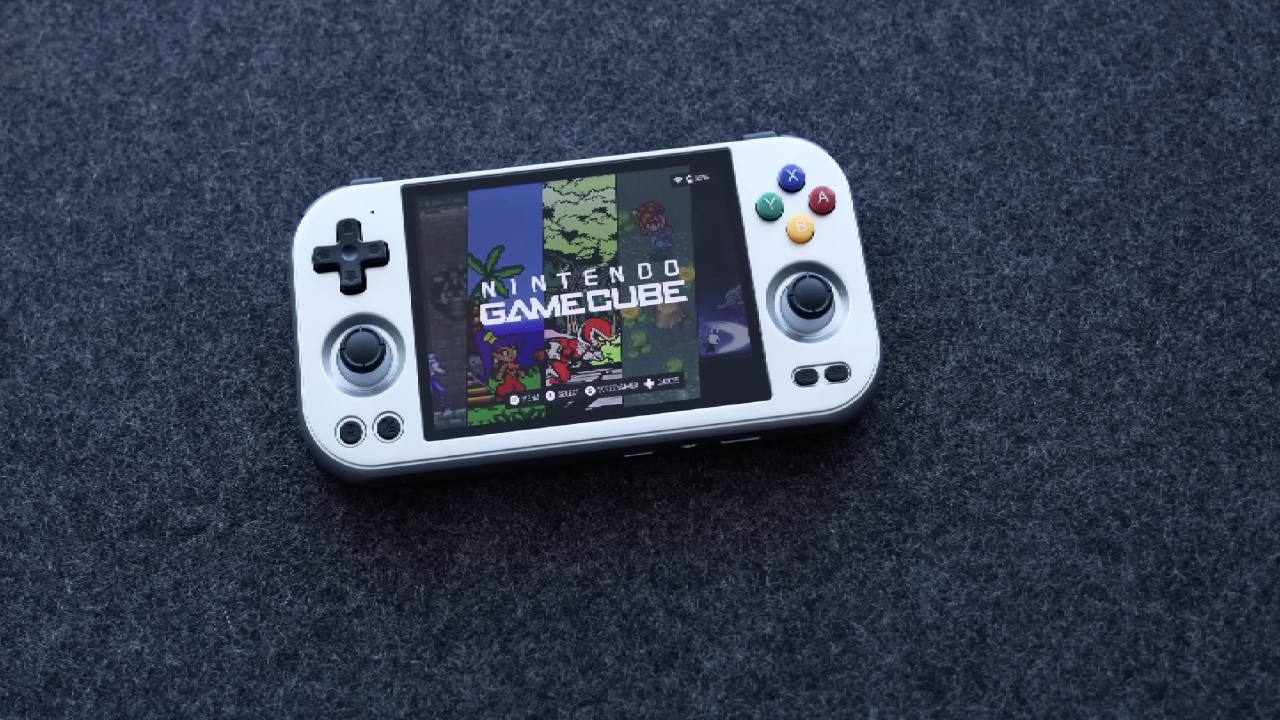
Still, that memory is like recording songs from the radio onto cassette tapes, then hearing those same songs on CD for the first time. Our memories often make things seem better than they really were.
On the one hand, we could be arguing over small details about something we remember as much better than it actually was. But the science backs up the case. CRT screens worked very differently from today's LCD panels, and they had features that were better for gaming.
A Game of Split Personality
This argument needs a split personality. On one side, there is a gamer who just wants to play old games and uses any good shader to get a nostalgic vibe. They are okay with it as long as it works. On the other side is the perfectionist, who is always unhappy and concerned with finding the best shader and the most realistic CRT experience.
When deciding whether it's worth spending more than $200 on an old emulation handheld capable of the heavy processing needed for realistic CRT emulation, these two points of view clash.
How CRT Screens Actually Worked
Scan lines that moved quickly across the screen were used by CRT displays to make pictures. In between those flashes, the previous line went black until the next line showed up. It had totally disappeared by the time a line needed to reappear. This process greatly reduced motion blur, improving the game's movement.
Newer LCD and OLED screens work differently. They use a "sample-and-hold" method, meaning that pixels from the previous frame remain lit while the next frame begins to appear. This can cause significant motion blur, especially on poor LCD screens.
Black Frame Insertion plus High Refresh Rates
The RG477M features a 120 Hz screen that supports black-frame insertion. When BFI is enabled, a black frame is inserted between each picture frame. This results in 60 frames per second of gameplay, along with 60 black frames, which is a great match for the 120Hz refresh rate.
This method makes old games look clearer, sharper, and more responsive. It lowers the sample-and-hold effect and improves motion sharpness. It is a beautiful answer in theory, and it works much like a CRT.
Living With BFI on the RG477M
After a long time of using BFI on the RG477M, the change may feel small. The change is noticeable right away, but it is not very impressive. The Dimensity 8300 CPU can run high-end shaders like CRT Geom Deluxe and CRT Mattias without any issues.
Still, the price range of $229 to $289 makes me wonder. Putting on a good filter without BFI still makes a great picture. These days, LCD screens are so good that arguing over pixel response timing can feel like overkill.
Why the 4x3 Screen Matters
The RG477M is great for older systems like NES, SNES, Mega Drive, Master System, PC Engine, PS1, and N64 because its screen is 4x3. Integer scaling is great, and both the NES and the Mega Drive used perfect pixel-to-pixel scaling.
The SNES has a small frame around the screen, and even though the Game Boy content looks smaller, it's still easy to play because of the big screen. The RG477M becomes a dream device for hardcore old emulation fans if they choose the 8GB version.
RG477M vs Retroid Pocket 5
The RG477M is a sensible product when viewed only as a retro-gaming gadget. There's little doubt that the 4x3 display was built for a specific reason. But as a general-purpose mobile, it has a hard time explaining why it costs so much.
The smaller viewing area makes streaming new games from Steam or Game Pass feel less effective. In current fast-paced games, such as shooters and racing games, inline triggers make things difficult because they rely on straight trigger input. Media viewing is also disappointing because the screen looks washed out and too bright.
High-End Emulation Performance
The RG477M makes people interested in PS2 emulation again. Vulkan does a great job of running games at 2x resolution, and the gameplay is smooth and fun. GameCube simulation is a little less reliable, but still great for a handheld device.
For the Dolphin Emulator to work best, you have to switch back and forth between Vulkan and OpenGL. This device's real strength is in retro systems; the N64, NES, SNES, PC Engine, and PS1 all look great.
BFI Over Time
BFI doesn't start to be noticed right away; it takes time. The screen does get darker, but you can tell BFI is off after a while. The result is small, but it really does make the motion clearer, and it gets hard to give up.
Camera tests show that the motion blur between frames has been lessened. In addition, eye strain may help explain why BFI seems to work during long practices.
.jpg)
3DS, Switch, and PSP Emulation
3DS emulation works really well, with less stuttering and glitching in sound and graphics than expected. This could be because of the 12GB of RAM, but it works really well compared to other devices that were tried.
So far, the Eden emulator has worked well for switch emulation, even without modified drivers. The Dimensity chipset's raw power lets you play games, and 16:9 material still works on the 4:3 screen.
PSP games look great when upscaled and remain fun to play, and PS2 games like Sly Cooper benefit from clear visuals and strong image quality.
Heating and Fan Behavior
Worries about warmth seem too high. The fan behaves inconsistently, sometimes turning on for simple jobs and staying quiet during more difficult ones. In 16-bit games, the fan is rarely used. But software changes could help with fan control.
Design Quirks and Ergonomics
It's very disappointing that the speaker's fire downwards. They are quiet and don't have much impact, so they often need to be played at full volume. The way the weight is spread out makes the device feel bigger than it really is.
High-profile analog sticks and inline shoulder buttons don't work well together, resulting in a confused design. The face buttons and D-pad made of rubber material are among the best out there, but the shoulder buttons are too clicky and noisy.
Video Output and Build Quality
Right now, video output doesn't have the right scaling and adjustment choices, so it shows up as a fixed 4x3 image on outside screens. The build quality is good, but the shoulder buttons move a little when the test is shaken.
The RG477M doesn't look as nice as the one before it. The older model had better color choices, inset sticks, and a more unified design. The RG477M's appearance seems to be missing something.
Set Up and Software Experience
Using ES-DE with custom themes and up-to-date emulators keeps things running smoothly and gives them a finished look. The preinstalled apps are surprisingly up to date, and people who are used to Android-based handhelds will find that setting up the system is easy.
Final Thoughts
It's not easy to decide whether to buy the RG477M. A device like the Retroid Pocket 5 makes more sense for flexibility. Its 16:9 screen and Snapdragon CPU give it more features, but it's not really the best at anything.
That said, the RG477M is still the best portable for emulating CRTs. This meets a need that didn't exist before for gamers who already have modern gaming and streaming devices. It's an expert device for people who care more about how real something is than how easy it is to use. It gives those people something really special.
Also, check our other hardware articles:
- AMD Ryzen 9 9950X3D Review: Setting The Standard For 2025 Gaming CPU
- Amazon Luna 2025 Review: Is Prime Gaming's Cloud Service Your Go-To For Casual Fun?
- AMD RX 9070 XT Review: AMD's RDNA 4 Champion for 1440p Gaming
- GeForce Now Ultimate: Ditching Your Gaming PC For Cloud RTX 4080 Power?
- NVIDIA GeForce RTX 5080 Review (2025): Still A 4K Gaming Powerhouse?
- Intel Core Ultra 9 285K Review And Performance Breakdown (2025)
- AMD Ryzen 7 9800X3D Review: 3D V-Cache Goes God Mode with Stunning Gaming Performance
- Intel Core Ultra 9 285K vs AMD Ryzen 7 9800X3D: In-Depth Gaming Performance and Benchmark Comparison
- NVIDIA GeForce RTX 5080 Super Performance In Cyberpunk 2077: Path Tracing & DLSS 4.0 Tested
- AMD Radeon RX 9070 XT In Cyberpunk 2077: Ray Tracing & FSR 4.0 Tested
- Intel Arc B580 Review: The $250 GPU Revolutionizing 1440p Gaming
- Intel Arc B570 Vs. B580: Value, Specs, And Real-World Gaming Performance
- RTX 5090 Laptop Vs. M4 Max MacBook Pro: Ultimate Raw Performance Vs. Battery Endurance
- Intel Arc b580 Vs. RTX 4060: Game Performance And Value Analysis
- RTX5090 Hell Is Us Demo 4K Ultra Benchmark: DLSS Vs. Native Performance Guide
- NVIDIA RTX 5070 Review: Mid-Range Muscle or Marketing Hype?
- Nintendo Switch 2 Review: Handheld Performance, Features & Value Breakdown
- RTX 5070 Ti Review: Performance, Thermals & Power Efficiency Tested
- Samsung Odyssey OLED G81SF Review 2025: Ultimate 32-Inch QD-OLED Gaming Monitor
- AMD RX 9070 Performance Review: Thermals, Clocks, and Real-World FPS
- AMD Ryzen 5 7600 Review: Best Budget Gaming CPU of 2025?
- AMD Radeon RX 7800 XT Review: RDNA 3 Power For Midrange Gaming
- Asus ROG RTX 5090 Astral OC Vs. Founders Edition: The 4K Gaming Benchmark
- Intel Core i5-13400F Gaming Performance: Still Worth It in 2025?
- ASUS GeForce RTX 5090 LC Liquid Cooled GPU Review: Unmatched Silence & Speed
- ASUS ROG Ally X Handheld Review: Double the Battery, Double the Comfort
- Lenovo Legion Go S Review: The Ultimate Steam Deck 2 Alternative
- Sapphire NITRO+ AMD Radeon RX 9070 XT Review: The Ultimate 4K Gaming GPU
- Alienware 16 Area 51 Review: The Ultimate 2025 Gaming Laptop
- Alienware Area-51 Review: Unmatched 4K, Thermal, and Acoustic Performance
- AMD Ryzen 7 7800X3D: Delivers Gaming Performance Far Beyond Expectations
- AMD Ryzen 9 7900X Review: Powering the AM5 Era with DDR5 & PCIe 5.0
- Intel Core i9‑14900K vs. AMD Ryzen 7 7800X3D: Power Profiles & Gaming Benchmarks
- Intel Core i9 14900K: Specs, Benchmarks, and Competitor Comparison
- ASRock Radeon RX 7800 XT Challenger OC Review: Best Price-to-Performance GPU of 2025
Contributor, NoobFeed
Gaming Hardware Updates
No Data.