
Samsung 9100 Pro 8TB PCIe Gen5 SSD Tested: Performance, Thermals, and Real-World Results
Samsung expands its PCIe Gen5 SSD lineup with an ambitious 8TB model aimed at enthusiasts and professionals.
Hardware by Tanisha Aria on Jan 10, 2026
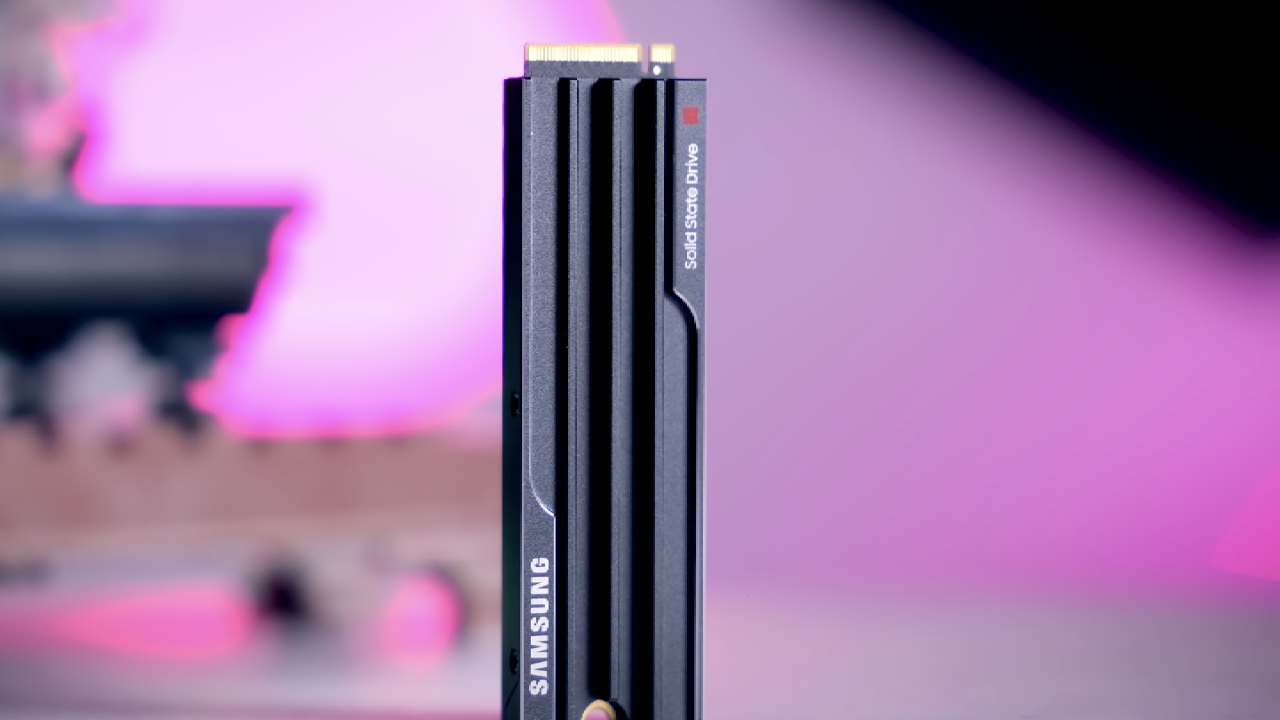
The Samsung 9100 Pro SSD has been on the market for a while now. It was a big deal because it was the company's first fully-fledged PCIe Gen5 SSD for consumers. It was never a fake Gen4 drive labeled as Gen5, or a deal without DRAM.
Right from the start, it was a real Gen5 NVMe SSD made for both personal and business use. It's not often that you go back and look at something again; SSDs usually don't need a second look unless there are big changes or firmware updates. Now, though, it's easy to see why: the 8TB model has arrived.
Why an 8TB Gen5 SSD Matters
PCIe Gen5 SSDs with a lot of space are still not very common. Gen5 drives are becoming more popular, but scaling them to 8TB poses challenges with heat, component costs, and the need for more DRAM.
Because of this, few makers want to enter this market. There is already a significant price difference between Gen5 SSDs and Gen3 and Gen4 options, and the cost of DRAM and NAND increases as storage capacity increases.
The 8TB Samsung 9100 Pro is definitely in the high-end range. The price is still high, but the size and specs are the same as those of the 2TB and 4TB models already on the market. You'll have 8TB of storage space, with an additional 740GB reserved for overprovisioning to maintain high speed and endurance over time.
Claimed Performance Versus Real-World Expectations
Samsung says that the 9100 Pro 8TB can read up to 14.8GB/s in a row on a high-end PCIe Gen5 platform under ideal conditions.
Real-world tests on a standard Windows-based computer did not hit those exact peak numbers. However, the results were very close in many cases, especially given that real-world workloads were used rather than computer-generated tests.
In addition to testing how well the drive performs in a lab, the goal was to learn how it performs in real life and at work. It was much more important to focus on steady output, consistency, and thermal behavior than on getting big numbers.
Hardware Design and Internal Components
The 8TB model uses the same Samsung Presto controller as the smaller models. This is a 32-bit ARM Cortex-based processor with 5 cores made by Samsung.
Since this is an 8TB Gen5 SSD, the DRAM has been scaled up to match, with 8GB of LPDDR4X on board. Having this large DRAM cache is very important for maintaining stable write speeds, especially when the SLC cache is busy.
For storage, there are four high-density NAND chips, two on each side of the PCB. Each of these Samsung 236-layer 3D TLC V8 NAND chips supports 2400 MT/s. As part of Samsung's "vertically integrated" strategy, all components are made in-house, from the processor to the DRAM to the NAND.
The drive has a PCIe Gen5x4 port, which means it can theoretically handle up to 16GB/s of data. In real life, that cap is never fully reached, but it ensures the drive doesn't hit an interface limit when it's used a lot.
Endurance and Software Support
Gen5 standards still consider endurance to be conservative, even though they focus on efficiency. The drive is listed at 0.3 DWPD, which means it will produce about 4,800 TBW over its lifetime. This is about the same as most consumer Gen5 SSDs and is still more than enough for heavy PC work.
You can still use Samsung's Magician program to update firmware, check your drives' health, and perform general maintenance. It doesn't come with the drive, but it's still a free tool that can help you manage things over the long run.
Real-World File Transfer Testing
The first test was a simple move of a Windows file. The dataset was 50GB and had about 1700 different files, such as ISOs, images, music, video, and small configuration files.
The upload took 46 seconds and went at an average speed of just over 1 GB/s. This sustained real-world throughput was much lower than the claimed synthetic peak throughput, but it was stable and comforting.
Video and Synthetic Benchmark Performance
We used AJA System Test files of 1GB, 4GB, 16GB, and 64GB for workloads that were like videos. Performance went up from about 8GB/s to peaks of about 10.6GB/s, and there were no big drops during long runs. It was great that the uniformity stayed the same, no matter how big the files were.
CrystalDiskMark tests showed that the fastest sequential read speed was about 13.5 GB/s and the fastest sequential write speed was about 11.8 GB/s. Random performance on the test system peaked at about 1.4 million IOPS, which was lower than Samsung's highest rated numbers but still good results for a test platform that wasn't designed for that purpose.
With read speeds of about 13.15GB/s and write speeds of about 11.7GB/s, ATTO Disk Benchmark confirmed these results even more. Performance was consistently just below Samsung's top numbers across all synthetic benchmarks, but it remained stable under load.
-(1).jpg)
Thermal Performance Without Active Cooling
One of the most surprising things about the 8TB 9100 Pro was how hot it was. The drive only uses passive cooling, even though it has a Gen5 port and a lot of space. When testing began, expectations were low, but the results were much better than expected.
Peak temperatures reached only 52°C when the load was maintained for more than an hour. Even more amazing was how quickly the heat dissipated; within 3 minutes of being idle between tests, the temperature dropped to about 41°C. All of this was done without the SSD itself having any active cooling.
Inside the Heatsink Design
Because I was interested, I opened the heatsink to see how it got such good temperature results. The layout of the thermal pads inside was much more complex than most SSD cooling systems. Samsung didn't use a single pad of a single thickness and material. Instead, they used several pads that were carefully matched to different parts.
While the NAND is allowed to run a little warmer, which is good for speed and longevity, the controller gets the most intense cooling. The metal frame inside is divided into levels to ensure even contact between parts of different heights. Even putting it back together was easy because the case has built-in alignment tools. However, opening the drive does void the guarantee.
Value, Pricing, and Market Position
There's no denying that the 8TB Samsung 9100 Pro costs a lot. Since Gen4 SSDs give speeds of 6GB/s to 7GB/s at a much lower price, the value proposition depends on whether you need top-level Gen5 speeds in a single large drive. For those who do, the 9100 Pro provides better performance, consistency, and heat handling.
Given Samsung's past, prices are likely to go down over time, especially during sales. After that, this drive will likely serve as the standard for Gen5 SSDs with a lot of space.
Final Thoughts
The Samsung 9100 Pro 8TB is one of the best PCIe Gen5 SSDs on the market. It offers great passive cooling, strong real-world performance, and high build quality, all in one package.
The price is still the biggest problem, but the drive does everything a top-of-the-line Gen5 SSD should. If the software support for this model stays strong in the future, it could become the standard for high-capacity Gen5 storage.
Also, check our other hardware articles:
- AMD Ryzen 9 9950X3D Review: Setting The Standard For 2025 Gaming CPU
- Amazon Luna 2025 Review: Is Prime Gaming's Cloud Service Your Go-To For Casual Fun?
- AMD RX 9070 XT Review: AMD's RDNA 4 Champion for 1440p Gaming
- GeForce Now Ultimate: Ditching Your Gaming PC For Cloud RTX 4080 Power?
- NVIDIA GeForce RTX 5080 Review (2025): Still A 4K Gaming Powerhouse?
- Intel Core Ultra 9 285K Review And Performance Breakdown (2025)
- AMD Ryzen 7 9800X3D Review: 3D V-Cache Goes God Mode with Stunning Gaming Performance
- Intel Core Ultra 9 285K vs AMD Ryzen 7 9800X3D: In-Depth Gaming Performance and Benchmark Comparison
- NVIDIA GeForce RTX 5080 Super Performance In Cyberpunk 2077: Path Tracing & DLSS 4.0 Tested
- AMD Radeon RX 9070 XT In Cyberpunk 2077: Ray Tracing & FSR 4.0 Tested
- Intel Arc B580 Review: The $250 GPU Revolutionizing 1440p Gaming
- Intel Arc B570 Vs. B580: Value, Specs, And Real-World Gaming Performance
- RTX 5090 Laptop Vs. M4 Max MacBook Pro: Ultimate Raw Performance Vs. Battery Endurance
- Intel Arc b580 Vs. RTX 4060: Game Performance And Value Analysis
- RTX5090 Hell Is Us Demo 4K Ultra Benchmark: DLSS Vs. Native Performance Guide
- NVIDIA RTX 5070 Review: Mid-Range Muscle or Marketing Hype?
- Nintendo Switch 2 Review: Handheld Performance, Features & Value Breakdown
- RTX 5070 Ti Review: Performance, Thermals & Power Efficiency Tested
- Samsung Odyssey OLED G81SF Review 2025: Ultimate 32-Inch QD-OLED Gaming Monitor
- AMD RX 9070 Performance Review: Thermals, Clocks, and Real-World FPS
- AMD Ryzen 5 7600 Review: Best Budget Gaming CPU of 2025?
- AMD Radeon RX 7800 XT Review: RDNA 3 Power For Midrange Gaming
- Asus ROG RTX 5090 Astral OC Vs. Founders Edition: The 4K Gaming Benchmark
Contributor, NoobFeed
Gaming Hardware Updates
No Data.