
Steam Deck OLED vs. Xbox ROG Ally X in 2026: Real-World Experience Decides the Best Handheld
A real-world look at how console-style simplicity and PC-level power shape modern handheld gaming experiences
Hardware by Tasnim Yoshi on Jan 26, 2026
In 2026, choosing a mobile gaming device is less about performance and more about the kind of experience the gamer desires. People already know a lot about the differences in power, and most people who compare the Steam Deck OLED to the Xbox ROG Ally X know which one is quicker. The actual question is which technology is easier to use in everyday life.
The best portable isn't usually the most powerful one. It's the one that you can pick up at the end of the day without thinking about it, when gaming should feel easy instead of like a job.
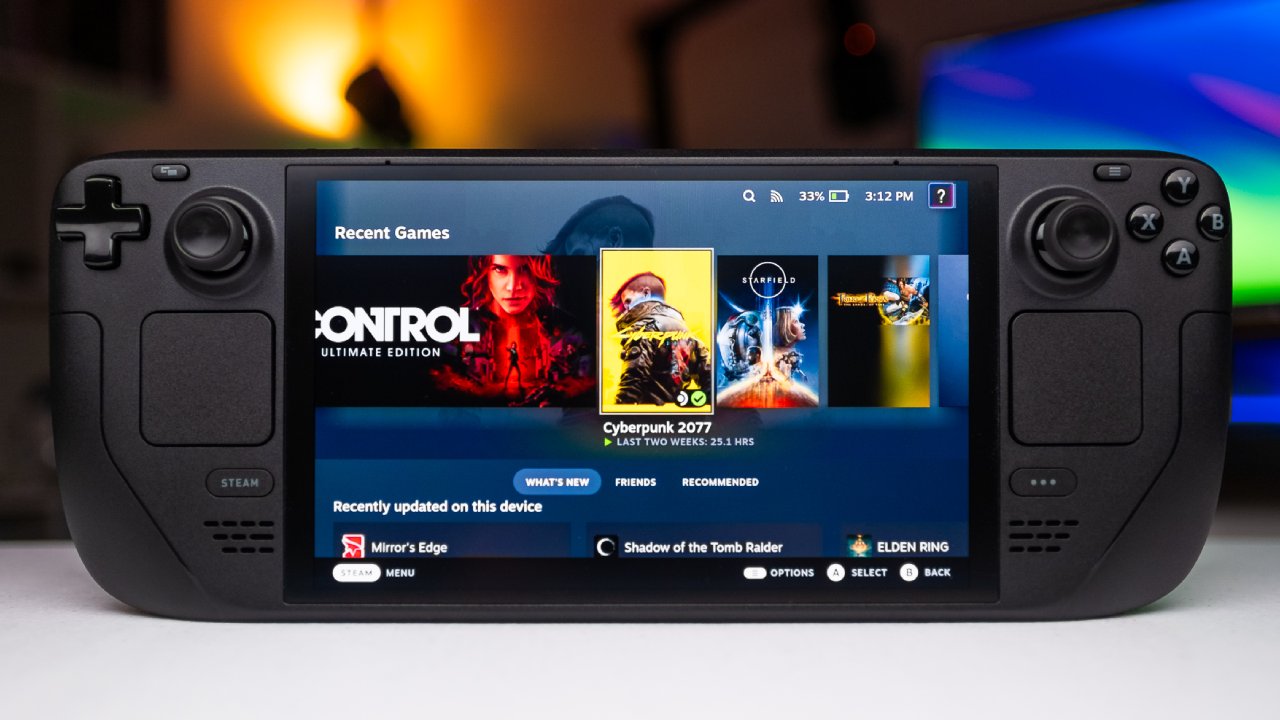
Two Devices, Two Philosophies
At first, it may seem unusual to compare these two handhelds, as they were designed with quite distinct ideas in mind. But they all promise the same basic idea: a device you can take with you and escape into while sitting on the couch. This comparison isn't about specs or launch fanfare; it's about how these gadgets work after upgrades, when they're just part of your daily life.
There is a difference between the two approaches that comes out. The Steam Deck OLED feels like a console. It knows its limits and accepts them. It has fixed power, predictable behavior, and a system that doesn't get in your way.
Even though it is promoted as a console, the Xbox ROG Ally X is really a Windows PC. It gives you more power, more options, and more freedom, but it also gives you greater responsibility. That difference changes how you feel before you even think about gaming.
How They Feel in the Hands
You make one of your first choices right away when you get the device. The Steam Deck is wider, more balanced, and lighter than it seems. Once it settles in, it nearly disappears, like a jacket that has been worn a lot and feels safe and familiar.
The Xbox ROG Ally X feels heavy and small. The grips are great and feel a lot like an Xbox controller, but you can always feel them in your hand. The Deck wants to sleep, but Ally X wants to be hugged. Both ways are OK, but these minor physical distinctions matter over time.
Build Quality and Daily Confidence
The quality of the build also affects how relaxed you feel. The Steam Deck feels like it was made for heavy use. It is easy to use and can be put in a purse or on a desk with little thought. It seems like it can take a whack and keep going. The Ally X is beautifully made, but its more refined, precise design makes it feel more fragile.
There is a gentle warning to be careful that makes you less likely to use it freely. That emotional response might not seem like a big deal, but after months of using it, it becomes part of the experience.
Screen Experience: Paper Specs vs Real Life
The Xbox ROG Ally X offers a higher resolution and a faster refresh rate, so it wins the screen comparison on paper. In real life, the Steam Deck OLED offers a different story.
The OLED panel feels more relaxed. In dark scenes, blacks don't glow gray; instead, they blend in. The screen is also easy on the eyes during extended sessions. The Ally X screen is sharp and quick, but the device is so powerful that it can feel a little small. Once that idea gets into your head, it's hard to ignore. Over time, it changes how comfortable and immersed you are.
.jpg)
Sleep, Resume, and Everyday Friction
Life is full of interruptions; it's important to be able to suspend and restart. Both devices can technically handle sleep well, but what counts is how they feel. When you push the power button on the Steam Deck, it takes you right to the home screen. SteamOS is focused and works, and suspend and resume feel like they don't exist.
You don't even think about the system anymore. On the Ally X, suspend and resume work effectively, especially with console-style interfaces. They operate better than on most other Windows handhelds. Windows is still there, though, handling updates and background tasks. It doesn't break anything, but it does expect a little more of you, which keeps you on your toes.
Gaming Behavior and Performance Philosophy
The Steam Deck prioritizes consistency in how people play games. The frame pace, thermals, and power behavior all feel right and done. It doesn't aim for its highest point; instead, it aims to stay stable.
The Ally X has more room to grow thanks to its powerful processor. It works surprisingly well at low power, and when you push it more, it works even better. You can change settings, modes, and updates, but you have to do it yourself. The Deck allows you sink in, while the Ally X keeps you interested in the system.
Controls and Input Experience
Controls on both devices are robust and snappy, and they mostly go away when you play. The Ally X is a little more precise because it feels like a regular Xbox controller, with a familiar grip and layout.
The Steam Deck feels more like a tool: strong and reliable. The D-pad is the Ally X's weakest point; it works, but it feels like the weakest part of the whole setup. In general, controls aren't a big deal, but they do slightly affect people's preferences.
Battery Life and Freedom of Play
Battery life affects freedom more than just stats show. The Steam Deck has a lower wattage limit and works best with older games, independent games, and emulation. It uses less power and lets you play for long periods of time without having to check the time.
The Ally X works well at low wattage but can also handle higher power. In hard AAA games, the battery drain becomes clear, and you never really forget about the percentages. In real life, the Deck makes it easy to have fun evenings, while the Ally X helps you push yourself to do better.
Thermals, Noise, and Physical Awareness
Thermals and noise make this difference much clearer. The Steam Deck is cold and quiet enough not be seen. The Ally X becomes hotter, especially when you play intense games, and you can feel the heat in your hands. There is fan noise, but it's not too loud and doesn't get in the way. The PC's warmth always reminds you that you are not playing on a standard console. This affects how relaxed or aware you feel over prolonged sessions.
Portability and Docked Experience
Portability isn't about fitting in your pocket; it's about fitting into your daily life. Both devices fit well in a backpack, especially if they have a case to protect them. When you dock them, their characteristics stand out more.
.jpg)
When it's docked, the Ally X seems like a powerful and adaptable PC on a screen. The Steam Deck acts more like a console, giving us a taste of what gaming in the living room might be like in the future. Neither one is better than the other, but they both add to the same tale when you play in handheld mode.
When Things Go Wrong
There are times when the Steam Deck struggles, especially when suspending and resuming hard games. It seems odd when something happens since you expect things to go smoothly. People expect the Ally X to need attention since they think it is a PC. That emotional gap is more important than benchmarks. It tells you how forgiving you are when things go wrong and how quickly you get angry.
Software Ecosystem and Gaming Habits
Software ecosystems also affect how people act. SteamOS is concentrated, with one store and a simple flow that makes you want to play games you already own. Some games won't work because they aren't compatible, and that's just how it is.
The Ally X is a PC that can play practically any game. Steam, other launchers, and subscription services make it easier to try things out than to commit to them. Neither method is preferable, but they affect how and what you play, changing your habits over time.
Playing Emulation and Older Games
The Steam Deck is a terrific way to play and emulate classic games. It does a terrific job of playing old games and library entries that people have forgotten about, which makes nostalgia a smooth experience. Setting it up is simple, the controller mapping works as it should, and the performance is consistent. This makes the Deck the only console for all of gaming history, which is perfect for soothing games that bring back memories.
AAA Gaming along with Modern Demands
The Ally X is the finest pick for new AAA games. You can set the settings higher, and the frame rates are more stable. Games run better. When you play hard games on the tablet, it feels natural, making it feel more like playing PC games on the go. This strength makes it the perfect choice for gamers who care most about the latest games and high-quality graphics.
Price and Value Consideration
The price will always come up in conversation. The Ally X costs a lot more because it is more powerful and flexible. The Steam Deck OLED is cheaper and offers a more complete experience for less. That difference alone can affect choices, especially when both devices are clearly capable and have their own merits.
The Final Decision
So, which handheld should you buy? There is no winner. The Steam Deck OLED sounds like a wonderful choice if you want a handheld that works like a console—predictably, calmly, and simply, especially for older games, independent games, or emulation. You can play newer AAA games with greater settings, more freedom, power, and refresh rates using Xbox ROG Ally X. You just need to get used to operating in a style like PC.
At the end of the day, it all comes down to the games you play and how much difficulty you're willing to go through in order to acquire more freedom.
Also, check our other articles below:
- AMD Ryzen 9 9950X3D Review: Setting The Standard For 2025 Gaming CPU
- AMD Ryzen 7 9800X3D Review: 3D V-Cache Goes God Mode with Stunning Gaming Performance
- AMD RX 9070 Performance Review: Thermals, Clocks, and Real-World FPS
- AMD Ryzen 5 7600 Review: Best Budget Gaming CPU of 2025?
- AMD Radeon RX 7800 XT Review: RDNA 3 Power For Midrange Gaming
- Sapphire NITRO+ AMD Radeon RX 9070 XT Review: The Ultimate 4K Gaming GPU
- AMD Ryzen 7 7800X3D: Delivers Gaming Performance Far Beyond Expectations
- AMD Ryzen 9 7900X Review: Powering the AM5 Era with DDR5 & PCIe 5.0
- Intel Core i9‑14900K vs. AMD Ryzen 7 7800X3D: Power Profiles & Gaming Benchmarks
Subscriber, NoobFeed
Gaming Hardware Updates
No Data.