
SteamOS 3.8 on Ryzen AI Max Plus 395: Overclocking, Thermals, and Performance
SteamOS 3.8 delivers seamless compatibility and performance on the Ryzen AI Max Plus 395 Mini PC.
Hardware by Tanvir Kabbo on Nov 05, 2025
The Ryzen AI Max Plus 395 Mini PC from Minis Forum is a powerful and efficient device. This small PC has the AMD Radeon 8060S, which is currently the most powerful iGPU on the market. It can handle up to 140W TDP and comes with 128GB of RAM. Now that official SteamOS 3.8 works well on this setup, it becomes a truly powerful gaming and productivity system for the living room.
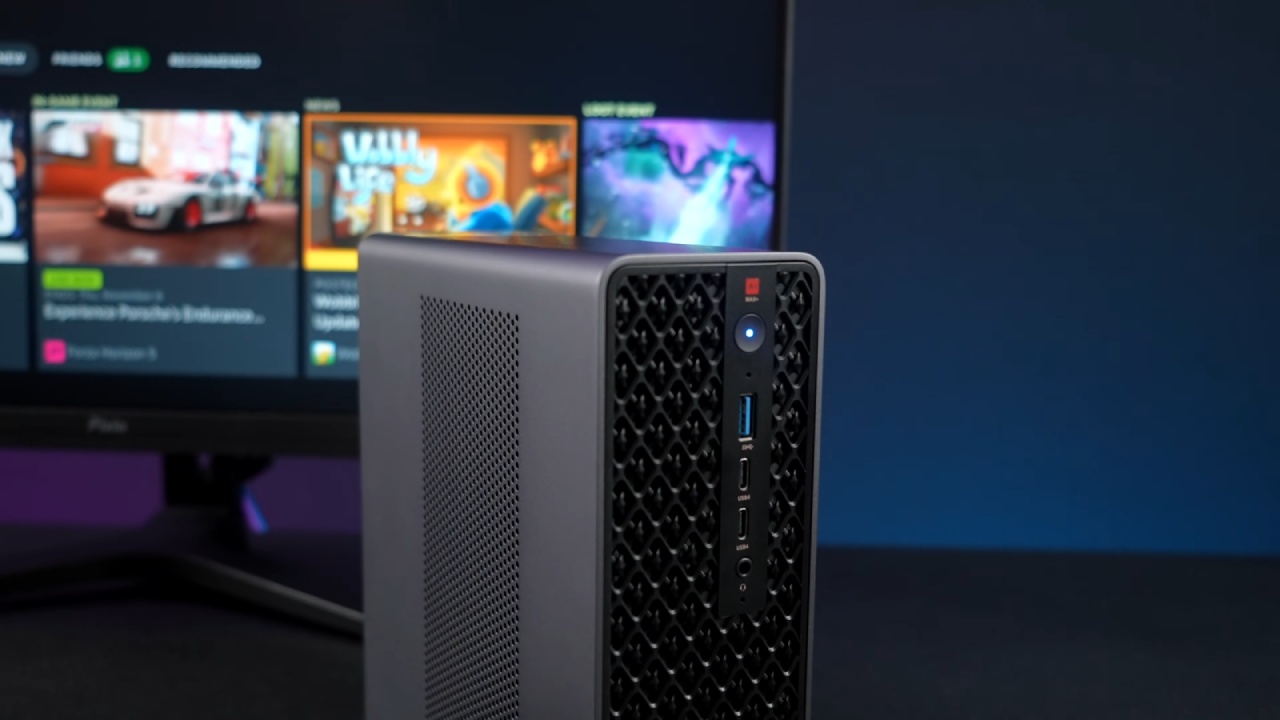
System Overview and Configuration
The Ryzen AI Max Plus 395 has 16 cores and 32 threads, which makes it as fast as high-end desktop processors. We can give the iGPU up to 96GB of RAM through the BIOS. This is excessive for most gaming purposes, but it's a fantastic way to assess the system's flexibility and performance.
SteamOS 3.8 works perfectly here and comes with built-in support for Wi-Fi and Bluetooth. Previously, similar systems required Ethernet due to driver issues, but with the MSS1, everything works immediately.
We can also adjust power and overclocking parameters using a tool called Smokeless UMath, available on GitHub. Through this, we can access advanced BIOS settings unavailable in standard menus. Setting Precision Boost Override to "Advanced" lets us push the Ryzen AI Max Plus 395 CPU from its 5.1GHz stock speed up to 5.3GHz.
The Radeon 8060S iGPU, which runs at 2900MHz by default, can also be overclocked to 3100MHz. The overclock provides a slight but noticeable performance boost, especially since the TDP limit is already high at 140W.
SteamOS Experience and Customization
SteamOS 3.8 on this system feels smooth and flexible. The interface differs slightly from the Steam Deck's due to our use of custom themes via Decky Loader and CSS Loader, which allow complete visual customization. With official support now available for Strix Halo APUs, we can expect to see more compact and powerful mini PC builds running SteamOS in the future.
It's easy to link controllers and use wireless gadgets because the Bluetooth and Wi-Fi connections are strong and reliable. Valve doesn't officially support the MSS1, yet it works well with SteamOS. There were no major concerns with the setup or use.

Overclocking and Performance Testing
After configuring our overclocks, we moved on to gaming performance. Starting with Doom: The Dark Ages, we ran it at 1440p high settings using FSR set to Quality. The experience was smooth, matching or exceeding expectations for an iGPU. It performs on par with an RX 7600 desktop GPU, which is impressive for integrated graphics.
In Cyberpunk 2077, at 1440p Ultra with FSR 3 Quality, frame rates were excellent. We found that FSR 3 outperforms 2.1 on newer RDNA 3 and RDNA 3.5 architectures, making it the better choice here.
Borderlands 4 performed best at 1440p medium settings with FSR Balanced. Linux optimization still lags slightly behind Windows, with Windows achieving around 72 fps at higher settings compared to 54–60 fps in SteamOS.
The Witcher 3 on Ultra without FSR averaged around 88fps, showcasing how beautiful this game looks when run at maximum settings. Similarly, Spider-Man 2 at 1440p Very High with FSR Balanced maintained consistent frame rates, averaging around 60fps with only minor dips.
God of War Ragnarok ran at 1440p Ultra without FSR, averaging 86fps and dipping briefly into the mid-70s during intense scenes. For an iGPU-powered system, maintaining this level of performance without frame generation is remarkable.
Power Consumption and Thermals
Thermals and power draw were well managed throughout testing. With SteamOS and mild overclocks, the system averaged 72°C during 1440p gaming, reaching a peak of 83°C. The dual-fan cooling design from Minis Forum effectively kept temperatures in check without excessive noise.
Power draw from the wall averaged around 16W at idle, rising to 187W during gameplay and peaking at 236W under full load. While not ultra-efficient, this power level is significantly lower than that of a typical desktop gaming rig with a discrete GPU.

Everyday Use and Desktop Functionality
The MSS1 is not simply a gaming machine; it's a real desktop computer. When you switch to desktop mode, you can use Discover to access programs, and it's straightforward and quick to install software. People can install emulators, productivity applications, or creative software, such as video and picture editors. With 128GB RAM and the Ryzen AI Max Plus 395's processing power, the system handles multitasking, content creation, and emulation effortlessly.
It's also possible to set up a dual-boot configuration using the two available M.2 slots, allowing SteamOS and another operating system to reside on separate drives without partitioning.
Final Thoughts
The Ryzen AI Max Plus 395 powers the Minis Forum MSS1, and SteamOS 3.8 runs very well on it. It has full Wi-Fi and Bluetooth compatibility, advanced BIOS access, and great gaming performance, making it one of the best compact PC systems for both gaming and work. With features like FSR 3 compatibility, customizable UI themes, and stable thermal performance, this is a great platform for anyone seeking a compact yet powerful PC experience.
More devices will soon be able to utilize SteamOS's burgeoning ecosystem, now that Strix Halo and Strix Point have received official support. For users interested in blending gaming power and everyday usability in a small form factor, this configuration offers a perfect balance.
Also, check our other AMD articles:
- AMD Ryzen 9 9950X3D Review: Setting The Standard For 2025 Gaming CPU
- AMD Ryzen 7 9800X3D Review: 3D V-Cache Goes God Mode with Stunning Gaming Performance
- AMD RX 9070 Performance Review: Thermals, Clocks, and Real-World FPS
- AMD Ryzen 5 7600 Review: Best Budget Gaming CPU of 2025?
- AMD Radeon RX 7800 XT Review: RDNA 3 Power For Midrange Gaming
- Sapphire NITRO+ AMD Radeon RX 9070 XT Review: The Ultimate 4K Gaming GPU
- AMD Ryzen 7 7800X3D: Delivers Gaming Performance Far Beyond Expectations
- AMD Ryzen 9 7900X Review: Powering the AM5 Era with DDR5 & PCIe 5.0
- ASRock Radeon RX 7800 XT Challenger OC Review: Best Price-to-Performance GPU of 2025
- Intel Core i9‑14900K vs. AMD Ryzen 7 7800X3D: Power Profiles & Gaming Benchmarks
Senior Editor, NoobFeed
Gaming Hardware Updates
No Data.