

Lenovo Legion Go 2 Hands-On: Stunning OLED, Solid Performance, and Premium Build
Lenovo Legion Go 2 introduces an advanced OLED display and Ryzen Z2 Extreme APU for elevated portable gaming performance.
Hardware by Nakiro on Oct 13, 2025
Legion Go 2 has arrived with an all-new OLED display, powered by AMD's Ryzen Z2 Extreme APU. After extensive hands-on time, it feels like Lenovo has truly refined the handheld gaming experience.
With excellent ergonomics, a stunning 8.8-inch OLED screen, and impressive performance, the Legion Go 2 positions itself as one of the best handheld gaming devices currently available—though not without one major drawback.
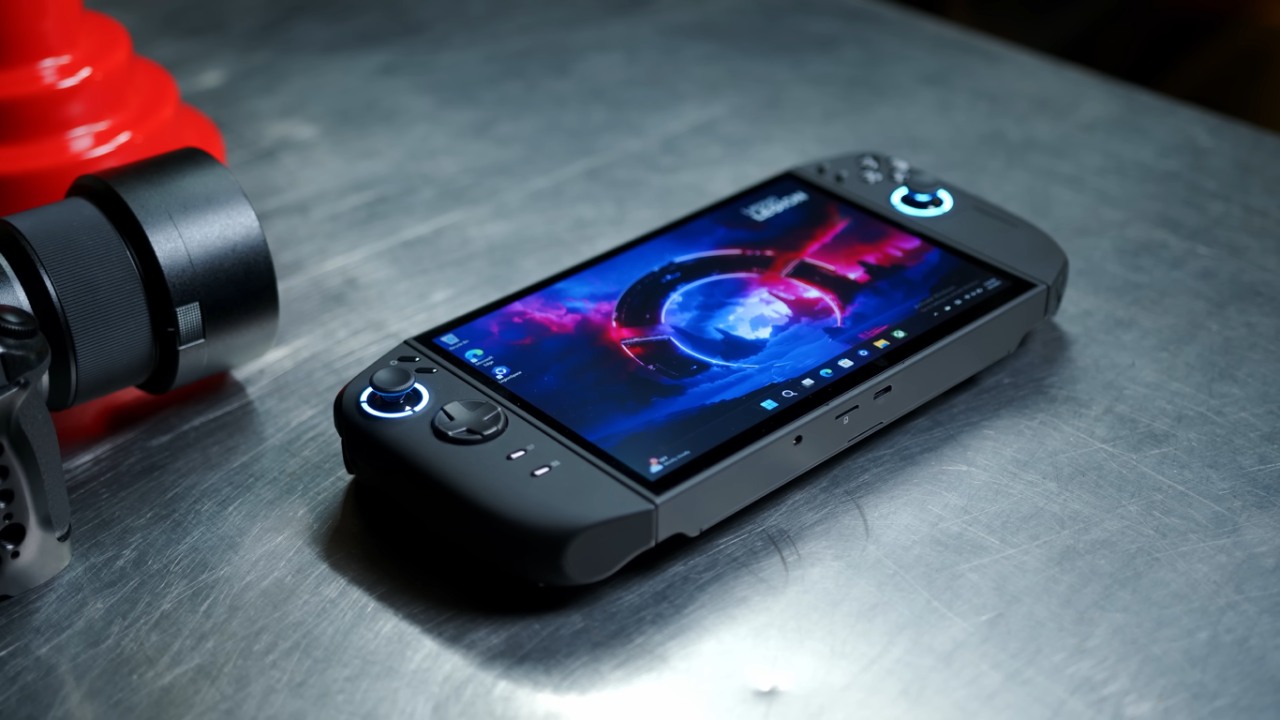
Design and Display
The 8.8-inch OLED panel stands out as one of the most vibrant displays ever seen in a handheld. The graphics are quite smooth and immersive, with a resolution of 1920x1200, a refresh rate of up to 144Hz, and support for VRR.
Even with HDR turned off, the Legion Go 2's screen looks brighter and more colorful than the Steam Deck OLED when you put them next to each other. Once HDR is enabled and properly calibrated, the visuals reach a level entirely different, offering exceptional contrast and brilliance that elevate every game.
The overall ergonomics are excellent, though the Legion Go S remains slightly more comfortable due to its lighter weight. The Go 2 weighs around 920g, making it one of the heavier handhelds on the market. Still, Lenovo's clever balance and centered battery placement make it feel surprisingly manageable during long sessions.
The detachable controllers feature an improved texture, while the entire chassis has a new fingerprint-resistant coating that feels premium and significantly reduces smudges.
Ports and Build Features
Accessibility is a highlight of the Legion Go 2's design. On the top, there's a USB-C port, volume rocker, power button with an LED power mode indicator, and upward-firing stereo speakers that produce impressive volume.
The bottom features another USB4 port (both offering 40Gbps speeds), a microSD slot, a 3.5mm audio jack, and a switch for FPS mode.
The handheld comes with a 65W charger, a carrying case, and FPS mode accessories. Attaching and detaching the controllers feels smoother and more secure than before, thanks to improved snap locks.
The right controller features an FPS switch and can be converted into a mouse using the provided base plate, offering a unique and accurate way to play shooters or navigate the operating system.
.jpg)
Performance and Power Modes
Performance customization is another strong suit of the Legion Go 2. Through Legion Space or its quick menu, you can select from several power presets: Quiet Mode (8W battery/15W plugged), Balanced Mode (16W battery/25W plugged), and Performance Mode (20W battery/32W plugged).
There's also a Custom Mode that allows tuning between 35W sustained and 45W for short bursts. Users can manually tweak the fan curve or select from preset cooling profiles.
In gaming, we tested several titles under these modes. Forza Horizon 5 runs beautifully, especially with the triggers offering smooth linear control. The display's clarity at 800p is remarkable—so much so that it's hard to distinguish from 1200p on this OLED panel. At higher resolutions, performance stays good, and the device can easily handle 70 to 80 frames per second in most recent games when set to Balanced or Performance mode.
Gaming Experience
The new D-pad design is a big step up from the old Legion Go. It has a "dish-style" hybrid feel that works for both rolling and directed play. Games like Street Fighter 6 at 1200p, medium settings perform flawlessly in Balanced Mode, maintaining 60fps without pushing the APU to its maximum wattage.
In The Witcher 3 at 1200p medium settings with FSR set to Balanced, the device draws about 22-23W in Performance Mode, delivering stable gameplay. Grand Theft Auto V at 1200p high settings with FSR Balanced averages over 70fps while pulling around 19W.
Even Spider-Man 2 can hit smooth framerates with FSR Frame Generation enabled, demonstrating how capable the Z2 Extreme is for demanding titles.
Battery Life and Charging
Battery performance varies with usage, but remains impressive given its 74Wh capacity. With brightness at 50%, RGB off, and Wi-Fi/Bluetooth on, the following tests were recorded:
- Quiet Mode (Indie Games, Hades 2): 7h 4min
- Balanced Mode (AAA Titles, Cyberpunk 2077): 3h 6min
- Performance Mode (AAA Titles, Borderlands 4): 2h 17min
Charging is fast, especially with Lenovo's rapid charge technology. Although it ships with a 65W charger, it supports up to 100W charging, allowing a 0–50% recharge in just 30min using a compatible charger.
Connectivity and Expandability
Dual USB4 ports open the door for serious expansion. Both ports support docking, external SSDs, and even eGPU setups for desktop-class gaming when docked to a monitor or TV. The flexibility includes several play modes, such as FPS mode, tablet setup, or conventional handheld mode. Each one makes the game easier to use, depending on how you like to play.
.jpg)
Final Thoughts
After weeks of use, it's evident that the Lenovo Legion Go 2 is the best mobile gaming display on the market. It is a pleasure to use because it has an OLED panel, well-thought-out ergonomics, and a controller that can be used in several ways.
The Ryzen Z2 Extreme delivers reliable performance, though it doesn't outperform the Z1 Extreme by much at higher wattages.
The only big problem is how much it costs. The 1TB variant with the Z2 Extreme APU costs $1,349, which makes it one of the most costly mainstream handhelds in the US. A less expensive version of the Z2 is available, but it still costs more than $1,000. The Legion Go 2 is a great pick, even though it costs a lot. Its OLED display gives you a visual experience that no other mobile gaming PC can equal.
Lenovo has made a high-end gadget that blurs the line between console and portable PC gaming. It costs a lot, but its performance, versatility, and workmanship make it a strong challenger in the handheld gaming field.
Also, check our other Handheld articles :
- ASUS ROG Ally X Handheld Review: Double the Battery, Double the Comfort
- Nintendo Switch 2 Vs. Original Switch 1: A Full Comparison
- How To Connect A Camera And Join Voice Chat With Nintendo Switch 2
- Nintendo Switch 2 Review: Handheld Performance, Features & Value Breakdown
- ROG Xbox Ally X Vs. ROG Ally X: Display, Battery & Controls
- ASUS ROG Ally X vs. Steam Deck OLED: Display, Battery & Gaming Benchmarks
- MSI Claw 8 AI+ Review: Display, Controls & Gaming
- Nintendo Switch 2 vs. Steam Deck OLED: Gaming, Performance, Battery, Display and Value
- PlayStation Portal Review: Remote Play, Cloud Streaming & Travel Gaming
- PlayStation Portal vs. Lenovo Legion Go: Best Portable Gameplay
- Cyberpunk 2077 Patch 2.3 FPS Test on MSI Claw 8 AI+
Editor, NoobFeed
Latest Articles
No Data.