
Steam Deck OLED vs Lenovo Legion Go S: Best SteamOS Handheld in 2026
Lenovo Legion Go S offers higher resolution, smoother gameplay, and increased power without abandoning the Steam Deck experience.
Hardware by Masaru Hoshino on Feb 18, 2026
The Steam Deck is one of, if not the most, recommended PC handhelds on the internet today. It's affordable, comfortable, and SteamOS makes PC gaming feel almost like a console. But for the first time, there's a handheld that might actually be better without abandoning what makes the Steam Deck great.
Lenovo Legion Go S is the first handheld to ship with SteamOS right out of the box, offering a bigger screen, more power, higher resolutions, and smoother gameplay.
You would think this would be the de facto entry-level PC handheld recommendation. But more often than not, people always come back to just getting a Steam Deck. That led to a simple thought: if this device is so good, why doesn't the Legion Go S replace the Steam Deck in most people's minds? So we picked one up to find out whether you should just get a Legion Go S instead.
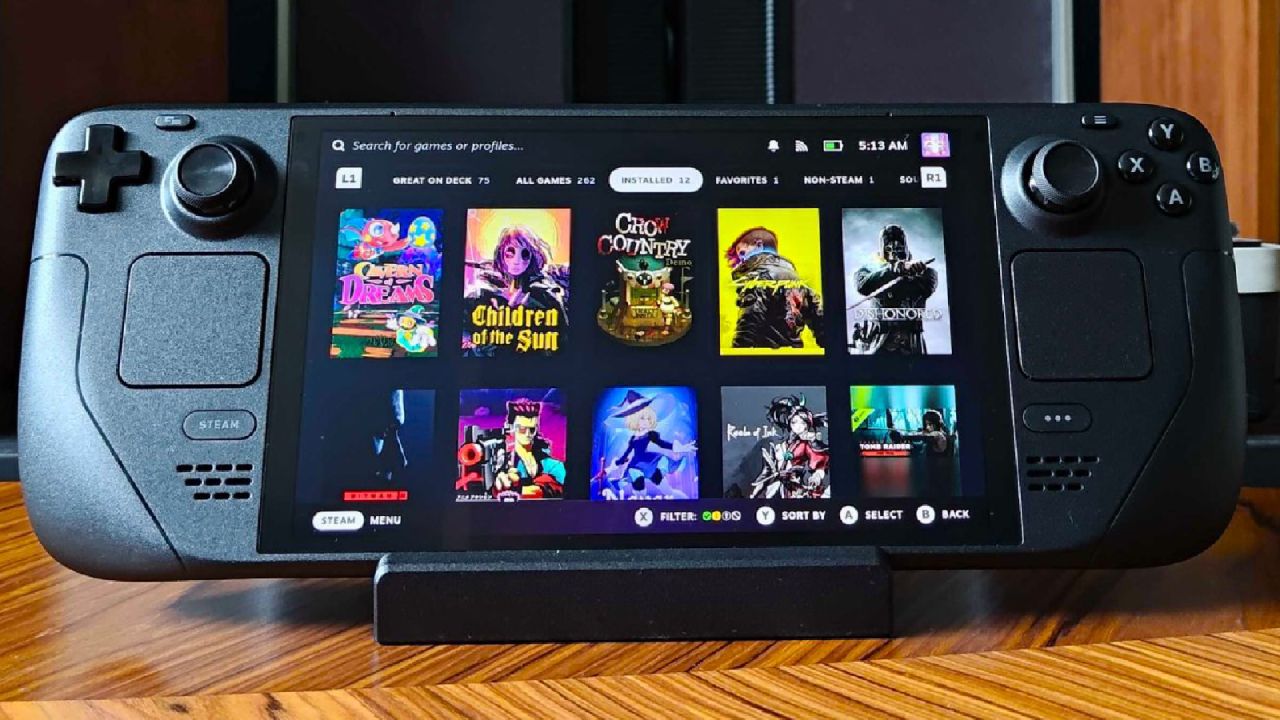
What It Is and What It Isn't
Before diving into what this device is, it's important to understand what it isn't. It isn't a Steam Deck. Yes, it runs SteamOS, but some things inherently make a Steam Deck a Steam Deck. The Legion Go S doesn't have an OLED display. It doesn't have HDR. And it doesn't have the viable trackpads like the Steam Deck does.
That said, you're getting a larger device with more power and some features you simply don't see on the Steam Deck. Lenovo took SteamOS and made something that feels like their own.
The first thing you'll notice is the Nebula Nocturn colorway. It's a subtle dark metallic purple and honestly refreshing in a sea of black slabs. In terms of size, it's not much wider than a Steam Deck, but it is a little taller thanks to the 8in 16:10 1200p display. It also supports VRR and reaches up to 120 Hz. Lenovo managed to fit all of that into a footprint very similar to the Deck.
Controls and Ergonomics
To make room for the larger display, Lenovo completely dropped the trackpads and went with a more traditional Xbox-style layout. Offset sticks replace the symmetrical layout of the Steam Deck, and there's a tiny square they're calling a trackpad. It's honestly useless. The more we used it, the more we missed the trackpads on the Deck, even if they were mostly used for typing.
At first, the offset layout didn't seem like a big deal. But over time, it became one of the things that slightly hurt the first impression. The thumbstick caps are pretty smooth, and we found ourselves adjusting grip to get comfortable placement on the right stick. That wasn't something we had to do on the Steam Deck, where everything is symmetrical. Add in the extra weight of the Legion Go S, and grip adjustments become more noticeable.
That said, the controls themselves are great. Hall effect sticks mean you don't have to worry much about stick drift. The buttons and D-pad feel great. The bumpers are very clicky and very loud, which may not be for everyone. The triggers, however, are where things get interesting. The Legion Go S lets you switch between full trigger throw and hair triggers using a physical switch on the back. That flexibility is genuinely cool, even if not everyone will rely on it.
On the rear, there are two programmable back buttons. Technically, the Steam Deck has more rear buttons, but going back and forth between both devices revealed something funny. We couldn't even remember what half the Steam Deck's rear buttons were mapped to. In that sense, having just two programmable buttons felt simpler and, at times, even preferable.
Display Quality
The biggest difference became obvious the moment the device powered on. The screen is sharp. It's not OLED, and it doesn’t reach HDR-level brightness, but it's smooth and crisp. Compared to the Steam Deck's slightly smaller 800p display, the 1200p resolution is noticeably sharper, especially when looking at text.
While higher resolution doesn't automatically mean more immersive, games simply feel better on the Legion Go S. That's largely because of the extra power.
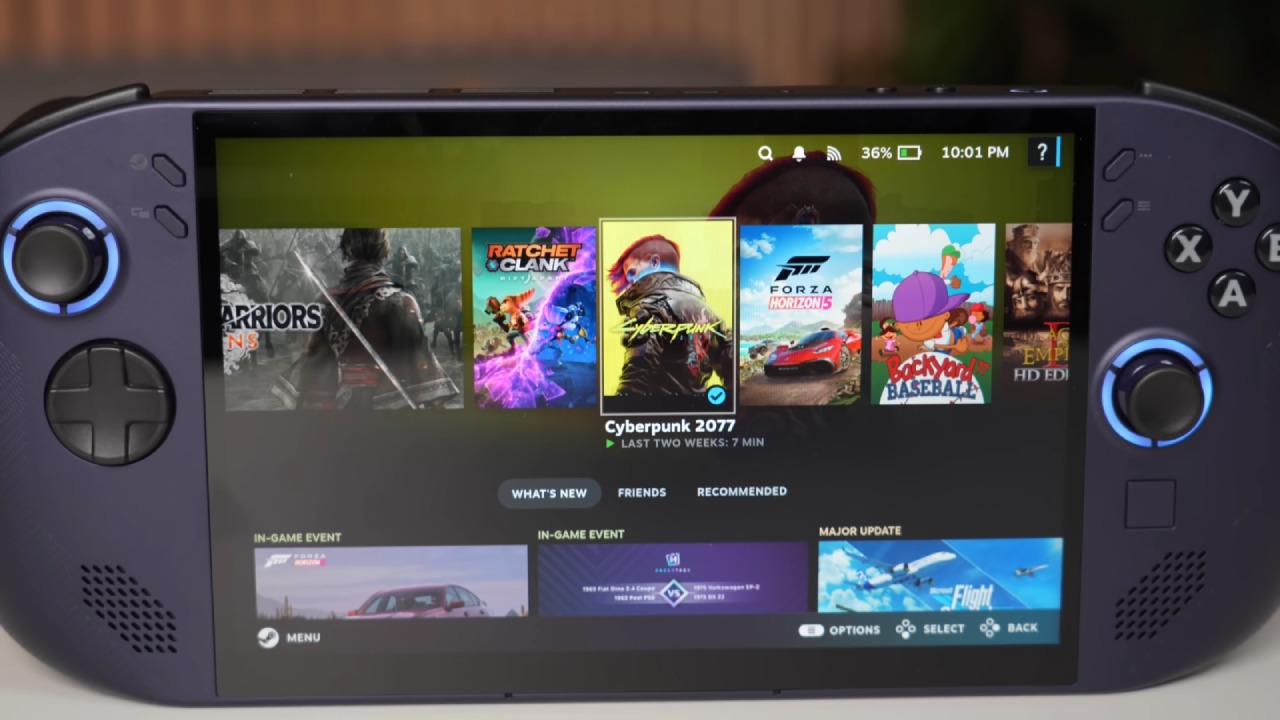
Performance: The Z1 Extreme Advantage
The Z1 Extreme processor in the tested model makes a big difference in performance. The experience is defined by higher resolutions, steadier frame rates, and fewer sacrifices. Instead of having to go through settings to downgrade graphics, we were able to play games at higher resolutions with the same or better performance than the Steam Deck.
The extra headroom changes what you're willing to install. Games that might not even be considered on the Deck, like Black Myth: Wukong and Helldivers 2, ran incredibly well on the Legion Go S without spending time tweaking settings. That shift from tinkering to simply picking up and playing is a big deal.
That's not to say the Steam Deck can't handle plenty of games well. It absolutely can. But for bigger, more demanding titles, the performance difference becomes significant.
Battery Life and Noise
Not everything is perfect. Battery life is arguably worse than the Steam Deck's. Yes, you can tweak settings to make titles lighter and improve efficiency. Still, at that point, if performance is being dialed back to match the Deck, it raises the question of what the advantage is.
Another issue is noise. The fans are loud and often ramp up aggressively. The vibration motors aren't subtle either. Between the fan noise and haptics, the device can get surprisingly loud during gameplay.
Even so, none of these issues felt like dealbreakers. Ergonomic concerns can be mitigated with a grip case. The shorter battery life is somewhat expected given the more powerful engine under the hood. More performance typically demands more energy.
Real Problem: Price
Open-box Z1 Extreme models can sometimes be found in the US for around $500-$600. At that price, the device becomes a no-brainer. You get SteamOS, more power, a bigger screen, higher resolution, and better frame rates. Outside of OLED and HDR, there isn't much missing.
But new units often range from $750 to $900, depending on the retailer and sales. Secondary markets hover around $700. That inconsistency changes everything. A swing between $500 and $900 isn't small.
At full price near $900, it's difficult to recommend. That's a steep jump. At that level, it starts competing with multiple other Z1 Extreme handhelds that cost less and can have SteamOS installed manually.
However, if you can grab a Legion Go S with the Z1 Extreme for around $600 and you don't care about OLED, HDR, or trackpads, skipping the Steam Deck and going straight for the Legion Go S makes a lot of sense.
Final Thoughts
As recent Steam Deck owners who genuinely love the device, we didn't expect to like the Legion Go S this much. Despite lacking OLED and HDR and having slightly less comfortable ergonomics, we found ourselves gravitating toward it more often.
In many ways, it delivers a better overall experience thanks to performance headroom, higher resolutions, and a larger 8in display. But price matters more than performance alone.
If an 8in OLED 1200p Steam Deck with Z1 Extreme-level power ever arrives at a similar price point, that would be an easy decision. Until then, the Legion Go S stands as a powerful alternative that, at the right price, can absolutely outperform expectations.
Also, check our other hardware articles:
- AMD Ryzen 9 9950X3D Review: Setting The Standard For 2025 Gaming CPU
- Amazon Luna 2025 Review: Is Prime Gaming's Cloud Service Your Go-To For Casual Fun?
- AMD RX 9070 XT Review: AMD's RDNA 4 Champion for 1440p Gaming
- GeForce Now Ultimate: Ditching Your Gaming PC For Cloud RTX 4080 Power?
- NVIDIA GeForce RTX 5080 Review (2025): Still A 4K Gaming Powerhouse?
- Intel Core Ultra 9 285K Review And Performance Breakdown (2025)
- AMD Ryzen 7 9800X3D Review: 3D V-Cache Goes God Mode with Stunning Gaming Performance
- Intel Core Ultra 9 285K vs AMD Ryzen 7 9800X3D: In-Depth Gaming Performance and Benchmark Comparison
- NVIDIA GeForce RTX 5080 Super Performance In Cyberpunk 2077: Path Tracing & DLSS 4.0 Tested
- AMD Radeon RX 9070 XT In Cyberpunk 2077: Ray Tracing & FSR 4.0 Tested
- Intel Arc B580 Review: The $250 GPU Revolutionizing 1440p Gaming
- Intel Arc B570 Vs. B580: Value, Specs, And Real-World Gaming Performance
- RTX 5090 Laptop Vs. M4 Max MacBook Pro: Ultimate Raw Performance Vs. Battery Endurance
- Intel Arc b580 Vs. RTX 4060: Game Performance And Value Analysis
- RTX5090 Hell Is Us Demo 4K Ultra Benchmark: DLSS Vs. Native Performance Guide
- NVIDIA RTX 5070 Review: Mid-Range Muscle or Marketing Hype?
- Nintendo Switch 2 Review: Handheld Performance, Features & Value Breakdown
- RTX 5070 Ti Review: Performance, Thermals & Power Efficiency Tested
- Samsung Odyssey OLED G81SF Review 2025: Ultimate 32-Inch QD-OLED Gaming Monitor
- AMD RX 9070 Performance Review: Thermals, Clocks, and Real-World FPS
- AMD Ryzen 5 7600 Review: Best Budget Gaming CPU of 2025?
- AMD Radeon RX 7800 XT Review: RDNA 3 Power For Midrange Gaming
- Asus ROG RTX 5090 Astral OC Vs. Founders Edition: The 4K Gaming Benchmark
Editor, NoobFeed
Latest Articles
No Data.