
Intel Arc Pro B50 Review: Low-Profile 16GB Workstation GPU Tested for Gaming and AI
A compact workstation graphics card combining low power consumption, 16GB of VRAM, and unexpected gaming capability in small systems
Hardware by Tasnim Yoshi on Dec 17, 2025
Intel Arc Pro B50 is a new low-profile workstation graphics card that has quickly become a popular choice in its category. It is marketed as a professional GPU with 16GB of VRAM, but its small, low-profile, dual-slot design makes it especially appealing for small-form-factor systems where gaming-capable GPUs are hard to find.
With its workstation branding, low power requirements, and compact form factor, it makes you wonder whether it can also be a good gaming GPU in addition to its professional work.
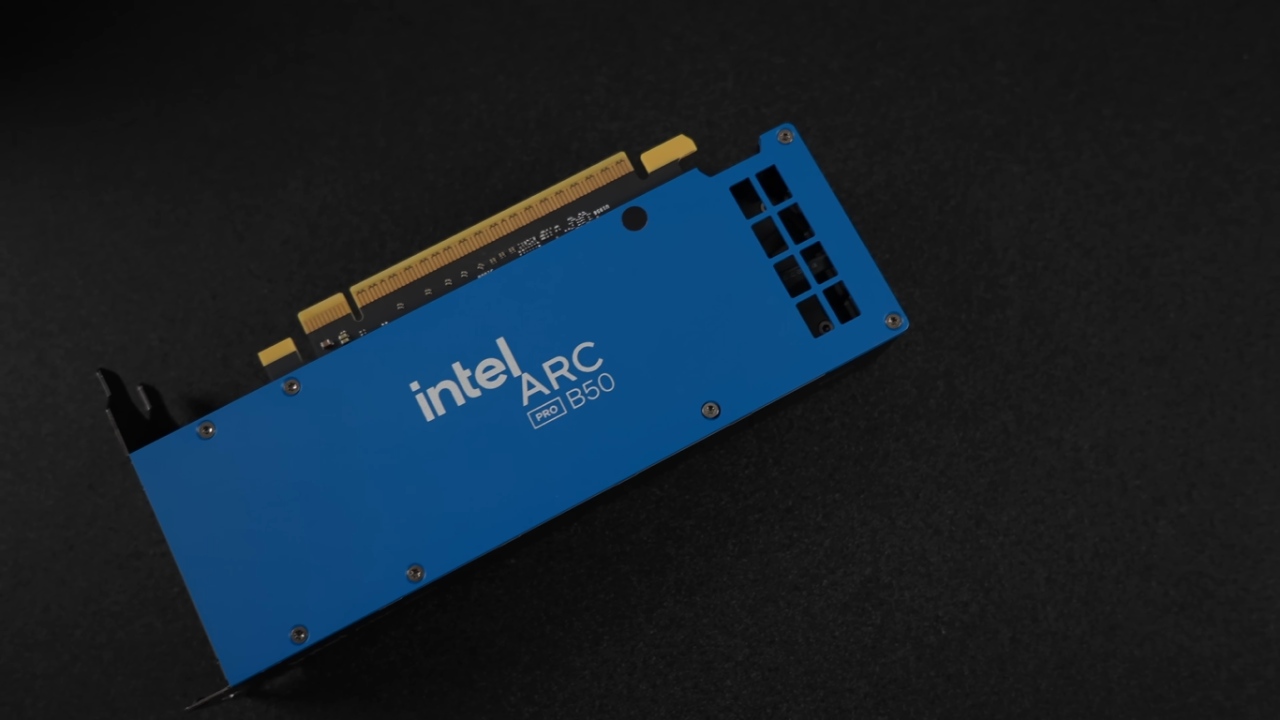
Design, Power, and Form Factor
Arc Pro B50 features a blower-style cooler and requires no external power connectors. The total power of the board is about 70W, but in real life, it usually only uses 55W to 57W when it's under load. Because it doesn't draw much power, it's well-suited for small builds with weak power supplies and limited airflow. The blower design directs hot air out the back of the case. This is especially helpful in tight spaces.
Low-profile gaming GPUs are uncommon, especially in dual-slot setups, which makes this card stand out. It fits into very small cases due to its size and still maintains good thermal and noise performance.
Test System Configuration
The test system was designed for small form factors. We paired Arc Pro B50 with an AMD Ryzen 7 8700G, a 65W CPU with 8 cores and 16 threads. This processor isn't the best, but it works well in small systems and fits with the GPU's low-power philosophy. The system had 32GB of DDR5 memory that could run at 6000MHz.
The case used was the Jonsbo NV10, a compact case that supports two low-profile GPUs via a PCIe riser. Arc Pro B50 didn't require any PCIe power cables, but a 500W power supply was installed. The vented top panel improved airflow, making the blower-style cooler perform well.
Arc Pro B50 Specifications
Intel Arc Pro B50 has 16GB of GDDR6 memory on a bus that is 128 bits wide. It has 16Xe cores, four render slices, 16 ray tracing units, and 128 XMX engines. It has ECC memory support as a workstation GPU, which can be turned on or off depending on the workload. ECC was turned off for gaming and testing.
Compared to consumer Arc models, the card is locked down, so you can't change the power limit or overclock it. We tried to use older tuning methods from first-generation Arc cards, but they didn't work, so the stock configuration limits performance.
Driver Setup and Power Behavior
At first, we used Intel's Pro graphics driver, which lets you configure ECC memory. The driver was switched to Intel's gaming driver for gaming tests to ensure it performed better on newer games. When the GPU was busy, it used 98% of its power and drew roughly 50W, with peaks of up to 57W. This indicates that the Arc Pro B50 GPU consumes relatively little power.
Workstation and AI Features
Arc Pro B50 is a suitable choice for AI and compute tasks because it is a workstation-grade card. It features 16GB of VRAM and XMX engines, which make it well-suited for tasks such as image processing and local AI inference. Intel's AI Playground made it easy to set up because it automatically downloaded and set up models.
We could use a GPU to run language models and generate images. GPU utilization fluctuated as needed across workloads, and text-based searches and image-generation operations were performed rapidly.
For a compact, low-power machine, generating images with modest step counts was fast, and the output quality was good. If you're new to AI, need help with coding, or want to conduct creative work on small systems, Arc Pro B50 is an excellent option.
Synthetic Benchmarks
Arc Pro B50 got just over 73,000 points in Geekbench 6 OpenCL testing, which is lower than GPUs like RTX 4060. The card scored 1,631 in 3DMark Steel Nomad, with an average frame rate of 16.32 fps. Time Spy scored 8,376.
These results were slightly lower than I expected, given my experience with Intel Arc hardware, which usually performs well in synthetic benchmarks. But synthetic scores don't always translate directly to real-world gaming performance, especially for workstation-grade GPUs.
Gaming Performance Overview
The main reason for testing Arc Pro B50 was to see how well it worked as a gaming system in a small form factor. Once we switched to the gaming driver, we started testing the workstation GPU in real games to see how well it works with modern titles.
Cyberpunk 2077
We tested Cyberpunk 2077 at 1440p with XeSS enabled and the Ultra preset. Performance stayed below 60 frames per second in XeSS quality mode, usually in the high 40s. Changing XeSS to balanced made things a little better, but it still wasn't enough for consistent 60fps gameplay.

It made a big difference in the experience to turn on XeSS frame generation with low-latency support. After restarting the game so that frame generation worked right, 1440p ultra became very playable.
The card's 16GB capacity was more than enough for VRAM, which was close to 8GB. Even though 1080p ultra without frame generation would give better native performance, the 1440p test showed how useful XeSS frame generation is on this GPU.
Marvel Rivals
We played Marvel's Rivals at 1440p with maximum settings, with XeSS set to high quality. The frame rate was kept over 60 frames per second, even during really hard bouts; it did decrease from time to time. Overall, the gameplay was smooth and responsive, which is a promising indicator for the Arc Pro B50 at 1440p.
Doom: The Dark Ages
Doom: The Dark Ages looked best at 1080p, which seemed to be the best resolution for this GPU. With no upscaling and Nightmare settings enabled, the game averaged 71 frames per second. The game ran smoothly and was highly playable, demonstrating that well-optimized titles can perform well on this hardware.
Forza Horizon 5
Without upscaling, Forza Horizon 5 ran great at 1440p Ultra. The average frame rate exceeded 100 fps, indicating the game is well optimized, and Arc Pro B50 can easily handle it. Even with the clocks reaching about 2600MHz, power consumption stayed around 50W.
Limitations and Potential
Arc Pro B50's power limit is clearly a problem; it can't go above 50W. There are currently no good ways to raise the power limits or clocks on Arc cards that are older. If future tools or firmware updates let you increase power even slightly, you might see better gaming performance.
That said, the card wasn't made to be used for gaming. Its best uses are for workstation tasks, AI workloads, and small, powerful system builds. Gaming performance is not the main benefit; it's a secondary one.
Final Thoughts
Intel Arc Pro B50 is a unique GPU that fits a need that few others do. It boasts a low-profile, dual-slot design, 16GB of VRAM, powerful AI capabilities, and doesn't use a lot of power. It isn't really a gaming GPU, but it can still play games well at 1080p and even 1440p with the help of frame generation and XeSS.
If you want to build a compact PC, work on a workstation, or just learn about AI, the Arc Pro B50 is an excellent choice. It does a good job of balancing speed with getting things done. Over time and with likely software updates, it could be a lot more useful than it seems at first.
Also, check our other Intel chips Articles below:
- Intel Core Ultra 9 285K Review And Performance Breakdown (2025)
- Intel Core Ultra 9 285K vs AMD Ryzen 7 9800X3D: In-Depth Gaming Performance and Benchmark Comparison
- Intel Core i5-13400F Gaming Performance: Still Worth It in 2025?
- Intel Core i9‑14900K vs. AMD Ryzen 7 7800X3D: Power Profiles & Gaming Benchmarks
- Intel Core i9 14900K: Specs, Benchmarks, and Competitor Comparison
- Intel Core Ultra 5 245K Review: Gaming, Productivity & Power Efficiency Tested
- Intel Core Ultra 9 285 K's iGPU Gaming: In-Depth Benchmarks & Analysis
- Intel vs. AMD Gaming Laptop: Performance, Thermals & Battery Life Compared
- AMD Ryzen 7 9800X3D vs.7800X3D vs. Intel Core Ultra 7 265K: Gaming, Thermals & Price Analysis
Subscriber, NoobFeed
Gaming Hardware Updates
No Data.