
MSI Claw AI Performance with XeSS Multi-Frame Generation
Intel XeSS multi-frame generation delivers major performance gains on MSI Claw AI handheld hardware using native rendering.
Hardware by Tanvir Kabbo on Feb 07, 2026
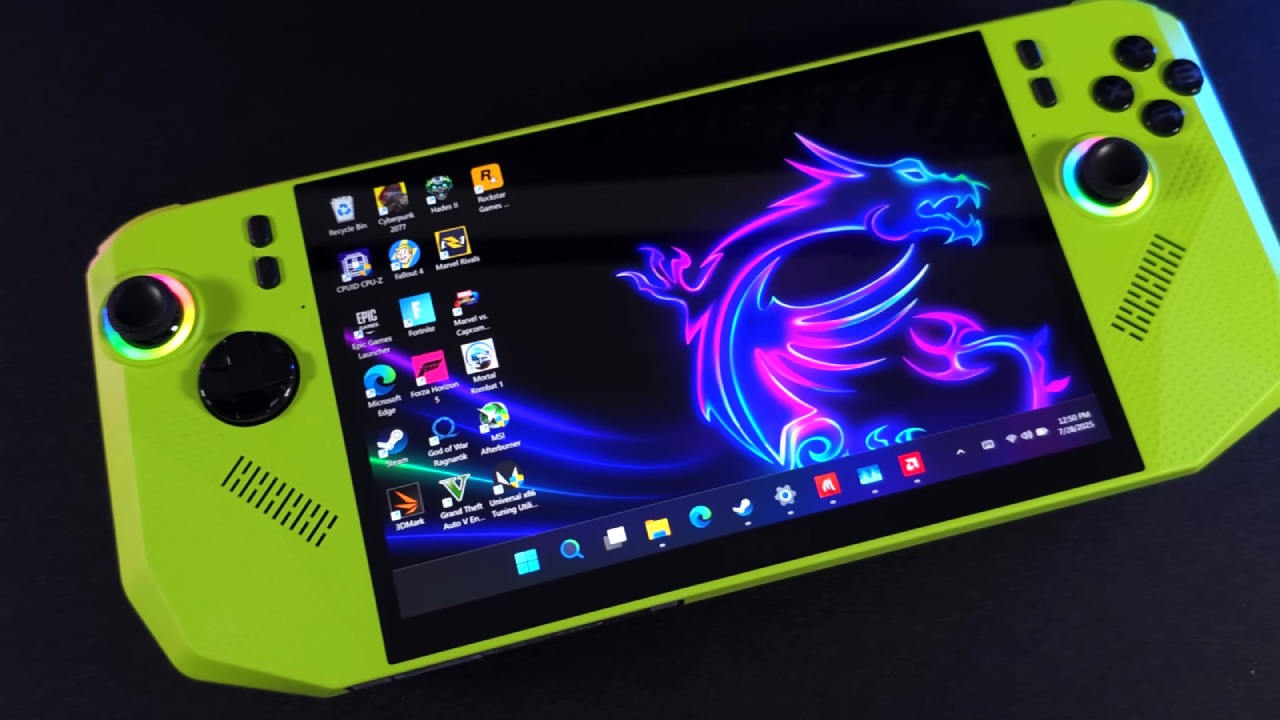
An early look at XeSS multi-frame generation running on the MSI Claw AI shows just how far handheld gaming performance has come. Cyberpunk 2077 is running at 1200p on a handheld gaming device with the ultra preset, XeSS multi-frame generation enabled.
Everything shown is running natively on the device, with no streaming involved, and the results are immediately impressive.
.jpg)
Panther Lake, Arc GPUs, and XeSS Multi-Frame Gen
Recently, Intel launched its new Panther Lake chips with XC3i GPUs. While XeSS multi-frame generation has not officially arrived on Xe2i GPUs like the one inside the MSI Claw AI, there is already a way to enable it.
The device here is running on the Arc140V iGPU based on Xe2, and although official support is expected later, multi-frame generation is already functional. Alongside this, Intel’s new XeSS low-latency mode is active, keeping input latency minimal even with multi-frame generation set to Xe4.
Enabling XeSS Multi-Frame Generation
Once configured, the Intel graphics software reveals a new XeSS multi-frame generation override section with options for 2x, 3x, and 4x. Testing has primarily been done at4x, and performance gains are substantial. Although the method is a workaround, it relies only on official Intel drivers and files, and it is expected to become officially supported in the future.
To get everything working, you need the latest Intel Arc graphics driver and Display Driver Uninstaller. After extracting the driver package, two graphics folders are visible. One contains the newer XeSS3 driver, while the other includes the older XeSS2 driver normally installed. By copying specific files from the newer folder into the older installer folder, the installer is effectively tricked into deploying the new XeSS multi-frame generation components.
After placing the files correctly, Display Driver Uninstaller is used to completely remove the existing Intel Arc driver. Once the system reboots, the modified installer is run. Any warnings during installation can be ignored. When finished, XeSS multi-frame generation becomes available directly in the Intel graphics software.
Performance in Cyberpunk 2077
With everything enabled, Cyberpunk 2077 becomes a standout example. At1200p high settings, standard XESS frame generation roughly doubles frame rates. With XESS multi-frame generation enabled at X4, frame rates increase dramatically, often exceeding 100 fps. Power draw does increase slightly, with the device running near a30w TDP, but the performance gains are hard to ignore.
At 800p on the built-in 8-inch display, which supports up to 120hz with VRR, the results are even more striking. When you set XeSS multi-frame generation to Xe4 and turn off XeSS scaling, the average performance is about 157 fps, which is great for a portable gaming device.
Testing in Black Myth Wukong
We also tested Black Myth Wukong, albeit with a little bit of a different setup. When multi-frame generation was set to Xe4, there was a perceptible delay in input. Lowering it to Xe3 made things more responsive. Running at 1200p with high settings and scaling set to 80%, performance remains far beyond what is typically possible on handheld hardware.
Among all tested titles, this game showed the most sensitivity to higher multi-frame generation levels, but Xe3 proved to be a solid balance.
Racing and Action Games
Japanese Drift Master was tested as a racing title, and XeSS multi-frame generation worked smoothly. For multi-frame generation to function, a game must already support Intel XeSS frame generation. At the time of testing, roughly 43 to 45 games supported this feature, and every compatible title tested performed well.
One exception was Borderlands 4, where neither XeSS nor FSR frame generation worked properly despite troubleshooting. Other titles, such as Hogwarts Legacy, ran at 1200p high settings with XeSS multi-frame generation set to Xe4 and delivered strong performance.
In many cases, dropping to Xe3 is recommended to reduce power draw and improve battery life without sacrificing much smoothness.
.jpg)
Multiplayer and Competitive Gaming
Marvel Rivals was tested at 1200p high settings with XESS multi-frame generation set to X4. While frame generation is usually avoided in online multiplayer games, Intel’s XeSS low latency mode makes it surprisingly playable even in competitive scenarios.
Input responsiveness is still good, therefore frame creation is a good alternative in situations where it would generally be avoided.
Final Thoughts
Intel has made a lot of progress with Arc driver upgrades, especially on devices like the MSI Claw AI. Since the introduction, there have been big advances in performance, and XeSS multi-frame generation takes things even farther. Intel has also announced plans for a custom Panther Lake chip designed specifically for handhelds, which is expected to outperform the current CPU in the MSI Claw AI, though it is still some time away.
For now, XeSS multi-frame generation already delivers impressive gains, especially when balanced correctly between performance, latency, and power consumption. With continued driver updates and future hardware, handheld gaming performance is only set to improve further.
Also, check our other Intel chips Articles below:
- Intel Core Ultra 9 285K Review And Performance Breakdown (2025)
- Intel Core Ultra 9 285K vs AMD Ryzen 7 9800X3D: In-Depth Gaming Performance and Benchmark Comparison
- Intel Core i5-13400F Gaming Performance: Still Worth It in 2025?
- Intel Core i9‑14900K vs. AMD Ryzen 7 7800X3D: Power Profiles & Gaming Benchmarks
- Intel Core i9 14900K: Specs, Benchmarks, and Competitor Comparison
- Intel Core Ultra 5 245K Review: Gaming, Productivity & Power Efficiency Tested
- Intel Core Ultra 9 285 K's iGPU Gaming: In-Depth Benchmarks & Analysis
- Intel vs. AMD Gaming Laptop: Performance, Thermals & Battery Life Compared
- AMD Ryzen 7 9800X3D vs.7800X3D vs. Intel Core Ultra 7 265K: Gaming, Thermals & Price Analysis
Senior Editor, NoobFeed
Gaming Hardware Updates
No Data.