
Steam Frame vs. Modern VR Headsets: Resolution, Compression, and Pancake Lens Clarity
Steam Frame utilizes foveated streaming technology to enhance image clarity by concentrating full bitrate on the user’s focal point.
Hardware by Tanvir Kabbo on Nov 28, 2025
Many fans were confused and even disappointed when Valve announced the Steam Frame, the next generation of wireless virtual reality headgear. Most of the worries were about the screen resolution and the lack of a direct DisplayPort connection. Valve advertised cable-like quality thanks to a new VR streaming technology that uses full bitrate on the portion of the display where the user is actually looking. Whether this can truly match a wired connection, and whether the chosen resolution is enough for 2026, are questions worth exploring.
The goal here is to analyze what using the Steam Frame may feel like based on existing hardware with nearly identical specifications, offering a realistic idea of what to expect from the headset.
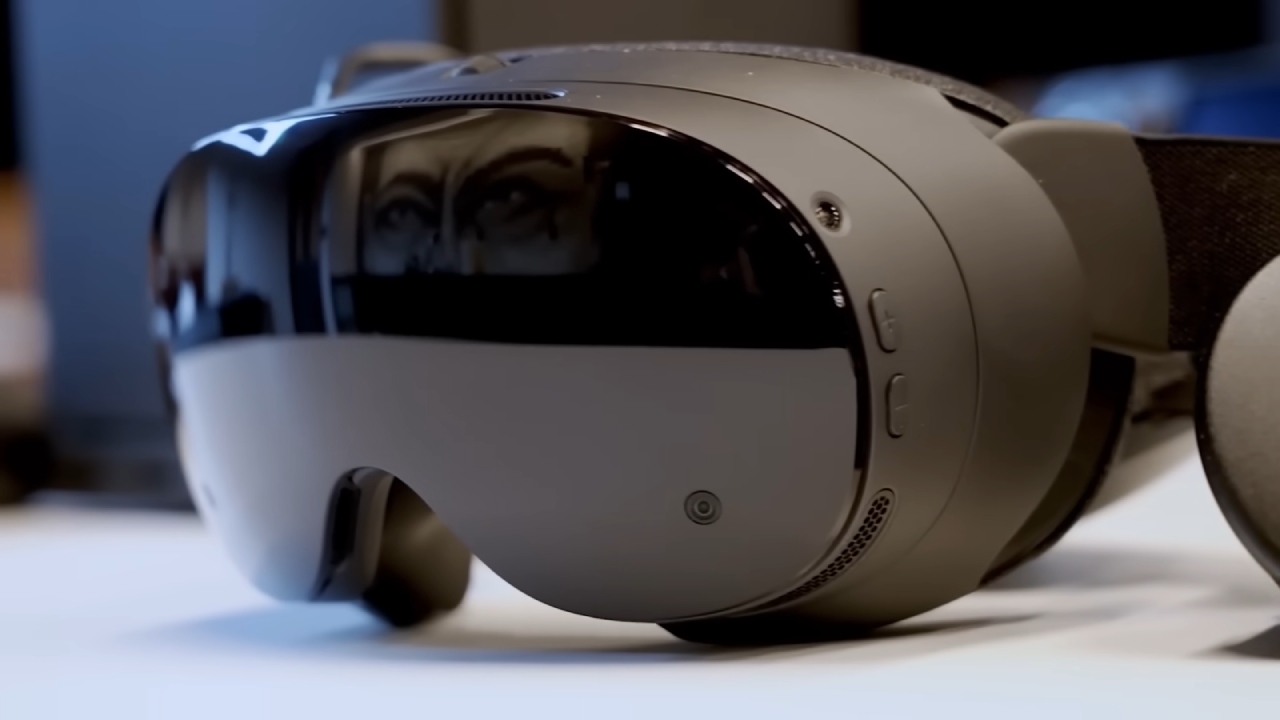
Display, Lenses, and the Core Technical Foundation
We are looking at a headset with two LCD screens, one for each eye, that can run at up to 120Hz and has a "lab mode" that runs at 144Hz, just like the Valve Index. The arrangement aims for clarity and low distortion when used with custom pancake lenses that feature glass elements to reduce glare.
One of the most important aspects, however, is the very low persistence, which greatly reduces smearing during movement and helps with motion sickness.
A major part of the Steam Frame's potential lies in foveated streaming and foveated encoding. With cameras focused on your eyes, the system can allocate full bitrate to the specific part of the screen you're looking at. This offers a more efficient rendering and streaming approach that preserves clarity where it matters most.
Using Existing Hardware to Simulate Steam Frame Performance
To understand what we might expect, we look at the Pico 4 Ultra, which features Wi-Fi 7, the same exact 2160x2160 per-eye resolution, and pancake lenses. It does not have eye-tracking for foveated streaming. We can still get close to the experience with a few workarounds, such changing the FOV tangent settings in Virtual Desktop.
By setting both the horizontal and vertical FOV tangent values to 40%, we make the bitrate focus on a smaller rendered area, which is similar to how the Steam Frame uses eye-tracking to distribute resources.
This workaround helps us see what difference intelligent bitrate usage can make, especially because PC-to-headset streaming always involves compression and decompression. Compressing video reduces quality, and when decompressed, it may look filled with artifacts, softening small details or distant objects. Using bitrate more intelligently solves much of this problem.
Visual Differences and Streaming Quality
With full-resolution rendering and optimized bitrate allocation, the difference becomes immediately clear. When we compare shots and text readability—for example, on the well-known "Crazy Egg Book" test image—the clarity with concentrated bitrate increases significantly. Even when you super-sample the non-foveated version up to 350%, the clarity stays about the same because of wasted bandwidth.
Standard streaming typically makes things look blurry and shimmering in situations like space or faraway landscapes. When you switch to foveated streaming emulation, things that are far away become more stable and simpler to read.
When you race in games like Assetto Corsa, the difference is huge: cars far away keep their structure and texture instead of turning into a pixel smear. The experience is similar to that of a direct DisplayPort connection.
We detect a significant jump in clarity compared to the Valve Index. And compared with Quest 3, which has a similar resolution, the improvement comes from efficient bitrate usage and the optical clarity of pancake lenses rather than raw pixel count.
.jpg)
Evaluating Resolution and Screen Technology
Is 2160x2160 per eye enough for 2026? The answer is complicated. While the resolution is not bleeding-edge, it remains acceptable, especially given that many users still rely on headsets with similar or slightly lower specs. The screen-door effect will be present, but minimized through proper lens design and pixel utilization.
Compared with LCD, micro-OLED panels like the 3560x3880 per-eye displays found in premium headsets offer vastly superior image quality. However, pushing extremely high resolutions over wireless introduces major challenges. Choosing a balanced resolution like 2160x2160 enables maintaining cable-like streaming quality, which would be nearly impossible at ultra-high densities without a physical connection.
Brightness concerns are often exaggerated. In a tight VR space, eyes adjust quickly, and even micro-OLED headsets occasionally need to have their brightness turned down. It's not so much about the maximum brightness as it is about the contrast, clarity, and lens performance.
Final Thoughts
We can assume that the Steam Frame will probably operate fairly similarly to a cable DisplayPort setup because it uses smart bitrate allocation and eye-tracked foveated streaming. The resolution isn't remarkable, but it nevertheless provides clarity that is on par with popular headsets today, especially when used with pancake optics.
Micro-OLED headsets with higher resolutions will always appear better, but they also need a lot more from wireless transmission. Valve seems to have carefully weighed the pros and cons of performance, cost, and making sure the wireless experience doesn't fall behind wired options.
The LCD panels may seem like a step back on paper, but with the right tweaks and clever streaming, the whole experience should still be sharp, comfortable, and visually interesting. The Steam Frame offers a big improvement over the last generation and a dependable wireless PC VR experience, as long as people have realistic expectations.
Also, check our other articles below :
- ASUS ROG Ally X Handheld Review: Double the Battery, Double the Comfort
- Nintendo Switch 2 Vs. Original Switch 1: A Full Comparison
- How To Connect A Camera And Join Voice Chat With Nintendo Switch 2
- Nintendo Switch 2 Review: Handheld Performance, Features & Value Breakdown
- ROG Xbox Ally X Vs. ROG Ally X: Display, Battery & Controls
- ASUS ROG Ally X vs. Steam Deck OLED: Display, Battery & Gaming Benchmarks
- MSI Claw 8 AI+ Review: Display, Controls & Gaming
- Nintendo Switch 2 vs. Steam Deck OLED: Gaming, Performance, Battery, Display and Value
- PlayStation Portal Review: Remote Play, Cloud Streaming & Travel Gaming
- PlayStation Portal vs. Lenovo Legion Go: Best Portable Gameplay
- Cyberpunk 2077 Patch 2.3 FPS Test on MSI Claw 8 AI+
Senior Editor, NoobFeed
Gaming Hardware Updates
No Data.