

8-Core CPUs in 2025: Why Mid-Range Creators Should Rethink Their CPU Choice
Modern creative applications reveal diminishing value in eight-core CPUs when compared against newer hybrid and higher-core alternatives
Hardware by Yoshi on Dec 19, 2025
The question of how many CPU cores creators really need in 2025 is getting more and more complicated. The traditional 8-core standard that used to define high-performance CPUs is no longer in use because of the rise of efficiency cores, which are often called "fake" or low-power cores.
There are still processors with eight cores or fewer, like Ryzen 9700X, but their usefulness as mid-range options is now being questioned. On paper, an 8-core processor looks good because the AM5 socket is a great way to upgrade.
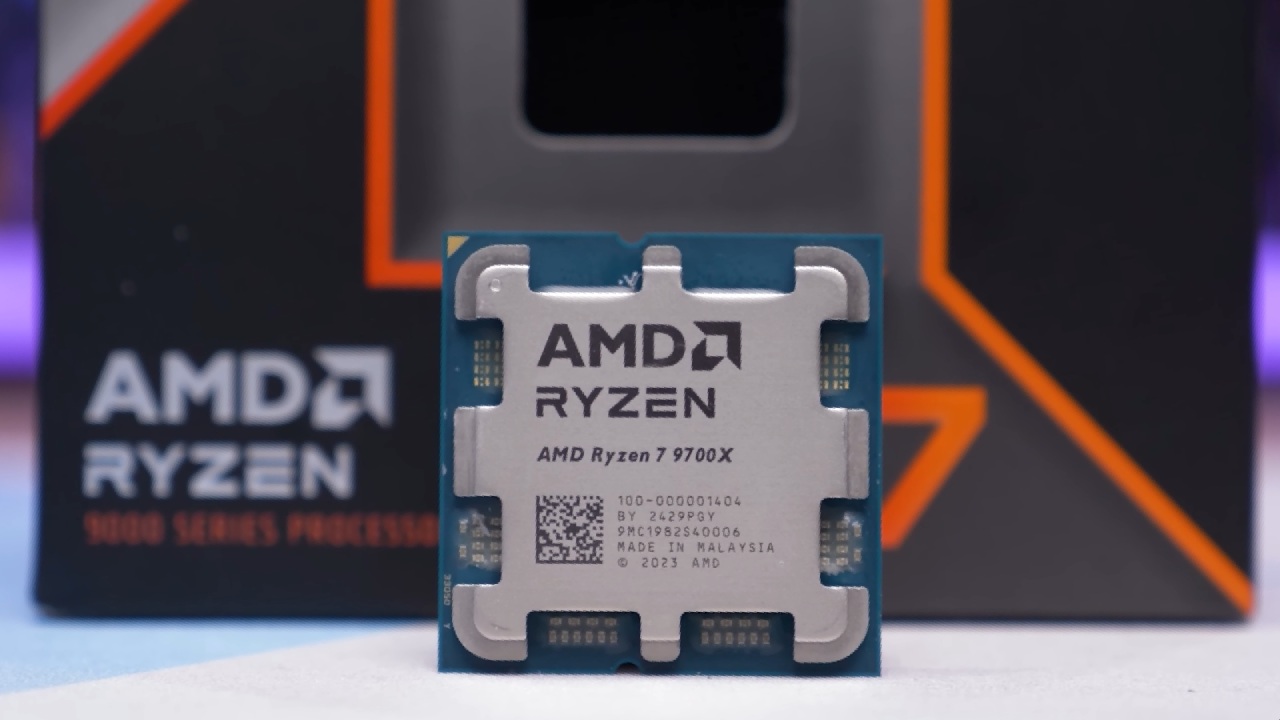
But whether those eight cores are really enough depends a lot on the workload, the price, and the competition. By the end of this guide, it should be clear that very few people should seriously think about getting an 8-core processor like 9700X right now.
Test Bench Configuration
Instead of just using gaming benchmarks, we looked at testing from the point of view of the creator. We used an Asus X870 Pro Creator Wi-Fi motherboard with Ryzen 9000-series CPUs and 64GB of DDR5 memory running at 5600MHz to build our test bench.
An RTX 4090 took care of the graphics, and a 360mm AIO kept it cool. There was one OS SSD and one project SSD, and the project files were stored on a Samsung 980 Pro.
We used the same 360mm AIO cooling system and SSD arrangement as the Core Ultra platform, but we used a Gigabyte Z890 Aero D motherboard and 48GB of RAM running at 8000MHz. The Samsung 980 Pro 2TB was the drive for the project.
Why Different Memory Speeds Matter
The difference in RAM speeds may seem unfair at first. But we tested each CPU using the memory specs that were officially supported, not the overclocked ones.
This method shows how creators really use each platform's built-in memory controller and shows off its strengths. The Core Ultra series has a better IMC, which lets it run stably at higher memory speeds. This is very important for some creative tasks.
CPU Specifications Overview
We used Ryzen 9700X as the starting point for all of our comparisons. We also tested Ryzen 9950X, which is two 9700X chips put together to make a16-core processor, and the Ryzen 9800X3D, which is another 8-core CPU that is widely thought to be one of the best gaming processors on the market.

We also added Core Ultra 7 265K from Intel. 9700X can go up to 5.5GHz, which is the same as Core Ultra 7 265K, but its base frequency is a little lower.
Intel's processor has "efficiency cores," which are better called "specialized cores" that are designed to handle background and low-power tasks. Intel uses a 3nm process node, while AMD uses a 4nm process node in this generation.
Cinebench R24 Performance
9800X3D had almost the same single-core performance as 9700X in Cinebench R24, but it had a 16.6% boost in multi-core results. 9950X showed almost linear scaling, giving about 97% better multi-core performance, but single-core gains were small.
Core Ultra 7 265K was the fastest in single-core performance, beating 9700X by 6% and improving multi-core performance by 86.8%, coming very close to 9950X.
Geekbench 6 Results
Geekbench 6 told a different story. 9800X3D was slower at single-core tasks but faster at multi-core tasks by 6%. 9950X had small gains in single-core performance and a 30.8% increase in multi-core performance. Core Ultra 7 265K actually outperformed the 9950X in multi-core performance, with a 37.8% boost over 9700X.
Adobe Photoshop and Lightroom Classic
9700X did a great job of holding its own in Photoshop. 9800X3D was only 2.2% faster, and 9950X was only 3.7% faster. Core Ultra 7 265K was actually 10% slower, which made 9700X look good in this particular workload.
Lightroom Classic told a very different story. 9800X3D was 42% faster, 9950X was about 40% faster, and Core Ultra 7 265K was 71.6% faster. 9700X fell far behind in this case.
Premiere Pro Performance
We saw big differences when we used an older version of Premiere Pro to make sure that H.265 hardware acceleration was always the same. 9800X3D got about 10% better overall, and its 3D V-Cache made interframe workloads up to 52% faster. 9950X was 20% better overall and up to 70% faster at intraframe tasks.
Core Ultra 7 265K beat all the other Premiere Pro benchmarks, getting 31% higher overall scores and 79% faster intraframe performance. Even the GPU effects got better, with a 20.8% improvement even though all the systems had the same GPUs.

After Effects Benchmarks
9950X did better on standard scores in After Effects, going up by 21.5%. Core Ultra 7 265K, on the other hand, did even better, with a 26.8% improvement over 9700X. This shows how well Intel's architecture works for heavily threaded creative tasks.
DaVinci Resolve Results
DaVinci Resolve relied more on the GPU, which made differences in CPU performance less noticeable. 9800X3D didn't do much better, but 9950X did about 12% better overall.
Core Ultra 7 265K came in first again, with overall scores that were about 10% higher. However, it fell behind a little in long-GOP tasks, probably because of software and driver limitations.
Blender and V-Ray Rendering
When rendering in Blender on a CPU, it was clear that having more cores was a good thing. 9950X was more than twice as fast as 9700X. Core Ultra 7 265K couldn't beat 9950X, but it did make big improvements in a lot of scenes.
V-Ray did the same thing. 9800X3D sped things up by 20%, 9950X sped things up by 112%, and Core Ultra 7 265K sped things up by 66%.
Power Consumption Considerations
Power draw gives you critical information. When fully loaded, the 9700X only utilized 88W, which made it incredibly efficient and easy to cool. The 9800X3D used roughly 150W, and the 9950X used more than 200W. When it was fully loaded, the Core Ultra 7 265K used roughly 210W.
People often talk about peak power draw, but in the real world, creator workloads spend more time in active but not rendering states. In these situations, Intel platforms tend to use a lot less power when they're not doing anything, which can help keep overall power use even over time.
Pricing and Value Reality
9700X has a hard time justifying its price of over $300. On the other hand, Core Ultra 7 265K is much cheaper and works much better. 9950X and 9800X3D are in completely different price ranges, with prices going up to $600 or more.
Intel's value proposition gets even stronger when you look at the prices of motherboards and the features of the platform. Boards are often less expensive and have better features, and problems like PCIe lane limits are no longer a problem.
Final Thoughts
At $300, 8-core CPUs are no longer a good deal for creators. The AM5 platform has a lot of room for improvement, but processors like 9700X don't do well in many creative tasks right now. For most creators today, Core Ultra 7 265K is a better choice because it consistently gives better performance per dollar.
Eight cores are no longer enough to rule the mid-range market. Pricing, platform costs, and real-world performance all suggest that there are better options out there that can meet the needs of modern creatives.
Also, check our other articles below:
- AMD Ryzen 9 9950X3D Review: Setting The Standard For 2025 Gaming CPU
- AMD Ryzen 7 9800X3D Review: 3D V-Cache Goes God Mode with Stunning Gaming Performance
- AMD RX 9070 Performance Review: Thermals, Clocks, and Real-World FPS
- AMD Ryzen 5 7600 Review: Best Budget Gaming CPU of 2025?
- AMD Radeon RX 7800 XT Review: RDNA 3 Power For Midrange Gaming
- Sapphire NITRO+ AMD Radeon RX 9070 XT Review: The Ultimate 4K Gaming GPU
- AMD Ryzen 7 7800X3D: Delivers Gaming Performance Far Beyond Expectations
- AMD Ryzen 9 7900X Review: Powering the AM5 Era with DDR5 & PCIe 5.0
- Intel Core i9‑14900K vs. AMD Ryzen 7 7800X3D: Power Profiles & Gaming Benchmarks
Subscriber, NoobFeed
Latest Articles
No Data.