
MSI Claw 8 AI Plus Gets Intel XeSS 3 4x Frame Generation Boost
Intel XeSS 3 driver introduces up to 4x frame generation, significantly improving performance on MSI Claw 8 AI Plus handheld gaming.
Hardware by Masaru Hoshino on Feb 18, 2026
Intel's XeSS 3 multi-frame generation is now officially available in the new graphics driver, which is a big advance for the MSI Claw 8 AI Plus. Intel talked about its XeSS 3 technology and said it would work with older hardware, such as the Core Ultra 200 series chips that are within the Claw, at CES 2026.
Multi-frame generation, offering up to 4x frame generation at the app and driver level, is now available on Lunar Lake and Arrow Lake Core Ultra 2 series processors. With the new driver finally out, it is time to take a closer look at how it installs and how frame generation performs on the MSI Claw 8 AI Plus.
.jpg)
Installing the Latest Intel Driver
Inside the Intel graphics app, the update may appear available, although it does not always work consistently. Sometimes it updates without issue, and other times it does not. MSI Center M can also provide graphics driver updates, but those typically lag behind the newest releases.
For the best results, it is recommended to download the newest driver directly from Intel’s website. After downloading, open File Explorer, navigate to the Downloads folder, and double-click the driver file. The installation process will begin and present the usual prompts. After agreeing to the terms, you can either perform a standard upgrade or execute a clean installation.
We prefer running a clean installation when introducing major features like XeSS3, though either method works. During customization, the improvement program can be unchecked if desired, and then the installation can proceed. The driver will remove the old version, install the new one, and typically complete within a few minutes. Once finished, allow the graphics software to launch and then reboot the system.
After rebooting, the Intel graphics app will confirm the system is updated to the newest driver. A new option labeled XeSS Frame Generation Override now appears at the top of the app.
Enabling XeSS Frame Generation Override
The XeSS Frame Generation Override allows selection of 2x, 3x, or 4x frame generation in games that already support frame generation. The key detail is that the multiplier must be selected before launching the game. Changing the setting while the game is running will not apply the adjustment until the game is restarted.
In games like Cyberpunk 2077, there is currently no in-game dropdown to choose 2x, 3x, or 4x frame generation. Instead, enable Intel frame generation in-game, then select the desired multiplier inside the Intel app. The driver will override the in-game setting accordingly. If switching from 2x to 4x, the game must be fully closed and relaunched for the change to take effect.
Cyberpunk 2077 Performance with 4x Frame Generation
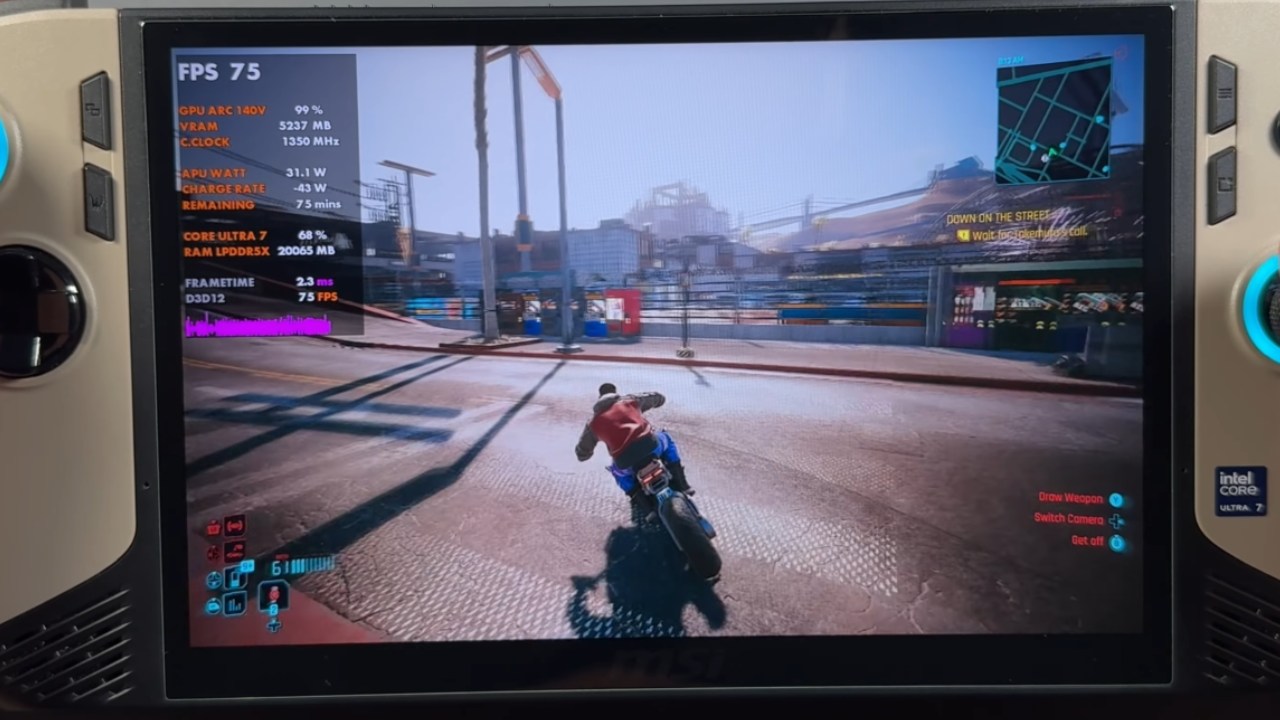
With 4x frame generation enabled in Cyberpunk 2077, performance increases significantly. Frame rates can reach 140fps , 150fps , and even 160fps depending on the scene. There is some additional input latency, as expected with higher frame generation levels, but it is not nearly as noticeable as anticipated.
Visually, the experience remains fluid. Even at 4x frame generation, there is minimal artifacting and very little of the skipping commonly associated with aggressive frame generation. In person, the smoothness is far more apparent than what a 60fps recording might show.
Compared to other solutions such as AMD’s frame generation or lossless scaling tools, Intel’s implementation continues to impress. The improvements on Core Ultra 200 series hardware are especially noticeable, and the technology feels refined and stable in extended testing sessions.
Hogwarts Legacy Performance Results
Hogwarts Legacy also supports Intel frame generation, though currently without an in-game dropdown for selecting multipliers. With 2x frame generation enabled, performance increases from around 33fps to approximately 57fps in the same scene.
Switching to 4x frame generation requires exiting the game, adjusting the setting in the Intel app, and relaunching. When turned on, frame rates can go up to 80 to 100 fps, depending on how complicated the scenario is and what graphical settings are used. You can get even better performance by lowering the resolution or changing the settings even further.
The feature works well, and over several hours of testing, there were no crashes or problems with installation. Stability has been solid, and the override feature integrates smoothly with supported titles.
Early Impressions of Intel XeSS 3 on MSI Claw 8 AI Plus
Initial impressions of Intel’s XeSS 3 multi-frame generation on the MSI Claw 8 AI Plus are very positive. The ability to push up to 4x frame generation on Lunar Lake and Arrow Lake Core Ultra 2 series processors significantly boosts handheld gaming performance.
Cyberpunk 2077 currently stands out as one of the best demonstrations of the technology, delivering high frame rates with impressive smoothness and manageable latency. As more games receive updates and potentially integrate multiplier options directly into their settings menus, the experience should improve even further.
Overall, the driver installation process is straightforward, performance gains are substantial, and Intel’s frame generation technology continues to evolve in a very promising direction for handheld gaming.
Also, check our other Handheld articles below :
- ASUS ROG Ally X Handheld Review: Double the Battery, Double the Comfort
- Nintendo Switch 2 Vs. Original Switch 1: A Full Comparison
- How To Connect A Camera And Join Voice Chat With Nintendo Switch 2
- Nintendo Switch 2 Review: Handheld Performance, Features & Value Breakdown
- ROG Xbox Ally X Vs. ROG Ally X: Display, Battery & Controls
- ASUS ROG Ally X vs. Steam Deck OLED: Display, Battery & Gaming Benchmarks
- MSI Claw 8 AI+ Review: Display, Controls & Gaming
- Nintendo Switch 2 vs. Steam Deck OLED: Gaming, Performance, Battery, Display and Value
- NVIDIA GeForce Now on Steam Deck: Battery Life, Gameplay, Streaming
Editor, NoobFeed
Gaming Hardware Updates
No Data.