
ASUS TUF A14 Review: Ryzen AI Max Plus 392 and Radeon 8060S iGPU Performance
Compact 14-inch gaming laptop combines 12-core Ryzen AI processor, 165hz display, and high-performance Radeon 8060S integrated graphics.
Hardware by Tanvir Kabbo on Mar 16, 2026
The brand-new TUF A14 for 2026 has a lot of new features that are different from the last version. It is still a gaming laptop, but it doesn't need a separate GPU anymore. Instead, it has the most powerful integrated GPU in the world right now. It is especially fascinating to test the system because it has an APU that has never been tested before.
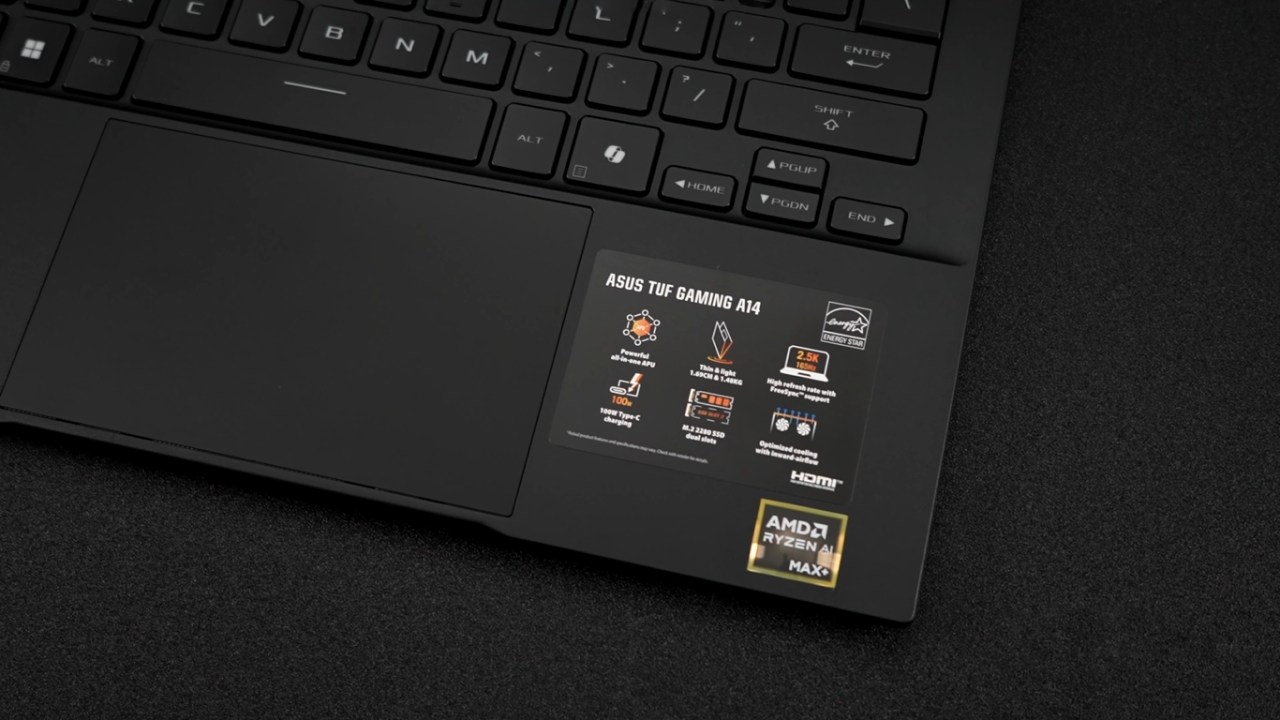
The new TUF A14 is equipped with the AMD Ryzen AI Max Plus 392. While the naming is slightly different from the higher-end model, the system still includes the Radeon 8060S iGPU based on RDNA3.5 with 40 compute units.
.jpg)
The main difference compared to the Ryzen AI Max Plus 395 is the reduced CPU core count. The 395 includes 16 cores, whereas the 392 uses 12 cores and 24 threads. There is a lot to examine with this device, including its design, performance characteristics, benchmarks, and gaming capability.
Hardware Activation and Setup
Before diving into the laptop itself, it is worth mentioning the availability of affordable Windows keys from URCD Keys. The platform features Steam keys, Uplay games, and Ubisoft games, but the most helpful thing to buy is usually Windows 11 Pro activation keys. Using the code ETA at checkout gives you a 25% discount, which brings the price down to $25.
You will get the activation key by email after you buy it, and you may use it right away. It's easy to activate. To activate Windows 11 on a new PC, go to the settings menu and click on Activation Settings. If there is no product key installed, copy the key you bought into the activation field and continue with the process.
Windows will turn on and be ready to use once you confirm. If the system is running Windows 11 Home, a Home key will be required, while Windows 11 Pro systems require a Pro key.
Design and Form Factor
The first TUF A14 was a hit because it was small, and that hasn't changed in the 2026 edition. The laptop has a 14-inch screen and is tiny enough to put in a bag. The screen is an IPS panel that doesn't reflect light and has a resolution of 2560×1600 with a refresh rate of up to 165Hz.
Although an OLED Nebula panel would have been a welcome addition, the IPS screen still looks excellent and benefits from its anti-glare coating. Externally, the laptop follows the TUF design philosophy. It doesn't use showy design features or RGB lighting; instead, it has a sleek and simple look.
Connections and ports
The TUF A14 has a good number of ports that work with both work and gaming setups, even if it is small. The laptop has a full-size HDMI2.1 port, a 40Gbps USB4 port, a USB3.2Gen2 Type-A port, and a 3.5mm audio jack on the left side.
It also has an ASUS thin power jack that connects to the 200W charger that comes with it. On the right side of the laptop, there is a microSD card reader that can read cards at UHS-II speeds of up to 312MB/s, a USB-C 3.2 port, and another full-size USB3.2Gen2 Type-A port. This combination keeps the compact look while making sure that the device stays connected.
Input and Keyboard
The laptop has a chiclet-style keyboard with LEDs that light up in one zone. There isn't much RGB lighting, which keeps the look clean and professional while still letting you see in low-light situations. The trackpad is quite large for a 14-inch laptop and feels very smooth during use, with no noticeable issues during navigation or gestures.
Like many modern laptops, the keyboard includes a Copilot key for quick AI access along with a dedicated Armoury Crate key that allows quick access to performance settings and system controls.
Specifications Overview
The most significant changes in this generation appear in the hardware configuration. The system is powered by the AMD Ryzen AI Max Plus 392 with 12 cores and 24 threads. The Ryzen AI Max Plus 395, which is a higher-end model, has 16 cores and 32 threads. However, this may not be essential for a little laptop like this.
The Radeon 8060S with 40 compute units based on RDNA3.5 architecture is the same for both CPUs' integrated GPUs. Memory is unified, with configurations available up to 64GB running at 8000MT/s, while the tested model includes 32GB.
The laptop also has a 14-inch IPS screen with a resolution of 2560×1600, a refresh rate of 165Hz, and an aspect ratio of 16:10. The monitor covers all of the sRGB color space and works with AMD FreeSync to make gaming smoother.
The laptop has two PCIe 4.0 M.2 slots, so you can very easily add more storage. The tested unit has a 1TB SSD, but the system can handle up to 4TB overall with two single-sided 2TB SSDs. Additional specifications include a 73Wh battery capable of charging up to 50% in 30 minutes, a total weight of 1.48kg or 3.26lb, and Windows 11 installed out of the box.
CPU, GPU, and AI Hardware
Looking closer at the processor reveals the 12-core, 24-thread configuration of the Ryzen AI Max Plus 392. While the 395 model includes more CPU cores, the reduced core count here may allow more power to be directed toward the integrated GPU.
The integrated GPU remains the Radeon 8060S with 40 compute units. In the tested configuration, 16GB of memory is dedicated as VRAM for the GPU, while the remaining 16GB is used for the system.
The GPU memory allocation might only be 4GB when the laptop first powers up. You may change this in Armory Crate, AMD software, or the BIOS. You can set the dedicated graphics memory in Armoury Crate to be anywhere from 0.5GB to 24GB.
The processor has AI capabilities, therefore it also has a built-in NPU that is made for AI workloads and speeding up machine learning activities.
Performance Profiles and Power Limits
We can change how the laptop works by using Armoury Crate's several power profiles. There are four settings to choose from: Silent, Performance, Turbo, and Manual. Performance mode boosts power to about 65W, while Turbo mode lets you go even higher and perform even better.
Manual mode provides deeper customization, allowing adjustment of the sustained power limit and boost behavior. The SPL or sustained power limit is set around 95W, the SPPT 2-minute boost can reach around 100W, and the FPPT 10-second boost can reach approximately 115W. Fan curves can also be manually adjusted, including the CPU auxiliary fan.
During testing in Turbo mode, the processor briefly reaches around 115W before stabilizing at roughly 99–100W sustained power. When both the CPU and GPU are under load, this available power is shared between them. Even without manual tuning, the default ASUS performance profiles work extremely well with this chipset.
Benchmark Results
Benchmark testing gives you a better idea of how the Ryzen AI Max Plus 392 stacks up against other processors of the same type. The TUF A14 got a single-core score of 2894 and a multi-core score of 18000 in Geekbench 6 tests. When compared with the Flow Z13 equipped with the Ryzen AI Max Plus 395 running in turbo mode, the A14 actually scores slightly higher in single-core performance while falling slightly behind in multi-core performance.
In Cinebench R24, the single-core score reaches 109, while the multi-core score reaches 1381. In single-core workloads, the Apple M1 Max remains slightly ahead, which is similar to the behavior observed with the 395 model. In multi-core workloads, the score comes behind the Apple M1 Ultra, although the 395 model with 16 cores can surpass the M1 Ultra in certain tests.
Another benchmark used was 3DMark Time Spy. With the Radeon 8060S integrated GPU, the system achieved a score of 10786. That level of graphics performance is roughly comparable to a laptop RTX4060, which is impressive considering that the GPU is fully integrated within the processor.
.jpg)
Gaming Performance
Gaming performance is where the Radeon 8060S integrated GPU demonstrates its real strength. In Red Dead Redemption2 running at 2560×1600 with high settings and no FSR enabled, the system maintains average frame rates slightly above 80fps. Borderlands 4 was also tested at 2560×1600 using high settings with FSR frame generation enabled. During intense gameplay moments, the frame rate typically remains in the mid-80fps range.
Spider-Man2 was tested at 2560×1600 on high settings without FSR. Performance is generally smooth, although occasional dips occur in more demanding areas before quickly recovering. Enabling FSR can further stabilize performance and improve frame consistency.
Black Myth Wukong was tested using high settings at 2560×1600 with FSR resolution scaling set to 80%. The game runs smoothly with these settings, showing how capable the integrated GPU is for modern titles. A racing game, Japanese Drift Master, was also tested at 2560×1600 with high settings and no FSR.
The game runs smoothly, although reaching a consistent 120fps at native resolution is difficult without enabling FSR. When frame generation and upscaling technologies are enabled, the Radeon 8060S can nearly double the frame rate in many modern games.
Early Impressions
The 2026 TUF A14 is going to be a great small gaming laptop. The Ryzen AI Max Plus 392 has a powerful CPU and lets more power go to the built-in GPU. The CPU works very well, even if it has less cores than the 395 model. This is especially true for gaming applications, where the Radeon 8060S benefits from extra power headroom.
More tests will look at thermals, different performance settings, and a direct comparison of the Ryzen AI Max Plus 392 and Ryzen AI Max Plus 395. Preliminary findings indicate that the diminished core design may enhance gaming performance in low-power systems by emphasizing GPU performance rather than distributing power to supplementary CPU cores.
Also, check our other hardware articles:
- AMD Ryzen 9 9950X3D Review: Setting The Standard For 2025 Gaming CPU
- Amazon Luna 2025 Review: Is Prime Gaming's Cloud Service Your Go-To For Casual Fun?
- AMD RX 9070 XT Review: AMD's RDNA 4 Champion for 1440p Gaming
- GeForce Now Ultimate: Ditching Your Gaming PC For Cloud RTX 4080 Power?
- NVIDIA GeForce RTX 5080 Review (2025): Still A 4K Gaming Powerhouse?
- Intel Core Ultra 9 285K Review And Performance Breakdown (2025)
- AMD Ryzen 7 9800X3D Review: 3D V-Cache Goes God Mode with Stunning Gaming Performance
- Intel Core Ultra 9 285K vs AMD Ryzen 7 9800X3D: In-Depth Gaming Performance and Benchmark Comparison
- NVIDIA GeForce RTX 5080 Super Performance In Cyberpunk 2077: Path Tracing & DLSS 4.0 Tested
- AMD Radeon RX 9070 XT In Cyberpunk 2077: Ray Tracing & FSR 4.0 Tested
- Intel Arc B580 Review: The $250 GPU Revolutionizing 1440p Gaming
- Intel Arc B570 Vs. B580: Value, Specs, And Real-World Gaming Performance
- RTX 5090 Laptop Vs. M4 Max MacBook Pro: Ultimate Raw Performance Vs. Battery Endurance
- Intel Arc b580 Vs. RTX 4060: Game Performance And Value Analysis
- RTX5090 Hell Is Us Demo 4K Ultra Benchmark: DLSS Vs. Native Performance Guide
- NVIDIA RTX 5070 Review: Mid-Range Muscle or Marketing Hype?
- Nintendo Switch 2 Review: Handheld Performance, Features & Value Breakdown
- RTX 5070 Ti Review: Performance, Thermals & Power Efficiency Tested
- Samsung Odyssey OLED G81SF Review 2025: Ultimate 32-Inch QD-OLED Gaming Monitor
- AMD RX 9070 Performance Review: Thermals, Clocks, and Real-World FPS
- AMD Ryzen 5 7600 Review: Best Budget Gaming CPU of 2025?
- AMD Radeon RX 7800 XT Review: RDNA 3 Power For Midrange Gaming
- Asus ROG RTX 5090 Astral OC Vs. Founders Edition: The 4K Gaming Benchmark
Senior Editor, NoobFeed
Gaming Hardware Updates
No Data.