
Intel Arc Pro B50 Paired with Ryzen 7 9800X3D: Surprising 1080p & 1440p Gaming Performance
Intel Arc Pro B50 demonstrates impressive 1080p and 1440p gaming performance when paired with the Ryzen 7 9800X3D.
Hardware by Masaru Hoshino on Oct 05, 2025
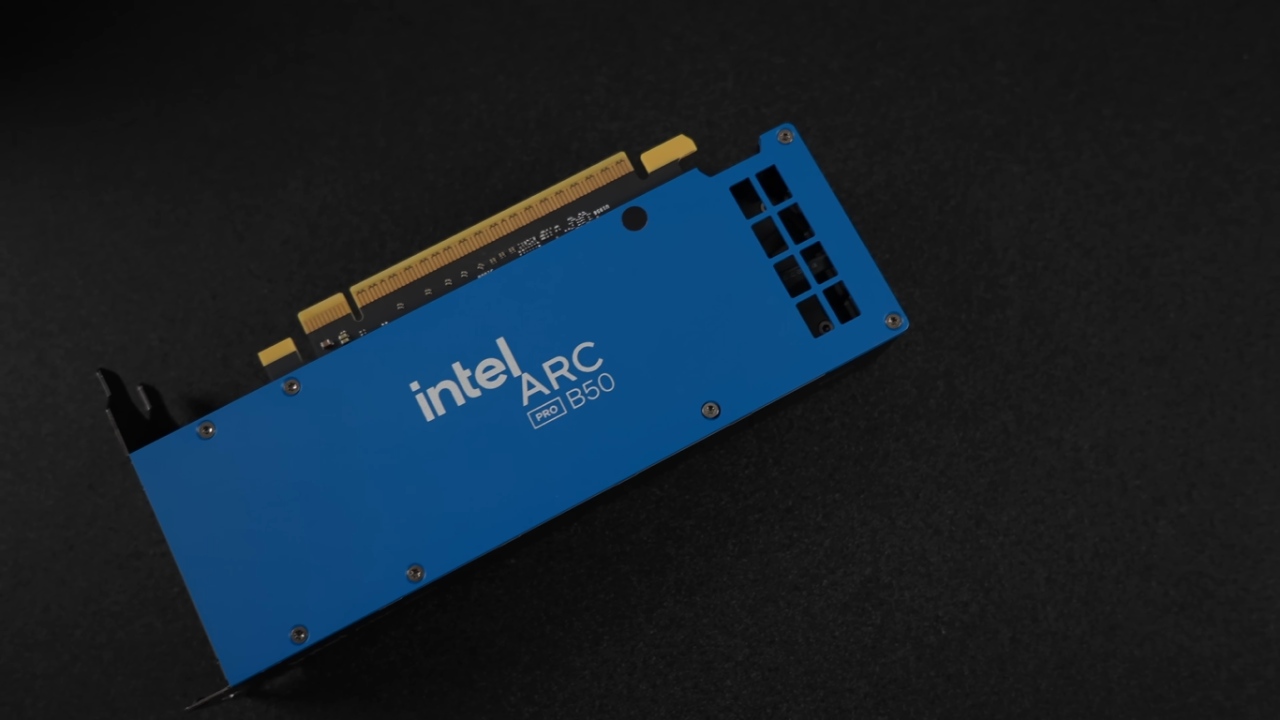
The Intel Arc Pro B50 is a compact, low-profile dual-slot workstation GPU equipped with 16GB of GDDR6 memory. Designed to fit easily into small form factor builds, it offers an appealing balance between performance and efficiency.
The card draws up to 70W of total board power, eliminating the need for external power connectors. It comes with both full-size and low-profile brackets for flexible installation options.
With 16 Xe cores, 4 render slices, 16 ray tracing units, and 128 XMX engines running on a 128-bit memory bus, the Arc Pro B50 presents a surprisingly capable configuration for its size and power draw.
Pairing the GPU with a High-Performance CPU
For testing, we paired the Arc Pro B50 with the AMD Ryzen 7 9800X3D, currently regarded by many as one of the best gaming CPUs on the market. The GPU was installed in an ASUS pre-built rig, originally featuring a Radeon RX 9070 XT.
While the RX 9070 XT easily outperforms the Arc Pro B50, this comparison allows us to see how the smaller card performs when paired with a high-end CPU in a compact form factor setup.
Borderlands 4 Performance
In Borderlands 4, at 1080p medium settings with XESS set to balanced, performance initially hovered just below 60 FPS. By switching XESS to performance mode, frame rates improved to around 64fps on average.
With Afterburner displaying live system metrics, we observed total GPU power draw around 50W. Once XESS Frame Generation was enabled, frame rates jumped dramatically to over 100fps, paired with Intel's XESS low latency mode for smoother gameplay.
This enhancement significantly improves the experience and demonstrates the effectiveness of Intel's frame generation implementation, even on lower-end cards like the Arc A380.
Cyberpunk 2077 Testing
In Cyberpunk 2077, the GPU was tested at 1080p ultra settings with XESS set to quality. Under these conditions, we achieved an average of 77fps—fully playable and visually impressive. By enabling Intel's XESS Frame Generation feature, the game became even more fluid.
We were also able to upscale to 1440p while maintaining excellent responsiveness and visual fidelity. The combination of XESS Frame Gen and low latency mode created an enjoyable experience that felt seamless and visually rich.

Horizon Zero Dawn Remastered Performance
The Arc Pro B50 had a lot of trouble with Horizon Zero Dawn Remastered since it is quite demanding on lower-end GPUs. At 1080p high settings, the VRAM use went over 8GB, which shows that this card's 16GB size keeps performance from dropping like it does with 8GB GPUs.
The extra VRAM made a big difference; it let the game run more smoothly and kept textures from loading slowly.
Forza Horizon 5 Benchmark
Testing Forza Horizon 5 at 1440p ultra settings, we saw an average frame rate of around 75fps without enabling XESS. The game ran very smoothly, though enabling XESS could further improve frame rates if desired.
The Arc Pro B50 handled the title surprisingly well given its workstation classification and modest power requirements.
Doom: The Dark Ages Results
In Doom: The Dark Ages, tested at 1080p ultra settings with XESS set to balanced, performance was again impressive. We initially expected to lower settings or switch to performance mode, but it wasn't necessary. VRAM usage exceeded 10GB, demonstrating once again the significant benefits of the large memory buffer for this GPU.
For a low-profile, dual-slot card, performance was strong, demonstrating its ability to deliver a great gaming experience within realistic expectations.

Final Thoughts
The Intel Arc Pro B50 is not primarily designed for gaming. Yet, it performs surprisingly well at 1080p and even 1440p when paired with XESS Frame Generation. While it's not suited for 4K gaming except for older or less demanding titles, its 16GB VRAM provides a major advantage for both gaming and AI workloads.
We wouldn't recommend buying it solely for gaming. Still, for users who need a low-profile, dual-slot GPU with solid 1080p performance and excellent workstation capability, it's a smart and affordable choice.
Check Our Other Intel Chips Articles:
- Intel Core Ultra 9 285K Review And Performance Breakdown (2025)
- Intel Core Ultra 9 285K vs AMD Ryzen 7 9800X3D: In-Depth Gaming Performance and Benchmark Comparison
- Intel Core i5-13400F Gaming Performance: Still Worth It in 2025?
- Intel Core i9‑14900K vs. AMD Ryzen 7 7800X3D: Power Profiles & Gaming Benchmarks
- Intel Core i9 14900K: Specs, Benchmarks, and Competitor Comparison
- Intel Core Ultra 5 245K Review: Gaming, Productivity & Power Efficiency Tested
- Intel Core Ultra 9 285 K's iGPU Gaming: In-Depth Benchmarks & Analysis
- Intel vs. AMD Gaming Laptop: Performance, Thermals & Battery Life Compared
- AMD Ryzen 7 9800X3D vs.7800X3D vs. Intel Core Ultra 7 265K: Gaming, Thermals & Price Analysis
Editor, NoobFeed
Gaming Hardware Updates
No Data.