
Ultimate Quad AMD Radeon AI Pro R9700 Workstation Build for AI and Compute
Explore how AMD’s RDNA4 architecture revolutionizes AI workloads for workstation setups.
Hardware by Tanisha Aria on Dec 29, 2025
Because of AMD, XFX, and Sapphire, it was possible to build something really cool: a single system with four GPUs totaling 128GB of VRAM. The plan is to build a powerful computer, review the hardware options and limitations, and demonstrate how well a quad-GPU setup can perform in real-world use.
Along the way, two AMD Radeon AI Pro R9700 GPUs will be given away to community projects that are deemed interesting. Each GPU has 32GB of VRAM.
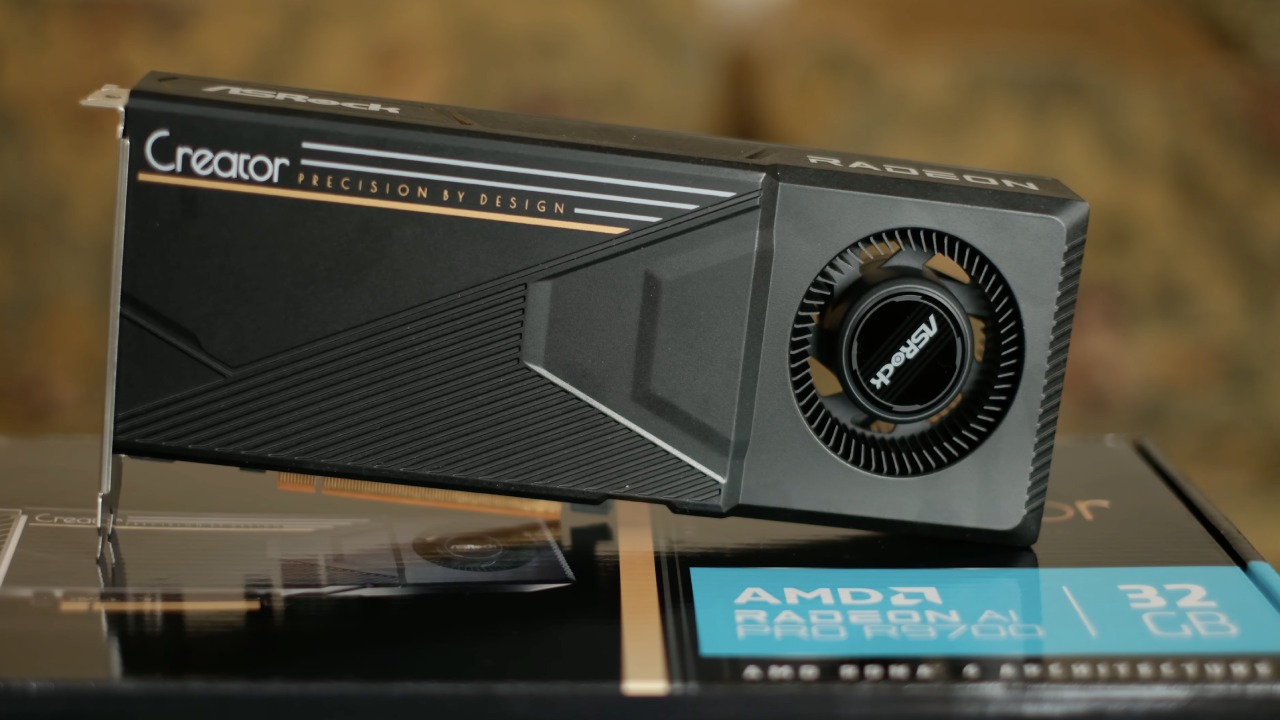
With about $5,000 worth of GPUs, this setup is just as much about finding useful limits as it is about speed. The point is to show that four GPUs can work together, scale well, and enable really heavy AI and computing tasks.
RDNA4 and AMD's AI Direction
With the Radeon AI Pro R9700, AMD is putting a lot of focus on AI features in the first wave of RDNA4 GPUs. NVIDIA's environment is nothing like AMD's. NVIDIA often uses the same silicon designs across consumer, business, and workstation products. This makes it easier for features and software stacks to go from small to big deployments.
There is a clear split on AMD's side. While RDNA handles graphics and workstation-class tasks, CDNA handles business and datacenter computing. The software stacks and settings differ, even though the hardware features are similar.
Vulkan is a graphics backend that AI work on AMD hardware has counted on in the past. Early CUDA workloads also worked by changing graphics processes so they could be used for computation, which is an interesting fact.
GPUs based on RDNA can handle math, and support for ROCm keeps getting better. In this build, we look at both Windows and Linux environments, but Linux is the main focus for real optimization.
Planning a Four-GPU System
Careful planning is required to fit four GPUs into a single machine. We're using the SilverStone SEDA H2 case, a chassis designed for extreme setups. The power of four GPUs set at 300W each is almost 1200W. In reality, these cards usually need about 280W–290W, but it's important to plan for the worst.
The CPU base is Threadripper, which draws about 280W under load. When you add the storage, cooling, and other parts, the entire system's power is about 1600W.
That greatly limits the choices for a power source. High-end 1600W units made for workstation and server-class loads are a good pick.
Cooling is just as important. The CPU is cooled by a 360mm radiator placed at the front, and the case is kept cool by extra high-quality fans. With this many ways to make heat, planning for movement is a must.
Case, Motherboard, and Expansion Slot Constraints
Four GPUs with dual slots need eight expansion slots. Many of today's processors, including big Threadripper boards, have only seven slots. This makes case selection very important, as the frame must support an eighth slot beyond the motherboard edge.
The SEDA H2 has thick metal walls, is built to be strong, and focuses on soundproofing and cooling. Cases like this are becoming less common, especially as many companies use lighter materials and focus more on looks than function.
It's also important which motherboard you use. PCIe lane distribution can become a limiting feature on the TRX50 platform. Even though there are officially enough lanes, not all of them work at PCIe Gen5 speeds.
Because of the board's design, some GPUs can run at Gen5x16 in this setup, while others can only run at Gen4x16. The WRX90 systems don't have these problems, but they do need more expensive Threadripper Pro CPUs and motherboards.
GPU Design and Cooling Considerations
Sapphire and XFX's Radeon AI Pro R9700 cards are made for professional workstations, so they are mostly the same. Each card has four DisplayPort outputs and no HDMI. This is good for Linux systems because there are still problems with open-source drivers and licenses for HDMI.
For thick multi-GPU setups, blower-style coolers are the best option. When GPUs are stacked closely together, they must expel hot air straight out of the case. While flow-through designs work well for systems with one or two GPUs, they struggle when four cards are placed next to each other.
Power Behavior and Initial Testing
Idle power consumption is about 123W with all four GPUs installed. This is impressively low given the hardware. When running AI workloads, power usage under load ranges from 500W to 900W, depending on the number of GPUs in use.
Even though there are some issues with PCIe speed, performance stays good. The rates of token and image generation scale pretty well, especially since not all tools are tuned for four GPUs from the start.
.jpg)
Windows Experience and Software Limitations
Lemonade is one of the simplest tools for getting started with RDNA-based AI on Windows. It works well with one or two cards and has great support for AMD GPUs. But Lemonade wasn't designed to work with computers with 4 GPUs.
Lemonade memory-maps through system RAM by default when loading big models. This still causes problems even with 128GB of system memory and 128GB of VRAM. A 45GB model can use over 80GB of memory because of how it is loaded and compressed.
LM Studio performs a little better in multi-GPU setups, but it doesn't support ROCm on Windows. The performance is okay, but not great. It gets the lowest token rates compared to a well-tuned Linux setup.
Linux Setup and Optimization
If someone really wants to get the most out of their computer, Linux is clearly the best operating system. If the BIOS is fully updated and the Resize BAR feature is enabled, these GPUs will work with Ubuntu 24.04 LTS right away. AMD's written guides and kernel updates make the process easy to understand.
When ROCm is properly configured, all four GPUs are fully recognized and used. On this processor, peer-to-peer bandwidth testing shows that two GPUs are working at Gen5x16 speeds and two at Gen4x16 speeds. Still, the performance on VLM and AI Toolkit tasks is very good.
Making high-resolution pictures, like 1024x1024 results with advanced models and LoRA settings, is very quick. Having all four Radeon AI Pro R9700 GPUs running in the AI Toolkit interface really shows that the platform works as it should.
Future Work
If community members have interesting projects, they will get two of this system's Radeon AI Pro R9700 GPUs. The choice was not made at random; it was based on quality and creativity. It is especially encouraged for students and current community members who have or want to have AI, computing, or research projects to contribute.
There's a lot more to come after this quad-GPU build. More tests, deeper optimization, and more advanced tasks are planned. Future reports will explain more about what can be done with this type of hardware setup.
Also, check our other AMD articles below:
- AMD Ryzen 9 9950X3D Review: Setting The Standard For 2025 Gaming CPU
- AMD Ryzen 7 9800X3D Review: 3D V-Cache Goes God Mode with Stunning Gaming Performance
- AMD RX 9070 Performance Review: Thermals, Clocks, and Real-World FPS
- AMD Ryzen 5 7600 Review: Best Budget Gaming CPU of 2025?
- AMD Radeon RX 7800 XT Review: RDNA 3 Power For Midrange Gaming
- Sapphire NITRO+ AMD Radeon RX 9070 XT Review: The Ultimate 4K Gaming GPU
- AMD Ryzen 7 7800X3D: Delivers Gaming Performance Far Beyond Expectations
- AMD Ryzen 9 7900X Review: Powering the AM5 Era with DDR5 & PCIe 5.0
- Intel Core i9‑14900K vs. AMD Ryzen 7 7800X3D: Power Profiles & Gaming Benchmarks
Contributor, NoobFeed
Gaming Hardware Updates
No Data.