

Best 1440p Gaming Monitor 2025: Asus ROG Strix XG27AQWMG with Fourth-Gen OLED Panel
Discover the performance and design of Asus ROG XG27AQWMG, featuring fourth-generation LG OLED with improved brightness and color.
Hardware by Vecna on Dec 22, 2025
Asus ROG Strix XG27AQWMG is a gaming monitor that many people are excited about. It uses LG Display's fourth-generation tandem OLED technology in the mainstream 1440p segment. It was announced earlier this year and combines a high-refresh OLED screen with Asus' new True Black Glossy coating.
This is meant to make things brighter, improve color performance, and make blacks deeper compared to previous generations of OLED. There is a lot to unpack, since this comes in a well-known ROG form with many useful upgrades.
Important Specs and Prices
LG's new primary RGB tandem OLED screen is at the heart of the XG27AQWMG. This fourth-generation technology moves from a three-layer to a four-layer stack, making it brighter, allowing it to display more colors, and greatly extending its lifespan.
The screen is a 27-inch 1440p monitor with a 280Hz refresh rate. That may not sound as high as the newer 360 Hz or 500 Hz OLED options, but it's still a great feature and helps keep the price low overall.
Instead of trying to be the best and newest all the time, Asus puts this monitor in a place to give high-end OLED performance without making the price too high. Thanks to newer panel technology, this monitor offers significant real-world improvements. It also costs the same as many other 1440p240Hz OLED monitors.
Design and Build Quality
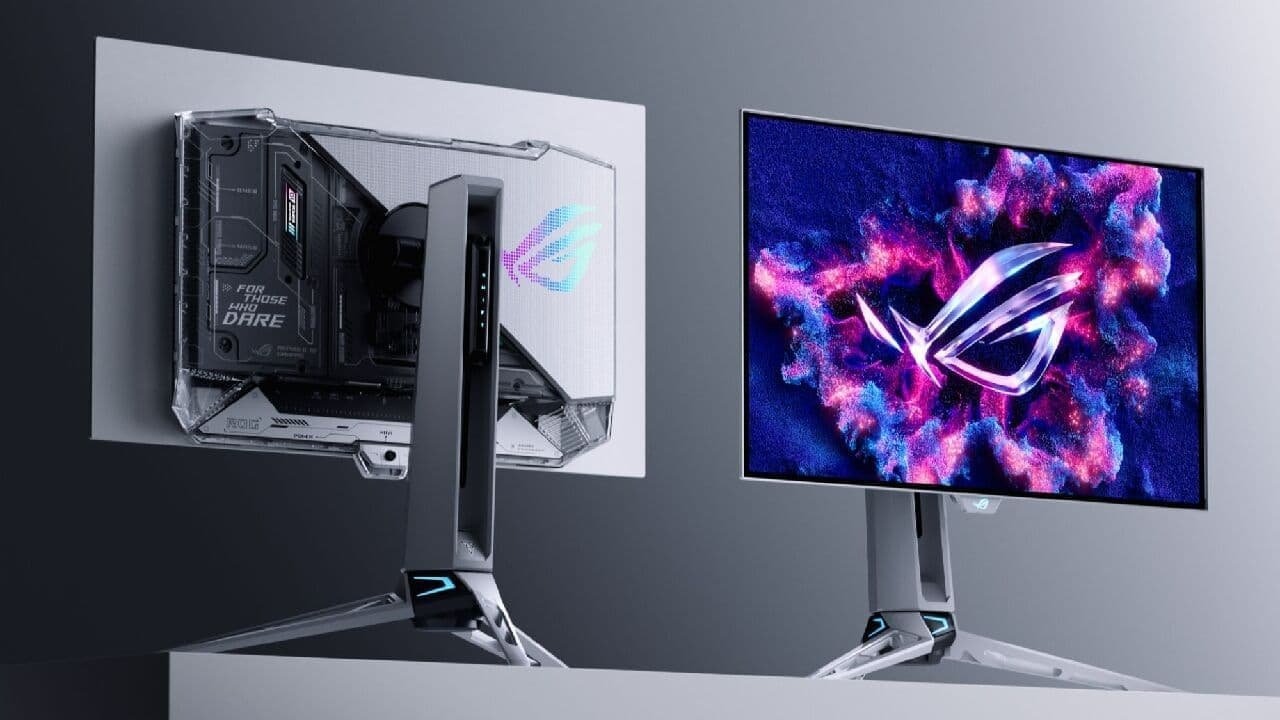
If you've used recent Asus ROG monitors, the general design will feel familiar. The XG27AQWMG's dark gray frame is mostly plastic, but it does have a metal foot for the stand. The ROG logo, which can be lit up with RGB lighting, takes up most of the back. If you want a cleaner look, you can turn off the name.
The computer looks neat and under control from the front. There is a small ROG logo at the bottom edge, where the proximity sensor is also located.
The stand has a lot of great ergonomic adjustments, like height changes of up to 110mm, tilting from -5° to 20°, swiveling 45° in each direction, and turning 90° in each direction. It also comes with the standard 100x100 VESA mount.
Connectivity and OSD Features
One way to save money is to make some adjustments in connectivity. Along with a two-port USB-A hub, you get one HDMI 2.1 port and two DisplayPort 1.4 inputs. There's no USB-C port or KVM support, so people who want a more flexible workstation may be disappointed.
On the plus side, Asus includes a joystick-based control system for moving the on-screen display and a shortcut button that the user can set up however they want.
The OSD is easy to use and includes a range of gaming tools, such as crosshairs, shadow boost, and color space options. Asus also offers DisplayWidget Center software, which lets you change most settings right from your system. It works well in real life, too.
True Black Glossy Coating
Asus' new True Black Glossy finish is one of the things that makes the XG27AQWMG stand out. This finish is made to keep blacks dark and haze-free. When a QD-OLED display is next to this display in bright light, the difference is immediately apparent.
Because there isn't a polarizing layer, QD-OLED screens usually have higher black levels. On the other hand, the Asus panel stays black even when it isn't on.
You have to give up some things to get others. The shiny surface reflects light sources more clearly than semi-gloss options because it acts more like a mirror. If your setup faces a window or another bright light source, shadows might be easier to see.
But in well-lit rooms, the increase in how deep the black looks is really big. If you usually play games at night or can adjust the room's lighting, the difference isn't as noticeable, but in general, the glossy finish looks much better.
Text Clarity and Burn-In Protection
Like most OLED screens, the 1440p resolution and subpixel layout can still cause some text blurring. LG's move from an RWBG to an RGWB layout has made things much better than on first-generation OLED panels, and most people will get used to it quickly.
Burn-in is still a problem with OLED displays, but LG says the new four-layer tandem structure makes the screen last much longer.
Asus includes a full range of features to prevent burn-in, including a proximity monitor that you can set up to turn off the screen when you step away. Adding a three-year warranty with burn-in coverage helps even more to calm people's worries.
Default Panel Performance
Using professional calibration tools to test shows clear improvements over earlier OLED versions. The full-screen brightness of almost 325 nits is a clear improvement over earlier models, which struggled to exceed 250 nits. The minimum light level is about 27 nits, which makes the screen easy on the eyes in a dark room.
When constant brightness is off, the peak brightness at smaller window sizes can reach 540 nits. This value decreases as the bright area gets larger, though.
Allowing even brightness keeps the output around 325 nits. Still, it ensures the brightness remains the same regardless of the screen material. As assumed from OLED technology, panel uniformity is very good.
Another big deal is the color gamut coverage. The screen covers 99.7% of DCI-P3, 95.8% of AdobeRGB, and 83.8% of Rec2020, which is a big improvement over earlier W-OLED panels.
The factory calibration is just as amazing, with color temperature averaging almost 6500K and gamma tracking almost exactly on target at 2.2. A deltaE2000 of about 1.02 in grayscale shows great accuracy right out of the box.
sRGB Mode and Calibration
Because the original color range is so wide, oversaturation will happen when you view standard sRGB content in the default mode. Asus is nice enough to include an sRGB calibration mode that clamps the range well.
In this state, color balance is almost perfect at 6500K, gamma stays correct, and both grayscale and color deltaE values are less than 1. Because the accuracy is so high that only slight improvements can be made through manual calibration, this mode is the best choice for most people who work with sRGB material.

Response Times and Motion Clarity
OLED technology still has the best reaction time, and the XG27AQWMG is no exception. Response times are basically zero, and there is no noticeable ghosting across the whole speed range. It's easy to see the difference between 120 Hz and 280 Hz; higher refresh rates make motion look much sharper.
There are OLED monitors with higher refresh rates. Still, you should consider whether your machine can actually handle frame rates above 280 fps at 1440p. Asus also has a function called ELMB that adds black frames between rendered frames to make motion clearer.
When ELMB is turned on, the motion sharpness at 140 Hz can approach what you would normally see at 280 Hz. The bad things are that adaptive sync doesn't work, and brightness is limited to about 158 nits. Also, the feature only works at certain frame rates.
Real-World Gaming Experience
When you use it for games, it works just like a high-end OLED should. A 280Hz OLED panel is still a lot better than any LCD panel, even though it's not quite as good as a 500Hz panel in that regard.
At 1440p, it's easy to hit high frame rates in competitive games, and variable sync ensures gameplay stays smooth even as performance fluctuates.
In addition to clear motion, the combination of high brightness, an extremely wide color gamut, and ideal black levels delivers a beautiful viewing experience.
The contrast and color depth of the OLED screen are especially good for slower and more atmospheric games. If you've never used an OLED display before, this is a great first option.
HDR Performance
The new tandem OLED screen also works great for HDR. In HDR Gaming mode, the top brightness level gets close to 1600 nits, and it works well even with very small window areas.
The DisplayHDR True Black mode is less harsh and tops out around 833 nits, but it has a more accurate EOTF tracking and a more subtle display.
Both modes work great, but HDR Gaming emphasizes lighter areas, while True Black provides more accurate tone mapping.
Even though full 100% Rec2020 coverage isn't achieved, the wide color gamut helps achieve great color accuracy in HDR. HDR video looks great in practice, and having several modes set up correctly lets you choose how you want to see it.
Final Thoughts
As the first monitor to use LG's fourth-generation tandem OLED screen, the Asus ROG Strix XG27AQWMG makes a big impact. It's easy to see that brightness, color range, and general performance have been improved. The True Black Glossy coating adds a depth of black that makes it stand out from many other QD-OLEDs.
The factory adjustment and sRGB mode are among the best we've seen, satisfying even the pickiest users. It is easy to understand that this doesn't have USB-C or KVM support since it works so well and is such a good deal.
The XG27AQWMG is one of the most interesting choices in its group for a 1440p 280Hz OLED with next-generation screen tech and great HDR performance. At this level, it's a new standard for what to expect from OLED game monitors. It also makes a strong case for LG's newest panel technology in the future.
Also, check our other hardware articles:
- AMD Ryzen 9 9950X3D Review: Setting The Standard For 2025 Gaming CPU
- Amazon Luna 2025 Review: Is Prime Gaming's Cloud Service Your Go-To For Casual Fun?
- AMD RX 9070 XT Review: AMD's RDNA 4 Champion for 1440p Gaming
- GeForce Now Ultimate: Ditching Your Gaming PC For Cloud RTX 4080 Power?
- NVIDIA GeForce RTX 5080 Review (2025): Still A 4K Gaming Powerhouse?
- Intel Core Ultra 9 285K Review And Performance Breakdown (2025)
- AMD Ryzen 7 9800X3D Review: 3D V-Cache Goes God Mode with Stunning Gaming Performance
- Intel Core Ultra 9 285K vs AMD Ryzen 7 9800X3D: In-Depth Gaming Performance and Benchmark Comparison
- NVIDIA GeForce RTX 5080 Super Performance In Cyberpunk 2077: Path Tracing & DLSS 4.0 Tested
- AMD Radeon RX 9070 XT In Cyberpunk 2077: Ray Tracing & FSR 4.0 Tested
- Intel Arc B580 Review: The $250 GPU Revolutionizing 1440p Gaming
- Intel Arc B570 Vs. B580: Value, Specs, And Real-World Gaming Performance
- RTX 5090 Laptop Vs. M4 Max MacBook Pro: Ultimate Raw Performance Vs. Battery Endurance
- Intel Arc b580 Vs. RTX 4060: Game Performance And Value Analysis
- RTX5090 Hell Is Us Demo 4K Ultra Benchmark: DLSS Vs. Native Performance Guide
- NVIDIA RTX 5070 Review: Mid-Range Muscle or Marketing Hype?
- Nintendo Switch 2 Review: Handheld Performance, Features & Value Breakdown
- RTX 5070 Ti Review: Performance, Thermals & Power Efficiency Tested
- Samsung Odyssey OLED G81SF Review 2025: Ultimate 32-Inch QD-OLED Gaming Monitor
- AMD RX 9070 Performance Review: Thermals, Clocks, and Real-World FPS
- AMD Ryzen 5 7600 Review: Best Budget Gaming CPU of 2025?
- AMD Radeon RX 7800 XT Review: RDNA 3 Power For Midrange Gaming
- Asus ROG RTX 5090 Astral OC Vs. Founders Edition: The 4K Gaming Benchmark
Editor, NoobFeed
Latest Articles
No Data.