

Asus ProArt GoPro PX13 (2026) – Most Powerful 13in Creator Laptop for Professionals
Discover how the PX13 delivers unprecedented CPU performance surpassing larger 16in laptops in a compact 13in design.
Hardware by RereRara on Mar 01, 2026
The 2026 Asus ProArt GoPro PX13 changes everything a 13-inch laptop can do. The world's most powerful 13-inch laptop is no longer a gaming laptop for the first time.
Instead, it goes to a device designed for creators that has high CPU performance and can even beat larger models like the P16 with RTX5090 in some tasks. Because of its powerful CPU, it is one of the best computers, regardless of size, you can buy.
.jpg)
CPU Performance That Redefines the 13in Category
The 16-core, 32-thread Ryzen AI Max Plus 395 processor inside the ProArt GoPro PX13 totally changes what people expect from a device of this size. At the moment, no other 13-inch laptop can match this level of speed. When it comes to CPU performance, the PX13 is even better than its bigger brother, the ProArt P16.
The PX13 scores 1747 points in Cinebench 24's multi-core test. The P16 used to get around 1200 points, so the 13-inch model does almost 50% better than the bigger machine. That is a huge accomplishment for such a small machine.
The laptop has up to 128GB of unified memory, built on a SoC. Users who want to run local AI models or large LLMs will benefit greatly from this. It is possible to load high-parameter models that need more than 64GB of VRAM without any problems.
Memory allocation is flexible, so 32GB of system RAM and 96GB of VRAM are possible, or even higher VRAM allocations can be used based on the workload. The memory runs at 8000 MT/s, which is very fast.
Integrated GPU Performance and Efficiency
In terms of GPU speed, it's about the same as an RTX4060. There are, however, efficiency gains because the GPU is built into the unified design. The battery life was much shorter on the previous version, which had a dedicated RTX4070. The battery's performance is much better with this new design.
The system still works well for everyday jobs and creative workflows. In tablet mode, simple tasks use very little power. But when you need the most power, you should definitely use laptop mode. In tablet mode, the hinge design and the fan's placement at the bottom make it harder for air to flow, which limits speed to protect the thermals.
A True 2-in-1 Design With Creator Flexibility
There's more to the PX13 than meets the eye. It has a 180° hinge and can be used as a computer. The hinge is strong, so you can lay the screen flat to draw without worrying about it moving. The keyboard turns off automatically when the screen is rotated to tablet mode, preventing accidental key presses.
It's easy to use for taking notes, making music sheets, or drawing. There are GoPro-themed accents on the backlit keyboard, and a dedicated GoPro button for quick access to playback software.
The device is very portable, weighing only 1.39 kg. It is also very durable, with MIL-STD-810H certification, CNC-machined detailing, and a full-metal frame.
3K OLED 10-bit Display Built for Professionals
One of the best parts is the 13.3-inch 3K OLED screen. It has 100% DCI-P3 coverage and full 10-bit colour, not 8-bit or FRC. The screen has a DeltaE < 1 grade and supports VESA DisplayHDR True Black 500.
That amount of colour accuracy is very high for creators. Displays with a DeltaE3 rating are good, those with a DeltaE2 rating are professional, and those with a DeltaE1 rating are the most accurate.
The 16:10 aspect ratio gives you more room to work vertically. Asus also adds OLED burn-in protection that has been improved over many generations.
The refresh rate is the only limited thing; it can only be 60 Hz. Even though 120Hz would be nice, especially for creators used to higher refresh screens, 13-inch OLED panels with high refresh rates are hard to find right now. Even so, the visual clarity is still very good.
.jpg)
GoPro Collaboration That Actually Makes Sense
This relationship has real value, unlike many brand collaborations that feel like they're just for show. The PX13 works very well with GoPro processes. Users can transfer, preview, and organise GoPro videos, including large 5.6 K 360 ° files, all in one easy-to-use interface with Asus StoryCube.
The laptop has a microSD UHS-II card that works great with a GoPro. A 12-month subscription to GoPro Premium Plus is also included, improving cloud interaction and workflow continuity.
This partnership is also evident in the packaging. The carrying case has modular pockets and sponge squares that let you organise things in different ways. The straps can be used again as arm straps, and the case can hold both the laptop and GoPro accessories.
Asus Pen3.0 and DialPad Enhancements
The Asus Pen3.0, which is now smaller and easier to hold, comes in the box. Charging is simplified with a magnetic dock rather than a dangling cable. Since the eraser has been moved to the back of the pen, the way it works is a little different from older versions.
A corner swipe turns on the Asus DialPad, which is built into the keyboard. In normal Windows use, it changes the level and brightness. It can be set to speed up timeline scrubbing, change brush size, or do other useful things in creative software like Photoshop or video editing tools. The ProArt Hub program lets you make many changes.
Performance Modes and Manual Tuning
Whisper Mode puts battery life and silence first. Standard Mode strikes a mix between speed and energy use. Performance Mode lets you use more power when plugged in. In Manual Mode, you can fine-tune the power and CPU temperature sliders to get the best result.
In Manual Mode, the hardware is pushed closer to its thermal limits while still staying within the maker's limits. In cooler places, this can lead to real performance gains.
Connectivity and Ports
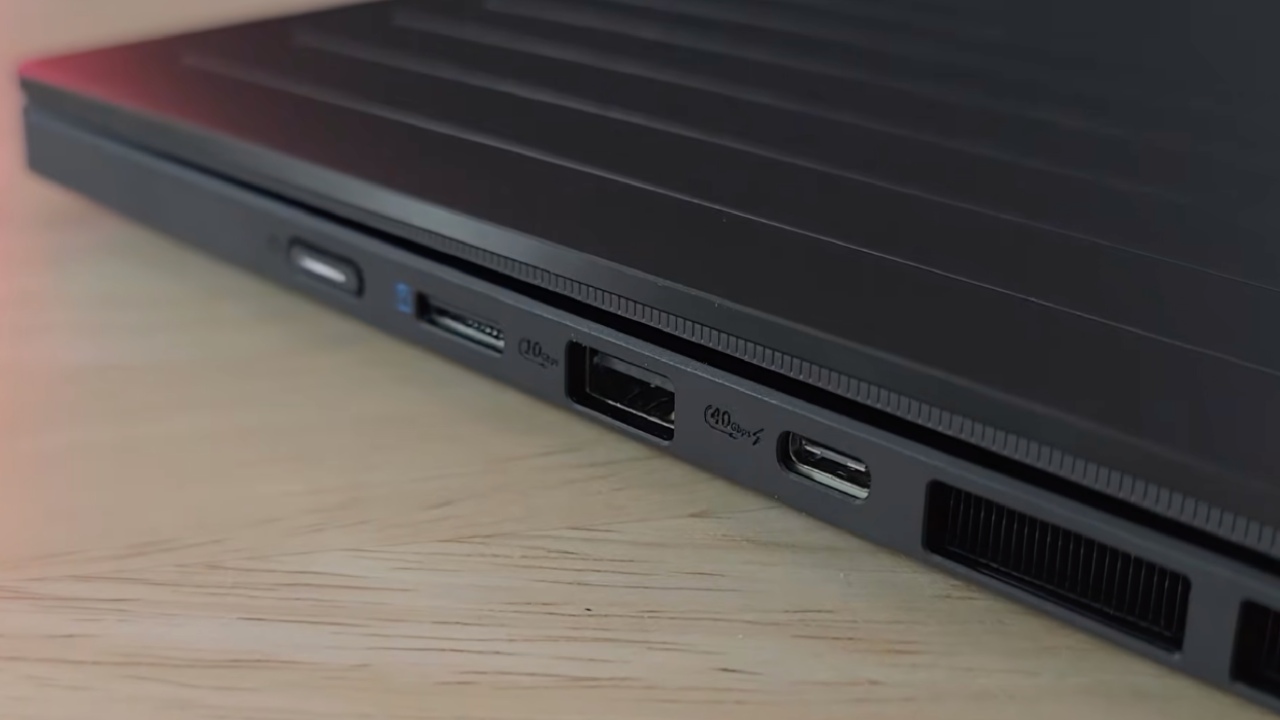
For a 13-inch machine, the port selection is great. The power button, microSD UHS-II slot, USB-A 10 Gbps, and USB4 Type-C 40 Gbps are all on one side.
On the other side, there is a proprietary 200W charging port, an HDMI2.1 port that can send up to 4K120hz or 8K60hz, a second USB440Gbps port, and a jack for headphones and a microphone.
If the special charger is not used, the laptop can charge via USB-C at up to 100W. Wi-Fi 7 and Bluetooth 5.4 are used for connectivity, giving you access to the latest wireless standards. Interestingly, the PX13 has two USB4 ports, which is better than the P16's single USB4 port.
Unified Memory and AI Workloads
The unified design lets you assign VRAM in various ways. For AI fans, this means big local models can run quickly without the VRAM limits of separate GPUs. Even though AI-generated outputs aren't always correct, the fact that this 13-inch device can load and run very large models locally is still impressive.
Final Thoughts
The 2026 Asus ProArt GoPro PX13 is one of the few cameras that are portable, perform well, and work well with other equipment. It has a professional-grade 3K10-bit OLED display, a flexible unified memory up to 128GB, and works well with GoPro workflows. In CPU benchmarks, it performs better than bigger computers.
We get great CPU speed in a small 13-inch chassis, and you get the flexibility of a real 2-in-1 device with a lot of creative power. The teamwork seems useful rather than a nice-to-have, and the whole package is well-designed and capable.
The ProArt GoPro PX13 is the best 13-inch screen for creators who want the most CPU power in the smallest possible package, without sacrificing professional display quality or connectivity.
Also, check our other hardware articles:
- AMD Ryzen 9 9950X3D Review: Setting The Standard For 2025 Gaming CPU
- Amazon Luna 2025 Review: Is Prime Gaming's Cloud Service Your Go-To For Casual Fun?
- AMD RX 9070 XT Review: AMD's RDNA 4 Champion for 1440p Gaming
- GeForce Now Ultimate: Ditching Your Gaming PC For Cloud RTX 4080 Power?
- NVIDIA GeForce RTX 5080 Review (2025): Still A 4K Gaming Powerhouse?
- Intel Core Ultra 9 285K Review And Performance Breakdown (2025)
- AMD Ryzen 7 9800X3D Review: 3D V-Cache Goes God Mode with Stunning Gaming Performance
- Intel Core Ultra 9 285K vs AMD Ryzen 7 9800X3D: In-Depth Gaming Performance and Benchmark Comparison
- NVIDIA GeForce RTX 5080 Super Performance In Cyberpunk 2077: Path Tracing & DLSS 4.0 Tested
- AMD Radeon RX 9070 XT In Cyberpunk 2077: Ray Tracing & FSR 4.0 Tested
- Intel Arc B580 Review: The $250 GPU Revolutionizing 1440p Gaming
- Intel Arc B570 Vs. B580: Value, Specs, And Real-World Gaming Performance
- RTX 5090 Laptop Vs. M4 Max MacBook Pro: Ultimate Raw Performance Vs. Battery Endurance
- Intel Arc b580 Vs. RTX 4060: Game Performance And Value Analysis
- RTX5090 Hell Is Us Demo 4K Ultra Benchmark: DLSS Vs. Native Performance Guide
- NVIDIA RTX 5070 Review: Mid-Range Muscle or Marketing Hype?
- Nintendo Switch 2 Review: Handheld Performance, Features & Value Breakdown
- RTX 5070 Ti Review: Performance, Thermals & Power Efficiency Tested
- Samsung Odyssey OLED G81SF Review 2025: Ultimate 32-Inch QD-OLED Gaming Monitor
- AMD RX 9070 Performance Review: Thermals, Clocks, and Real-World FPS
- AMD Ryzen 5 7600 Review: Best Budget Gaming CPU of 2025?
- AMD Radeon RX 7800 XT Review: RDNA 3 Power For Midrange Gaming
- Asus ROG RTX 5090 Astral OC Vs. Founders Edition: The 4K Gaming Benchmark
Contributor, NoobFeed
Latest Articles
No Data.