
Battlefield 6 Guide | How to Increase Enemy Visibility
Here’s how you can spot your enemies faster and better.
Game Guide by Joy Rahman on Nov 06, 2025
Visibility is important, especially when it comes to the RedSec Battle Royale mode in Battlefield 6. Adjusting a few visual and HUD knobs can alter how you perceive enemies, making it much easier to spot them.
This guidewill cover a few of the steps that you can change to enhance visibility.
HUD & Mini Map
In the options menu, you want to select the HUD tab and scroll down to the Mini Map, and set it to large. Utilising your Mini Map is an underrated aspect of having situational awareness.
You 'll also want to set the opacity to 100 so that it is easier to differentiate enemies and locations.
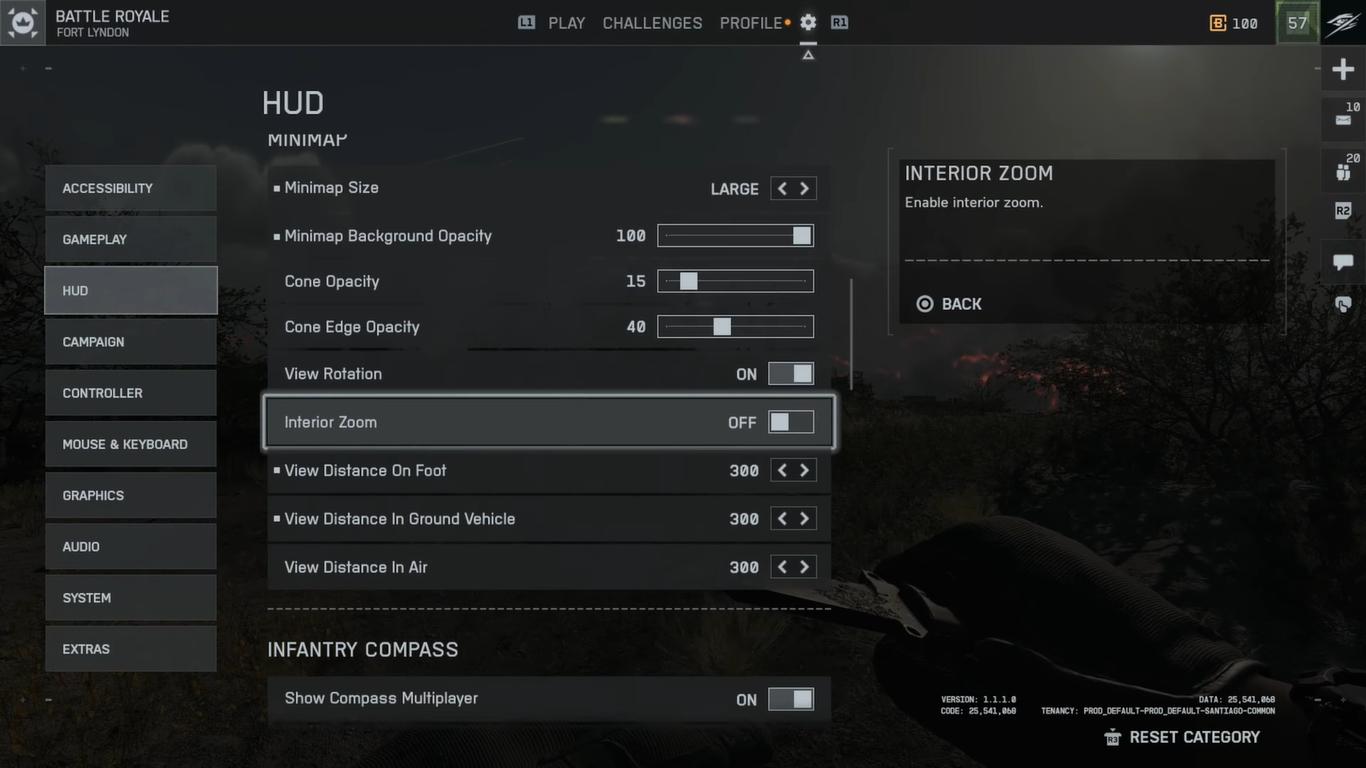
Another important aspect that you don't want to miss is setting the view distance from the default 160 to 300 meters, which will allow you to spot distant enemies more visibly, especially handy when it comes to sniping.
Next, scroll to the top and select advanced HUD and icon settings. Set the Big Map Size to 100% as well as the Icons and Indicators intensity for maximum brightness in clarity.
You’ll also want to increase Object Opacity for different indicators like Friendly, Squad and Enemy Icons. Setting 150% for enemies and 135% for allies is a good benchmark.
Enemy Colors
Important that your enemies stand out and have contrast so that you can easily spot them regardless of terrain. From the options menu, head to accessibility and then select Colour Profiles and Graphics.
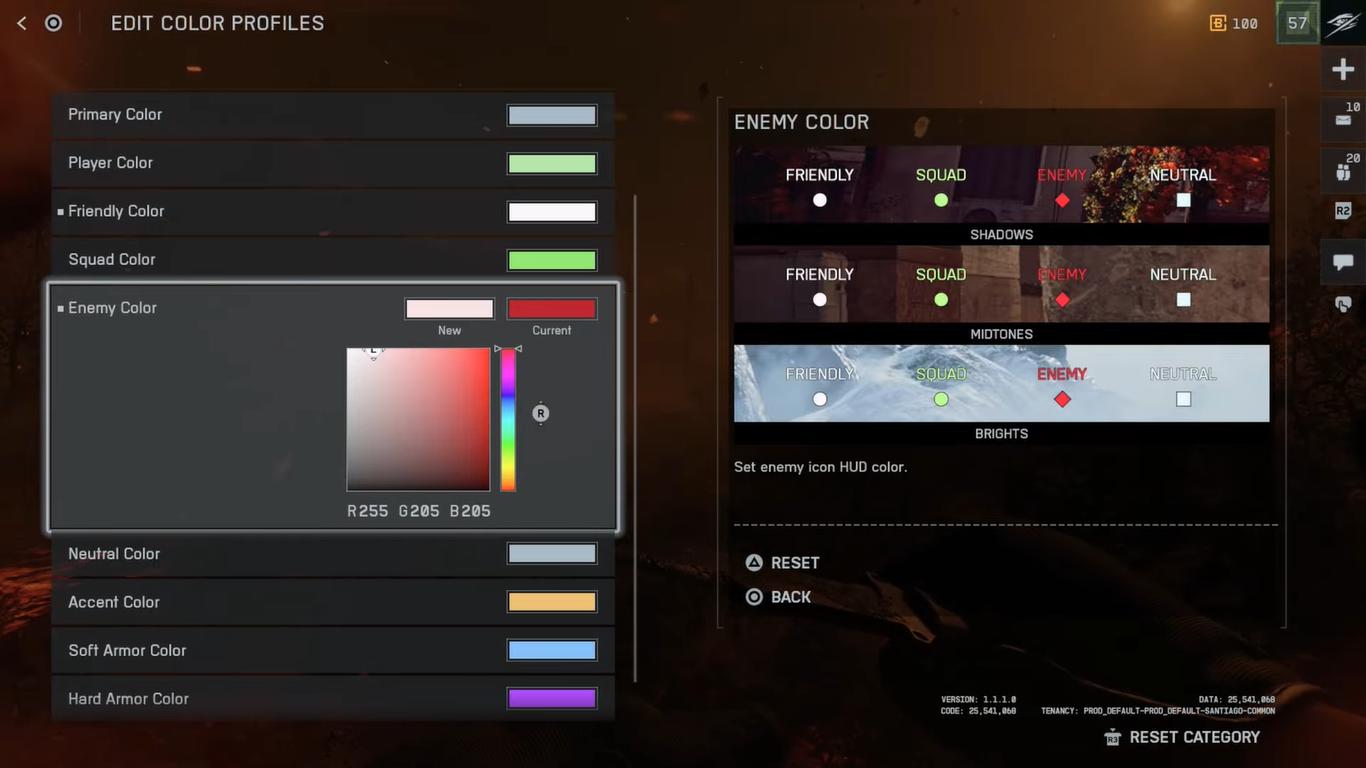
From here, change the enemy colours to something more distinct and darker; a dark red hue tends to stand out in most environments.
You could also change your crosshair if it blends in too much with the environment.
Making these changes can help markers be more visible during combat, allowing you to effortlessly spot enemies. It will still require some experimentation, depending on your preference, until you find the right balance.
Also, check out our Battlefield 6 Review and other guides below:
- Battlefield 6 Beginner's Guide | Tips & Tricks
- Battlefield 6 Guide | How to Fly Helicopter
- Battlefield 6 Guide | How to Fly Jets
- Battlefield 6 Guide | Best Classes
- Battlefield 6 Guide | Best L110 Loadout
- Battlefield 6 Guide | Best SGX Loadout
- Battlefield 6 Guide | Best Low Recoil Early Weapons
- Battlefield 6 Guide | How to Level Up Player & Gun Fast
- Battlefield 6 Guide | Best M433 Loadout
- Battlefield 6 Guide | Best M4A1 Loadout
- Battlefield 6 Guide | Best PW7A2 Loadout
- Battlefield 6 Guide | Best Low Rank Weapons List
- Battlefield 6 Guide | How to Improve Aim Accuracy
- Battlefield 6 Guide | How to Stop Dying
- Battlefield 6 Guide | Best M2010 ESR Loadout
- Battlefield 6 Guide | Best Current Meta Weapons
- Battlefield 6 Guide | 10 Hidden Mechanics
- Battlefield 6 Guide | How to Get End of an Era Trophy
- Battlefield 6 Guide | How to Use Tanks
- Battlefield 6 Guide | One Stone Trophy
- Battlefield 6 Guide | Best Battle Royale Weapons
- Battlefield 6 Guide | Best Weapon Attachments
- Battlefield 6 Guide | How to Increase Enemy Visibility
- Battlefield 6 Guide | How to Set Favorite Weapon (Custom Loadout)
- Battlefield 6 Guide | Top 10 Most Accurate Weapons
Contributor, NoobFeed
Latest Articles
No Data.