
Gothic 1 Remake Guide | How to Use Quick Slots
Here’s a guide on how to use Quick Slots in Gothic 1 Remake.
Game Guide by Ragib Rawnak on Jun 08, 2026
You can set your Weapons to different slots on your Action Bar. This helps you switch between your gear much faster. Start by pressing I to open your Inventory.

Assigning Your Gear
Find the Weapon or item you want to move. If it is already equipped, press the Right Mouse Button to unequip it. Now, press Equip or use the Left Mouse Button to choose where to put it. A list of slots will show up.
You can click on the slot you want, or just press the Number Key on your Keyboard that matches the slot in Gothic 1 Remake.
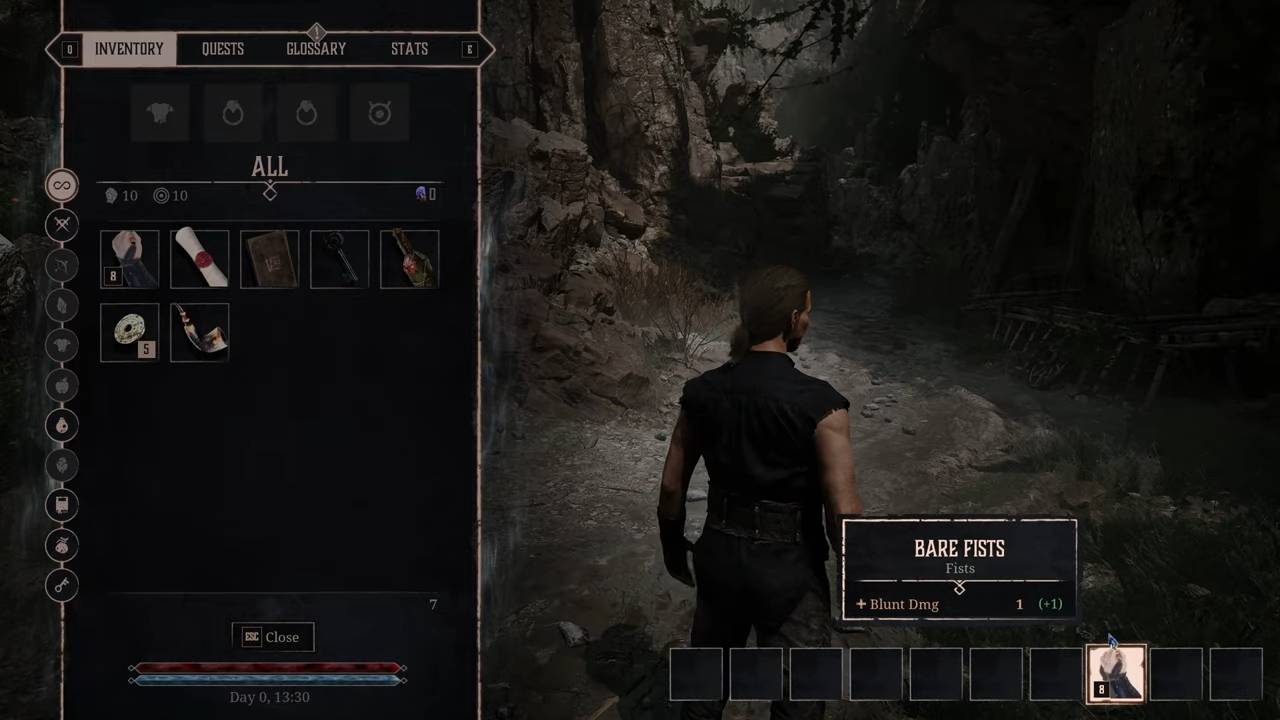
Checking the Change
For example, if you press 1 while choosing the slot, that Weapon will now be tied to the first button on your Action Bar.
You can repeat this for all your gear to keep your Inventory organized. This trick works for your Fists and any other Tools or Swords you pick up in the Colony in Gothic 1 Remake.
Also, check our Gothic 1 Remake Review and other guides below:
- Gothic 1 Remake Guide | How to Get the Best Early Sword for Free
- Gothic 1 Remake Guide | How to Become Good at Lockpicking
- Gothic 1 Remake Guide | How to Get the Best Early Shortbow for Free
- Gothic 1 Remake Guide | How to Get Blank Parchment
- Gothic 1 Remake Guide | How to Find Hellcap Mushrooms
- Gothic 1 Remake Guide | How to Reach New Camp
- Gothic 1 Remake Guide | Best One-Handed Sword Location
- Gothic 1 Remake Guide | Best Early Skills & Upgrades
- Gothic 1 Remake Guide | How to Unlock Map
- Gothic 1 Remake Guide | How to Sell Items
- Gothic 1 Remake Guide | Where to Find Nek
- Gothic 1 Remake Guide | How to Farm XP & Level Up Early
- Gothic 1 Remake Guide | How to Use Learning Points to Learn Skills
- Gothic 1 Remake Guide | How to Complete Vanisher Warder Quest
- Gothic 1 Remake Guide | How to Complete Test of Faith Quest
- Gothic 1 Remake Guide | How to Get the Morningstar
- Gothic 1 Remake Guide | How to Increase Health Early
- Gothic 1 Remake Guide | How to Get the Ring of Iron Skin
- Gothic 1 Remake Guide | How to Stow Torch
- Gothic 1 Remake Guide | Where to Find Fingers
- Gothic 1 Remake Guide | How to Complete Snaf’s Recipe Quest
- Gothic 1 Remake Guide | Where to Find Vendors
- Gothic 1 Remake Guide | How to Get Free Bed
- Gothic 1 Remake Guide | How to Skip Time
- Gothic 1 Remake Guide | How to Farm Money Early
- Gothic 1 Remake Guide | How to Get the Best Early Armor for Free
- Gothic 1 Remake Beginner’s Guide | Gameplay Tips & Tricks
Senior Editor, NoobFeed
Latest Articles
No Data.