
JSAUX Steam Machine Displays Bring System Data to the Front
JSAUX Steam Machine Faceplates add Front-Mounted system data with E-Ink and Dot Matrix display options.
Hardware by Nahe Yan on Oct 01, 2026
Steam Machine is getting new ways to display system information directly on the front of the device. JSAUX has introduced two faceplate displays that magnetically attach to the Steam Machine and provide information such as CPU usage, GPU usage, RAM usage, FPS, weather, playtime, and other data.
At the same time, iFixit has published repair guides covering many parts of the Steam Machine, giving owners a way to work on the hardware themselves. The two new faceplate displays from JSAUX attach magnetically to the front of the Steam Machine, show a lot of information, and allow customization.
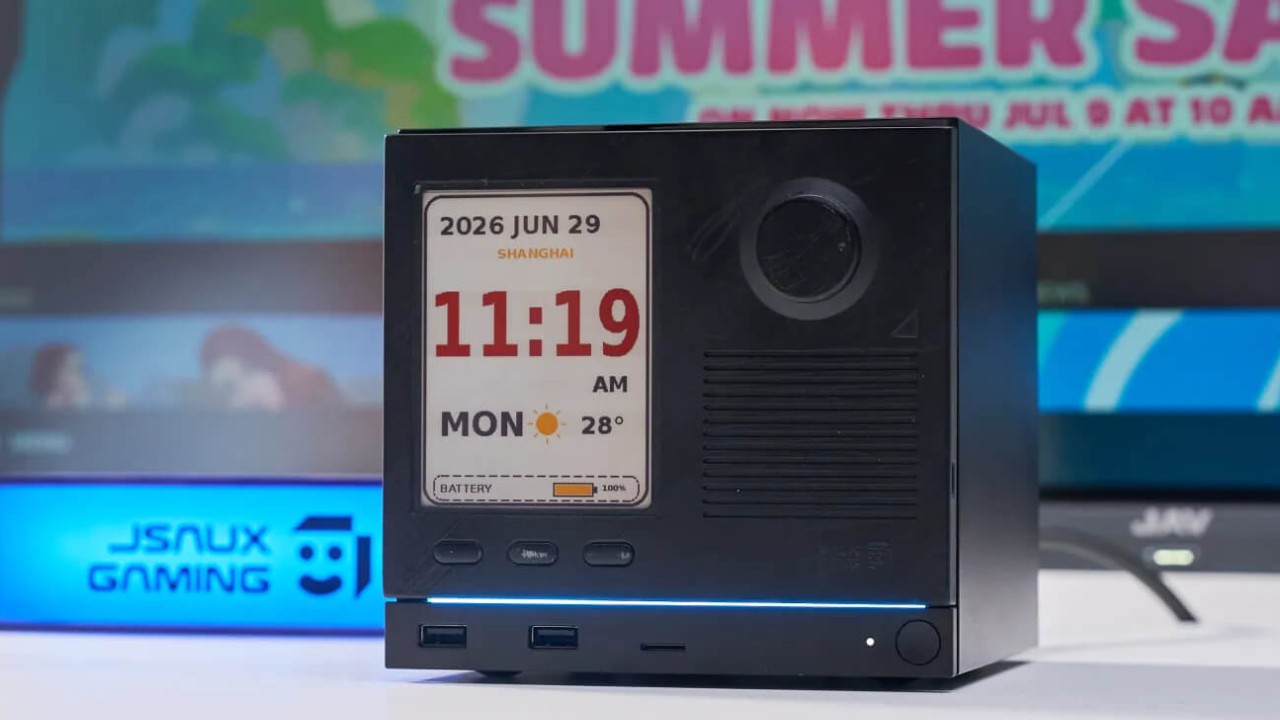
JSAUX E-Ink Display Brings System Data to the Front
The e-ink display is based on the type of display that Valve previously showed on the Steam Machine, where data such as CPU usage, GPU usage, RAM usage, and FPS could be displayed without covering the game. Valve eventually released 3D printer files and the parts needed to build an e-ink display.
JSAUX has its own version, with custom software for both displays that is easy to set up. The main requirement is Decky Loader. Once Decky is installed, you can download, install, and access the JSAUX software through the Decky menu in Game Mode. The apps let you change the information shown on the displays.
Each screen has around seven different profiles. The dashboard profile shows CPU usage, GPU usage, RAM, time, weather, and other information on the small screen. The text is large enough to read, and it also includes an FPS counter. The issue with the FPS counter is that it uses the monitor's refresh rate.
The e-ink display also has a long-lasting battery. JSAUX says it can last about 22 or 23 days. After sitting for around two weeks, the display was still at 70% battery. If the display remains on the Steam Machine while constantly receiving and refreshing data, the battery would likely drain faster.
Since you can remove and attach the display as needed, it uses very little battery.
It can also be charged through USB-C and placed back on the Steam Machine when needed. You can remove the e-ink display and replace it with the standard faceplate whenever you don't need the extra information. The weather profile connects to the Steam Machine over Bluetooth and pulls weather data from the cloud.
The information can be displayed without requiring additional setup. Another profile shows game information. It tracks the current play session and the total time spent playing a game. For example, Resident Evil 4 showed a total playtime of 39 hours. Because the display uses E Ink, changing profiles does not immediately update the screen.
You can change the profile instantly in the Decky app, but the display may take about 30-40 seconds to refresh. The display costs $100, and the setup process does not require going through the Bluetooth settings. After installing the app, open the Decky section and select the sync option.
Editor, NoobFeed
Gaming Hardware Updates
No Data.