
Grand Theft Auto 6 Guide | All In-Game Apps Explained
This Grand Theft Auto 6 Guide exlains All In-Game Apps
Game Guide by Amaya on Nov 23, 2026
Grand Theft Auto 6 features several in-game smartphone apps that allow Jason and Lucia to manage their money, communicate with other characters, scan vehicles, arrange transportation, track fitness, and keep up with what's happening around Leonida. Some apps are available from the beginning, while others unlock as you progress through the story.
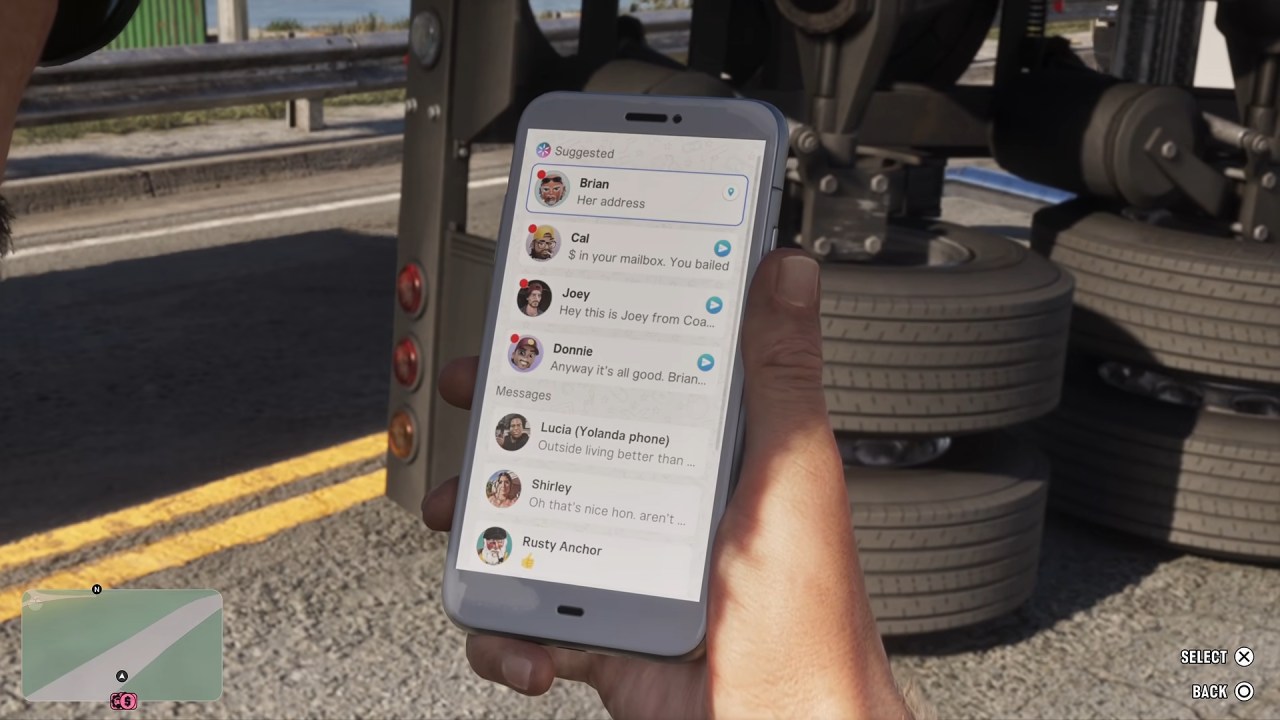
How to Open Your Phone in GTA 6
To open your smartphone in GTA 6, press Up on the D-pad while playing as Jason or Lucia. Use the D-pad to navigate between apps, then select an app to access its features.
You can also hold Up on the D-pad to quickly access the WAiNK vehicle scanner. You can use your phone while walking, driving, or riding as a passenger.
Some apps unlock through story missions, so don't worry if you cannot access every feature right away.
All In-Game Apps in GTA 6
1. WAiNK
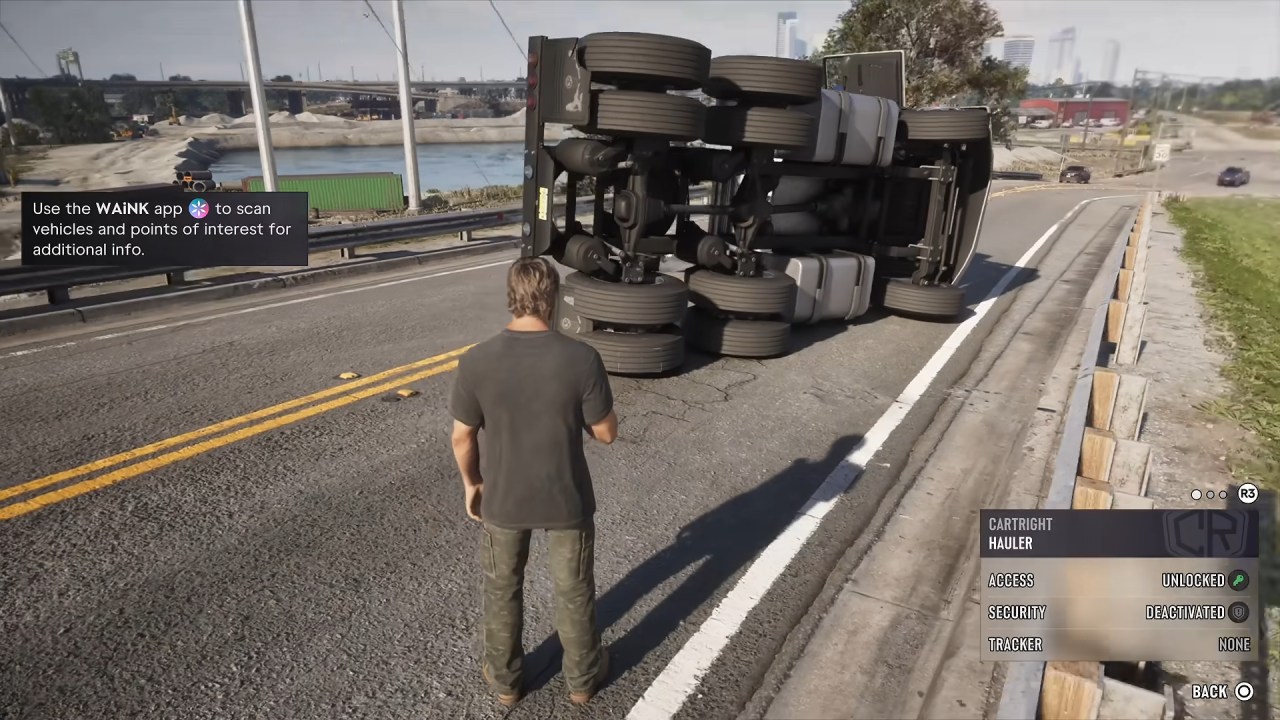
WAiNK is one of the most useful apps in GTA 6, especially if you enjoy stealing vehicles. It lets you scan cars and learn key information before attempting to take them.
You can use it to check:
-
Vehicle make and model.
-
Whether the vehicle is locked.
-
Whether it has an alarm.
-
Whether it has a tracker.
-
Vehicle condition and value.
-
Registration costs.
You can also use WAiNK to scan certain landmarks and collectibles. This makes it useful for players who want to explore Leonida and complete optional activities.
Tip: Always scan a vehicle before stealing it to avoid taking one with an alarm or tracker.
2. BuckMe
BuckMe is the banking app in GTA 6. It allows Jason and Lucia to manage their money without constantly visiting ATMs.
The app includes banking features such as checking your account balance, managing savings, and finding nearby ATMs.Deposit your cash into your bank account whenever possible. Getting robbed or arrested can cause you to lose the cash you carry in your pocket, plus a small banking maintenance fee.
Unlock: Chapter 1, during the Buck Me mission.
3. RydeMe
RydeMe is a ridesharing app that lets you book transportation around Leonida. It works similarly to Uber, allowing you to select a destination and have a driver pick you up.
One of its most useful features is fast travel. Instead of driving across the entire map yourself, you can book a ride and skip the journey.
You can also interact with your driver during the trip or skip the ride to reach your destination faster.
Unlock: Chapter 2.
4. Scooter Bros
Scooter Bros is a vehicle management app that lets you request your registered personal vehicles.
Rather than searching for your car after leaving it somewhere, you can use this app to have it delivered to your current location for a fee.
It is particularly useful when exploring Leonida on foot or when you want to switch between different vehicles without driving back to a garage.
Unlock: Chapter 2, after completing the Moses mission.
5. Vice City Real Estate
Vice City Real Estate lets you buy garages directly on your smartphone.
These garages provide additional parking spaces for your personal vehicles, making them useful if you enjoy collecting cars and motorcycles.
The available garages reportedly cost between $5,000 and $50,000, with each offering one parking space.
You also receive a free garage after completing the Daily Driver mission.
Unlock: Chapter 2, after Daily Driver.
6. WhatUp
WhatUp is GTA 6's messaging application. It allows Jason and Lucia to communicate with each other and other characters throughout the game.
You can receive messages, respond to conversations, and keep track of important information shared by other characters.
Messages can also provide useful information about activities, locations,s and potential opportunities around Leonida. Check your messages regularly, as some conversations and interactions can influence your relationship with the other protagonist.
7. Contacts
The Contacts app stores the phone numbers of characters and services you encounter throughout GTA 6.
You can use it to call friends, acquaintances, and businesses to access different services.
Some useful contacts include:
-
Paradise Taxi: Call a taxi to travel around Leonida.
-
Joey: Request assistance with your personal vehicle, including repairs and delivery.
New contacts become available as you meet more characters and progress through the story.
8. Snapmatic
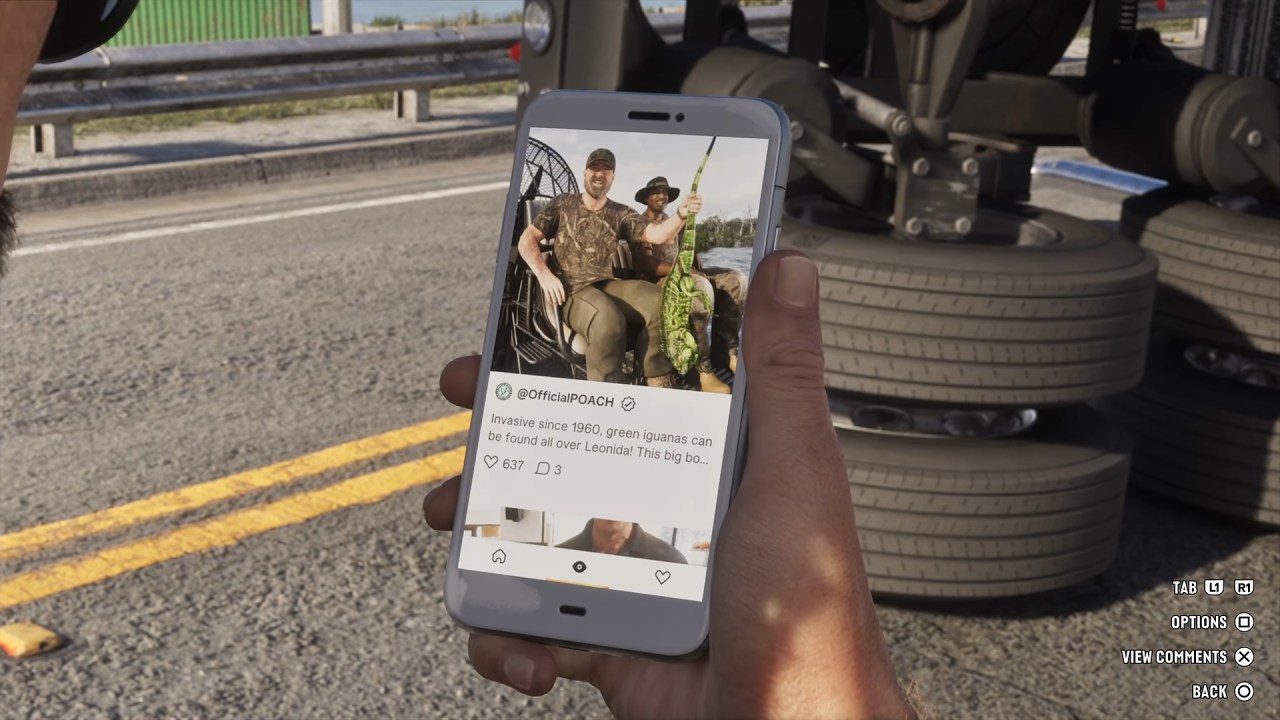
Snapmatic is GTA 6's version of Instagram. It allows you to browse social media posts and see what other characters are sharing around Leonida.
You can view posts, like content,t and follow different accounts.
Unlike a traditional social media application, Jason and Lucia cannot upload their own posts. Instead, Snapmatic is primarily used to keep up with the activities and conversations happening throughout the game.
You should also check it regularly because certain posts can provide information about interesting locations and activities.
9. Camera
The Camera app lets you take photos and selfies with your smartphone.
It includes several photography features, including zoom, a grid, lighting options, and different filters.
You can use it to capture interesting moments, photograph vehicles, or document your adventures around Vice City.
10. Gallery
The Gallery app stores photographs taken using your smartphone's camera.
You can revisit your pictures, zoom in, and delete photos you no longer want.
It is essentially the storage application for your in-game photography, allowing you to keep track of the pictures you have taken throughout your adventure.
11. Fitness
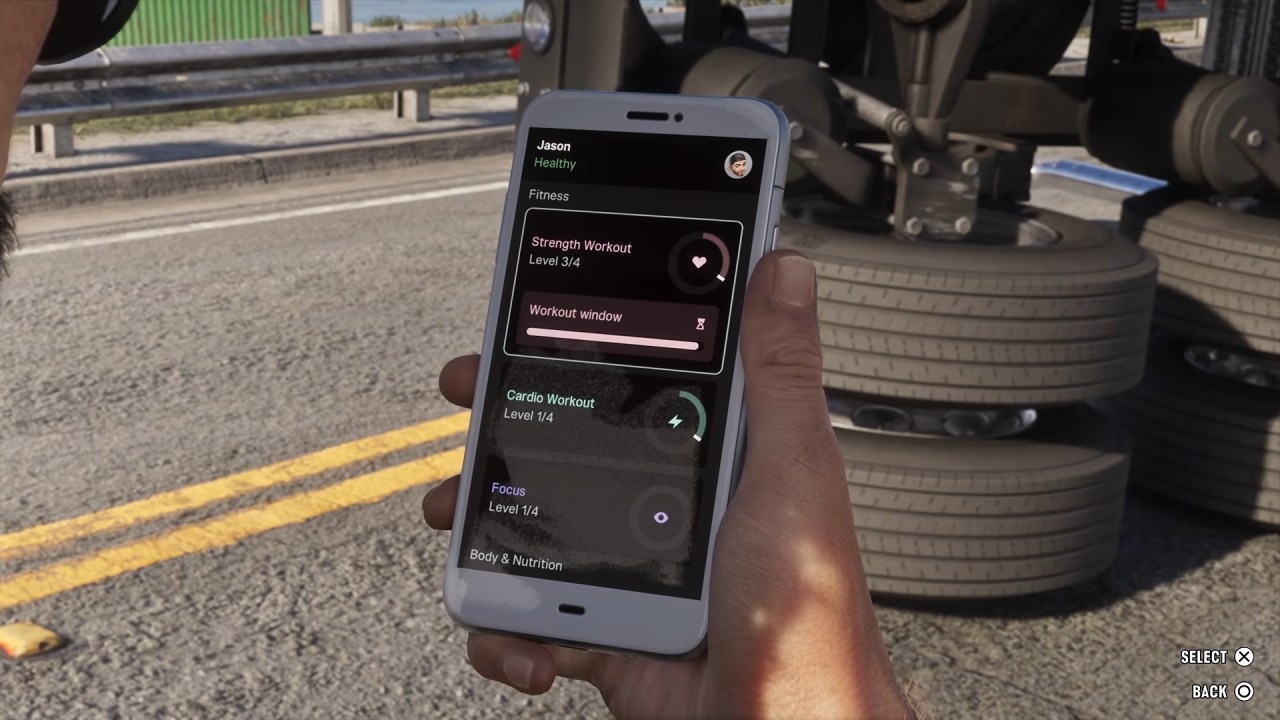
Fitness is an important application for players who want to improve their characters' physical abilities.
It tracks different aspects of Jason and Lucia's physical development, including:
-
Strength
-
Cardio
-
Focus
-
Body composition
-
Nutrition and calorie intake
-
Workout progression
You can use the application to monitor your progress and keep track of your workouts.
Make sure you maintain your workout routine, as neglecting it can negatively affect your physical progression.\
12. On Demand
On Demand is an entertainment application that gives you access to podcasts, shows, and additional audio content.
It provides another way to enjoy entertainment while exploring Leonida, rather than relying exclusively on traditional radio stations. You can also enjoy audio content while walking around with headphones.
13. News
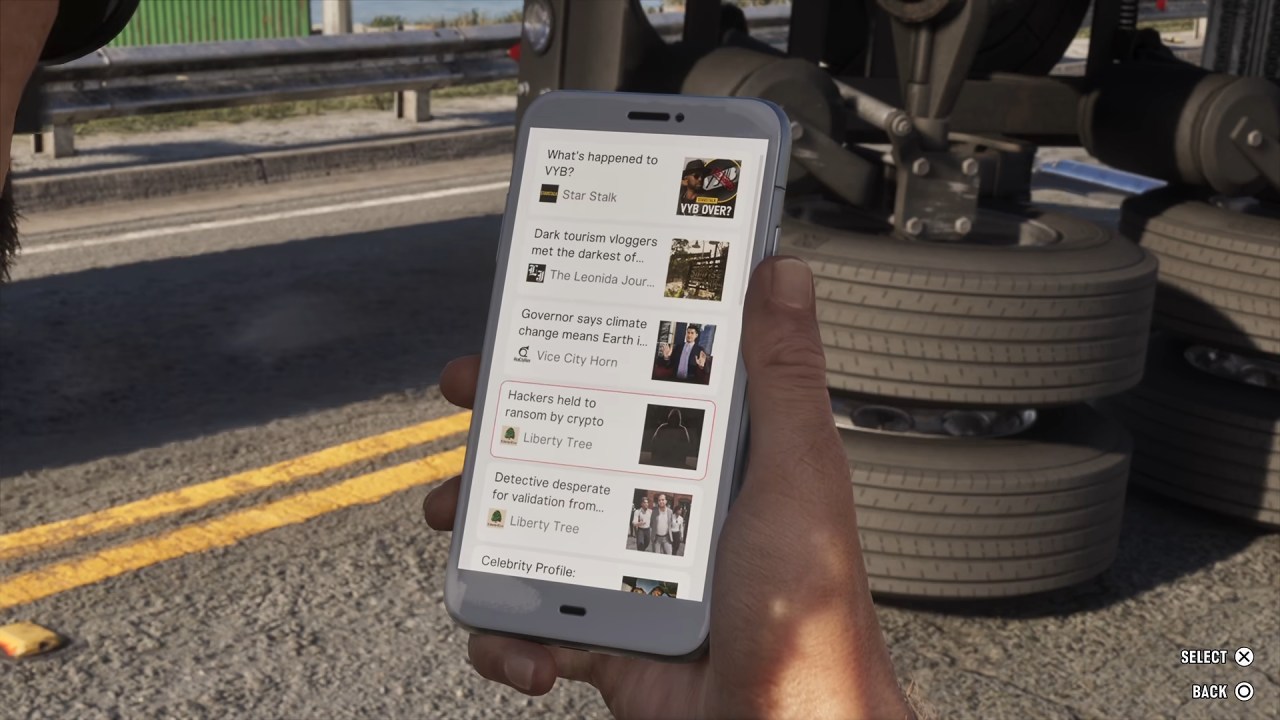
The News application lets you read headlines and keep up with events throughout Leonida.
It features different in-game news outlets, including Weazel News, the Vice City Horn and The Leonida Journal.
You can use it to learn about local incidents, major events, and other happenings in the game world.
14. Weather
The Weather app provides information about current weather conditions throughout Leonida.
It includes hourly forecasts, upcoming weather conditions, and weather information.
This can be particularly useful when planning outdoor activities or deciding when to explore certain locations.
15. Settings
The Settings app lets you customize different aspects of your smartphone.
You can change your phone's wallpaper and ringtone to give it a more personal appearance.
It also includes additional phone features and settings, allowing you to adjust how certain functions work.
Other Phone Features in GTA 6
Apart from the 15 main applications, there are a few additional features worth knowing about.
Reminders: The Reminders feature tracks important notifications, missed calls, and other information you might have overlooked. Check it regularly to avoid missing important updates.
Cop Scanner: You can unlock a police scanner through the story. It provides information about police activity and nearby units, which can help you understand where law enforcement is heading when you're trying to escape.
Phone Display: You can change how your smartphone appears on screen through Settings. The Phone Display option allows you to choose between the default view and a first-person phone view.
Final Thoughts
The smartphone in GTA 6 is much more than a way to make calls. It connects several important gameplay systems, including banking, transportation, vehicle management, fitness, and social interactions.
While some applications are more useful than others, I recommend checking your phone regularly because new features and services become available as you progress through the story.
FAQ
Q. How many phone apps are there in GTA 6?
A. There are 15 listed smartphone apps, including WAiNK, BuckMe, RydeMe, Scooter Bros, Snapmatic, and Fitness.
Q. How do you open your phone in GTA 6?
A. Press Up on the D-pad to open your smartphone. Hold Up to quickly access the WAiNK scanner.
Q. Which apps unlock as you progress through the story?
A. BuckMe unlocks during Chapter 1, while RydeMe, Scooter Bros, and Vice City Real Estate become available during Chapter 2.
Q. Can you use your phone while driving in GTA 6?
A. Yes. You can access your smartphone while driving and while traveling as a passenger.
Q. Can you use your phone to fast travel in GTA 6?
A. Yes. RydeMe allows you to book rides around Leonida and skip the journey to reach your destination faster.
Q. Can you post pictures on Snapmatic?
A. No. Snapmatic lets you browse, like, and follow posts, but Jason and Lucia cannot upload their own pictures.
Editor, NoobFeed
Latest Articles
No Data.