
Solo Leveling: ARISE OVERDRIVE Guide | How to Shadow Extract
Here’s how you can Shadow Extract.
Game Guide by Joy Rahman on Dec 01, 2025
Shadow Extraction in Solo Leveling: ARISE OVERDRIVE is a fundamental mechanic that is used to gather shadows, collect fragments, and resources for future missions. It's a pretty simple process, and once you visualize the prompt, knowing how to use it can make a big difference. This guide will explain how.
When in combat or following a brief encounter, you will notice a thick, purple cloud on the floor. Upon getting closer to it, an icon may appear, and it's labeled as "Shadow Extraction."
The prompt will indicate that the cloud can be converted into a shadow or turned into useful materials.
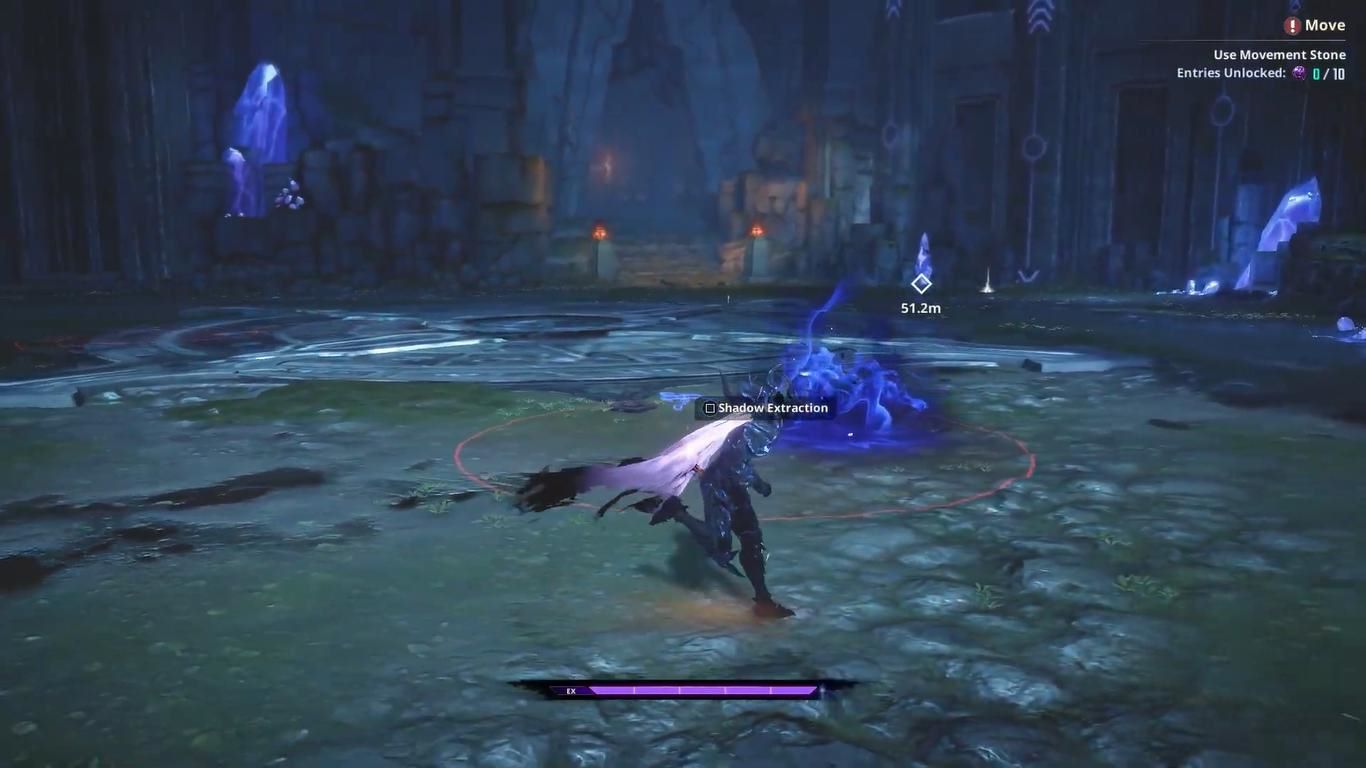
After it appears, you'll want to approach the target and hold Square on your controller (or equivalent). Holding the button will complete the process and convert the shadow into various fragments and resources. The same process can apply to missions and dungeons, making it useful for gathering resources.
Collecting the shadows allows you to revive a slain Beast or Hunter as a Shadow Soldier, basically allowing you to create an army of shadows that work according to your command. But it does have a few weaknesses.
You won't be able to use Shadow Extraction on targets that are contaminated with mana, like Demons, and you won't be able to use them against stronger targets compared to yourself.
You'll only be able to use shadow extractions three times on a single target, and it can be used on a target that has been dead for a significant period of time.
Despite all of this, the shadow extraction mechanic is a simple and great tool to utilize. It’s one of the more valuable tools in Solo Leveling: ARISR OVERDRIVE, helping you build a stronger force whilst also gathering useful resources.
Also, check out our Solo Leveling: ARISE OVERDRIVE Review and other guides below:
- Solo Leveling: ARISE OVERDRIVE Beginner’s Guide | Tips & Tricks
- Solo Leveling: ARISE OVERDRIVE Guide | How to Get Hunter Coins (Easy)
- Solo Leveling: ARISE OVERDRIVE Guide | How to Get Pets
- Solo Leveling: ARISE OVERDRIVE Guide | How to Get SSS Rank
- Solo Leveling: ARISE OVERDRIVE Guide | How to Play Co-op
- Solo Leveling: ARISE OVERDRIVE Guide | How to Duel Friends
- Solo Leveling: ARISE OVERDRIVE Guide | How to Get Outfits
- Solo Leveling: ARISE OVERDRIVE Guide | How to Get Gold
- Solo Leveling: ARISE OVERDRIVE Guide | How to Use Shadow Monarch
Contributor, NoobFeed
Latest Articles
No Data.