
ASRock X870 Taichi Creator Review: AM5 Motherboard with 10Gb Ethernet
High-speed networking with dual Ethernet, including a 10Gb option, makes this motherboard ideal for professional workloads.
Hardware by Masaru Hoshino on Oct 01, 2025
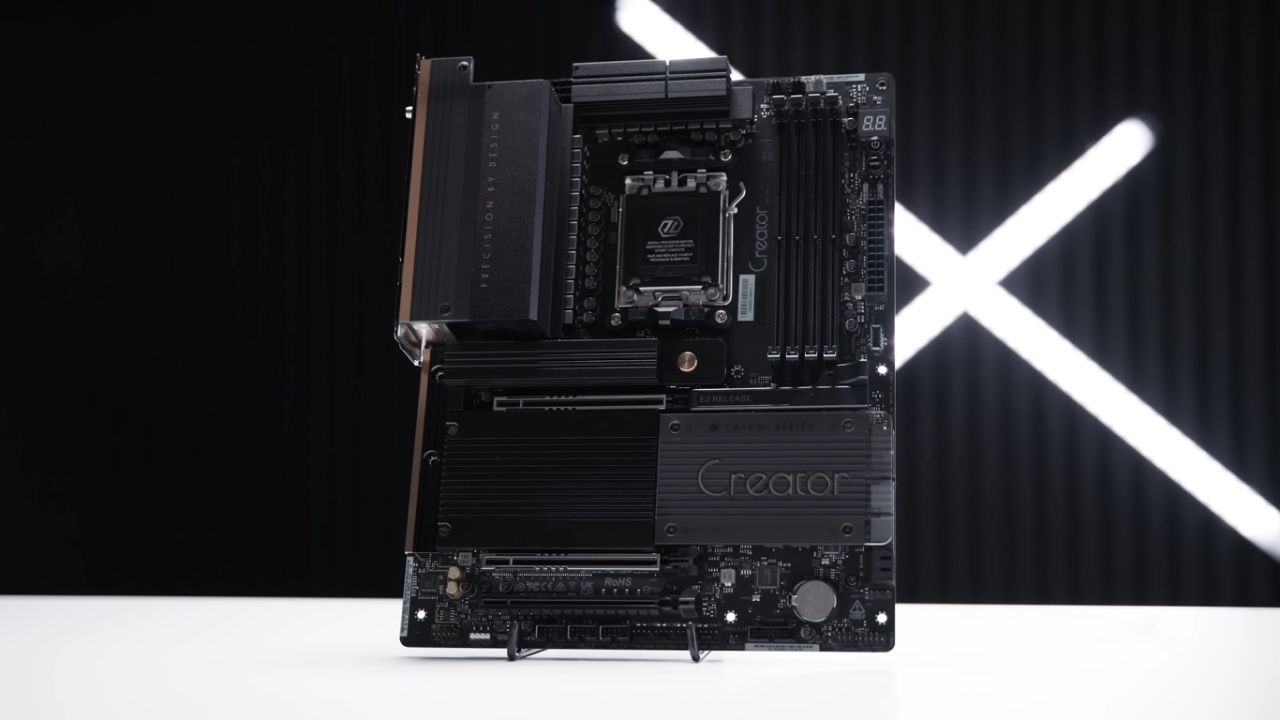
ASRock X870 Taichi Creator has been one of the most anticipated boards in ASRock's lineup, designed to cater to professionals and enthusiasts alike. At first glance, it closely resembles ASUS's ProArt series, and that seems intentional, as the board is clearly positioned to compete in the creator-focused market.
The X870 Taichi Creator is more than just a pretty face. It has strong performance, a useful design, and a lot of ways to connect to other devices. It's perfect for anyone who need a reliable computer for video editing, 3D rendering, and heavy multitasking.
This board strikes a decent balance between features that are helpful for creators and inexpensive prices. It works with the latest Ryzen 7000, 8000, and even 9000 series processors. It includes enhanced networking with both 5Gb and 10Gb Ethernet and a number of high-speed storage options.
In 2025, this is a terrific choice for anyone who wants a powerful but cheap base for a professional workstation or high-end PC setup.
What's in the Box
Inside the package, we get several useful inclusions. There's a Wi-Fi antenna for the built-in Wi-Fi 7, along with a thermal probe that allows monitoring of temperatures in different parts of the case for fan control adjustments.
An addressable RGB splitter cable is included for those who want to add lighting to their system. The documentation, including the quick installation guide, helps with setup, whether you're new to PC building or experienced. Finally, we get a set of SATA cables for 2.5-inch SSDs or 3.5-inch hard drives.
Board Layout and Front Panel Connectivity
Looking at the board itself, there's a variety of headers and connectors. On the bottom edge, we see the front panel audio header, a 4-pin 12V RGB header, a 3-pin 5V addressable RGB header, and, notably, three USB 2.0 front panel headers.
The motherboard features four PWM fan headers, a thermal probe header, a USB 3.2 front panel header, a clear CMOS header, and standard front panel connectors for power and indicator lights.
On the right-hand side, the board provides four SATA ports, a right-angled USB 3.2 header, a USB Type-C header, the 24-pin power connector, two 3-pin 5V RGB headers, a reset button, a power button, and a debug LED screen.
At the top, three additional PWM fan headers are positioned. At the same time, the top-left corner features dual 8-pin EPS power connectors to power Ryzen 7000, 8000, or 9000 processors.
Expansion and VRM Design
The PCIe slot configuration is worth noting. Despite ASRock's claim of all PCIe x16 slots, that's not entirely accurate. The top slot is PCIe 5.0 x16, the second slot is PCIe 5.0 x8 with a full-size connector, and the bottom slot is PCIe 3.0 x4. The top PCIe slot features a quick-release mechanism, making GPU swapping much easier.
For power delivery, the board uses an 18+2+1 phase VRM design with 80A smart power stages. The VRM heatsinks are large, covering the I/O section and the top portion of the board, ensuring efficient cooling.
The AM5 socket uses the standard mounting system for compatibility with existing coolers. On the rear, the board is reinforced with a full-cover backplate and built on an 8-layer PCB for stability.
.jpg)
Memory and Storage
The X870 Taichi Creator features four DDR5 DIMM slots, supporting up to 256GB of memory at speeds of up to 8000 MT/s. For storage, there are four M.2 slots. The top two slots support PCIe Gen5 x4, the third slot supports PCIe Gen3 x4, and the bottom slot supports PCIe Gen4 x4.
The top M.2 slot features a quick-release mechanism, whereas the others utilize screw-mounted heatsinks. All drives can be installed without screws, making the process easier.
Rear I/O and Connectivity
The rear I/O is well-equipped. There's a BIOS flashback button, a clear CMOS button, Wi-Fi 7 antenna connectors, and an HDMI 2.1 port for integrated graphics. Multiple USB 3.2 ports of varying generations are available, along with two USB 2.0 ports.
Most importantly, the board offers both 5Gb Ethernet and 10Gb Ethernet. You'll also find dual USB4 ports, audio jacks including line-in and microphone, and an optical S/PDIF output.
Networking and Why 10Gb Ethernet Matters
One of the standout features here is the inclusion of 10Gb Ethernet. Every modern motherboard should ideally include this standard.
Unlike the inconsistent 2.5Gb or 5Gb speeds, 10Gb Ethernet offers a straightforward, next-level networking experience. For creators working with large files, it provides significant performance benefits.
Pricing and Value
The affordability of this board is what makes it so appealing. In the US, the ASRock X870 Taichi Creator costs about $319. It has an 18+2+1 VRM design, two Ethernet ports, and a lot of USB ports, hence it is much cheaper than similar boards.
While comparable boards can cost $650 or more, this board offers high-end functionality at a significantly more approachable price.
.jpg)
Final Thoughts
ASRock X870 Taichi Creator delivers exactly what many of us have been waiting for in a creator-focused motherboard. It strips away unnecessary flash while prioritizing features that truly matter—robust VRM power delivery, reliable cooling, high-speed storage options, and most importantly, dual Ethernet with a 10Gb connection that sets it apart from much of the competition.
We get an abundance of USB ports, USB4 connectivity, Wi-Fi 7, and a professional no-RGB design that feels refined rather than showy. At about $319 in the US, this board is hard to pass up, especially because other boards that are similar often cost almost twice as much.
The X870 Taichi Creator is one of the best-balanced solutions for content producers, professionals, and even PC enthusiasts who want a powerful, future-proof workstation without spending too much money in 2025. It's a board we'd confidently recommend for any serious new build or upgrade.
Check Our Other AMD articles:
- AMD Ryzen 9 9950X3D Review: Setting The Standard For 2025 Gaming CPU
- AMD Ryzen 7 9800X3D Review: 3D V-Cache Goes God Mode with Stunning Gaming Performance
- AMD RX 9070 Performance Review: Thermals, Clocks, and Real-World FPS
- AMD Ryzen 5 7600 Review: Best Budget Gaming CPU of 2025?
- AMD Radeon RX 7800 XT Review: RDNA 3 Power For Midrange Gaming
- Sapphire NITRO+ AMD Radeon RX 9070 XT Review: The Ultimate 4K Gaming GPU
- AMD Ryzen 7 7800X3D: Delivers Gaming Performance Far Beyond Expectations
- AMD Ryzen 9 7900X Review: Powering the AM5 Era with DDR5 & PCIe 5.0
- ASRock Radeon RX 7800 XT Challenger OC Review: Best Price-to-Performance GPU of 2025
- Intel Core i9‑14900K vs. AMD Ryzen 7 7800X3D: Power Profiles & Gaming Benchmarks
Editor, NoobFeed
Gaming Hardware Updates
No Data.