
Compact $1000 Gaming PC Build for 2026: Powerful Micro-ATX Performance Guide
Market Conditions and Component Pricing Challenges Affecting Modern PC Builds
Hardware by Tasnim Yoshi on Jan 28, 2026
Even though part prices are rising, it is still possible to build a small gaming PC for $1000 in 2026. You can build a tiny form-factor system that performs well at both 1080p and 1440p if you choose the right parts and focus on real-world performance.
This book covers the entire process of building a computer, explains why each part was chosen, and demonstrates how well the system performs in modern competitive games.
Build Philosophy and Current Market Challenges
Many individuals plan system builds during the holidays, but the recent price hikes in DDR5 memory and SSDs have led many to change their plans. We didn't sacrifice performance; instead, we made clever changes and concentrated on a DDR4 platform that still offers great value.
The goal was to keep the entire cost at $1000 while allowing for smooth gameplay, good multitasking, and long-term use.
This build is made for beginners and covers everything from choosing parts to setting up the system. You can construct your first PC with confidence without cutting corners.
Why 32GB DDR4 Memory Matters
We chose 32GB of DDR4 RAM for this machine, and we strongly suggest that you don't go lower than that amount at this price. Many new games already take close to or more than 16GB of RAM, and things like voice chat, music, and launchers that run in the background also use memory.
You aren't really safe even if a game looks like it uses less than 16GB. When the system runs out of RAM, stuttering worsens, frame drops occur more often, and the system as a whole becomes less responsive. In 2026, 32GB is the minimum amount of memory you need for both competitive play and pleasant campaign experiences.
Core Components Overview
Graphics Card Selection
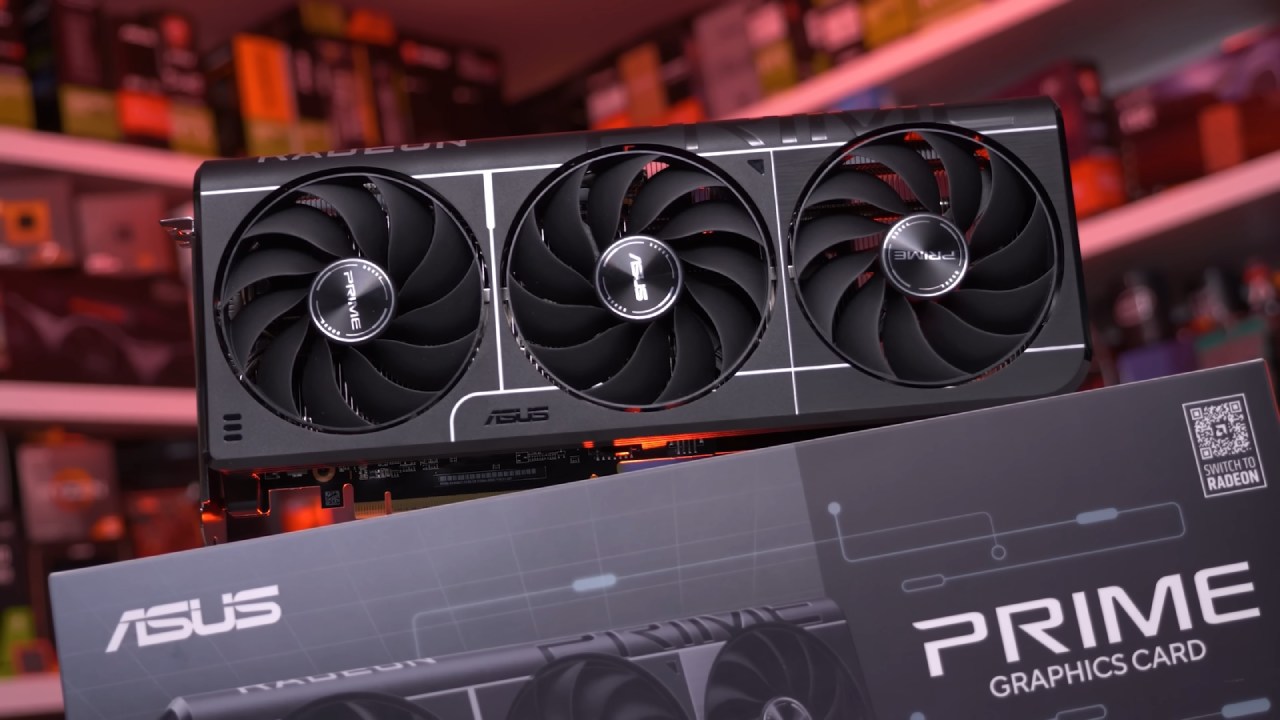
We chose the RX 9060XT since it has 16GB of VRAM and is a good deal. This card works great for playing games at both 1080p and 1440p, plus it has ample VRAM space for new and forthcoming games. It is the main part of this build and always uses a lot of GPU power during testing.
Processor Choice
The AMD Ryzen 7 5800XT was chosen as the CPU. It may not be well known, but it works like a Ryzen 7 5800X and has better boost behavior. It works great with the RX 9060XT because it has 8 cores and boost speeds up to 4.8GHz. This keeps the CPU from getting too busy when playing games at high refresh rates.
Motherboard and Platform
We used an AM4 B550 microATX motherboard for the platform. More and more people are buying small-form-factor devices, and this board supports that trend without sacrificing any functionality. It has many PCIe slots, dual M.2 slots, built-in Wi-Fi, and plenty of room for growth. Even though it's small, it's really useful and often goes unnoticed.
.jpg)
Storage Configuration
A 500GB Gen4 NVMe M.2 SSD is part of the system. This amount of storage is enough to get you started, but if you want to install many large games, you'll need to upgrade. You may easily add more M.2 drives to the motherboard.
Power Supply and Case
A 650W bronze-rated semi-modular power supply was chosen to easily manage the system. It has enough power for current parts and has modern ports for future GPU upgrades. An 850W unit would give you more room to grow if you plan to make bigger modifications later.
The microATX D32 standard enclosure keeps everything small while still supporting fairly large GPUs. Even though it's small, the airflow and component compatibility are carefully thought out, making it a great choice for small setups that need a lot of power.
Cooling Decisions and Cost Control
We considered an AIO liquid cooler, but in the end we stuck with the default CPU cooler to stay under the $1000 goal. The cooler that comes with it is straightforward to set up and works well enough for this CPU. An extra 120mm case fan was added to boost airflow. This fan costs very little and helps keep the case cooler.
System Assembly Overview
The first step in building a computer is to put the CPU, cooler, RAM, and M.2 SSD on the motherboard. If you align the CPU correctly and handle it carefully, the pins won't bend, making installation easy. Next, the connections and power supply are connected, and the motherboard is inserted into the case.
Next, you connect the casing cables, which include the USB, Type-C, and HD audio connectors on the front panel. After that, the right wire is used to turn on the graphics card in the primary PCIe slot. The layout is small, but the cables are still orderly, and there is room to add more things in the future.
The first boot and setup of the system
The first time the system starts up once the building is done, there are no complications. Setting up the graphics card and motherboard drivers comes after installing the operating system. After that, the BIOS uses XMP to set the RAM speed to its rated 3200 MHz.
.jpg)
By default, this motherboard has secure boot enabled, which lets it run newer competitive games that require it. Now that the drivers are in place and the parameters are adjusted, the machine is ready for testing.
Gaming Performance Results
1080p Performance
The system works great with many games at native 1080p with competitive settings. When playing fast-paced shooters, GPU usage stays high, indicating that the CPU and GPU are working well together. This build is great for 144hz and even 240hz monitors because the frame rates are always over 120fps.
Games like Fortnite run really well, with average frame rates well over 300 fps. Games like Counter-Strike 2 and Rainbow Six Siege keep gameplay fluid at frame rates around 240 fps.
1440p Performance
Performance is still great at native 1440p. The system averages about 120 frames per second (fps) while keeping the GPU usage high in demanding current shooters. This proves that the construction is a real 1440p powerhouse that costs less than $1000.
Final Thoughts
In 2026, you can still get a lot of power for a low price, like this $ 1,000 small gaming PC. The system boasts a solid AM4 architecture, 32GB of RAM, a capable GPU with enough VRAM, and fluid, competitive gaming. It's also a great deal.
The design is small, making it easy to put together and move around. It also makes it possible to make things better in the future. Whether you want to play games at 1080p with a high refresh rate or at 1440p with outstanding performance, this build will deliver the same results.
Also, check our other hardware articles:
- AMD Ryzen 9 9950X3D Review: Setting The Standard For 2025 Gaming CPU
- Amazon Luna 2025 Review: Is Prime Gaming's Cloud Service Your Go-To For Casual Fun?
- AMD RX 9070 XT Review: AMD's RDNA 4 Champion for 1440p Gaming
- GeForce Now Ultimate: Ditching Your Gaming PC For Cloud RTX 4080 Power?
- NVIDIA GeForce RTX 5080 Review (2025): Still A 4K Gaming Powerhouse?
- Intel Core Ultra 9 285K Review And Performance Breakdown (2025)
- AMD Ryzen 7 9800X3D Review: 3D V-Cache Goes God Mode with Stunning Gaming Performance
- Intel Core Ultra 9 285K vs AMD Ryzen 7 9800X3D: In-Depth Gaming Performance and Benchmark Comparison
- NVIDIA GeForce RTX 5080 Super Performance In Cyberpunk 2077: Path Tracing & DLSS 4.0 Tested
- AMD Radeon RX 9070 XT In Cyberpunk 2077: Ray Tracing & FSR 4.0 Tested
- Intel Arc B580 Review: The $250 GPU Revolutionizing 1440p Gaming
- Intel Arc B570 Vs. B580: Value, Specs, And Real-World Gaming Performance
- RTX 5090 Laptop Vs. M4 Max MacBook Pro: Ultimate Raw Performance Vs. Battery Endurance
- Intel Arc b580 Vs. RTX 4060: Game Performance And Value Analysis
- RTX5090 Hell Is Us Demo 4K Ultra Benchmark: DLSS Vs. Native Performance Guide
- NVIDIA RTX 5070 Review: Mid-Range Muscle or Marketing Hype?
- Nintendo Switch 2 Review: Handheld Performance, Features & Value Breakdown
- RTX 5070 Ti Review: Performance, Thermals & Power Efficiency Tested
- Samsung Odyssey OLED G81SF Review 2025: Ultimate 32-Inch QD-OLED Gaming Monitor
- AMD RX 9070 Performance Review: Thermals, Clocks, and Real-World FPS
- AMD Ryzen 5 7600 Review: Best Budget Gaming CPU of 2025?
- AMD Radeon RX 7800 XT Review: RDNA 3 Power For Midrange Gaming
- Asus ROG RTX 5090 Astral OC Vs. Founders Edition: The 4K Gaming Benchmark
Subscriber, NoobFeed
Gaming Hardware Updates
No Data.