
Gigabyte Radeon RX 9070 XT Gaming OC ICE Review
Gigabyte expands the RX 9070 XT lineup with a white ICE variant featuring identical hardware and growing FSR4 adoption.
Hardware by Shinji Okazaki on Dec 23, 2025
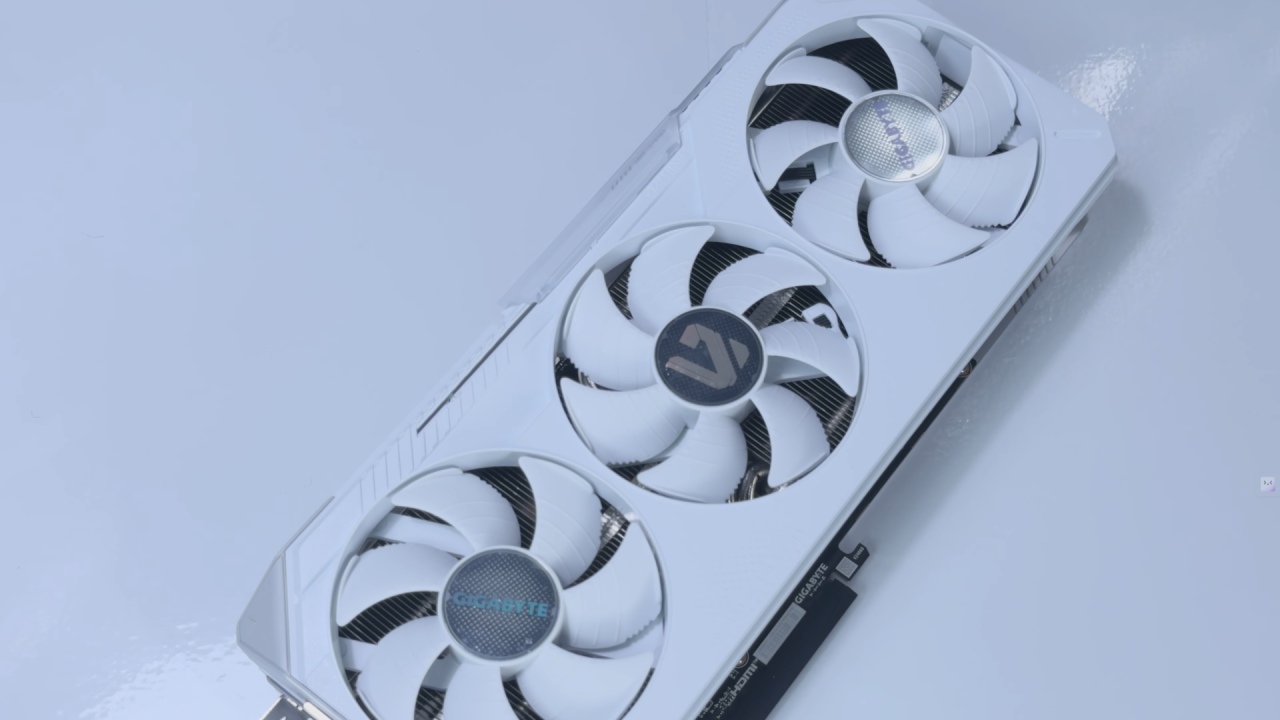
The new Radeon RX 9000 series GPUs have been out for a while, but Gigabyte has now added new ICE versions to its selection. The original black Radeon RX 9000 series cards reviewed at launch are the same as these variants, but they come in white.
FSR4, which is only available for the RX 9000 series, has been updated since its release, though performance has remained the same. Now is a good time to go back to the hardware and test it with newer games.
Make and Build
Before discussing performance and benchmarks, it's essential to examine the design of Radeon RX 9070 XT Gaming OC ICE. The card is white instead of black, but the outside shell still has the same rugged look. The side RGB logo slider can slide up and down, and the card's tip features a large G logo indicating it's part of Gigabyte's gaming line. This G logo is more gray than white, which makes it stand out a little from the rest of the card.
The rear-screen cooling cutout and the triple-fan Windforce cooling system remain the same. There are more logos on the bottom, such as the AMD Radeon and Gigabyte Gaming logos. There are three 8-pin PCIe power connectors, and each has a white LED that indicates it's connected correctly. There are two HDMI 2.1 B ports and two DisplayPort 2.1A connections for display output.
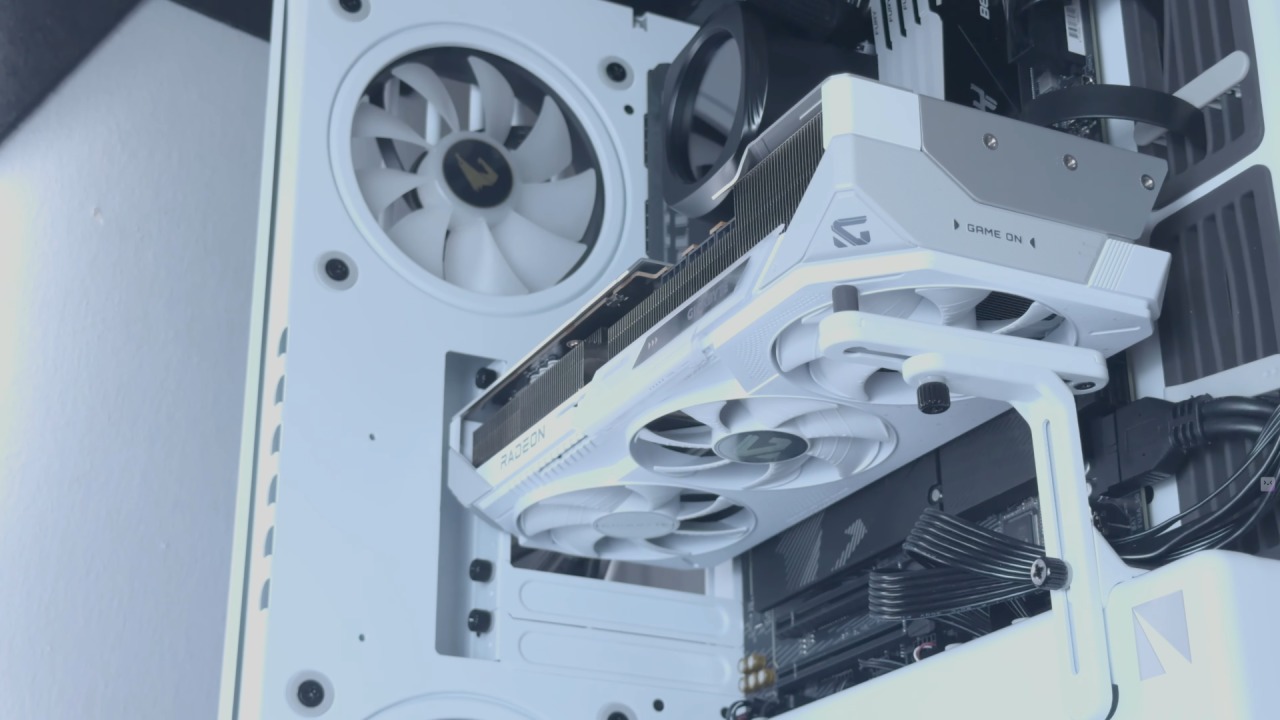
The GPU is 288mm long, 132mm wide, and 56mm thick, which is about the same as a standard computer case. Because of its size, it is best to use an anti-sag mount.
Specifications
Gigabyte Radeon RX 9070 XT Gaming OC ICE suggests an 850W power supply from a technical standpoint. It has a memory speed of 20Gbps, a 256-bit memory bus, and 16GB of GDDR6 memory. The card can go up to 3600MHz, and the game clock can reach 2520MHz. Both numbers are higher than the reference model's boost speeds of 2970MHz and game clocks of 2400MHz.
There are 56 RT cores, 112 matrix cores, and 224 TMUs in the GPU. Overall, the balance between appearance and specifications is good, especially if you want a wide RX 9070 XT card with consistent build quality.
Experience with Installation
It's easy to set up the card. We installed the GPU in the Haven HS420 case, used a GPU support bracket to secure it, and plugged in all the power cords it required. The installation process is easy; however, keeping the cables organized can be hard. Three different power lines hanging from the GPU can make a clean build messy. It would be good if AMD looked for ways to make wires less bulky in future designs.
Goals for Performance
AMD says RX 9070 XT is a GPU for high-end 1440p gaming and entry-level 4K gaming. You can play most games at 1440p without using FSR. But at 4K, enabling FSR is crucial to keep performance smooth and the frame rate high.
We used a closed PC setup for testing. It has an AMD Ryzen 9950X3D Ryzen 9 5950X3D CPU, 64GB of DDR5 6000MTs memory, an Aorus X870 WiFi7 motherboard, an Aorus Waterforce X2360 cooler, a Gigabyte Radeon RX 9070 XT Gaming OC ICE, and a Haven HS420 case.
Results from the Benchmark. We ran several games through a benchmark, both those that support FSR4 and those that don't. In most testing, RX 9070 XT consistently gave 4K performance in the 50fps to 60fps range at the highest settings. In more demanding games, turning on and changing FSR made a big difference in frame rates and overall smoothness.
Experience with FSR4
FSR4 is still clearly better than FSR3 in both image quality and upscaling. The difference is evident when you play, but there aren't many copies available. A lot of games still don't support FSR4, even if they've been out for a while. Some newer titles don't even use the technology at all. FSR3 is still a practical choice and still offers real benefits till more people start using it.
Thermals, Power, and Noise
This card does a good job of keeping things cool. We had trouble getting temperatures above 56°C during long tests. The fans went up to about 1800 RPM, the game clock reached 2845 MHz, and the system used 305W of power. Power efficiency remains balanced, preventing thermal bottlenecks and allowing you to overclock.
There is ample room to push clocks into the mid-3000 MHz range without placing too much burden on the cooling system. It will likely be possible to reach 3400 MHz or higher with modest power boosts. The fan noise is loud; while gaming, it goes about 48dB at 75% fan speed. When you push the fans to 100%, the noise level rises to roughly 60dB. This is too loud for regular use and not needed under typical situations.
Final Thoughts
We liked the black version of this card before, and we appreciate the ICE version just as much, especially for people who want to complement a white-themed setup. The hardware still works well with recent games; however, it sometimes feels neglected because there isn't much FSR4 support.
RX 9070 XT is usually lower than RTX 5080 among other GPUs, though it can switch places with RTX 5060 and RTX 5070 depending on the workload. Ray tracing performance isn't as good as Nvidia's, primarily because of architectural changes. However, in many games where ray tracing doesn't contribute much to the visuals but costs a lot of speed, the gap isn't that big.
Gigabyte Radeon RX 9070 XT Gaming OC ICE ultimately delivers solid performance, reasonable temperatures, and a clean look. If you've been waiting for a white RX 9070 XT, this card is a great choice. It works well in many different games and maintains its performance.
Also, check our other AMD articles below:
- AMD Ryzen 9 9950X3D Review: Setting The Standard For 2025 Gaming CPU
- AMD Ryzen 7 9800X3D Review: 3D V-Cache Goes God Mode with Stunning Gaming Performance
- AMD RX 9070 Performance Review: Thermals, Clocks, and Real-World FPS
- AMD Ryzen 5 7600 Review: Best Budget Gaming CPU of 2025?
- AMD Radeon RX 7800 XT Review: RDNA 3 Power For Midrange Gaming
- Sapphire NITRO+ AMD Radeon RX 9070 XT Review: The Ultimate 4K Gaming GPU
- AMD Ryzen 7 7800X3D: Delivers Gaming Performance Far Beyond Expectations
- AMD Ryzen 9 7900X Review: Powering the AM5 Era with DDR5 & PCIe 5.0
- Intel Core i9‑14900K vs. AMD Ryzen 7 7800X3D: Power Profiles & Gaming Benchmarks
Editor, NoobFeed
Gaming Hardware Updates
No Data.