
Gigabyte X870E Aorus Pro X3D ICE Review and Performance Analysis
X870E Aorus Pro X3D ICE combines updated firmware, dynamic performance profiles, and refined thermal design on AMD’s X870 platform.
Hardware by Shinji Okazaki on Dec 27, 2025
Gigabyte has introduced a new line of X870E motherboards that use the X870 chipset for AMD AM5. These motherboards work with both Zen4 and Zen5 processors. Gigabyte X870E Aorus Pro X3D ICE is the main emphasis here. The name X3D refers to a version that adds performance-related capabilities, especially X3D Turbo Mode 2.
At first glance, the upgrades from previous Aorus models seem small. Still, many new features raise questions, such as DDR59000 memory compatibility, an 8-layer PCB with back-drilling, the D5 Bionic Corsa hardware, and new thermal and DIY-focused capabilities.
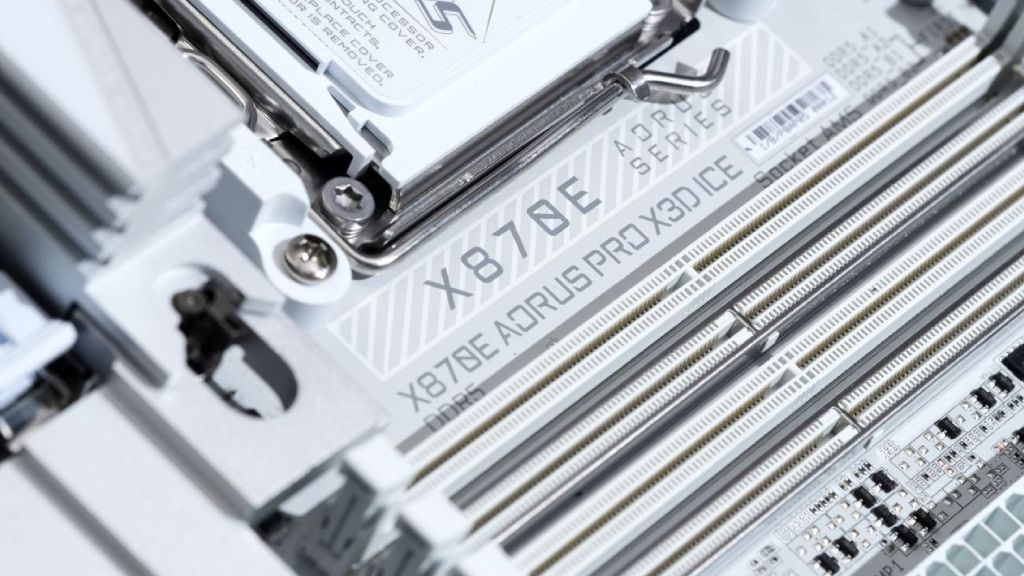
Gigabyte says the new motherboard supports PCI Express Gen5, Wi-Fi7, a one-piece PCB thermal plate, direct-touch heat pipes, and a new VRM cooling method. A new feature called X3D Turbo Mode 2 pops out right away. It is a core improvement on X3D-branded X870E boards.
Updates and performance claims for X3D
Gigabyte lists several changes that will happen when you upgrade from ordinary X870E models to X870E X3D models. These changes include X3D Turbo Mode 2, an 8-layer back-drilled PCB, support for slightly faster memory speeds, changes to the VRM heatsink cooling, and improvements to DIY installation capabilities. Some capabilities that were previously available only on Extreme- and Master-tier boards are now available on all X3D models.
Gigabyte says game performance can increase by up to 25% and CPU performance by up to 14%. If you look more closely at the comparison charts, you'll see that the baseline is set up with DDR54800 memory and the boosted results are based on DDR56000 memory. The chipset itself hasn't changed, which has people wondering how these increases were achieved. Gigabyte's answer is based on AI-assisted tuning.
The D5 Bionic Corsa hardware features a dedicated onboard processor that monitors, calculates, and optimizes system performance in real time. This hardware, along with firmware and software, turns on X3D Turbo Mode 2, making it more than just a static BIOS default.
What Comes in the Package and What to Look for First
The contents of the package are few but useful. Inside the package are instructions, SATA cables, a Wi-Fi antenna with a quick-connect design, M.2 thermal pads, a G-connector adapter for front-panel headers, a small onboard buzzer, a case badge, and a small extra fan with mounting hardware. The fan is meant to be mounted close to the memory slots so that air may travel directly over the DIMMs. The major focus is still on the motherboard itself, even with additional extras.
Adding space, storage, and connections
The main PCI Express slot works with PCIe Gen5x16 graphics cards. The second slot is Gen4x16 in terms of mechanics, but it works at x4. The third slot is Gen3x16 and works at x2. There is one main Gen5 M.2 slot and a second Gen5 M.2 slot that may also be used with USB4. There are four SATA ports and two more Gen4 M.2 slots.
Two USB4 ports on the back work at 40Gbits, two USB-C USB3.2 Gen2 ports that work at 10Gbits, five USB-A USB3.2 Gen2 ports that work at 10Gbits, and three USB-A USB3.2 Gen1 ports that work at 5Gbits. There are four USB 3.0 connectors and four USB 2.0 ports on the front panel. The USB3 Gen2x2 ports can send data at 20 Gbit/s and deliver up to 65W of power.
Realtek 5GB Ethernet handles networking, while Qualcomm Wi-Fi7 and Bluetooth 5 handle Bluetooth 4. Design for Power Delivery and Cooling.
.jpg)
The VRM uses an 18+2+2-phase architecture with doublers and is controlled by an Infineon 12-phase controller. Eighteen 110A Infineon stages power the Vcore. The SoC gets its power from two more 110A stages, and two 60A DrMOS stages handle extra power. There are large heatsinks with direct-touch heat pipes and a new thermal plate to help keep things cool.
DIY features include M.2 heatsinks that don't need tools to install and are held in place by magnetic mounts and latches. The main M.2 heatsink is tall and has many fins. The other M.2 slots are shown through a second hinged cover. There is an onboard debug display and an HDMI header for internal case displays. The board has two EPS connectors at the top and an extra PCIe power input.
The back of the PCB has a full backplate and small holes visible from the back-drilling procedure. These are meant to improve signal quality and heat flow. The back panel heatsink assembly has rear I/O ventilation ports that allow airflow.
BIOS Settings with X3D Turbo Mode 2
There are four X3D Turbo profiles in the BIOS: Disabled, Standard, Max Performance, and Extreme Gaming. Gigabyte's performance promises are based on these characteristics. Ryzen 79800X3D and ADATA XPG Lancer RGB DDR56000 RAM were the main components tested.
Setting Up the Test System
The test system featured a Phanteks Glacier 360MPH liquid cooler, an MSI GeForce RTX 4090 Ventus 3X graphics card, and a Seasonic Vertex GX1200 power supply. RGB lighting on the memory modules, the back I/O shroud, and the chipset region are all examples of visual aspects.
Performance of Synthetic Benchmark
The Geekbench6 multicore results show that Turbo Off boards score about 18600 points, which is the same as baseline boards. Turbo Standard gets outcomes just around 19,000 points, whereas Max Performance gets results of about 19,357 points. Extreme Gaming declines quickly to about 17700 points.
When the memory speed is raised to DDR5 8000, performance usually improves in both Turbo Standard and Max Performance modes. Extreme Gaming still doesn't do well with multicore workloads. In Geekbench6 single-core testing, this tendency is reversed: Extreme Gaming delivers the highest results, followed by Max Performance and Turbo Standard. The difference between profiles is around 10%.
CinebenchR23 multicore works the same way as Geekbench multicore. With the turbo off, it runs at 5.22GHz and uses 135W of power. Turbo Standard goes up to 5.42GHz at 145W. Max Performance increases power draw to 150W and shows the clock speed around 5.06GHz. Extreme Gaming turns off SMT and runs eight cores and eight threads at about 5.25 GHz and 135W.
How Memory Bandwidth Works
The results of AIDA64's memory bandwidth tests reveal that scaling isn't consistent. DDR56000 is occasionally better than DDR58000, especially when gaming at its most extreme. DDR58000 memory sometimes runs at 8350MT/s; however, it still has less bandwidth than DDR56000. EXPO settings always yield more accurate results than hand overclocking.
Analysis of Gaming Performance
Extreme Gaming settings give the best average framerates in Far Cry 6 at 1080p, and DDR58000 improves the lowest framerates by 1%. Max Performance is quite close behind, and Turbo Off is lower on the chart. Extreme Gaming is still at the top at 1440p, although the gaps are getting smaller.
Extreme Gaming is ahead by tiny amounts in Assassin's Creed Mirage at 1080p and 1440p. Memory speed has a bigger effect on 1% lows than on averages. When Turbo Off is on, the minimums are always lower.
The results for Cyberpunk 2077 are mixed. At 1080p, the Max Performance profiles beat the Extreme Gaming profiles by 1% in the lowest 1% of scores. At 1440 p.m., the performance differences get smaller, with only a few fps separating the profiles.
Extreme Gaming has some problems that show up in Total War testing, where the 1% lows drop significantly compared to Max Performance and Turbo Standard. At 1440 p.m., the difference between the best and worst minimum framerates is 60 fps, while the average difference is 13 fps.

Observations on Software and Stability
Gigabyte has a tool called OnFly that lets you switch profiles from the system tray. You need to restart your computer after making changes to your profile, since those changes occur at the BIOS level. During testing, the board sometimes returned to Turbo Off without warning because the system became unstable under heavy stress. The application helped check active profiles after the resets.
Things to Think About When it Comes to Price and Value
The board is priced at around £400, which puts it below premium versions but above more common options. The cost of memory and the difficulty of tuning are two important factors that affect overall value. The feature set is still comparable to that of higher-tier boards, but to achieve the best performance, you have to do manual testing and profile evaluation.
The Good and the Bad
When set up correctly, the board offers many connection options, installation features that are great for DIYers, powerful power delivery, and performance tuning options via X3D Turbo Mode 2.
To achieve consistent results with X3D Turbo Mode 2, it needs to be tested and investigated. Prices are still higher than those of non-X3D options.
Final Thoughts
Gigabyte X870E Aorus Pro X3D ICE has great hardware, lots of ways to connect to other devices, and a unique way to tune performance. X3D Turbo Mode 2 has a meaningful effect; however, how it works depends a lot on the workload. Profiles have quite different levels of performance, and it's important to know what those differences are. The board gets an 8.5 out of 10 rating and is still worth buying for people who are willing to spend time tuning and testing it.
Also, check our other AMD articles below:
- AMD Ryzen 9 9950X3D Review: Setting The Standard For 2025 Gaming CPU
- AMD Ryzen 7 9800X3D Review: 3D V-Cache Goes God Mode with Stunning Gaming Performance
- AMD RX 9070 Performance Review: Thermals, Clocks, and Real-World FPS
- AMD Ryzen 5 7600 Review: Best Budget Gaming CPU of 2025?
- AMD Radeon RX 7800 XT Review: RDNA 3 Power For Midrange Gaming
- Sapphire NITRO+ AMD Radeon RX 9070 XT Review: The Ultimate 4K Gaming GPU
- AMD Ryzen 7 7800X3D: Delivers Gaming Performance Far Beyond Expectations
- AMD Ryzen 9 7900X Review: Powering the AM5 Era with DDR5 & PCIe 5.0
- ASRock Radeon RX 7800 XT Challenger OC Review: Best Price-to-Performance GPU of 2025
- Intel Core i9‑14900K vs. AMD Ryzen 7 7800X3D: Power Profiles & Gaming Benchmarks
Editor, NoobFeed
Gaming Hardware Updates
No Data.