
Meta Quest 3 vs. Steam Frame: Full VR Comparison for Performance and Features
A clear overview of resolution, refresh rate, optical clarity, and field-of-view performance across both modern VR headsets.
Hardware by Tanisha Aria on Nov 28, 2025
The VR world is still changing quickly, with new devices pushing the limits of hardware design, visual clarity, and gameplay. Meta Quest 3 and Steam Frame are two different ways to use VR today.
Both headsets have high-tech features, are light, have better optics, and have big content ecosystems, but they are aimed at different groups.

To help you figure out what's good and bad about each, this comparison looks at their design, comfort, controllers, display technology, speed, game libraries, software experience, and overall value.
First Impression
When we look inside each box, we see right away that the items that come with them are different. The headset unit, the Touch Plus controllers, and a standard charging cord with adapter make up the Quest 3's simple package.
The Steam Frame, on the other hand, comes with its own headset and controllers as well as a special USB-C dongle made just for PC VR games. This new item is a major reason the Steam Frame will have better delay performance in the future.
Design and Comfort of Headsets
When we pick up both gadgets, we can tell they are not the same weight. Because it weighs 515g, the Meta Quest 3 is larger than the Steam Frame, which weighs 435g. This is one of the things that makes each headset feel different during longer play sessions.
From the outside, the Quest 3 has built-in cameras that track controllers and hands, with full-color passthrough. This lets us see our surroundings clearly and play mixed-reality games.
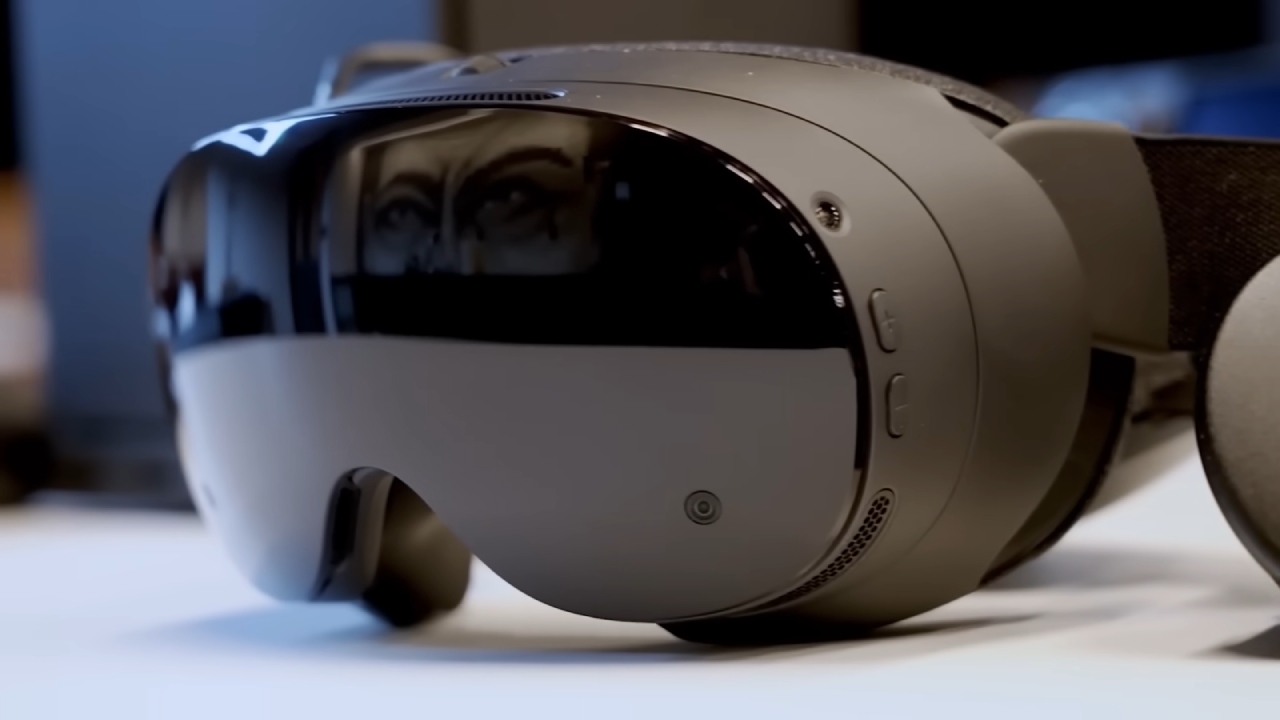
The Steam Frame also has four outward-facing cameras, but they are all black-and-white, so passthrough can only happen in black-and-white.
The Quest 3 has a soft two-band strap on the back that is tightened with plastic clips. These clips may hurt after prolonged use. The Steam Frame has a similar strap design, but the battery is built into the back of the frame. This helps with balance and weight spread while playing.
Layout and Functions of the Controller
The controllers for the Quest 3 are white Touch Plus models with thumbsticks, a trigger, standard face buttons, and a grip button on the back. They run on AA batteries that can be switched out, but we can't charge them via USB-C.
The layout of the Steam Frame controls is different, but they look the same. On the left is a D-pad, and on the right are all four face buttons. With this setup, the controller feels more like a normal game controller. They use AA batteries that we can switch out, just like the Quest controls.
Technology for displays and optics
When we compare tech specs, one of the most important things to look at is the screen. The LCD sizes of both headsets are very similar. The Quest 3 has a resolution of 2064x2208 per eye.
The Quest 3 can handle up to 120Hz, and the Steam Frame has an experimental mode that can boost the frame rate to 144Hz.
Both devices use pancake optics, which have a big sweet spot, fewer gold rays, and better image quality than older Fresnel lenses. The field of view is also very similar, with both headsets giving you about 110°.
Differences in Performance and Chipset
The processor is what makes the hardware different. The Snapdragon XR2 Gen 2 platform runs the Quest 3.
Even though it still works well, this isn't as good as the Steam Frame's Snapdragon Series 8 Gen 3, which is a more modern chip. At the moment, this newer chip is considered one of the most powerful mobile processors available in a VR headset.
The Steam Frame also has several cameras that face inwards to help with eye tracking and focused graphics or streaming. This technology makes the things we look at sharper while lightening the load on other parts of the computer, making everything clearer and more efficient.
Library of games and standalone experiences
For VR players, games remain among the most important things. Through the Horizon Store, the Meta Quest 3 has a huge collection of standalone games, some of which we can't play on any other headset.
Meta also has a service called Quest Plus that lets you subscribe to VR games. It works a lot like Xbox Game Pass. You can use the $30 store credit you get when you buy New Quest 3 however you want.
If we'd rather play PC VR games, the Quest 3 can connect to a PC wired or wirelessly using a Link Cable or an app like Virtual Desktop. We can now use the SteamVR tools however we want.
The Steam Frame is officially a standalone headset, but its main purpose is PC VR and wireless PC streaming with the Wi-Fi 6E dongle that comes with it. Compared to the standard wireless solutions used on Quest, this dongle significantly reduces latency.
One big improvement for the Steam Frame is that it can run SteamVR games directly. That means we don't need a PC to download and play games like Half-Life: Alyx on the headset.
It may be necessary for developers to lower the graphics settings to make the games run smoothly, but being able to play high-end PC VR games on their own is a big step forward. Valve also gives games a "Steam Frame Verified" mark that makes it easy to see which ones can be played on their own.
Choices for software, interface, and storage
Horizon OS, which is what the Quest 3 runs, has changed a lot over the years. Standard navigation tools are built into the platform, and Horizon Worlds, Meta's social VR setting, gets a lot of attention.
Steam Frame runs SteamOS, which is basically the same software that runs on Steam Deck, but for VR. Many people think the layout is smooth, responsive, and very flexible, which is great for people who like to customize or "mod" things.
The Quest 3 offers a 512GB storage option. The Steam Frame comes in both 256GB and 1TB models. We can add more storage with a microSD card that supports up to 2TB, so we can play large game libraries directly on the device.
When will it be released, and a final summary
The Quest 3 came out in 2023, and the Steam Frame will come out in early 2026, three years later. The change in timing shows that the hardware in Valve's device has improved.
There are clear pros and cons to both systems. The Quest 3 focuses on self-contained gameplay, full-color mixed reality, and affordable pricing.
The Steam Frame is designed to improve PC VR performance. It comes with an open operating system and support for native SteamVR games.
Which one we choose relies on whether we want a wide range of standalone VR experiences or advanced PC VR features for streaming and performance.
Also, check our other articles below :
- ASUS ROG Ally X Handheld Review: Double the Battery, Double the Comfort
- Nintendo Switch 2 Vs. Original Switch 1: A Full Comparison
- How To Connect A Camera And Join Voice Chat With Nintendo Switch 2
- Nintendo Switch 2 Review: Handheld Performance, Features & Value Breakdown
- ROG Xbox Ally X Vs. ROG Ally X: Display, Battery & Controls
- ASUS ROG Ally X vs. Steam Deck OLED: Display, Battery & Gaming Benchmarks
- MSI Claw 8 AI+ Review: Display, Controls & Gaming
- Nintendo Switch 2 vs. Steam Deck OLED: Gaming, Performance, Battery, Display and Value
- PlayStation Portal Review: Remote Play, Cloud Streaming & Travel Gaming
- PlayStation Portal vs. Lenovo Legion Go: Best Portable Gameplay
- Cyberpunk 2077 Patch 2.3 FPS Test on MSI Claw 8 AI+
Contributor, NoobFeed
Gaming Hardware Updates
No Data.