
ASRock B850i Lightning Wi-Fi Review Highlights Features, Performance, and Value for AM5 ITX Builds
ASRock B850i Lightning Wi-Fi delivers essential ITX motherboard features with strong performance at a lower price point.
Hardware by Tanisha Aria on Nov 24, 2025
ASRock B850i Lightning Wi-Fi is an AM5 ITX motherboard marketed as a budget option for small computers. It focuses on essential features rather than nice-to-have extras, making it a great deal for people who want to get the most out of a small device.
At $220, it's much cheaper than many other ITX B850 models on the market. Yet, it still supports high-end processors, offers good connectivity, and delivers power efficiently.
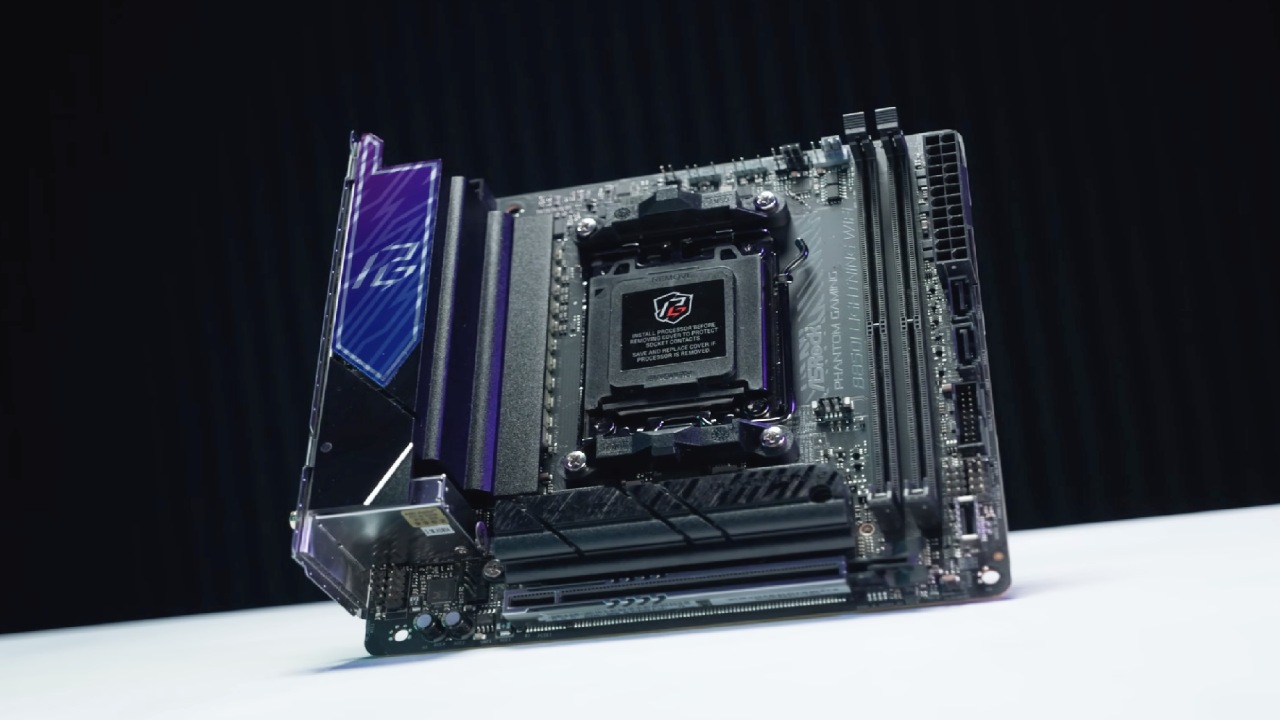
First Impression
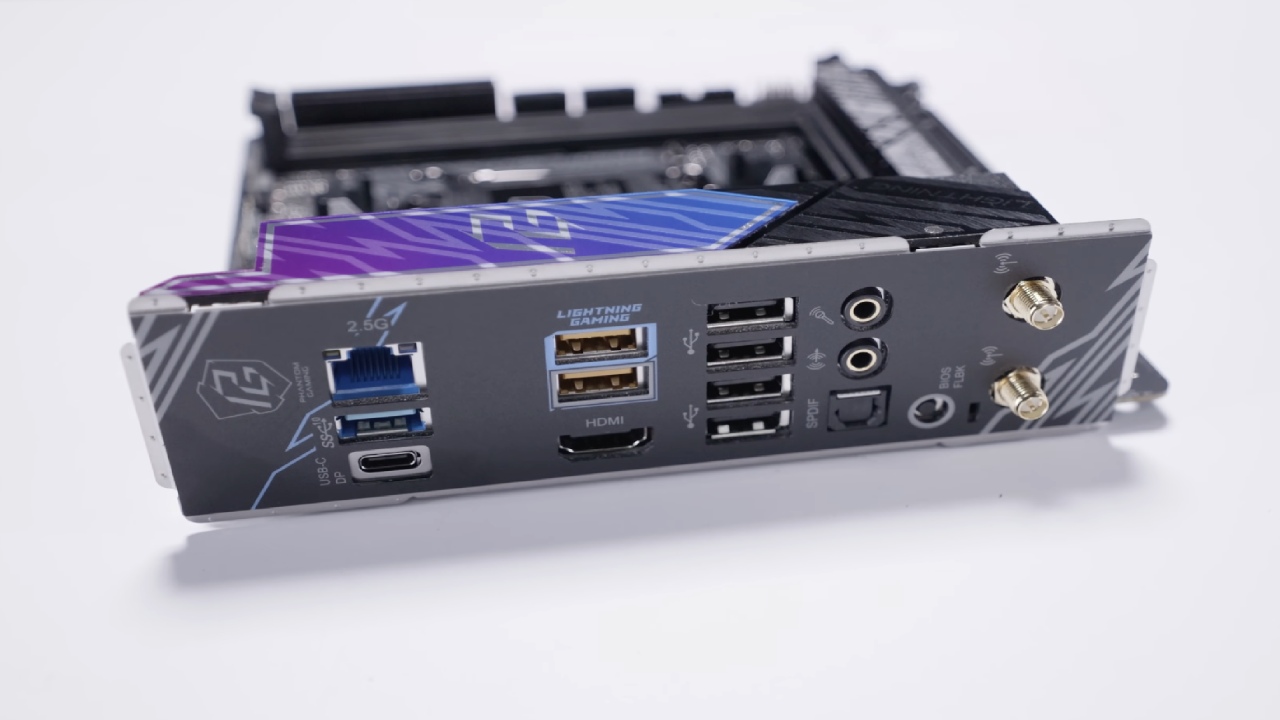
We can find two SATA cables, a thermistor cable for temperature checking, and two screws for the M.2 slots inside the box. The IO shield is already set up when it comes. There is a Killer 2.5Gb LAN port and eight USB ports on the back, but only four are USB 2.0.
The top USB port is USB3 5Gb, and the bottom one is USB3 10Gb. They are both above the HDMI port. In addition to supporting BIOS Flashback, the lower port lets you update software even if you have an AM5 CPU that doesn't support it.
Both USB ports under the LAN jack are 10Gb, and the USB-C port can produce video. ASRock says that some processors support a 40Gbit USB4 link, but the feature is only available on 8000G-series CPUs.
There are also an SPDIF port, a microphone port, an audio jack, the BIOS Flashback button, and antenna connections. A MediaTek Wi-Fi 6E card handles wireless tasks.
Internal Layout and Component Support
When you open the board, you can see that it supports DDR5, which is listed at 8200+MHz, which is a tall order. For proof, we tried a 6000MHz kit. The VRM features a 10+1+1 power-phase design and a good-sized fan for the price. It's pretty stable.
With Ryzen 7000 and 9000 series CPUs, a steel-reinforced PCIe Gen5 x16 slot works at full speed. With 8000 series chips, however, bandwidth drops. For 7000 and 9000 series processors, the main M.2 slot is PCIe Gen5 x4. For 8000-series processors, the speed is lower.
There is a PCIe Gen4 x4 connection in the back M.2 slot, and the board also has two SATA ports. The USB3 and USB-C headers are on the front for I/O. The sound comes from a Realtek ALC1220 chip.
Only three headers can be used for cooling: the CPU, the AIO pump, and one chassis fan. The board doesn't come with built-in lights, but there are two RGB headers for those who want to add some.
Set up and BIOS Flashback Experience
We tested the motherboard with AMD's Ryzen 9950X3D, but at first, the BIOS didn't allow it. This was fixed by BIOS Flashback, though in a slightly different way than we're used to. Before the flash can proceed, the board needs a CPU, RAM, and a power source installed.
After renaming the update file on a USB drive, press and hold the BIOS Flashback button for 3 seconds to start the process. Everything went well. We put together a full build with 32GB of G.Skill DDR5-6000 memory, a Phanteks 360mm AIO, a Samsung 990 Pro NVMe SSD, and a Thermaltake Toughpower 1000W SFX PSU.
More often than not, we write about mini PCs, so adding these parts helps us better understand how desktop-class hardware works.
Benchmark Results and Performance Behavior
Ryzen 9950X3D achieved top-notch single-core performance in Cinebench, in line with other sources' results. HX370 mobile chip was behind, but it was still able to compete.
In terms of multicore speed, the 9950X3D was far ahead of mobile processors. Our multicore score was just a little lower than the best standard score of 42871, which means we were about 3.5% behind, but we still did very well.
9950X3D outperformed every other chip in Geekbench single-core tests, reaching over 30000. The same thing happened with multicore results. Even though the 7945HX mobile CPU and desktop processor have the same number of cores and threads, the desktop processor has higher power limits and 3D V-Cache.
The processor's built-in graphics are still basic. Still, they work about the same as the Radeon 610M and are useful for troubleshooting.
Using a Gigabyte RTX 4070 Super, the board delivered strong results, slightly beating our previous mobile-on-desktop tests across all 3DMark runs, including DX11, DX12 Time Spy, and DX12 Steel Nomad Light.
When the system was not in use, it used 50W with built-in graphics and 108W with the RTX 4070 Super added. For full load, the 9950X3D used 282W, but with the GPU going, it used 445W.
The VRM reached 90 °C, which is high but not too bad, as the system can handle up to 110 °C. With an open bench and a 360mm AIO, the CPU reached 85 °C.
BIOS Interface and Software Features
Press the Delete key to enter the BIOS. There are two modes: Easy Mode and Advanced Mode. In Easy Mode, common settings are grouped together. In Advanced Mode, you can find full overclocking tools, board setup menus, and the Instant Flash utility.
When you connect to the internet for the first time after installing Windows, the auto-driver software starts right away, making setup easier. There are fan-tuning controls in the Hardware Monitor section, and the visual fan curve editor lets you make precise manual changes. There is no extraneous mess, and all the core system-level features are covered.
.jpg)
Final Thoughts
We had a chance to spend some time with the B850i Lightning Wi-Fi and are sure to say that value is its main strength. The board is cheaper than other B850 ITX boards, but it still supports AMD's top-of-the-line processors thanks to its robust VRM. Overall, speed is always good, making it a good choice for ITX builders on a budget.
The cons are that there aren't any steel-reinforced RAM slots, Wi-Fi 7, or USB4 features that can only be unlocked when paired with an 8000G-series CPU.
Still, the basics are still there. If you want to build an ITX system around an AM5 chip, this processor is a good choice. You can save money on other parts of the system.
It's nice to review something other than standard mini PC hardware once in a while. If you're interested in 8000G-series builds, we suggest you check out the ASRock DeskMini X600 content, which goes well with those APUs.
Also, check our other hardware articles:
- AMD Ryzen 9 9950X3D Review: Setting The Standard For 2025 Gaming CPU
- Amazon Luna 2025 Review: Is Prime Gaming's Cloud Service Your Go-To For Casual Fun?
- AMD RX 9070 XT Review: AMD's RDNA 4 Champion for 1440p Gaming
- GeForce Now Ultimate: Ditching Your Gaming PC For Cloud RTX 4080 Power?
- NVIDIA GeForce RTX 5080 Review (2025): Still A 4K Gaming Powerhouse?
- Intel Core Ultra 9 285K Review And Performance Breakdown (2025)
- AMD Ryzen 7 9800X3D Review: 3D V-Cache Goes God Mode with Stunning Gaming Performance
- Intel Core Ultra 9 285K vs AMD Ryzen 7 9800X3D: In-Depth Gaming Performance and Benchmark Comparison
- NVIDIA GeForce RTX 5080 Super Performance In Cyberpunk 2077: Path Tracing & DLSS 4.0 Tested
- AMD Radeon RX 9070 XT In Cyberpunk 2077: Ray Tracing & FSR 4.0 Tested
- Intel Arc B580 Review: The $250 GPU Revolutionizing 1440p Gaming
- Intel Arc B570 Vs. B580: Value, Specs, And Real-World Gaming Performance
- RTX 5090 Laptop Vs. M4 Max MacBook Pro: Ultimate Raw Performance Vs. Battery Endurance
- Intel Arc b580 Vs. RTX 4060: Game Performance And Value Analysis
- RTX5090 Hell Is Us Demo 4K Ultra Benchmark: DLSS Vs. Native Performance Guide
- NVIDIA RTX 5070 Review: Mid-Range Muscle or Marketing Hype?
- Nintendo Switch 2 Review: Handheld Performance, Features & Value Breakdown
- RTX 5070 Ti Review: Performance, Thermals & Power Efficiency Tested
- Samsung Odyssey OLED G81SF Review 2025: Ultimate 32-Inch QD-OLED Gaming Monitor
- AMD RX 9070 Performance Review: Thermals, Clocks, and Real-World FPS
- AMD Ryzen 5 7600 Review: Best Budget Gaming CPU of 2025?
- AMD Radeon RX 7800 XT Review: RDNA 3 Power For Midrange Gaming
- Asus ROG RTX 5090 Astral OC Vs. Founders Edition: The 4K Gaming Benchmark
- Intel Core i5-13400F Gaming Performance: Still Worth It in 2025?
- ASUS GeForce RTX 5090 LC Liquid Cooled GPU Review: Unmatched Silence & Speed
- ASUS ROG Ally X Handheld Review: Double the Battery, Double the Comfort
- Lenovo Legion Go S Review: The Ultimate Steam Deck 2 Alternative
Contributor, NoobFeed
Gaming Hardware Updates
No Data.