
Nvidia GeForce RTX 5090 Founders Edition Review: Thermals, Noise, Coil Whine, and Design
Nvidia’s RTX 5090 Founders Edition blends compact design, extreme power delivery, and unconventional cooling engineering.
Hardware by Nahe Yan on Dec 19, 2025
People are talking about the Nvidia GeForce RTX 5090 Founders Edition for its small size, high power target, and unique unboxing experience. In addition to performance.
Other key factors to consider when deciding whether to buy this model include its noise and heat levels and its overall usefulness.
The Experience of Unboxing
Unwrapping this graphics card is different than unwrapping partner graphics cards from companies like ASUS, Gigabyte, or MSI. There is no Nvidia branding on the outside of the box, and it opens with a pull-tab. When you open it, you see a second box with the Nvidia logo. This box opens to reveal the card and accessories.
There is no plastic in the package; it is made of cardboard and paper. There is only one 16-pin power adaptor inside that converts four 8-pin connectors into a single 16-pin connector. The adaptor feels sturdy and well-made. There is also a tiny, fast-start guide that shows you how to install the GPU, plug it in, and connect a display.
There is a GeForce RTX 5090 logo indented on the inside of the box. The box opens by sliding. The graphics card is well-protected and safe because it is made of cardboard.
Design and Build in Real Life
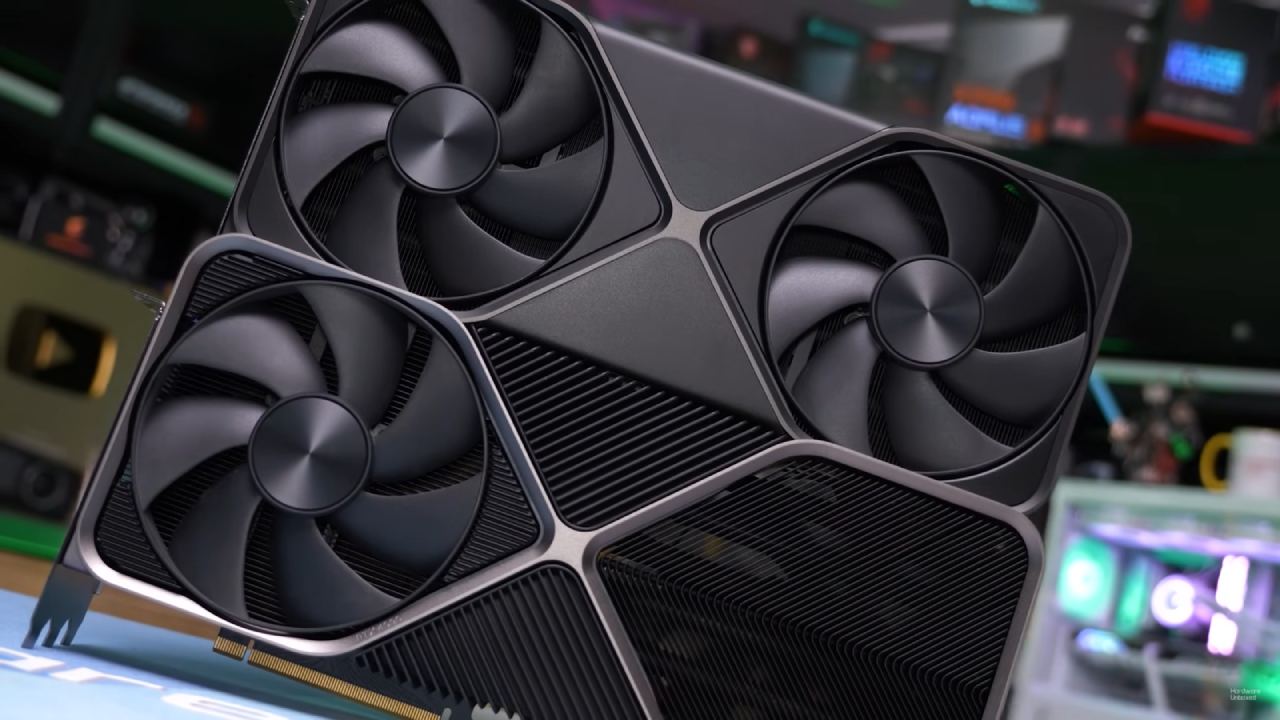
RTX 5090 Founders Edition seems heavier than it should be for its size. It weighs 1824g, which is about 4 pounds. The card features a matte gunmetal-gray finish, black fans, and a black heatsink. The card's front is clean and has no branding.
There are some small markings on the surface, including a small defect near the shroud and light scratches on the PCIe connector. These don't disclose internal parts or compromise the structure's strength, but they do raise questions about quality control.
The card has a small PCB in the middle that lets air flow directly through the heatsink from both sides. Cutouts on the top and bottom let air pass through and cool the heatsink fins. The power connector is attached to the top edge at an angle.
There are three DisplayPort connectors and one HDMI port for display outputs. There is a small Nvidia logo and an RTX 5090 label on the back, which is a subtle branding touch. On the side, there is an LED logo, and near the power connector, there is another light-up X-shaped feature.
Size, Compatibility, and How to Install
RTX 5090 Founders Edition is 37mm thick, 138mm tall, and features a true 2-slot design. Even though it requires 600W of power, its modest size makes it compatible with many Mini-ITX and small-form-factor chassis.
After being mounted, the card fits snugly in the PCIe slot without sagging. Because the weight is evenly distributed, a GPU support bracket is not needed. The slanted power connector might make it hard to route cables, and placing the cord in the right spot may cover part of the side logo.
Right now, you can't turn off the LED lights in the Nvidia program. This can be important to you if you don't want a system with lights.
Performance and Power Behavior in Games
RTX 5090 Founders Edition draws about 575W when fully loaded at native 4K with ray tracing enabled. Turning on DLSS uses less power.
The GPU temperature stays at 80°C, with occasional surges above 82°C. The temperature at the memory junction is 96°C. The typical core boost clock speed is 2570 MHz; however, it can range from 2565 MHz to 2587 MHz.
The fan speed stays at about 55% (1740 RPM). The room temperature during testing is about 23°C.
Sounds and coil whine
The measured noise production is about 45dB when the load is on. The fan noise stays under control and doesn't dominate the sound profile, especially given the card's size and power demand.
There is a distinct coil whining. The sound can be heard at about 50 fps and varies depending on the game. The coil whining is bearable in certain games. Still, in others, it gets louder and more annoying, especially during quieter sequences.
Other users have said that coil whine is widespread on Founders Edition devices, which makes it more likely than rare. The severity changes from unit to unit. Using speakers or placing the PC close to where you sit makes the sound more noticeable, even with a headset.
The case fans may need to run faster to dissipate heat from the GPU, which can make the system noise louder. Adding extra intake fans to improve airflow may lower the system's overall noise, but it won't eliminate coil whine.
Thermals and How to Use Them
Thermal performance stays the same, with no signs of throttling. Modern silicon can handle temperatures up to 80°C without any reliability issues.
The cooling solution does a good job of keeping fan noise down, and the biggest noise problem is still coil whine, not airflow or mechanical noise. It is not possible to completely avoid coil whine, and it may also show up on partner cards. However, reports indicate it occurs more often on Founders Edition models.
Final Thoughts
RTX 5090 Founders Edition has a compact 2-slot design that delivers a lot of power while keeping temperatures steady and fan noise under control. The airflow-through cooling method works as it should, and the card fits well in tiny cases without needing any extra support.
The primary problem with coils is that they can make noise, which might change the experience depending on how sensitive you are, where the system is, and how much work it has to do. It might not be a big deal if you use headphones or keep your computer farther away. This is something you should think about carefully if you want your speakers to be quieter.
The coil noise doesn't stop the card from working for everyday gaming and high-end workloads. Over time, the noise may fade into the background or become a constant irritation.
Also, check our other NVIDIA articles below:
- GeForce RTX 5090 Unleashed: Is NVIDIA's New Flagship the Ultimate 4K Gaming GPU?
- NVIDIA GeForce RTX 5080 Review (2025): Still A 4K Gaming Powerhouse?
- RTX 5090 Performance Testing In GTA 5 – 1080p, 1440p, and 4K Max Settings Benchmark
- RTX 5090 Laptop Vs. M4 Max MacBook Pro: Ultimate Raw Performance Vs. Battery Endurance
- NVIDIA RTX 5070 Review: Mid-Range Muscle or Marketing Hype?
- RTX 5070 Ti Review: Performance, Thermals & Power Efficiency Tested
- Asus ROG RTX 5090 Astral OC Vs. Founders Edition: The 4K Gaming Benchmark
- ASUS ROG Astral RTX 5090 OC Edition Review: 32GB GDDR7 & 4K Gaming Benchmark
- ASUS GeForce RTX 5090 LC Liquid Cooled GPU Review: Unmatched Silence & Speed
- MSI GeForce RTX 5090 32GB SUPRIM SOC Review: Power Efficiency, Cooling, and Gaming Performance
- INNO3D RTX 5060 Ti 16 GB X2 Review: Gaming Benchmarks, Temps, and Power Efficiency
- HP Omen 45L Review: RTX 5090 Performance, Thermals, and Value Analysis
- ASUS TUF Gaming GeForce RTX 5060 Ti Review: DLSS 4, Power Efficiency, and Gaming
- ASUS Prime RTX 5060 Ti OC 16GB Review: DLSS 4, Ray Tracing, & Thermals Tested
- NVIDIA GeForce RTX 5060 Review: Specs, Gaming, and Cost per Frame
- MSI GeForce RTX 5090 GAMING TRIO OC Review: A Monster Power GPU
Editor, NoobFeed
Gaming Hardware Updates
No Data.