

MSI X870 Godlike X Edition AM5 Motherboard Features and Testing
An overbuilt X870E motherboard designed for maximum storage, networking, and long term high performance AM5 systems
Hardware by Okazaki on Dec 21, 2025
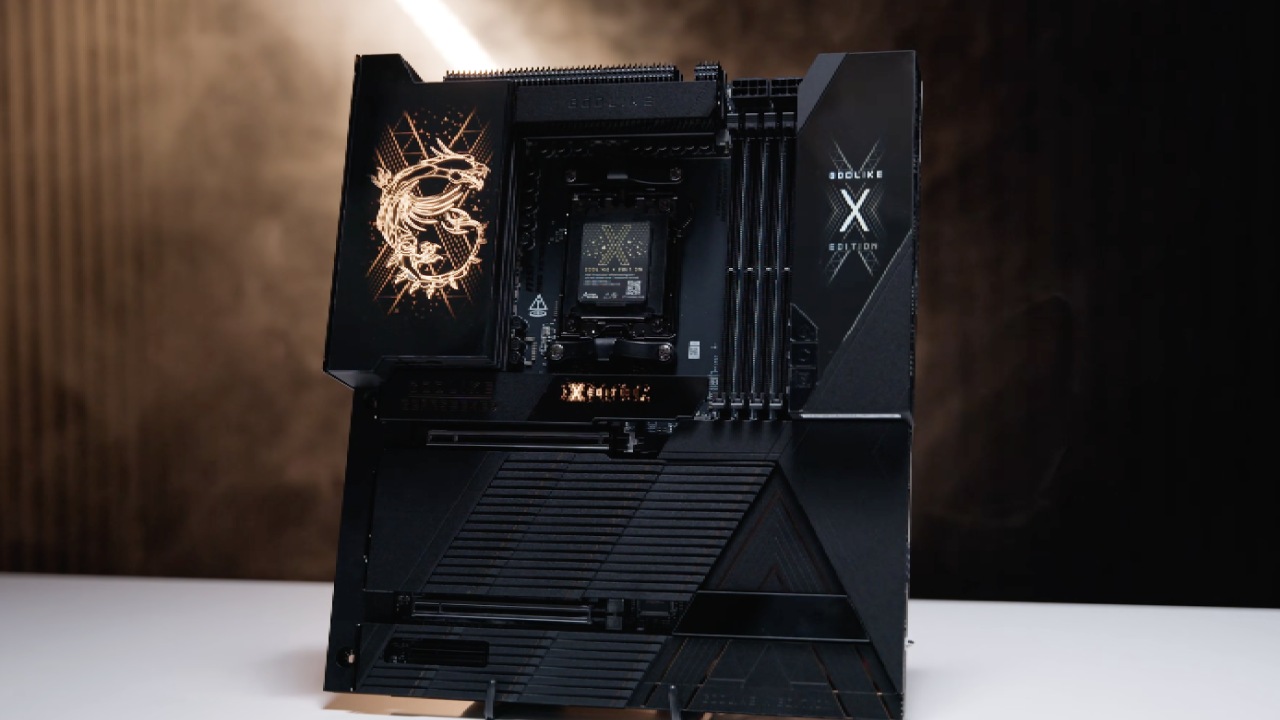
X870 Godlike X Edition is a rare AM5 motherboard compatible with Ryzen 7000, 8000, and 9000 series desktop processors. Only 1,000 will be created. It has one PCIe5x16 slot, one PCIe5x8 slot, one PCIe4x4 slot, four DDR5 DIMM slots, two USB4 ports on the chipset, and several M.2 slots.
The board is marketed as the most feature-rich X870E-class motherboard and is intended for long-term studio use.
Accessories and Packaging
The presentation is a big part of the unboxing experience. There are several accessory kits, a Wi-Fi7 antenna, a USB-C cable, extra thermal pads, stickers, and a fortune keychain, all celebrating the 10th anniversary of Godlike branding, in the box. There is also a large decorative element meant to sit on a desk long after the motherboard is no longer useful. The motherboard packaging shows that it is a limited-edition item, not that it is useful.
Design and Growth Design
The motherboard layout is too thick and too large. Expansion includes extensive PCIe and M.2 support, exceeding the AM5 platform's native lane count. Lane sharing is taken into account while using two PCIe Gen5 M.2 drives. There is a 22110 M.2 slot that can hold longer drives. Clear silkscreen labels show which M.2 slots are SATA-based and which are PCIe-based, as well as the best order for populating DIMMs.
A heavily grounded PCB layer surrounds the DIMM area. This is critical for memory configurations with a lot of memory. This design option matters when you use 256GB of DDR5 memory at DDR56000.
I/O and Connectivity in the Back
The back I/O panel is full. It has 10GbE and 5GbE Ethernet, six USB-C ports, eight USB-A ports, Wi-Fi7 antenna connectors, optical S/PDIF output, analog audio connections, BIOS Flashback, Clear CMOS, and a programmable smart button. When supported, USB-C bandwidth can reach up to 40 Gbps. The rear I/O uses all of the available space.
Power Delivery and Internal Headers
Internal connections go down the front edge of the board at right angles, which means the enclosure needs more space. Power delivery has a 24-pin ATX connector and two 8-pin CPU connectors. There are two 20-pin USB headers and two USB-C 10Gbps headers on the front panel. One of them can charge at 60W.
There are also additional headers for the fan, pump, ARGB, temperature sensors, tuning controller input, bridge input, USB 2.0, and front panel audio. The audio header on the front panel has been moved from the back corner to the front edge. A heatsink partially covers the SATA ports, but you can easily remove it with a magnet to access them.
Add Features that Make things Easier
The board has a simple button to release the GPU so you can safely remove hefty graphics cards. A bridge interface connects a removable screen module, which clearly advises against unplugging it while it's hot. To make installation easier, screw location guidelines are provided right on the protective stickers.
A built-in M.2 extension card occupies the second PCIe slot and uses eight graphics lanes to provide more NVMe storage. It doesn't support hot-swapping, but it lets you install M.2 drives without tools and is great for Linux-based storage setups.
Check Setting up the Bench and Checking the Memory
We first tested it on a workbench with a Ryzen 9950X-class processor, a 280mm AIO cooler, and a GSkill 256GB DDR5 kit with four DIMMs that was rated for DDR56000. It took a few minutes for memory training to finish on the first boot, which is normal for high-capacity setups. After turning on EXPO, the system successfully posted at DDR56000.
The average time for cold-boot memory training was about 3 minutes; however, subsequent boots were much faster. Sleep cycles caused retraining to occur at times, which is common with 256GB setups.
Testing Linux for Stability
We ran YC Cruncher and MemTest-style workloads under Linux as part of our stability testing. All tests at DDR56000 went off without a hitch. Linux had strong support for peripherals, including the Marvell 10GbE and Realtek 5GbE controllers.
When the PCIe load is high, it can affect memory stability under some circumstances, but this did not occur during testing. MSI's memory engineering is getting better, especially with four-DIMM DDR5 setups on AM5.
Things to think About for Performance, Cooling, and the Platform
With a 280mm AIO and PBO enabled, the CPU temperature stayed around 72°C under full load. There was no need to overclock manually, as AM5 performs better with automated boosting. For setups with simply a CPU on this platform, custom loop cooling doesn't help much.
For graphics, the RTX 5080 or RTX 5090 is the best choice. Dual 32GB GPUs can handle AI or computational workloads, but there are still limits on the number of platform lanes. Even though professional GPUs are technically enabled, systems with more PCIe lanes are still preferred for extreme multi-GPU setups.
.jpg)
Environment for Software and Storage
The system was tested with one PCIe Gen5 4TB NVMe disk; however, it can also work with two Gen5 drives. When it comes to mirrored storage, Linux-based software solutions are better than hardware RAID. Compared to platform-based RAID solutions, Linux has better NVMe handling and more stable RAID1 implementations.
Both Windows and Linux work well as operating systems, and support for GPU computing is improving on both platforms. Different GPU vendors have different toolchains, but the motherboard itself doesn't limit this in any way.
Final Thoughts
MSI X870 Godlike X Edition emphasizes feature density and engineering execution over platform efficiency. It lets you set up things like 256GB DDR5 at DDR56000, a lot of high-speed I/O, and various storage architectures that fit inside the limits of AM5. This board is the best AM5 can do in a single-socket configuration, even though competing platforms offer more PCIe lanes.
Also, check our other hardware articles below:
- AMD Ryzen 9 9950X3D Review: Setting The Standard For 2025 Gaming CPU
- Amazon Luna 2025 Review: Is Prime Gaming's Cloud Service Your Go-To For Casual Fun?
- AMD RX 9070 XT Review: AMD's RDNA 4 Champion for 1440p Gaming
- GeForce Now Ultimate: Ditching Your Gaming PC For Cloud RTX 4080 Power?
- NVIDIA GeForce RTX 5080 Review (2025): Still A 4K Gaming Powerhouse?
- Intel Core Ultra 9 285K Review And Performance Breakdown (2025)
- AMD Ryzen 7 9800X3D Review: 3D V-Cache Goes God Mode with Stunning Gaming Performance
- Intel Core Ultra 9 285K vs AMD Ryzen 7 9800X3D: In-Depth Gaming Performance and Benchmark Comparison
- NVIDIA GeForce RTX 5080 Super Performance In Cyberpunk 2077: Path Tracing & DLSS 4.0 Tested
- AMD Radeon RX 9070 XT In Cyberpunk 2077: Ray Tracing & FSR 4.0 Tested
- Intel Arc B580 Review: The $250 GPU Revolutionizing 1440p Gaming
- Intel Arc B570 Vs. B580: Value, Specs, And Real-World Gaming Performance
- RTX 5090 Laptop Vs. M4 Max MacBook Pro: Ultimate Raw Performance Vs. Battery Endurance
- Intel Arc b580 Vs. RTX 4060: Game Performance And Value Analysis
- RTX5090 Hell Is Us Demo 4K Ultra Benchmark: DLSS Vs. Native Performance Guide
- NVIDIA RTX 5070 Review: Mid-Range Muscle or Marketing Hype?
- Nintendo Switch 2 Review: Handheld Performance, Features & Value Breakdown
- RTX 5070 Ti Review: Performance, Thermals & Power Efficiency Tested
- Samsung Odyssey OLED G81SF Review 2025: Ultimate 32-Inch QD-OLED Gaming Monitor
- AMD RX 9070 Performance Review: Thermals, Clocks, and Real-World FPS
- AMD Ryzen 5 7600 Review: Best Budget Gaming CPU of 2025?
- AMD Radeon RX 7800 XT Review: RDNA 3 Power For Midrange Gaming
- Asus ROG RTX 5090 Astral OC Vs. Founders Edition: The 4K Gaming Benchmark
Editor, NoobFeed
Latest Articles
No Data.