
Windows Handheld Battle: Xbox Ally X vs. MSI Claw 8 AI+
Comfort focused ergonomics compete directly with larger screen driven immersion and visual clarity.
Hardware by Nahe Yan on Feb 17, 2026
You can get both for around the same high price. They both run Windows, come with Game Pass, and can access the same Steam library. On paper, they look the same, but in real life, they feel different. There's no need to compare the specs.
It's about how they feel every day having them around. It has the same running system and can play the same games, but the personalities are different.
.jpg)
Design and how it Feels in Hand
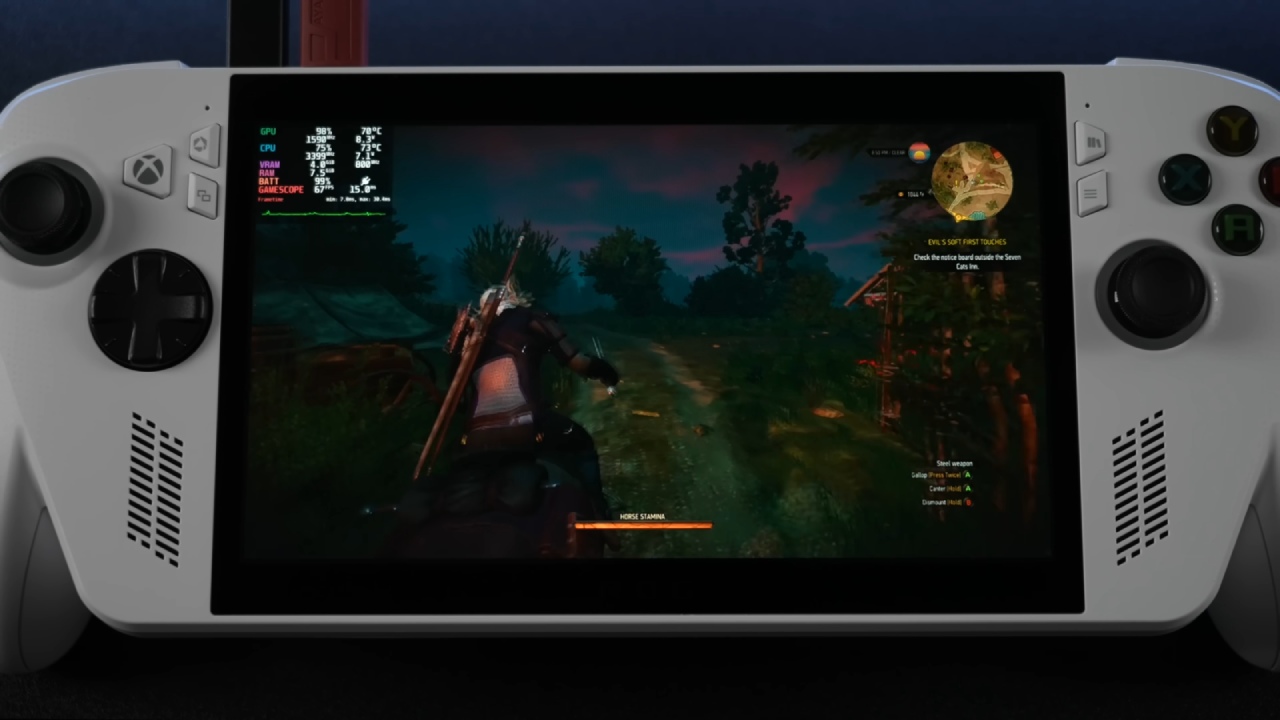
Xbox Ally X is similar to other consoles. It is a portable version of an Xbox controller. The curve, grip, and balance all fall into place when we pick it up. It feels lighter than it is, even if it is rather hefty, since muscle memory kicks in. This device wins hands down if comfort is the most important thing.
You can see right away that the MSI Claw 8 AI+ is different. It's bigger, heavier, and more bulky. You still know that you are holding a device. You can tell right away that it's big. Physical presence is an element of the experience, and it affects how you use it.
Display and Immersion in Visuals
The 8in display transforms the experience from the moment the Claw 8 AI+ turns on. Scaling the UI is important. Over time, smaller text gets tedious. Menus work better on the Claw. Open-world games feel bigger, and your eyes don't hurt as much because you don't have to squint as much. That extra inch makes a difference.
The panel stays bright and speedy when you go back to the Xbox Ally X, but the screen feels tighter after using the 8in display. Ally X wins in hand, and the Claw 8 AI+ wins in visual space. One is about getting into something by touch, and the other is about getting into something by sight. There is a real tradeoff.
How well it Works and how Hot it Gets
Both systems are powerful and work almost the same. Most games run smoothly on the Xbox Ally X, and benchmarks show similar figures. In heavier games like Battlefield 6, you can see increased heat and sometimes instability when the load is on for a long time. Everything is still playable, but with time, things start to change.
After it was released, the Claw 8 AI+ improved. Intel drivers are updated regularly. XeSS2 is here, and XeSS3 with frame generation is coming to games that support it. MSI Center M started off rough, but it improved and became more responsive over time. Long-term commitment is shown by ongoing assistance. The Intel platform no longer feels like a tradeoff in this area.
Experience with Software and Flexibility
Both devices use Windows, so it's normal to switch between launchers, navigate the desktop, and install updates. Asus Armory Crate SE is included with the Xbox Ally X, which adds a more curated layer. It's easy to swap between performance profiles. The controller's settings are all in one place. The built-in game library makes it feel more like a console. Windows is still there, but the presentation is consistent.
MSI Center M is on top of Windows on the Claw 8 AI+. It got better, but it feels more like a PC overlay than a console shell. Ally X is also flexible. It can run Bazzite without any problems, and if you don't want to use Windows, you can set it up like SteamOS. Claw 8 AI+ is still all about Windows. The distinction is in how they think. One gives you a way out, while the other immediately improves the Windows experience.
How it Works in the Real World and how Comfortable it is
Usage scenarios show the pros and cons. Claw 8 AI+ feels like a movie when you sit on a couch with your elbows on the armrests and the device on a pillow. The bigger screen makes us want to play the game. The screen size enhances immersion.
Xbox Ally X is comfortable to handle as you lie in bed with it above your head. The design and balance of the controller-like shape make it easier on your body. After around 45 minutes, the differences are evident. If you squint, you can see the screen size on the Ally X. The Claw 8 AI+ is big and heavy, making its screen size easy to see. Both devices are comfy, but each one reminds you of its tradeoff.
Sound, Heat, and Battery
Both systems speed up under load. After playing for a while, the Xbox Ally X feels warmer and makes a little more noise from the fan. Claw 8 AI+ has a quieter sound profile and feels more controlled when it comes to heat, yet it still works well under heavy loads.
Battery life is about the same under normal use, such as playing AAA games at a greater brightness. You should be able to use it for a few hours before needing to plug it in. In real-life gaming situations, the differences are small.
Audio and Practical Things to Think About
The sound quality on both devices is good. Claw 8 AI+ makes a sound that is a little fuller. Xbox Ally X makes a lot of noise for its size, which is impressive. Both devices sound great and don't have any problems.
Using a tempered screen protector on the Xbox One X maintains touch sensitivity while preventing scratches. A thin case with an SD card slot and a strong handle makes it easier to carry without adding weight. Useful attachments make things easier to use over time.
Final Thoughts
Xbox Ally X is still the best choice if comfort is your top priority. It feels natural, comfortable, and easy to hold for long periods. If screen immersion is more important, the MSI Claw 8 AI+ is the better pick because the 8in display gives you more room to see and reduces eye strain.
For some, the size of the screen may make engagement more important than how easy it is to hold. Any tool is fine. Every one of them puts a different kind of experience first. Which one to choose will rely on how important comfort or full immersion in the visuals is for daily use.
Also, check our other articles below :
- ASUS ROG Ally X Handheld Review: Double the Battery, Double the Comfort
- Nintendo Switch 2 Vs. Original Switch 1: A Full Comparison
- How To Connect A Camera And Join Voice Chat With Nintendo Switch 2
- Nintendo Switch 2 Review: Handheld Performance, Features & Value Breakdown
- ROG Xbox Ally X Vs. ROG Ally X: Display, Battery & Controls
- ASUS ROG Ally X vs. Steam Deck OLED: Display, Battery & Gaming Benchmarks
- MSI Claw 8 AI+ Review: Display, Controls & Gaming
- Nintendo Switch 2 vs. Steam Deck OLED: Gaming, Performance, Battery, Display and Value
- PlayStation Portal Review: Remote Play, Cloud Streaming & Travel Gaming
- PlayStation Portal vs. Lenovo Legion Go: Best Portable Gameplay
- Cyberpunk 2077 Patch 2.3 FPS Test on MSI Claw 8 AI+
Editor, NoobFeed
Gaming Hardware Updates
No Data.