
WWE 2K26 Guide | Best Camera, Controls and Gameplay Settings
Here's a guide for best Camera, Controls and Gameplay Settings for WWE 2k26.
Game Guide by Navid Kabbo on Jul 28, 2026
If you’re looking for the best WWE 2K26 settings, you’ve come to the right place. Modifying the game's settings can significantly enhance your experience, whether you're a casual player looking for some exciting matches or a veteran seeking a realistic WWE simulation.
This guide will cover the best graphics, difficulty, gameplay, and controller settings to get the most out of WWE 2K26.
Best Gameplay Settings
These settings offer a balanced experience with competitive yet realistic matches.
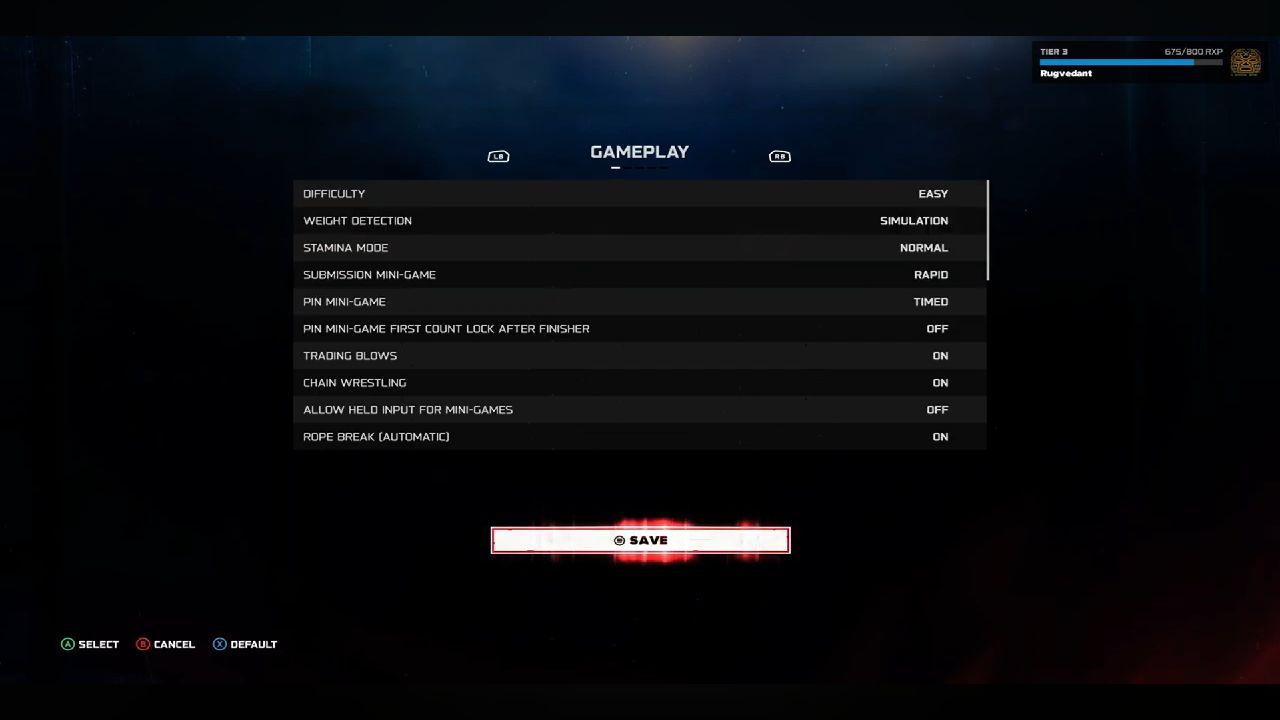
Recommended Settings
- Difficulty- Hard (Experienced Players) / Normal (Beginners)
- Weight Detection- Simulation
- Targeting- Manual
- Auto Reversal Prompt- Off
- Camera Cut- On
- Blood- On (Optional)
- Stamina- On
- Rope Break- On
These settings make matches feel more realistic and reward skill over button mashing.
Best WWE 2K26 Difficulty Settings
One of the most important settings in WWE 2K26 is choosing the right difficulty. It influences the AI's attack aggression, how often it reverses your moves, and the overall difficulty of matches.
If you’re just learning the mechanics, it’s best to start on a lower difficulty and work your way up as you get comfortable with reversals, combos, and submissions.
Easy
- Perfect for beginners
- Great for learning controls
- AI rarely counters your attacks
Normal
- Balanced challenge
- Best for casual players
- AI uses combos and reversals without being overwhelming
Hard (Recommended)
- Most realistic experience
- AI performs frequent counters
- Longer, more competitive matches
Legend
- Designed for experienced players
- AI reacts quickly to mistakes
- Requires excellent timing for reversals and submissions
Recommendation: Most players will enjoy Hard difficulty, as it provides the best balance between challenge and realism.
Best Gameplay Sliders for WWE 2K26
Gameplay sliders determine how matches are played out. If you prefer television-style WWE matches instead of quick squash matches.
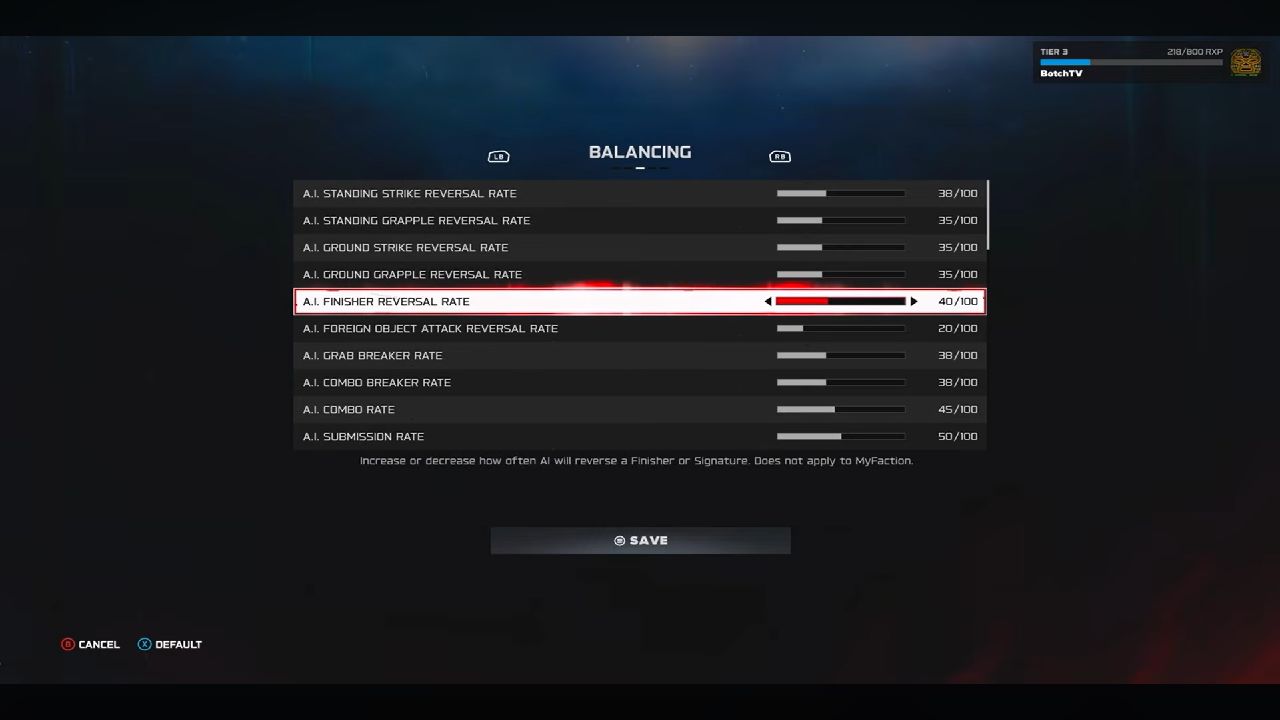
Try these settings:
- AI Reversal Rate- 60
- AI Strike Reversal- 55
- AI Grapple Reversal- 55
- Finisher Strength- 70
- Signature Strength- 65
- Stamina Recovery- 45
- Stamina Drain- 55
- Weapon Damage- 50
- Pin Escape Difficulty- 60
- Submission Difficulty- 55
These values help create longer, more dramatic matches while keeping gameplay fair.
Best Controller Settings
WWE 2K26 comes with a default controller setup that works well enough for most players, but you can make matches feel more responsive and improve overall performance by tweaking a few options.
Whether you play offline or online competitively, these settings will help you react faster in those heated moments.
Controller Vibration
- On for immersion
- Off if you prefer consistent inputs
Target Switching
- Manual
Button Mash Accessibility
- Use only if you struggle with repeated button presses.
Input Buffer
- Leave at the default setting unless you notice responsiveness issues.
Best Camera Settings
The camera is a big part of the feel in WWE 2K26 matches. Though the default camera gives you a good experience, tweaking some settings can improve visibility and make matches feel more like a live WWE broadcast.
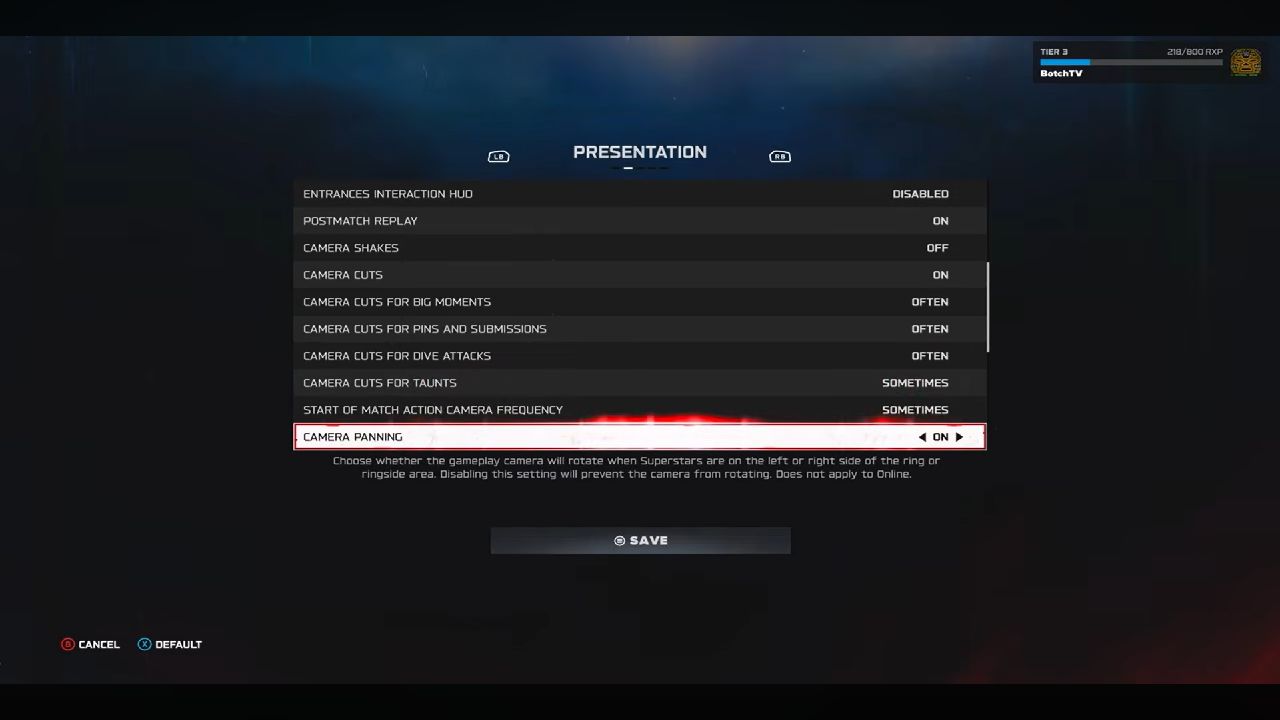
Recommended settings:
- Camera Cuts: On
- Dynamic Camera: On
- Camera Shake: Low
- Entrance Camera: Default
- Replay Frequency: Medium
These options provide a broadcast-style presentation without becoming distracted during gameplay.
Best Settings for Realistic WWE Matches
If realism is your priority, use this setup:
- Difficulty: Hard
- Weight Detection: Simulation
- AI Reversal Rate: 60
- Stamina: On
- Blood: On
- Rope Breaks: On
- Manual Targeting
- Camera Cuts: On
This combination creates longer, more strategic matches that feel closer to WWE television broadcasts.
Tips for Better Gameplay
- Learn reversal timing rather than relying on button-mashing.
- Save your Signature and Finisher for key moments rather than using them immediately.
- Manage your stamina to avoid becoming vulnerable late in the match.
- Mix strikes, grapples, and aerial attacks to keep opponents guessing.
- Practice with different wrestlers to understand their unique strengths and move sets.
Final Thoughts
The best WWE 2K26 settings will depend on what kind of experience you’re looking for. Players looking for realistic, TV-style matches should prioritize Hard difficulty, enable Simulation-based gameplay options, and fine-tune the gameplay settings to encourage longer, more competitive bouts.
There's no single setup that's perfect for everyone, so don't hesitate to tweak the sliders and options to match your preferred playstyle.
Also, check our WWE 2K26 review and other guides below:
Editor, NoobFeed
Latest Articles
No Data.