
ASUS ROG Raikiri 2 Full Features and Performance Breakdown
Built to support multi-device gaming through tri-mode connectivity and customizable button configurations for varied play styles
Hardware by Shinji Okazaki on Dec 10, 2025
After a long wait, users on all platforms may now get their hands on ROG Raikiri 2. This accessory has been one of the most desired in recent memory, thanks to both prior models and early hands-on impressions.
The device is designed for gaming across multiple platforms and features that make it more compatible, durable, and customizable.
Unboxing and Accessories
The first thing you see when you open the box is a hard-shell case. There are a few extras that you need to get to the controller first. There are stickers and a manual in the box. There is a wireless charging dock inside the case for quick placement charging. When you plug in the dock, the controller starts charging right away as soon as you put it in the cradle.
The dock has several modes and may either sit flat or use the removable feet that come with it. These feet let the dock be tilted in different ways depending on its orientation. An insert inside the case allows you to dock and charge the controller while it's still inside.
There are also extra caps for the thumbsticks. These caps are a little taller than the stock ones, giving them a different feel and making them more accurate for people who want longer sticks.
Tri-Mode Connectivity and Compatibility
The supplied USB dongle lets Raikiri 2 work wirelessly with Xbox. It works with Xbox Series X and S, the PC, and ROG Ally. When you use the Ally interface in a living room with a dock or XG Mobile, the dedicated command center and library buttons work.
There are a few ways to connect: a 2.4 GHz low-latency wireless connection via the dongle, Bluetooth when the dongle isn't available, or a USB-C cable. Xbox Series X and S are certified to work with both 2.4GHz and wired modes. Bluetooth lets you connect to PCs and mobile devices. ROG The SpeedNova wireless technology polls at 1000Hz on 2.4GHz.
There is a switch on the back that lets you switch between Bluetooth and dongle modes, as well as Xbox, PC, and cable modes. The dongle fits in a little compartment under a flap.
Buttons, Controls, and Design
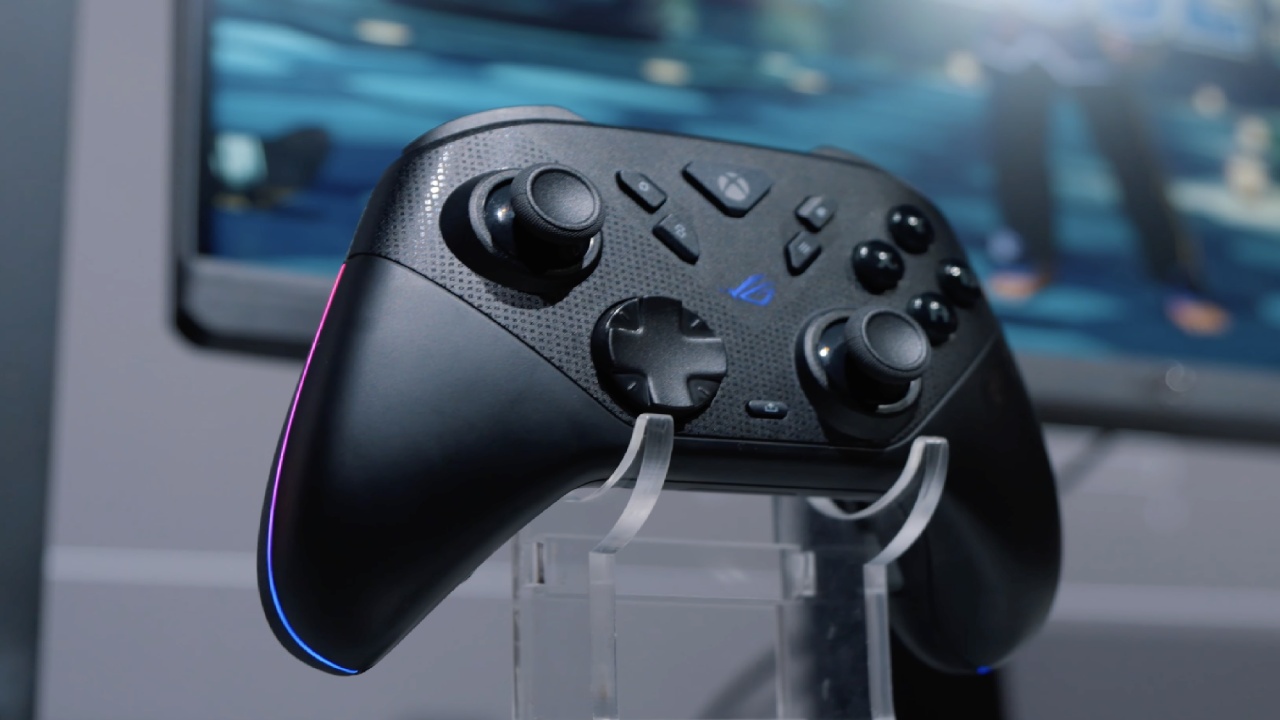
Raikiri 2 is the next version of the Pro model. You may change the height of the sticks, and the trigger stops let you use short-throw triggers. Four programmable back buttons give you more control possibilities.
The joysticks have TMR sensors that don't drift, similar to Hall-effect technology, but use less power and are more accurate. Analog triggers work OK; however, when the stops are turned on, they become micro-switch triggers.
Micro switches are used for all the main buttons, including ABXY, bumpers, the D-pad, and the back button. These have very little travel and make a clicking sound. When you use the stops, the triggers also click. This design allows for quick actuation, just like high-actuation keyboards.
The shell resembles an Xbox controller, with sticks of different lengths. Grips have a slightly rough surface to prevent slipping.
Back Buttons and Customization
You can fully enable or disable the back buttons. People who don't use back buttons can turn them off. The controller works fine even if the back buttons are pressed by mistake and not assigned.
Battery Life and Light
With 2.4GHz wireless with RGB, music, and vibration turned off, the battery can last up to 50 hours. Turning on these features will shorten battery life. There is a thin RGB strip along the edges of the controller that you may change in Armory Crate.
.jpg)
Works with ROG Ally and XG Mobile
ROG Ally controller has buttons for the command center and the library. When used with a dock or XG Mobile, this lets you play games on your couch. From the controller, users can open the command center. These special buttons don't work on older Raikiri models.
Final Thoughts
ROG Raikiri 2 has a layout that works with Xbox, PC, and portable gaming. It has greater compatibility, customizable controls, non-drifting sticks, and micro-switch buttons that respond quickly. The controller has tri-mode connectivity, dock charging, customizable parts, and works with the ROG Ally so that you can set it up for different play areas.
Users can count on a consistent input experience thanks to customisable features, longer battery life, and design decisions that make the device easy to carry and use on a desk.
Also, check our other ROG Xbox Ally articles below:
- ROG Xbox Ally X vs. Original Ally: Real-World FPS and Power Efficiency
- Next-Gen Xbox or No Console: Understanding the Impact on Games and Gamers
- Inside the ASUS ROG Xbox Ally: Power, Portability, and PC Gaming Without Limits
- ASUS ROG Xbox Ally Review: Ergonomics and Windows 11 Full-Screen Experience in 2025
- ASUS ROG Xbox Ally X Hands-on: Ryzen Z2 Extreme Power and Full-Screen Windows Experience
- Xbox Magnus: Next Generation Console with AI Power and PC Hybrid Design
- ROG Ally X Gets Xbox-Like Features with Latest Armoury Crate Update
- Future of Xbox: Cloud Gaming, Game Pass, and Hardware Exit Plans
- Xbox Series X vs. Xbox One X: Which Console Is Best for Backward Compatibility in 2025
- Xbox Full Screen Experience on the Lenovo Legion Go
Editor, NoobFeed
Gaming Hardware Updates
No Data.