
Gigabyte B850 Aorus Elite Wi-Fi 7 Review: Best Budget AM5 Motherboard in 2025
Offering next-generation connectivity and stable power delivery, the motherboard targets budget-conscious builders upgrading to Ryzen 7000 or 9000 CPUs.
Hardware by Tanisha Aria on Oct 30, 2025
The B850 Aorus Elite Wi-Fi 7 stands as a solid budget-friendly option in the latest lineup of Aorus motherboards. It carries forward many of the user-focused features seen in higher-end boards, such as the Stealth and the X3D Master Ice, but with a more accessible price point and a simplified design that maintains essential functionality without unnecessary frills.
.jpg)
Design and Build Quality
The B850 Aorus Elite Wi-Fi 7 may lack some high-end features, such as a full metal backplate, but its design remains clean and functional. Aorus has toned down its designs and moved away from the flashy styles that gamers typically prefer. They chose a more balanced look that complements a wide range of builds.
The board may not look like much, but it features useful components, including PCIe latches and EZ-latch mechanisms for the M.2 slots. This makes it easy to install and maintain, even on a limited budget.
At this price point, we think it's great that there are three M.2 slots, each with a quick-release cover. These simple but effective design choices make it easier to set up and change parts, making the assembly process more convenient.
Features and Gaming Optimization
The B850 Elite doesn't have Aorus's Turbo Mode 2.0, which is in the X3D lineup, but it does have the regular Turbo Mode.
This mode dynamically adjusts the CPU configuration by disabling secondary CCDs and SMT, potentially improving gaming performance by up to 18%. For people who play games, this can make things feel more responsive; however, those who use their computer for work will likely want to keep SMT on so they can utilize more cores.
We were surprised to find power and reset buttons on the board, which are features that are often missing from motherboards in this price range.
The back panel of the board also features a BIOS key flash, a nice touch for quickly updating firmware. Aorus doesn't have a separate two-digit debug display. Still, it does have diagnostic LEDs for the CPU, memory, VGA, and boot, which makes it easy to troubleshoot visually.
Power Delivery and Compatibility
Power delivery on this board is configured as 14+2+2 phases, offering sufficient stability for all current AMD Ryzen 9000 CPUs. It's fully compatible with Ryzen 7000 and 9000 series processors. While Ryzen 8000 support is available, we generally find performance trade-offs when using those chips due to lane and PCIe bandwidth limitations.
Memory support is generous, with four DIMM slots supporting up to 256GB DDR5. Given the increasing capacity of modern memory modules, it's likely that future boards will extend this standard to 512GB.
Installing memory feels smooth and visually cohesive with dark, non-RGB kits—particularly ones like Corsair's Vengeance series—matching the board's understated aesthetic.
PCIe and M.2 Configuration
We find it refreshing that the B850 Aorus Elite Wi-Fi 7 avoids the usual pitfalls of lane sharing. Despite the presence of three full-length PCIe slots, only the top slot is a true PCIe 5.0 x16, directly linked to the CPU. The remaining two slots are physically x16 but electrically x1 each, meaning there's no resource conflict with M.2 or USB lanes.
There are three Gen5 M.2 slots and one Gen4 M.2 slot on the board. The M2A_CPU slot, being the primary one, connects directly to the CPU for the fastest speed. The second one, M2B_CPU, works with Gen4, and the third one, M2C_SB, connects to the chipset.
Each slot can accommodate drives up to 22110 in size, but standard 2280 drives are most commonly used. The EZ-latch system makes it easy to install M.2 drives without needing tiny screws, making things more convenient overall.
Networking and Connectivity
The board has a Realtek 2.5Gb LAN port and a Realtek Wi-Fi 7 module for connecting to the internet. This is good for a product that costs less than $200. Wi-Fi 7 supports a 160MHz bandwidth and can transfer data at speeds of up to 2.9 GB/s.
This means that wireless performance is fast and stable. The antenna attaches to the case with magnets, making it easy and safe to place on a metal case.
Rear and Front I/O
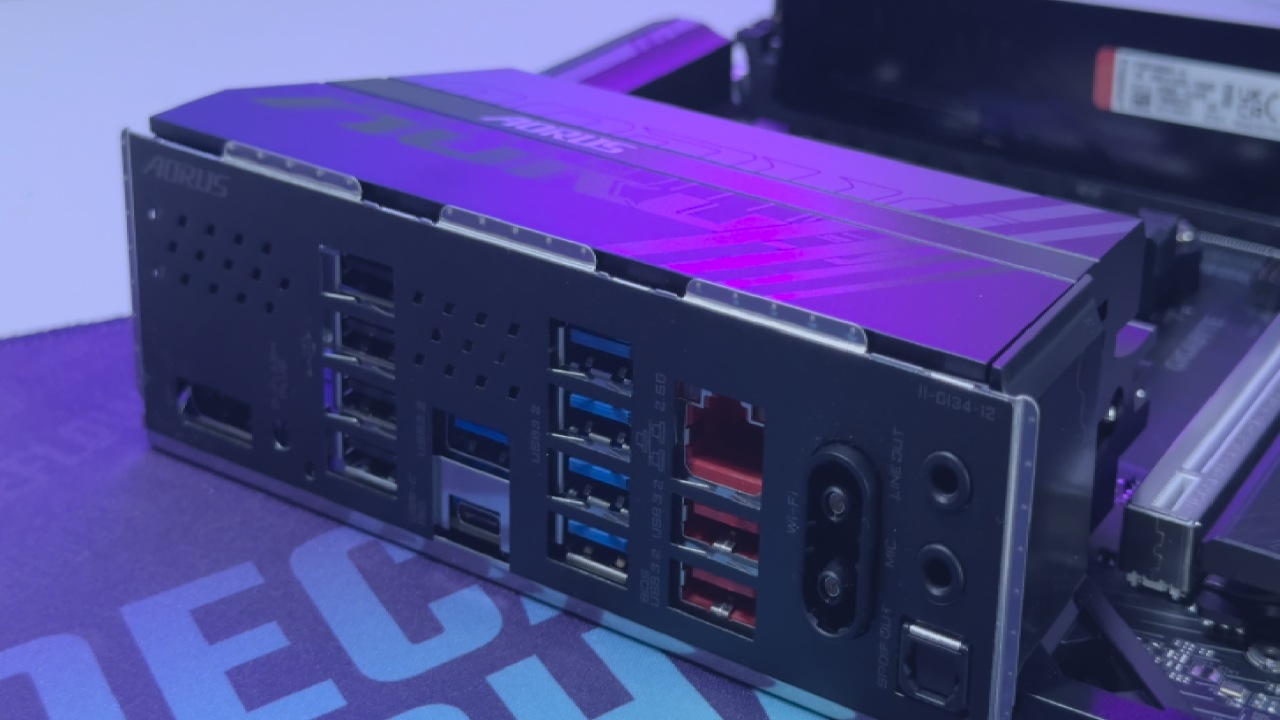
The back I/O doesn't have USB4 or 20GB Type-C ports, but it does have a full set of twelve USB connections. The device features one 10GB Type-C port, two 10GB Type-A ports (red), five 5GB Type-A ports (blue), and four USB 2.0 ports. This range has everything you need for most gaming and workstation setups.
The front panel can hold up to seven USB connections. The device features a 20GB internal Type-C header, one standard USB 3.0 header (supporting two ports), and two USB 2.0 headers for peripherals such as fans or RGB controllers.
Aorus features a DisplayPort 1.4 connection for display outputs that can handle resolutions of up to 3840x2160 at 144Hz, courtesy of the built-in AMD graphics. It's interesting that HDMI is only available as an internal header and can only support resolutions up to 1920x1080 at 30Hz.
This product is niche, but it could be useful for people who want to connect internal displays or cases with front HDMI passthrough.
.jpg)
Final Thoughts
The Gigabyte B850 Aorus Elite Wi-Fi 7 is a good deal at $199. It has a good balance of performance, ease of use, and design. It has enough power to run Ryzen 9000 series CPUs, numerous storage options, and advanced connectivity options like Wi-Fi 7, all while maintaining a professional and understated appearance.
It doesn't try to do too much by adding features that raise the price; instead, it focuses on what most builders really need: reliability, ease of setup, and good performance.
The B850 Aorus Elite Wi-Fi 7 is one of the best options in its category for individuals seeking a reliable AM5 motherboard without incurring a significant expense.
Also, check our other AMD articles:
- AMD Ryzen 9 9950X3D Review: Setting The Standard For 2025 Gaming CPU
- AMD Ryzen 7 9800X3D Review: 3D V-Cache Goes God Mode with Stunning Gaming Performance
- AMD RX 9070 Performance Review: Thermals, Clocks, and Real-World FPS
- AMD Ryzen 5 7600 Review: Best Budget Gaming CPU of 2025?
- AMD Radeon RX 7800 XT Review: RDNA 3 Power For Midrange Gaming
- Sapphire NITRO+ AMD Radeon RX 9070 XT Review: The Ultimate 4K Gaming GPU
- AMD Ryzen 7 7800X3D: Delivers Gaming Performance Far Beyond Expectations
- AMD Ryzen 9 7900X Review: Powering the AM5 Era with DDR5 & PCIe 5.0
- ASRock Radeon RX 7800 XT Challenger OC Review: Best Price-to-Performance GPU of 2025
- Intel Core i9‑14900K vs. AMD Ryzen 7 7800X3D: Power Profiles & Gaming Benchmarks
Contributor, NoobFeed
Gaming Hardware Updates
No Data.