
Lenovo Legion Go 2 vs. Original Legion Go: Performance, Display, Battery, and Design Compared
A detailed comparison highlighting design refinements, OLED display upgrades, performance gains, audio improvements, and extended battery efficiency across generations
Hardware by Tasnim Yoshi on Jan 28, 2026
We finally got to try out the Lenovo Legion Go 2 in the studio today. This is the Z2 Extreme, the more expensive variant. We've been waiting a long time for this device.
Since it came out, I've used the original Legion Go a lot. It's a great handheld because it has removable grips and a built-in kickstand. It can be used as a desktop replacement or as a real handheld gaming device.
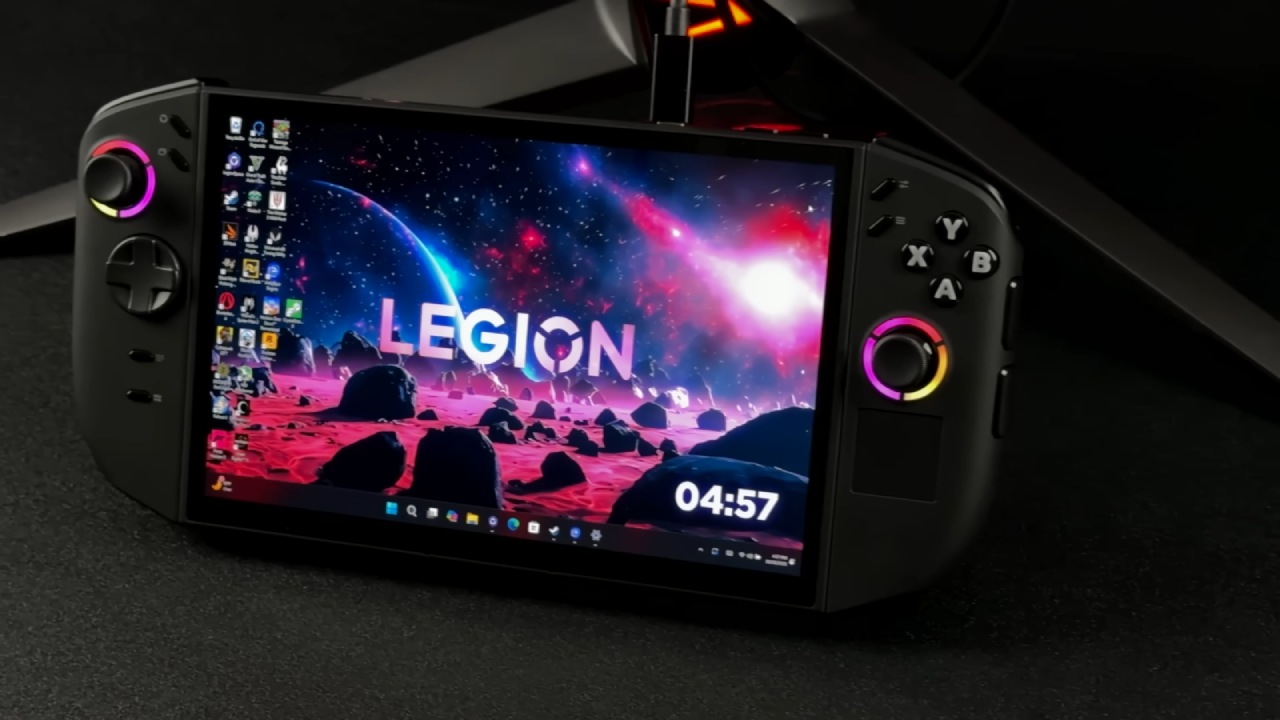
The first model was great overall, though it had some common flaws found in first-generation products. Because the new model costs a lot more, people naturally have higher expectations. The question is whether Lenovo has done a good enough job of fixing those problems to make the price worth it.
Specifications and Configurations
Before you compare the two devices directly, you should check the available configurations. Lenovo has added more options this generation. The Legion Go 2 can come with either the Z2 chip or the Z2 Extreme chip. Customers can also choose between 16GB and 32GB of RAM, with SSDs offering varying storage capacities. We think that in many cases, it's better to choose the lowest storage option and upgrade it yourself later.
The Z2 configuration is relatively expensive for what it offers, especially given its fewer graphics cores and an outdated Zen4 CPU architecture. We don't think it's worth the money compared to the much cheaper original Legion Go. The best choices are either the Z2 Extreme or an older Z1 Extreme Legion Go.
The Z2 Extreme we got has 32GB of fast RAM, a 1TB SSD, and an OLED screen. These features are the same on other Legion Go 2 variants. It also has a much larger battery than the first one. It is pricey, but it does come with many upgrades.
The original Legion Go launched at a significantly lower price, with a Z1 Extreme CPU, 16GB of RAM, and a 1TB SSD. Lenovo has obviously emphasized the premium positioning this year, and the price difference between the two generations is substantial.
Design and Display Improvements
Lenovo has kept the basic shape, but there are a number of small changes that are easy to see. The display is the biggest improvement. The first Legion Go had an 8.8-inch IPS display with a resolution of 2560x1600, 500 nits of brightness, and a 144 Hz refresh rate. The increased resolution made games seem great, but they sometimes had to operate at lower settings than they were meant to.
.jpg)
The Legion Go 2 keeps the same size (8.8 inches), brightness (500 nits), and refresh rate (144 Hz) as the original, but it now has an OLED panel and a more useful 1920x1200 resolution. This tweak lets more games run at their native resolution while still delivering the deep blacks and contrast OLED displays are known for. Once you've tried OLED, it's hard to go back to IPS. This change alone is a big part of the price rise.
Build Quality and Ergonomics
The removable controllers are still a key component, but they are now much more comfortable to use. The edges are more rounded, and the whole thing feels stronger. Compared to the original model, there is a lot less creaking and movement. This makes you feel more confident when operating the gadget in handheld mode.
The analog sticks feel great and protrude a little more than before, making them more accurate. The D-pad, on the other hand, is where the major change is. The first D-pad struggled with fighting games because it was hard to make precise inputs. The new D-pad is much better, which makes titles like Street Fighter, Mortal Kombat, and Tekken a lot more fun. This one improvement makes the gaming experience much better for lovers of the genre.
Button Layout and Software
There are now two more buttons on the button layout, and the roles of the current buttons have been changed. The menu and view buttons have been repositioned, and new desktop and task-switching buttons have been added. These adjustments are really helpful, especially when you need to navigate the operating system.
Lenovo's Space software handles all button remapping and performance profiles. Over time, the interface has improved, though it still looks the same across all Legion devices. It is well-organized and works effectively, with profiles, settings, and controller options easy to find.
Size, Weight, and Cooling
The Legion Go 2 is slightly thicker, heavier, and taller than the first one. When you use them, you can't tell the difference in weight. Better venting and a larger exhaust have improved thermal performance and reduced fan noise, which is notably noticeable during long gaming sessions.
Audio Performance
Both gadgets have speakers that point up, but the sound quality is far better on the one that points up. The Legion Go 2's speakers make the music much crisper and richer than the original, which sounds weak in contrast. This layout is necessary because of the detachable controller design; forward-firing speakers would still be better.
Ports and Connectivity
Both models have a USB4 connector on the top, but the Legion Go 2 moves the headset jack and SD card slot to the bottom. The SD card's location doesn't matter much; however, the headset jack at the bottom can be a problem when using the kickstand on a desk. The second USB-C port on the bottom also makes it harder to use in desktop-style settings. Based on what we've seen, dual top-mounted ports would have been a better option.
Kickstand and Accessories
The kickstand is still one of the best parts of the Legion Go series. It makes it easy to play games on a table or utilize a computer with external devices. The plastic feels a little flimsy, but the benefits exceed the negatives.
Lenovo has saved money by not including a travel case. The first case was hard and high-end, but the new one is softer and doesn't have some of the clever design elements. Even if it still protects, it feels like a degradation because the device costs more.
Detachable Controllers and Compatibility
It's nice to know that the new and old controllers will work together. People who already own the original Legion Go can buy the updated controllers separately, which could be a cheap way to upgrade. The controllers feel better in your hand, are more comfortable, and retain all their distinctive features, like touchpads and first-person shooter mouse mode.
The FPS mode is a specialized function, but it works effectively and remains a good choice in some situations. The provided attachments ensure the controllers can be used safely and comfortably in all available modes.
Performance and Gaming
Testing both devices on a dedicated configuration showed that the Z2 Extreme had clear gains in both the CPU and GPU. Geekbench 6 indicates a big improvement, especially in silent mode, which used to be very weak. Compared to the Z1 Extreme, the balanced and performance modes improve single-core responsiveness and increase multi-core performance by around 15%.
.jpg)
GPU performance improves significantly, in part because some profiles have stricter power constraints. Quiet mode now uses 14 watts instead of 9, while balanced mode uses 20 watts instead of 25. Both gadgets still have a performance mode that consumes 31 W. These upgrades lead to far-improved frame rates in demanding games like Cyberpunk 2077, especially when you add 32GB of RAM and more VRAM.
Fan Noise and Thermals
The thermal performance is better all around. The loud whine that was on the original Legion Go is gone, and the fans are quieter when the computer is not doing anything and when it is balanced. Fan noise can still increase at high load, but the overall sound quality is better and less distracting while playing.
Battery Life
The battery life is one of the best improvements. The Legion Go 2 has a battery that's about 50% larger, but the system's total power draw is still about the same as the original. Even at its brightest, the OLED screen still works well.
The gadget lasts about three hours of gameplay in balanced mode, and the battery life is much better across all profiles. Keeping the same power restrictions while expanding the battery capacity gives you a clear and useful edge.
Final Thoughts
The Legion Go 2 is definitely a pricey device, especially in its more powerful versions. But when you think about it and give it a discount, it's a big step forward from the original. Overall, the handheld is much better, with improved display, speakers, thermals, ergonomics, and battery life.
If you're a new customer and have to choose between the two, the Legion Go 2 is the superior option for those who are willing to pay more. If you already have a Legion Go, it could be harder to decide to upgrade because the performance gains might not be worth the money. In that case, it might be best to acquire the replacement controllers separately.
The Legion Go 2 is a terrific handheld overall, and practically every part of it has become better. But how much it's worth to you depends on how much money you have and whether you already own the last version.
Also, check our other articles below :
- ASUS ROG Ally X Handheld Review: Double the Battery, Double the Comfort
- Nintendo Switch 2 Vs. Original Switch 1: A Full Comparison
- How To Connect A Camera And Join Voice Chat With Nintendo Switch 2
- Nintendo Switch 2 Review: Handheld Performance, Features & Value Breakdown
- ROG Xbox Ally X Vs. ROG Ally X: Display, Battery & Controls
- ASUS ROG Ally X vs. Steam Deck OLED: Display, Battery & Gaming Benchmarks
- MSI Claw 8 AI+ Review: Display, Controls & Gaming
- Nintendo Switch 2 vs. Steam Deck OLED: Gaming, Performance, Battery, Display and Value
- PlayStation Portal Review: Remote Play, Cloud Streaming & Travel Gaming
- PlayStation Portal vs. Lenovo Legion Go: Best Portable Gameplay
- Cyberpunk 2077 Patch 2.3 FPS Test on MSI Claw 8 AI+
Subscriber, NoobFeed
Gaming Hardware Updates
No Data.