
Asus ROG Flow Z13 vs. M4 Pro MacBook Pro: Performance, Gaming, and Productivity
Design Philosophy and Build Quality Differences Between the Tablet-Style ROG Flow Z13 and Traditional MacBook Pro.
Hardware by Tanisha Aria on Dec 16, 2025
The Asus ROG Flow Z13, powered by the AMD Ryzen AI Max Plus 395, goes up against the M4 Pro MacBook Pro. This brings an unexpected level of competition to the thin-and-light speed category.
Now that Apple Silicon has set the bar for efficiency and speed, this comparison looks at how a next-generation x86 APU measures up against Apple's newest M-series chip across design, benchmarks, thermals, and everyday tasks.
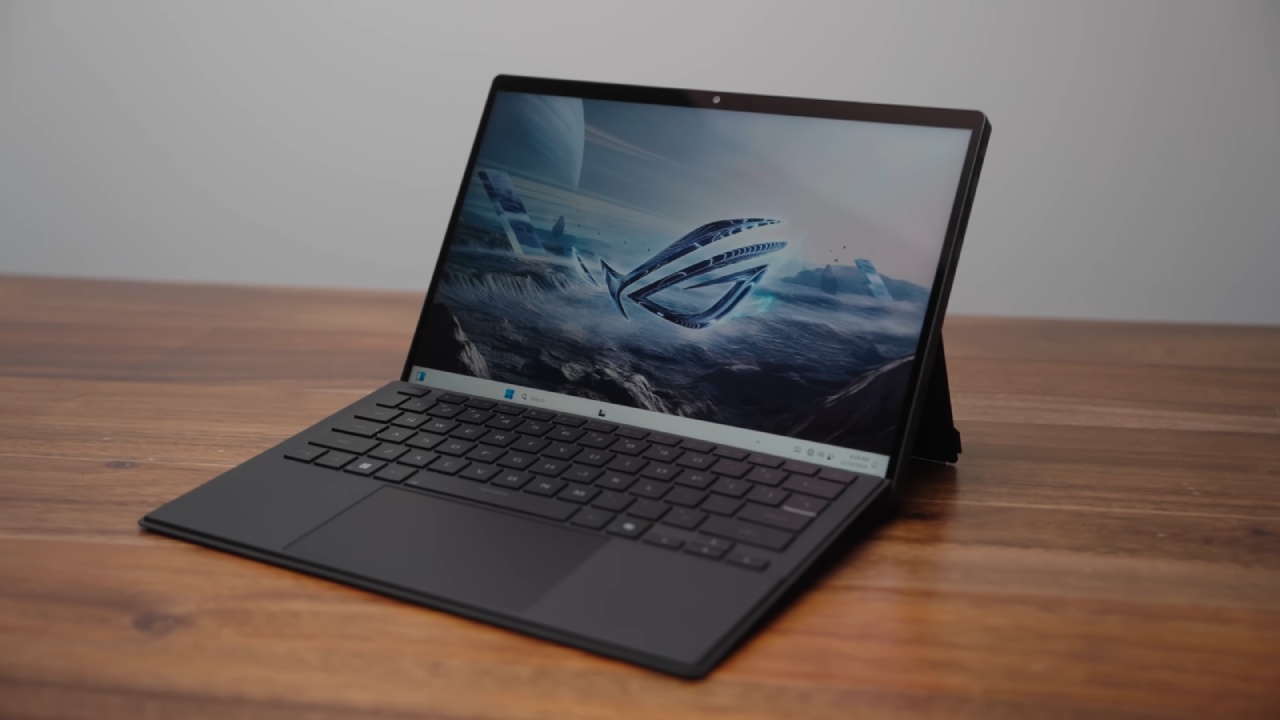
Design and Build Differences
The ROG Flow Z13 is a very powerful tablet with a removable keyboard and a built-in frame. Because of all the power packed into it, Asus still sells it as a gaming laptop, even though its size and shape make it very different from a typical laptop. Even though it's tablet-style, it has two fans, a vapor chamber, and doesn't need its own GPU.
The screen is a 2.5K panel that refreshes 180 times per minute and uses DCI-P3 to ensure accurate color. Memory support is one of the most interesting features of the Z13; the APU can be configured with up to 128GB of unified memory.
The M4 Pro MacBook Pro, on the other hand, only goes up to 64GB. The Z13 might be a little more expensive at base. Still, it offers 1TB of storage and better RAM options, making it a better value when similarly configured.
The build quality is great because the body is made of metal, and there is a see-through window that shows the mainboard. For a tablet-style device, the choice of ports is also amazing. It has microSD, USB4, HDMI 2.1, and regular USB ports, giving you options that many thin-and-light machines don't offer.
CPU Performance: Geekbench 6
We ran Geekbench 6 on both computers to test CPU performance. The M4 Pro has a 12-core CPU with very high clock speeds, and the AMD chip has 16 cores and a top boost clock of 5.1GHz. The M4 Pro leads by about 26% in single-core performance, showing how good Apple's per-core performance still is. In multi-core tests, the gap narrows to just 11% between the two.
The 4nm build of the AMD chip, combined with its integration into a single APU, makes these numbers very impressive, especially since the M4 Pro architecture is so new.
CPU Performance on Battery
On the ROG Flow Z13, we also tried Geekbench 6 while it was unplugged. The system limits access to performance mode when running on battery power; it can only be used when plugged in.
Because of this, performance drops significantly with multi-core, and the M4 Pro ends up performing 54% better, a 43% larger difference than before. For long, high-performance jobs, the Z13 needs to be plugged in.
.jpg)
GPU Performance: Geekbench Metal and 3DMark
For testing the GPU, we used Geekbench6 Metal on the MacBook and OpenCL on the Asus machine for comparison. In this test focused on processing power, the M4 Pro scored about 100,000 points, while the Z13 scored about 83,500 points. This means Apple had about a 19% lead.
However, gaming success tells a different story. The ROG Flow Z13 achieved 63.3 fps in 3DMark Steel Nomad Light's infinite mode, while the MacBook Pro achieved only 49.8 fps. The AMD-powered device has a 27% lead, is fully compatible with x86 games, and doesn't need translation layers.
Sustained Performance and Thermals: Cinebench2024
We ran stress tests with Cinebench2024 on both CPUs while monitoring noise and temperature. The AMD chip kept clocks of about 3.1GHz to 3.2GHz under full load, but the M4 Pro ran at about 3.9GHz. Even though the MacBook ran louder and hotter, with temperatures over 100°C, the ROG Flow Z13 kept its temperatures around 81°C, even with lower clocks.
After a long period of stress, thermal imaging showed that the Asus device was able to properly dissipate heat. The exhaust temperatures ranged from 42°C to 46°C. In the end, the AMD system beat the M4 Pro in the Cinebench scores, 1381 to 1318. This showed that it had better continuous multi-core performance under full load.
Everyday Performance: Web and Design Workloads
For normal tasks, Speedometer 3.0 showed that the M4 Pro had much better single-core performance, making it much faster for web-based chores. But when we started doing Figma web design jobs, both systems felt very quick. On both computers, loading large projects and zooming and panning were smooth.
The times for exporting as many layers with high quality were almost the same. The MacBook exported in 1 minute and 14 seconds, and the Asus system ended in 1 minute and 15 seconds. The fact that an x86-based machine was so close was a surprise.
3D Rendering in Blender
3D Rendering in Blender. Both computers performed well in Blender rendering. The M4 Pro passed the test in 43.6 seconds, but the AMD system took about 55 seconds, even with experimental GPU features enabled.
Changing the VRAM from 8GB to 16GB didn't change the results for this scene, indicating the workload wasn't memory-bound. Being able to add much more memory, on the other hand, is still a big help for complex projects and future work.
In Lightroom Classic, Memory Allocation and Photo Editing
In Lightroom Classic, we sent 500 high-resolution RAW pictures out to the world so they could be edited like photos. At first, the MacBook was way ahead, but the ROG Flow Z13 slowly closed the gap.
The Asus finished exporting in 6 minutes and 13 seconds, and the MacBook finished in 6 minutes and 16 seconds. The final export times were almost the same.
After moving memory around to give the CPU 24GB, the speed increased significantly. The export time was 5 minutes and 19 seconds, which was faster than even the best M4 Pro setups. This shows that the AMD APU's speed can be significantly affected by memory allocation.
.jpg)
Final Thoughts
The ROG Flow Z13's AMD Ryzen AI Max Plus 395 performs so well that it challenges Apple Silicon across tests and real-world tasks. This is not something that x86 devices usually do. The M4 Pro is still better at single-core tasks and web speed. Still, the Z13 is better at sustained multi-core workloads, gaming, and memory flexibility.
The ROG Flow Z13 is a big step forward for people who want a thin, portable device that can run games, creative work, and heavy multitasking without a dedicated GPU. The combination of strong performance, lower long-term temperatures, and ample memory space shows that real competition has finally arrived in this category.
Also, check our other hardware articles:
- AMD Ryzen 9 9950X3D Review: Setting The Standard For 2025 Gaming CPU
- Amazon Luna 2025 Review: Is Prime Gaming's Cloud Service Your Go-To For Casual Fun?
- AMD RX 9070 XT Review: AMD's RDNA 4 Champion for 1440p Gaming
- GeForce Now Ultimate: Ditching Your Gaming PC For Cloud RTX 4080 Power?
- NVIDIA GeForce RTX 5080 Review (2025): Still A 4K Gaming Powerhouse?
- Intel Core Ultra 9 285K Review And Performance Breakdown (2025)
- AMD Ryzen 7 9800X3D Review: 3D V-Cache Goes God Mode with Stunning Gaming Performance
- Intel Core Ultra 9 285K vs AMD Ryzen 7 9800X3D: In-Depth Gaming Performance and Benchmark Comparison
- NVIDIA GeForce RTX 5080 Super Performance In Cyberpunk 2077: Path Tracing & DLSS 4.0 Tested
- AMD Radeon RX 9070 XT In Cyberpunk 2077: Ray Tracing & FSR 4.0 Tested
- Intel Arc B580 Review: The $250 GPU Revolutionizing 1440p Gaming
- Intel Arc B570 Vs. B580: Value, Specs, And Real-World Gaming Performance
- RTX 5090 Laptop Vs. M4 Max MacBook Pro: Ultimate Raw Performance Vs. Battery Endurance
- Intel Arc b580 Vs. RTX 4060: Game Performance And Value Analysis
- RTX5090 Hell Is Us Demo 4K Ultra Benchmark: DLSS Vs. Native Performance Guide
- NVIDIA RTX 5070 Review: Mid-Range Muscle or Marketing Hype?
- Nintendo Switch 2 Review: Handheld Performance, Features & Value Breakdown
- RTX 5070 Ti Review: Performance, Thermals & Power Efficiency Tested
- Samsung Odyssey OLED G81SF Review 2025: Ultimate 32-Inch QD-OLED Gaming Monitor
- AMD RX 9070 Performance Review: Thermals, Clocks, and Real-World FPS
- AMD Ryzen 5 7600 Review: Best Budget Gaming CPU of 2025?
- AMD Radeon RX 7800 XT Review: RDNA 3 Power For Midrange Gaming
- Asus ROG RTX 5090 Astral OC Vs. Founders Edition: The 4K Gaming Benchmark
Contributor, NoobFeed
Gaming Hardware Updates
No Data.