
ROG Xbox Ally X Long-Term Performance and Display Experience
Windows interface still behaves like a PC despite Xbox full experience integration across handheld devices.
Hardware by Nahe Yan on Jan 14, 2026
Three months after using the ROG Xbox Ally X, I still have both good and bad things to say about it. The Dbrand skin and extra thumb grips make the gadget look distinct, easier to hold, and more comfortable to use. The device's look has changed, but using it every day shows how it works over time in real-world situations.
ROG Xbox Ally X's ergonomics are one of its best features. Even after extended gaming sessions, the tablet is comfortable to hold. The shape and grip design make it easy to use for long periods without discomfort. The thumb grips make it easier to manipulate and handle, resulting in a smoother game.
.jpg)
Hardware and Performance
Over the previous three months, performance has stayed the same. We were able to play all the AAA games we wanted with 24GB of RAM and the Z2 Extreme CPU. The Z2 Extreme is better than the Z1 Extreme, but not by a lot. In real life, performance is equivalent to that of other high-end handhelds, notably those with 16GB of RAM.
Noise Levels and Battery Life
We still like how quiet the device is while we play. The fan noise stays minimal even when you play hard games. Depending on the games being played, the battery can last anywhere from 2 to 4 hours. This gives you ample freedom to play games for short and medium sessions without having to charge them often.
Quality of the Speaker
The speakers sound great. Once the level exceeds 50%, the sound becomes loud without perceptible distortion. This means you can play games on the tablet without needing external speakers or headphones.
Windows and Xbox Game Pass: What You Need to Know
ROG Xbox Ally X runs Windows, which lets us use Xbox Game Pass PC on the move. This is a cheap way to play many games. But the entire Xbox experience is no longer only available on this device. Microsoft has made it available on all Windows handheld gaming devices, which takes away the distinctive selling point that used to set the Ally X apart.
Updating Windows on your Z1 Extreme device offers you access to the same Xbox interface and performance. The system still behaves like a PC rather than a console, which changes how users experience it.
How the System Works in Sleep Mode
We still have problems with the sleep mode. Sometimes, when the device is put on standby, it doesn't rest properly. The battery may already be dead when you get back an hour or two later. In other circumstances, the system keeps turning on and off when plugged in, causing the device to get hot even when it's not in use.
These issues aren't just with the ROG Xbox Ally X; other Windows portable devices exhibit the same behavior. But some thought that the complete Xbox experience would make the iPad feel more like a console. It still acts like a PC, though.
Compared to the Steam Deck
Steam Deck OLED still seems more like a portable console than a tablet. Compared to the ROG Xbox Ally X, it gives you a smoother, more console-like experience. Steam Deck OLED is still the best choice if you want a device that feels more like a gaming console than a PC.
Worries About the Quality of the Build
We heard cracking and creaking sounds coming from one side of the device not too long ago. The back cover has never been removed, but the plastic makes noise when you press it. This problem doesn't happen with any of the other devices in our collection. Over time, this makes people worry about how long it will last.
Z2 Extreme Performance Reality
Z2 Extreme processor is getting too much attention. The performance difference between the Legion Go Z1 Extreme and the Legion Go Z1 is very small. The extra 24GB of RAM is what makes things run better, not the processor itself. You don't need to upgrade if you already have a Z1 Extreme gadget, just for better performance.
Limitations of the Display
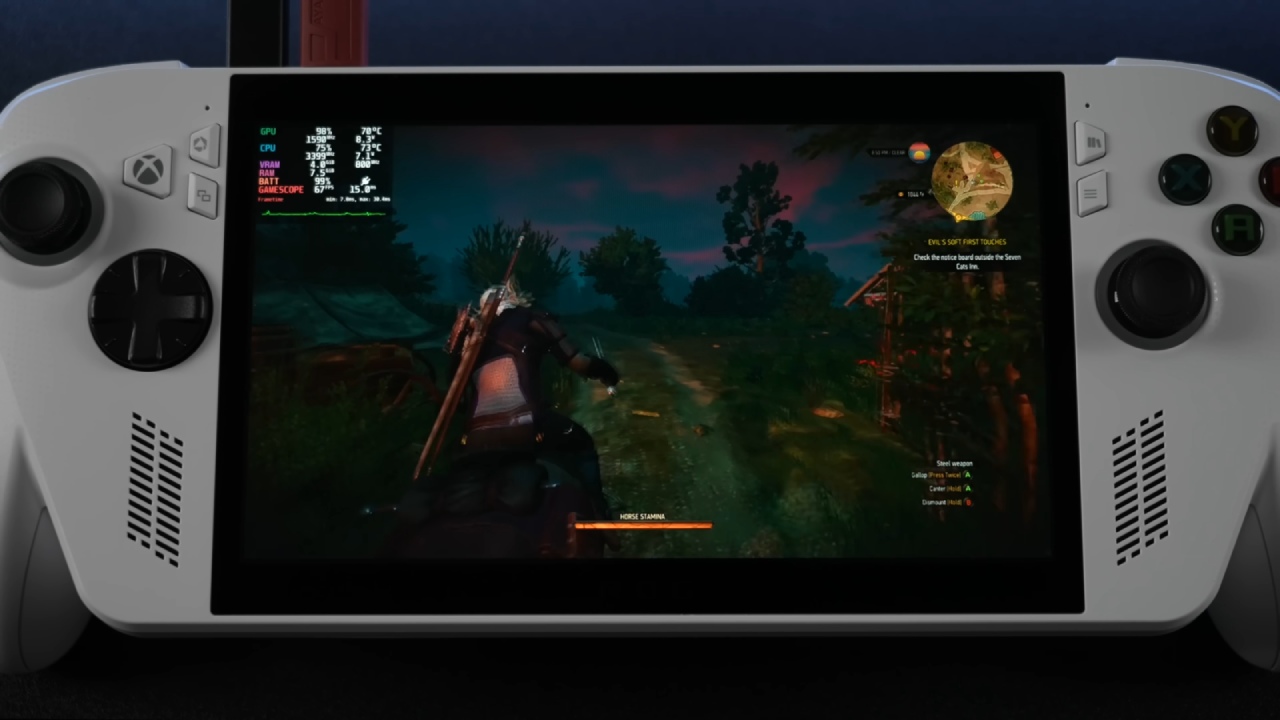
The screen is still the major problem. Compared to other mobile devices, the 7-inch 16x9 display seems modest. The large bezels at the top and bottom make the screen less usable. A 16x10 aspect ratio would have made it easier to see.
The screen is where you interact with any device. If it doesn't fulfill expectations, overall satisfaction goes down, no matter how well the inside gear works.
Thinking about Switching to a Bigger Screen
We are considering the MSI Claw A8 because screen size is important. It has an 8-inch screen with identical specs. The bigger screen can make the experience more pleasant and engaging.
Final Thoughts
It depends on your priorities whether the ROG Xbox Ally X is worth buying. Prices keep going up, and value is more important than ever. We wish we hadn't sold the Legion Go since it could have given us a similar experience with the complete Xbox UI.
Screen size, how the system works, and long-term comfort are the most important factors for you when deciding if this gadget is right for you. The 8-inch display size is the best fit, which is why a switch to a different size is still being thought about.
Also, Check our Other Handheld Articles Below :
- ASUS ROG Ally X Handheld Review: Double the Battery, Double the Comfort
- Nintendo Switch 2 Vs. Original Switch 1: A Full Comparison
- How To Connect A Camera And Join Voice Chat With Nintendo Switch 2
- Nintendo Switch 2 Review: Handheld Performance, Features & Value Breakdown
- ROG Xbox Ally X Vs. ROG Ally X: Display, Battery & Controls
- ASUS ROG Ally X vs. Steam Deck OLED: Display, Battery & Gaming Benchmarks
- MSI Claw 8 AI+ Review: Display, Controls & Gaming
- Nintendo Switch 2 vs. Steam Deck OLED: Gaming, Performance, Battery, Display and Value
- PlayStation Portal Review: Remote Play, Cloud Streaming & Travel Gaming
- PlayStation Portal vs. Lenovo Legion Go: Best Portable Gameplay
- Cyberpunk 2077 Patch 2.3 FPS Test on MSI Claw 8 AI+
Editor, NoobFeed
Gaming Hardware Updates
No Data.