

Smart Budget Gaming PC Build During the Memory Shortage
A value focused gaming PC configuration built to handle modern titles efficiently despite rising memory costs and limited hardware availability.
Hardware by Godrics01 on Dec 22, 2025
Even if the memory market is tough right now, you can still put together a great bargain gaming PC build. The main goal is to have good performance at 1080p and 1440p gaming, using parts that are still available and not too expensive.
The idea is to go through all the elements, explain why each was chosen, list possible alternatives, describe the entire build process, and then assess how well the game runs on a few recent titles.
The Truth About the Memory Market
Memory prices are the largest problem in the PC market right now. The prices of DDR5 kits, especially the 32GB ones, have gone through the roof, and they are getting harder to find. This issue makes newer DDR5 platforms even less appealing to budget-conscious purchasers.
The best thing to do is go back to DDR4 and pair it with a Ryzen 5000-series CPU that has been tested and certified. Even though these processors are old, they can still work with modern GPUs without causing bottlenecks, especially at higher resolutions where GPU load is higher.
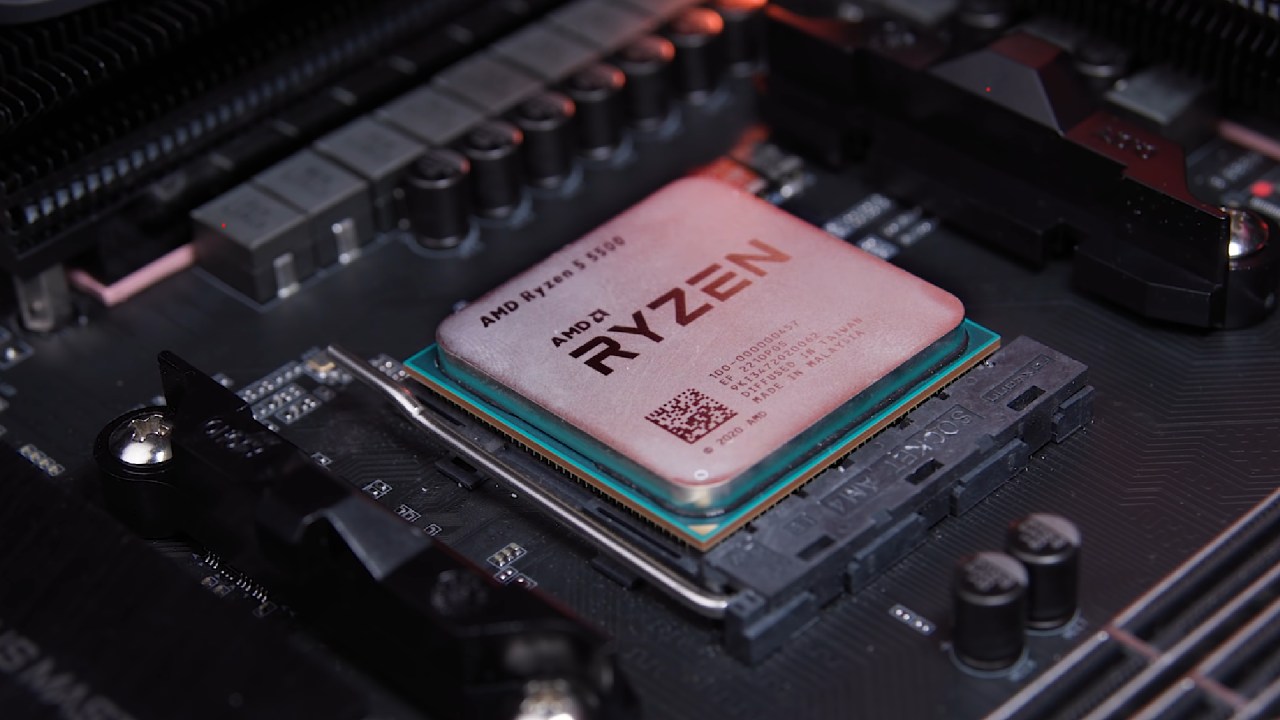
Ryzen 5 5500 will be the CPU used for this build. It works well for gaming while keeping the platform's cost low. If you have extra money, you can get greater frame rates, especially at 1080p, by upgrading to a Ryzen 5 5600X. At 1440 p.m., the performance difference isn't as important.
Choosing a Graphics Card and Thinking About VRAM
Radeon RX 9060 XT is the best GPU pick. You can choose between the 8GB and 16GB models. We chose the 8GB card to keep costs down, and testing reveals that it can still handle 1080p and even 1440p in many games, despite what some thought.
In some situations, the 16GB version works a little better, but it costs a lot more. There isn't a clear benefit to any of the other selections in this price range. 8GB RTX 5060 doesn't perform as well, and Intel Arc B580 is slower overall, even though it has 12GB of VRAM.
16GB RX 9060 XT is a good upgrade if you can afford it because it gives you more RAM. The 8GB version is still a good option today, even if it doesn't have the best performance.
Features of the Motherboard and Platform
The choice of motherboard changed from a relatively basic B550 to the ASRock B550M Pro4. Modern connectivity was the most important thing. The back I/O has to support USB-C more and more, and this board has that, along with four RAM slots, an M.2 heatsink, a reinforced PCIe slot, and a good mix of features.
One problem is that the front panel doesn't support USB-C, which affects the case choice later in the build.
Installing and Cooling the CPU
Ryzen 5000 CPUs use a pin-based design, so be careful when installing them. The retention arm holds the CPU in place without issue once it is in the correct position.
Installing memory is done in the usual way for dual-channel systems, using the second and fourth DIM slots. The kit includes 32GB of DDR4 3600 memory, more than enough for gaming and everyday use.
A Team Group MP44L NVMe SSD handles storage, and you may choose between 500GB and 1TB, depending on your budget or the gear you already have.
Instead of the factory solution, an aftermarket air cooler is employed to cool the system. The cooler that comes with it would work safely, but a better one would run more quietly and keep the temps steadier. It works with many AMD sockets and is compatible with both Ryzen 55500 and Ryzen 55600X.
Design of the Case and Airflow
Case selection considers price, airflow, and features. The chosen type has tempered glass, mesh front ventilation, and six fans already installed. Five of them are for intake, and one is for exhaust. This produces positive pressure that helps cool the GPU.
The arrangement gives the GPU plenty of room and comes with a basic support bracket, which is not needed for shorter graphics cards. Some high-end quality-of-life features are absent; however, this lowers the price overall.
The motherboard requires a separate I/O shield, so you have to install it by hand before mounting it. For a microATX configuration, it's easy to route cables and line up standoffs after installation.
Installing the Power Supply and GPU
The graphics card goes into the main PCIe slot and needs one 8-pin power connector. RX 9060 XT is quite efficient, so it consumes little power.
A 650W MSI A650BN unit provides power. It has all the connectors needed for this system, such as those for the motherboard, CPU, GPU, and SATA power. It doesn't support PCIe Gen5 natively, but that doesn't matter for this setup.
The power supply unit sits on top of the casing, and the cables pass through cutouts on the inside before final installation. Once everything is hooked up, they all get steady electricity without too much trouble.
Starting the System and Doing Final Checks
When the system is turned on, all fans spin appropriately, the RGB lighting works as it should, and airflow is confirmed from the bottom intake fans to the GPU. The system starts up without any problems, which means that the installation and cable management were done correctly.

Benchmarks for Gaming Performance
Most benchmarks were run at 1080p with high or competitive settings; some were run at 1440p.
RX 9060 XT 8GB gets about 125 fps in Fortnite at 1080p competitive settings. The 16GB option speeds things up to about 143fps.
The 8GB card averages 94.8fps at 1440p high settings in Ark: Survival Evolved, while the 16GB card averages 95.1fps.
On the 8GB card, Call of Duty: Black Ops 7 Zombies at 1440p high averages 88 fps, whereas on the 16GB card it averages 97 fps.
The 8GB variant of Cyberpunk 2077 at 1440p high averages 77 fps, and the 16GB model averages 76 fps. This means that having more VRAM doesn't make a big difference in this case.
At 1440p, Marvel Rivals gets an average of 74fps on the 8GB card and about 70fps on the 16GB card. This is well within the margin of error.
Overall, the performance differences between the two GPU types are not always clear and are typically small, which makes the cheaper alternative even more appealing.
Final Thoughts
It is harder to explain why the initial goal of avoiding high DDR5 costs remains valid now that DDR4 prices have also risen. The savings compared to a recent DDR5 platform are not as large as projected, making newer platforms more tempting for new builds.
This setup is still a great choice for people who already have DDR4 memory or an older machine that needs a new GPU and CPU. It lets you play games at 1080p with no problems, at 1440p with some problems, and choose from a wide range of parts without needing the newest hardware.
Also, check our other AMD articles below:
- AMD Ryzen 9 9950X3D Review: Setting The Standard For 2025 Gaming CPU
- AMD Ryzen 7 9800X3D Review: 3D V-Cache Goes God Mode with Stunning Gaming Performance
- AMD RX 9070 Performance Review: Thermals, Clocks, and Real-World FPS
- AMD Ryzen 5 7600 Review: Best Budget Gaming CPU of 2025?
- AMD Radeon RX 7800 XT Review: RDNA 3 Power For Midrange Gaming
- Sapphire NITRO+ AMD Radeon RX 9070 XT Review: The Ultimate 4K Gaming GPU
- AMD Ryzen 7 7800X3D: Delivers Gaming Performance Far Beyond Expectations
- AMD Ryzen 9 7900X Review: Powering the AM5 Era with DDR5 & PCIe 5.0
- Intel Core i9‑14900K vs. AMD Ryzen 7 7800X3D: Power Profiles & Gaming Benchmarks
Editor, NoobFeed
Latest Articles
No Data.