
Diablo IV: Lord of Hatred Guide | How to Use the Loot Filter
Set up a clean Loot Filter to hide weak drops, protect valuable items, and keep your inventory easier to manage.
Game Guide by Jubair Baky on Jun 05, 2026
A good Loot Filter makes farming much smoother in Diablo 4 Lord of Hatred. Instead of stopping for every useless drop, you can hide low-value items and highlight the gear that still matters. This setup works well as a simple baseline filter, especially once you are farming higher Torment levels.
Enable The Loot Filter Shortcut
Start by opening Settings, then go to the Gameplay tab. Enable the Loot Filter Shortcut in the game menu. This makes it easier to get to the filter whenever you need to edit, import or change your rules.
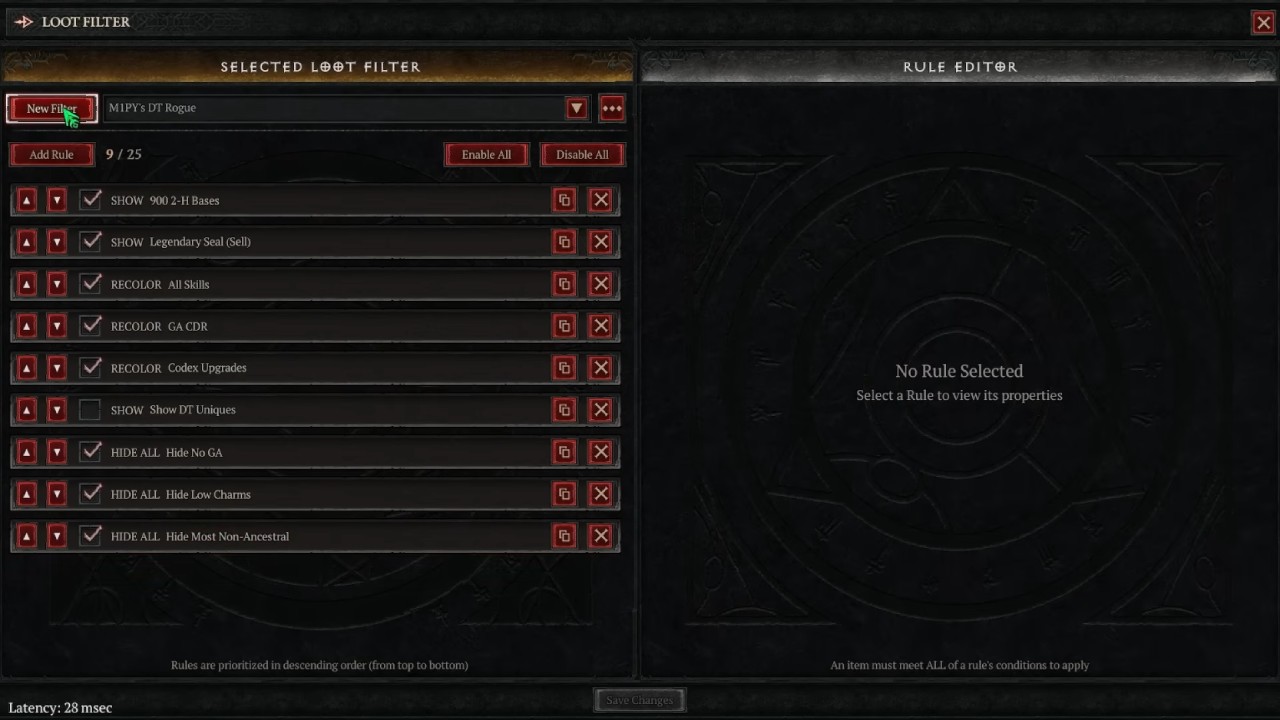
Create a new filter and name it something obvious like Baseline Loot Filter. The rules for Loot Filter work by priority from top to bottom, meaning the highest rules work first. This matters because your “hide” rules and “show” exceptions must be ordered properly.
Hide Non-Ancestral Items First
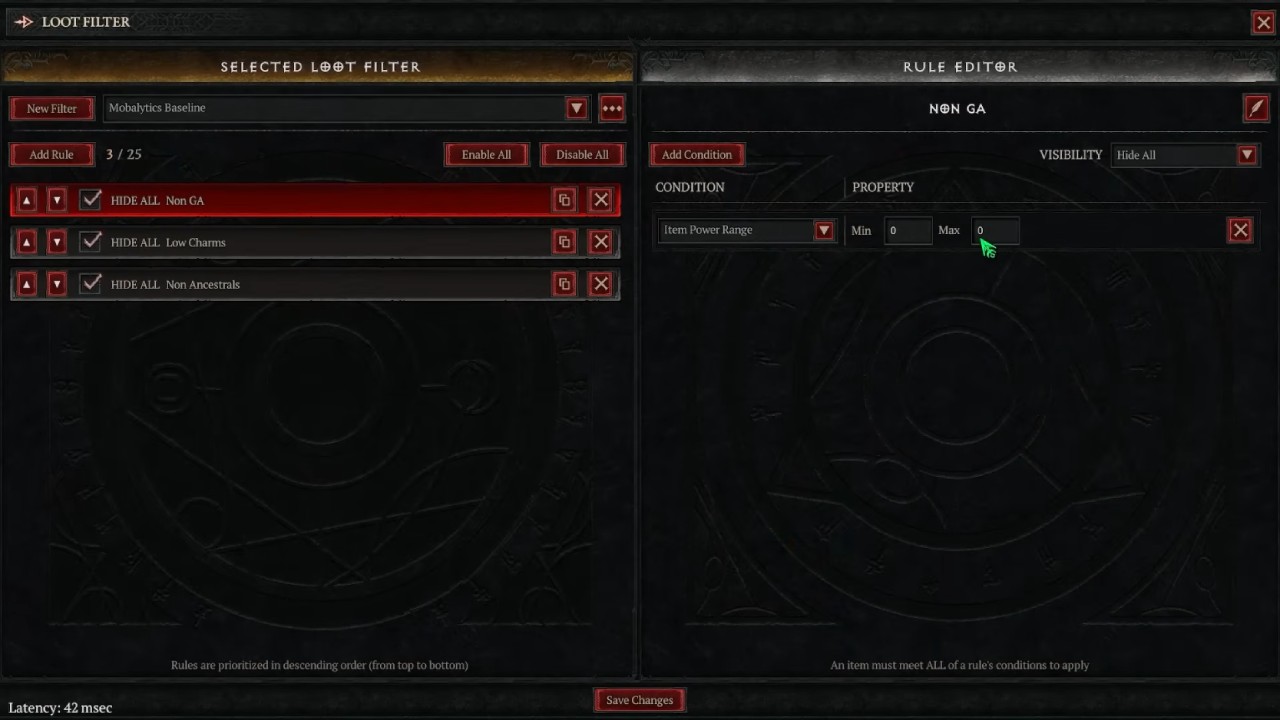
The first rule should remove items that are no longer useful for your progression. Most non-Ancestral items are very low value at higher Torment levels, especially Torment 7 and above.
Create a new rule called Non-Ancestrals. Set it to Hide All, and add an Item Power Range condition. Set the max item power to 850 and anything below it gets hidden. You can also apply this rule to Legendaries and Uniques, but this becomes stricter because you may hide potential Codex upgrades.
Add Stricter Cleanup Rules
After the main non-Ancestral rule, you can add optional cleanup rules. One useful rule hides low-value Common, Magic, and Rare Charms. Match the rule by item type, then select Charms and Seals where needed.This helps reduce inventory clutter from items with poor salvage or sell value.
A stricter endgame rule can hide items with fewer than one Greater Affix. This means non-GA items will no longer appear. Use this only when your farming is efficient enough, because it can hide items that may still have niche value.
Show Build-Specific Uniques
Strict filters need exceptions. Add a Show rule for Uniques that are important to your build. For a Death Trap Rogue this could be build relevant items such as Scion’s Claw, Eyes in the Dark, Sea Lord’s Fine Gloves, and Asheara’s Khanjar depending on your exact setup.
You can also set a minimum item power, such as 900, if you only want stronger versions to show up. It keeps your screen clean but still protects important build pieces.
Highlight Codex Upgrades And Legendary Seals
Add a rule for Codex Upgrades to be shown and recolored. For example, mint green. This is a handy tip, as some lower powered items will still upgrade your Codex even if your filter blocks similar drops.
Next, add a rule for Legendary Seals. Select Seal as the item type and Legendary as the rarity. Recoloring them can make them easier to spot, which is useful as valuable Seals are worth picking up and selling.
Add Stat-Based Rules For Your Build
You can add stat-based rules to the base filter to make it stronger if you need to for general farming. For instance, in some Death Trap Rogue setups, Cooldown Reduction is very useful. You can set a rule that only shows things that have certain Greater Affixes, like All Skills or Cooldown Reduction.
PC users can also import a filter code directly, by creating a new filter and pasting the code in the import box. Console users can manually build the same structure, by following the rule order above.
Also, check out our Diablo IV Review, Diablo 4: Vessel of Hatred DLC Review, and other guides below:
- Diablo IV: Lord of Hatred Guide | Best Leveling Builds For Every Class
- Diablo IV: Lord of Hatred Guide | How To Use War Plans
- Diablo IV: Lord of Hatred Guide | Best Dance Of Knives Rogue Build
- Diablo IV: Lord of Hatred Guide | How To Use The Horadric Cube
- Diablo IV: Lord of Hatred Guide | Endgame Meteor Sorcerer Build
- Diablo IV:Lord of Hatred Guide | How to Get All the Horse Mounts
- Diablo IV: Lord of Hatred Guide | How to Progress Through Torment 1-12
- Diablo IV: Lord of Hatred Guide | Best Ball Lightning Sorcerer Endgame Build
- Diablo IV: Lord of Hatred Guide | Best Death Trap Rogue Endgame Build
- Diablo IV: Lord of Hatred Guide | Poison Swarm Spiritborn Endgame Build
- Diablo IV: Lord of Hatred Guide | Best Endgame Builds Tier List
- Diablo IV Lord of Hatred Guide | Best XP And Paragon Farming Method
- Diablo IV Lord of Hatred Guide | Best Endgame Farming With Corrupted Roots
- Diablo IV: Lord of Hatred Guide | Fastest Necro Endgame Build
- Diablo IV: Lord of Hatred Guide | Lightning Spear Speedfarm Endgame Sorcerer Build
- Diablo IV: Lord of Hatred Guide | How to Beat Ah Bulan Boss
- Diablo IV: Lord of Hatred Guide | How to Beat Urivar Boss
- Diablo IV: Lord of Hatred Guide | How to Beat Vesicator Boss
- Diablo IV: Lord of Hatred Guide | How to Beat Abhorrent Manifestation Boss
- Diablo IV: Lord of Hatred Guide | How to Beat Enkindled Judicator Boss
- Diablo IV: Lord of Hatred Guide | How to beat Dread Captain Boss
- Diablo IV: Lord of Hatred Guide | How to Beat Eidolon of Jualin Boss
- Diablo IV: Lord of Hatred Guide | How to Beat Priestess of Hatred Boss
- Diablo IV: Lord of Hatred Guide | How to Get Doom Transmogs
- Diablo IV: Lord of Hatred Guide | How to Unlock Nahantu Tiger Mount
- Diablo IV: Lord of Hatred Guide | How to Get all the Cat mounts and Armors
- Diablo IV: Lord of Hatred Guide | Understanding Gear and Items
- Diablo IV: Mythic Gear Guide | How to Farm Mythic Items
- Diablo IV: Lord of Hatred Guide | How to Beat Uber Lilith
- Diablo IV: Lord of Hatred Guide | How to Beat Tormented Andariel
- Diablo IV: Lord of Hatred Guide | How to Beat Tormented Duriel
- Diablo IV: Lord of Hatred Guide | How to Beat Tormented Beast in the Ice
- Diablo IV: Lord of Hatred Guide | How to Beat Tormented Lord Zir
- Diablo IV: Lord of Hatred Guide | How to Beat Tormented Grigoire
- Diablo IV: Lord of Hatred Guide | How to Beat Tormented Varshan
- Diablo IV: Lord of Hatred Guide | Forging an Unstoppable Champion
- Diablo IV: Lord of Hatred Guide | Paladin Build: Mastering the Zealous Shredder
- Diablo IV: Lord of Hatred Guide | Paladin Build Mastering the Falling Star Arbiter
- Diablo IV: Lord of Hatred Guide | Paladin Build: Mastering the Holy Purifier
- Diablo IV: Lord of Hatred Guide | Warlock Build Mastering the Umbral Chains Weaver
- Diablo IV: Lord of Hatred Guide | The Ultimate Endgame Build
- Diablo IV: Lord of Hatred Guide | Essential Tips and Tricks for Traversing Sanctuary
- Diablo 4 Guide | Warlock Build Mastering the Blood Pact Invoker
- Diablo 4 Guide | Mastering the Pinnacle Challenges of Sanctuary
- Diablo IV: Lord of Hatred Warlock Build Guide | Mastering the Shadow Summoner
- Diablo IV: Lord of Hatred Guide | How to Choose Your Ideal Class
- Diablo IV: Lord of Hatred Guide | Warlock Build Mastering the Brimstone Apocalypse
- Diablo IV: Lord of Hatred Guide | Mastering the Frost Juggernaut
Editor, NoobFeed
Latest Articles
No Data.