
Pokémon Pokopia Guide | How To Turn Off Spectator Mode
Disable Spectator Mode in Pokémon Pier by toggling it off in Pallet Town, the only place where the setting can be changed.
Game Guide by Jubair Baky on Mar 17, 2026
Spectator Mode (also called Spectate Mode) is part of Link Play in Pokémon Pier. It is used when too many people join, letting extra players spectate instead of actively playing. If you are stuck spectating and want to play normally again, the fix is simple, but the location is strict.
What Spectator Mode Does
When a session has too many players, Spectator Mode lets players watch the game without joining in. You can toggle it on or off, but only from one hub area.
Go To Pallet Town To Change The Setting
You can only turn Spectator Mode on or off in Pallet Town. This town acts as the main hub because it is also where you can do Game Share. If you try to change the setting anywhere else, it will not work.
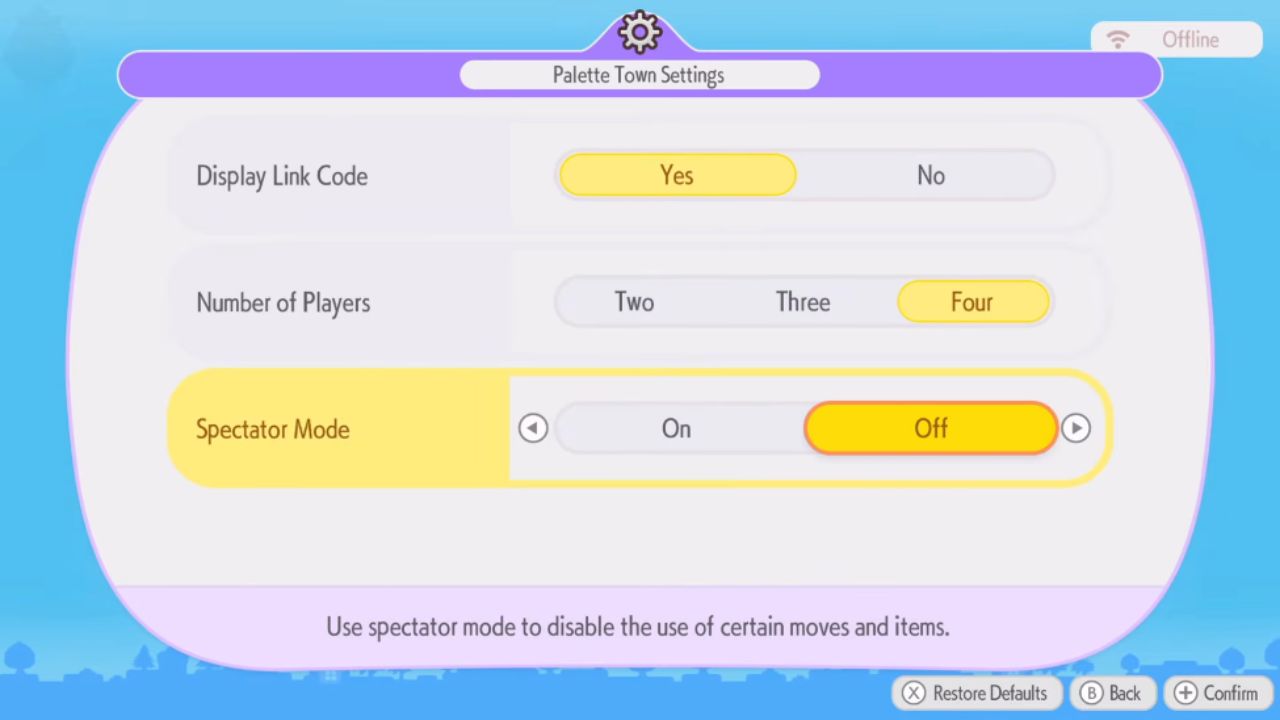
Turn Off Spectator Mode
Once you are in Pallet Town, open the Pokémon Pier Link Play settings and switch Spectator Mode off. After you toggle it off here, you can return to your session and join normally instead of spectating.
Also, check our Pokémon Pokopia Review and other guides below:
- Pokémon Pokopia Guide | How to Find Chef Dante’s Buddy’s Book
- Pokémon Pokopia Guide | How to Get Hot-Spring Water
- Pokémon Pokopia Guide | How to Get 50 Electricity in Withered Wasteland
- Pokémon Pokopia Guide | How to Get the Washing Machine, Refrigerator, and Game Boy
- Pokémon Pokopia Guide | How to Fix Humidity Stuck at 71
- Pokémon Pokopia Guide | How to Get Fluff and Paper
- Pokémon Pokopia Guide | How to Get Onix’s Smooth Tall Grass Habitat
- Pokémon Pokopia Guide | How to Get Squishy Clay and Make Bricks
- Pokémon Pokopia Guide | How to Get Squishy Clay and Make Bricks
- Pokémon Pokopia Guide | How to Make Gimmighoul’s Mini Museum Habitat
- Pokémon Pokopia Guide | How to Wake Up Snorlax
- Pokémon Pokopia Guide | How to Get Beans, Tomatoes, and Wheat
- Pokémon Pokopia Guide | How to Play With Friends Online
- Pokémon Pokopia Guide | How to Move and Destroy Buildings
- Pokémon Pokopia Guide | How to Make and Move Water Sources
- Pokémon Pokopia Guide | How to Activate the Water Wheels in Withered Wasteland
- Pokémon Pokopia Guide | How to Raise Humidity for Slowpoke
Editor, NoobFeed
Latest Articles
No Data.