

Viper Elite 5 Ultra DDR5 Memory Review
Performance optimization and stability balance make the Viper Elite 5 Ultra DDR5 a capable and versatile memory solution.
Hardware by Godrics01 on Nov 12, 2025
The Viper Elite 5 Ultra RGB DDR5 memory kit features two 24 GB modules. They run at 6000MHz with CL28 timings. The modules come in black, unlike the white TB series.
You can adjust the RGB lighting to your liking, and it shines from the center of each module, creating a unique light pattern.
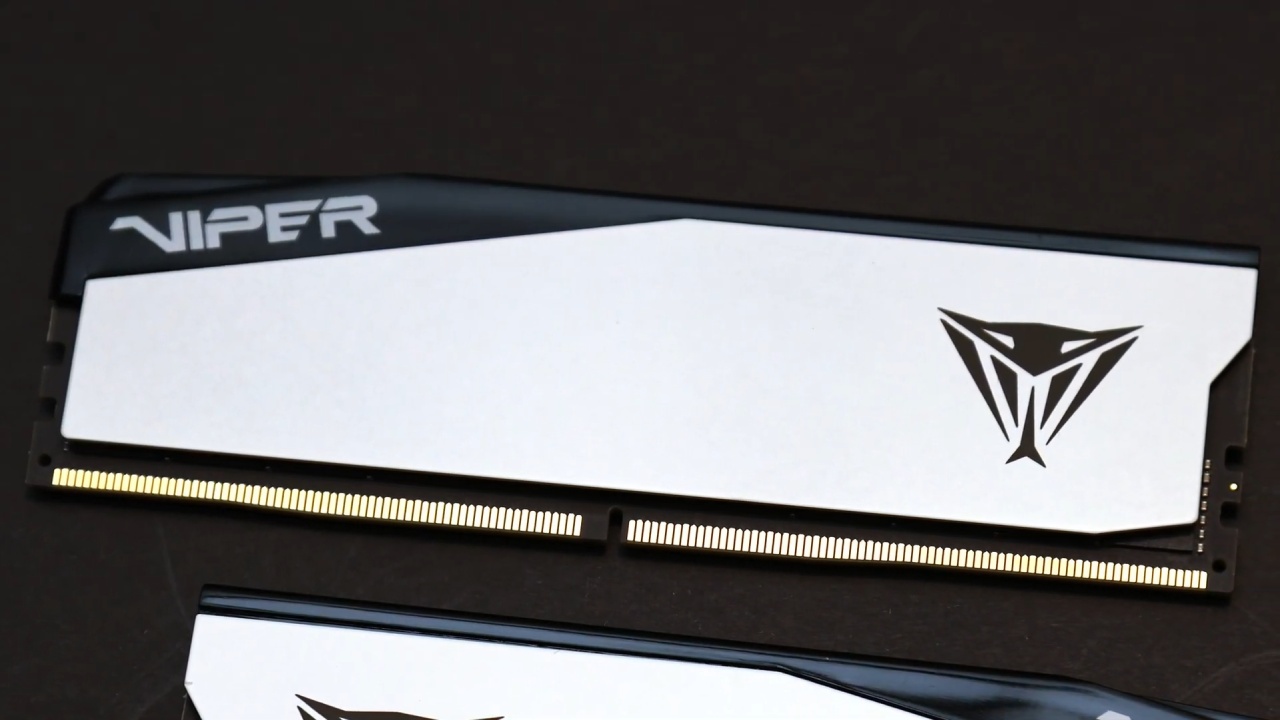
Specifications and Design
The Viper Elite 5 Ultra DDR5 kit comes in 16GB, 32GB, and 48GB sizes, with speeds of 6000MHz, 6400MHz, and 8000MHz. This kit is the 6000MHz type, which has stricter CL28 timings.
The modules include two XMP profiles: one for CL28 and one for CL36. We looked at both profiles to see how they performed differently.
Setting up and starting the test
The memory starts up at 5600MHz on Intel platforms and at 5200MHz on AMD platforms with the default JEDEC settings. These speeds serve as the starting point for further adjustments.
Enabling the XMP CL36 profile yields a slight performance improvement, albeit not a substantial one. Switching to the CL28 profile yields small improvements; however, the most significant changes occur when the computer is manually overclocked.
Performance when Overclocked
On Intel systems, steady overclocking was possible at 7800MHz with CL36 timings. On AMD systems, it was possible at 6400MHz with CL30. These changes reduced latency and increased throughput for both productivity and benchmark workloads.
The benefits were clearest in charts showing how well different systems worked together, indicating that overclocking remains a crucial way to maximize the potential of DDR5.

Performance in games
In games like Cyberpunk, Intel systems showed very little variation across profiles. On the other hand, AMD systems showed gains of up to 20 FPS when overclocked. This indicates that frequency scaling has a greater impact in AMD setups, where increased bandwidth is more crucial.
Thermal and stability issues
To maintain stability, long-term overclocking requires effective cooling. Using direct airflow, such as a small fan over the memory modules, prevents thermal throttling and maintains steady performance. If the cooling isn't right, stability can degrade at high load.
Compatibility & Ease of Use
Adding two XMP profiles has a useful purpose. The CL28 profile may not work well with all hardware combinations. In contrast, the CL36 profile is compatible with a wider range of hardware. The difference in real-world performance between the two is still small. Still, the dual-profile method gives consumers the choice between stability and customization.
Final Thoughts
The Viper Elite 5 Ultra DDR5 kit, running at 6000MHz CL28, holds considerable promise for delivering strong performance, especially when manually overclocked. Users should anticipate the software to work well on both Intel and AMD systems.
Depending on the hardware, they can even push the frequencies higher. If you find this memory kit at a good price, you can buy it with confidence, as the performance improvements you get from tweaking make it worth the investment.
Also, check our other hardware articles:
- AMD Ryzen 9 9950X3D Review: Setting The Standard For 2025 Gaming CPU
- Amazon Luna 2025 Review: Is Prime Gaming's Cloud Service Your Go-To For Casual Fun?
- AMD RX 9070 XT Review: AMD's RDNA 4 Champion for 1440p Gaming
- GeForce Now Ultimate: Ditching Your Gaming PC For Cloud RTX 4080 Power?
- NVIDIA GeForce RTX 5080 Review (2025): Still A 4K Gaming Powerhouse?
- Intel Core Ultra 9 285K Review And Performance Breakdown (2025)
- AMD Ryzen 7 9800X3D Review: 3D V-Cache Goes God Mode with Stunning Gaming Performance
- Intel Core Ultra 9 285K vs AMD Ryzen 7 9800X3D: In-Depth Gaming Performance and Benchmark Comparison
- NVIDIA GeForce RTX 5080 Super Performance In Cyberpunk 2077: Path Tracing & DLSS 4.0 Tested
- RTX 5090 Performance Testing In GTA 5 – 1080p, 1440p, and 4K Max Settings Benchmark
- AMD Radeon RX 9070 XT In Cyberpunk 2077: Ray Tracing & FSR 4.0 Tested
- Intel Arc B580 Review: The $250 GPU Revolutionizing 1440p Gaming
- Intel Arc B570 Vs. B580: Value, Specs, And Real-World Gaming Performance
- Intel Arc B570 Review: Efficient Xe2 Performance At An Affordable Price
- RTX 5090 Laptop Vs. M4 Max MacBook Pro: Ultimate Raw Performance Vs. Battery Endurance
- Intel Arc b580 Vs. RTX 4060: Game Performance And Value Analysis
- RTX5090 Hell Is Us Demo 4K Ultra Benchmark: DLSS Vs. Native Performance Guide
- NVIDIA RTX 5070 Review: Mid-Range Muscle or Marketing Hype?
- Nintendo Switch 2 Review: Handheld Performance, Features & Value Breakdown
- RTX 5070 Ti Review: Performance, Thermals & Power Efficiency Tested
- Samsung Odyssey OLED G81SF Review 2025: Ultimate 32-Inch QD-OLED Gaming Monitor
- AMD RX 9070 Performance Review: Thermals, Clocks, and Real-World FPS
- AMD Ryzen 5 7600 Review: Best Budget Gaming CPU of 2025?
- AMD Radeon RX 7800 XT Review: RDNA 3 Power For Midrange Gaming
- Asus ROG RTX 5090 Astral OC Vs. Founders Edition: The 4K Gaming Benchmark
- ASUS ROG Astral RTX 5090 OC Edition Review: 32GB GDDR7 & 4K Gaming Benchmark
- Intel Core i5-13400F Gaming Performance: Still Worth It in 2025?
- ASUS GeForce RTX 5090 LC Liquid Cooled GPU Review: Unmatched Silence & Speed
- ASUS ROG Ally X Handheld Review: Double the Battery, Double the Comfort
- Lenovo Legion Go S Review: The Ultimate Steam Deck 2 Alternative
- Sapphire NITRO+ AMD Radeon RX 9070 XT Review: The Ultimate 4K Gaming GPU
- Alienware 16 Area 51 Review: The Ultimate 2025 Gaming Laptop
- Alienware Area-51 Review: Unmatched 4K, Thermal, and Acoustic Performance
- AMD Ryzen 7 7800X3D: Delivers Gaming Performance Far Beyond Expectations
- AMD Ryzen 9 7900X Review: Powering the AM5 Era with DDR5 & PCIe 5.0
- Intel Core i9‑14900K vs. AMD Ryzen 7 7800X3D: Power Profiles & Gaming Benchmarks
- Intel Core i9 14900K: Specs, Benchmarks, and Competitor Comparison
- ASRock Radeon RX 7800 XT Challenger OC Review: Best Price-to-Performance GPU of 2025
Editor, NoobFeed
Latest Articles
No Data.