
MSI Claw A8 Hands-On Review: Ryzen Z2 Extreme Performance Tested
Breaking down the Ryzen Z2 Extreme, RDNA graphics, RAM configuration, storage, and display specifications.
Hardware by Mitsuba Miyu on Feb 15, 2026
Many parts of the newest MSI Claw are the same as those in the model released last year with the Lunar Lake Intel processor. The controls and screen are still the same, but the shell has been remade, and AMD's Ryzen Z2 Extreme chipset has been switched to.
This chip is pretty much the same as the ones in the Legion Go 2 and the Xbox Ally X, which are both very good handhelds. How does this updated MSI Claw compare to other laptops with similar specs in real life? That's the big question.
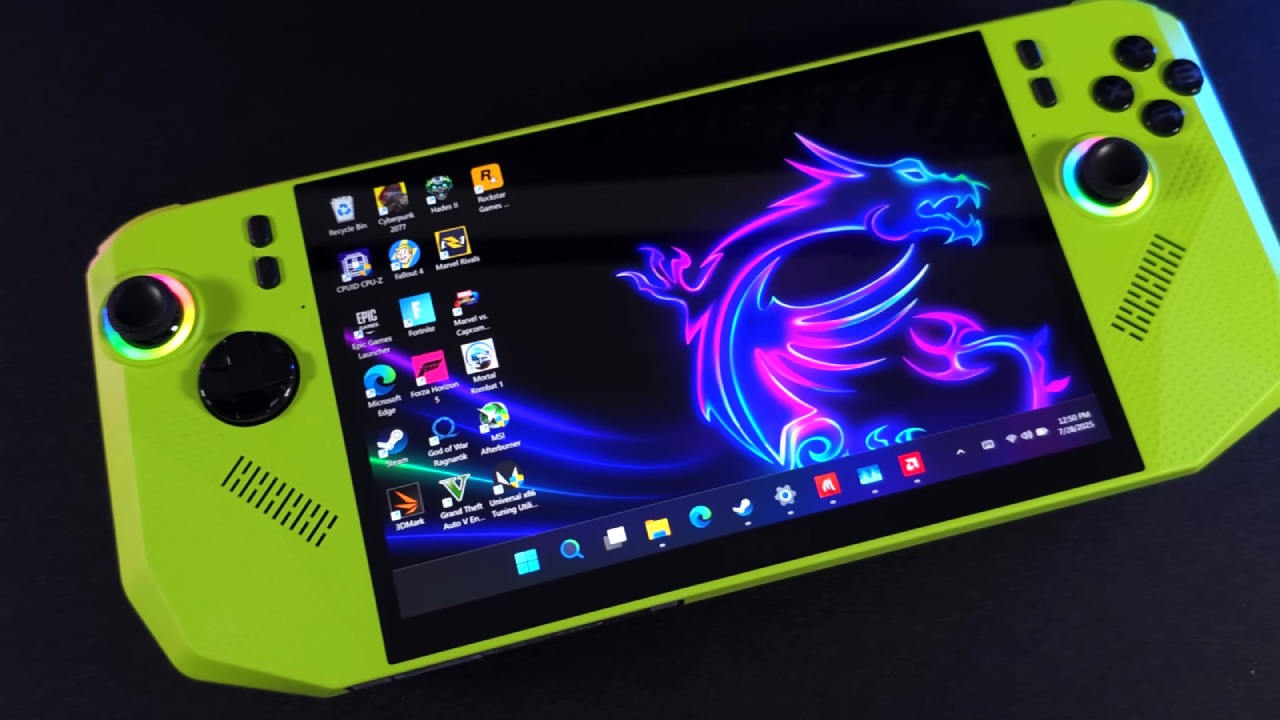
Specifications and Pricing
To begin, let us talk about the details. The AMD Ryzen Z2 Extreme processor powers the MSI Claw A8. It has 8 cores, 16 threads, and an integrated Radeon 890M GPU. It comes with 1TB of built-in storage and 24GB of LPDDR5X RAM.
The display remains unchanged from last year's model: an 8in LCD panel with a 1920x1200 resolution, a 16:10 aspect ratio, and a variable refresh rate up to 120hz. The battery is also the same great 80Wh unit, which is a big part of why it lasts so long. The device weighs 762g, which is about a pound and a half. This is an acceptable weight for the battery size.
Considering its 80Wh battery, the MSI Claw is surprisingly light compared to other handhelds in the same class. A similarly sized competitor with a 60Wh battery is only 9g lighter. It weighs about 50 grams more than the Xbox Ally X, which also has an 80Wh battery but a smaller screen. It weighs about 100 grams more than the Steam Deck OLED, which has a 50Wh battery.
There are two USB4 ports, Wi-Fi7, and Bluetooth5.4 for connecting. It ships with Windows11 integrated with the Xbox full-screen experience. Hall-effect triggers and sticks are still present from older models.
But when it comes to prices, things get tricky. The MSI Claw A8 costs $1,150. That is still pricey for a mobile PC, even though it is less expensive than last year's model.
A similarly configured competitor with an AI version of the Z2 Extreme, 24GB RAM, and 1TB storage comes in about $150 cheaper. On the high end, a competitor costs $1,350 and has 32GB of RAM and a larger 8.8-inch OLED screen.
It's hard to justify buying a handheld PC that costs more than $1,000, especially since older devices powered by the Z1 Extreme can be found on sale for around $650 and still run light games well. Over time, prices might fall, making the deal more appealing.
Design and Quality
The new shell shape is very blocky and sharp. The front has a mostly flat top that slopes down before the sides drop off steeply. Even though it's not a hard 90° drop, you can still feel the corners when you hold it. To my surprise, it's not uncomfortable from the front, and the textured surface feels good in my hands.
The back design features a variety of shapes and textures. The design is unique and somewhat stylish, but the functions aren't as good. The grips stick out, but not far enough to fully support the hand. This means that the pinky and middle fingers are in a strange place. After a lot of trying, the ergonomics feel good, but not great (about a 6 out of 10).
On the plus side, the size feels great all around. The 8-inch 16:10 screen size strikes a great balance between portability and immersion. The thickness and width are like those of devices like the Steam Deck, which makes it feel comfortable and right-sized.
Controls and Audio
The analog sticks have Hall sensors and RGB lights that can be changed. They're accurate and easy to hold, but they feel very light and flicky. It works, but more pushback would make it better.
The D-pad uses a rubber membrane and offers precise input. It works well with most games, like platformers and newer games that use it for extra inputs. But its sharp sides might make you tired after playing fighting games for a long time, where you have to roll a lot.
The face buttons are made of a rubber membrane and feel a bit like Xbox controller buttons. They are shiny and slightly curved. They work reliably. There are also buttons on the device that are only used for MSI's control center and quick settings.
The sound is a great feature. The two 2W speakers on the front of the device produce great sound, possibly even better than many competitors. The fan noise is also very quiet, and the temperature inside stays stable; even under heavy stress, it rarely rises above the high 70s°C. It has some of the best cooling efficiency in its class.
The power button can be unlocked with a fingerprint, and the top features an LED light, two USB4 ports, airflow, a microSD slot, a 3.5mm headphone jack, and volume controls. The power and volume buttons are now separate, which makes them easier to use. Triggers and bumpers work like the buttons on an Xbox controller, and the textured triggers give the best feedback.
Display Quality
The 8-inch 1200p LCD screen can reach 500 nits. Most of the time, 65% to 70% light is enough indoors. Outdoors, it remains usable, though direct sunlight can still pose challenges.
The screen can also be dimmed significantly, making it easy to use at night. The colors look good, and the ability to change the refresh rate up to 120Hz makes things smoother. Overall, the screen size and resolution feel nearly ideal for a handheld gaming PC.
.jpg)
Software Experience
The device has Windows11 installed, and when it starts up, the Xbox full-screen experience is already there. When users log in with a Microsoft account, they can start games right from the screen. This includes Steam games. Along with the Xbox interface, MSI's own Center M software is still available.
There are three performance modes: AI Engine, Endurance, and Manual. For power and battery life, the AI Engine usually caps at around 20W TDP. In manual mode, you can change the power from about 6W to 35W. An FPS limiter offers caps at 30, 45, 60, 90, and 120 fps.
The Xbox full-screen interface works, but it feels a bit awkward when compared to Steam Big Picture mode. For people who want an experience like SteamOS, the Z2 Extreme chipset also works with other operating systems.
Benchmarks and Real-World Performance
The device scores 4,559 in 3DMark Time Spy, about the same as other Z2 Extreme handhelds. The performance is what you'd expect from this device.
Lightweight games work well when power is low. The battery can last for about 6.5 hours at 7W TDP and 1200p60fps. At 8W TDP and slightly more demanding games, it is possible to get about 5 hours of use. The battery lasts about 4 to 5 hours at 10W to 13W.
When the TDP hits 15W, the battery life drops to about 3 hours. At 20W TDP, which is normal for AAA games' AI Engine mode, the battery lasts for about 2.5 hours on average.
Increasing TDP from 20W to 35W doesn't make much of a difference in speed and cuts battery life by a lot, to about 1.5 hours. Often, going from 1200p to 800p resolution works better to boost frame rates than going from 1200p to 800p resolution.
To keep frame rates stable between 35 and 60 fps, modern games that are hard to run often need to be played on low settings, with FSR upscaling enabled, or with the resolution lowered. The variable refresh rate helps smooth out performance fluctuations, making sub-60fps gameplay feel more consistent.
What We Like
The Ryzen Z2 Extreme delivers high performance in both low- and high-power scenarios. The 80Wh battery makes battery anxiety much less of a problem; it regularly lasts about 2.5 hours in demanding games and much longer in light games.
The 8-inch, 1280x720 screen is perfect for playing games on the go. The sound quality and cooling are both great, with fans that don't make noise and thermals that work well.
What We Don't Like
Compared with competitors' more rounded shells, the angular shell shape is less comfortable to use. The analog sticks feel too light and could use more resistance.
Most importantly, the $1,150 price tag seems hard to justify given how much better it is than previous generations. You can often get the same experiences for a lot less during sales.
Final Thoughts
The MSI Claw A8 is solid hardware with strong performance, excellent battery capacity, great audio, and a well-sized display. Although it doesn't really fail in any one area, it struggles to justify its high price.
If it cost around $800, it would be much more important. If sales or open-box deals put the price closer to that range, it will be a strong contender. Until then, while it is a good handheld PC, its cost remains its biggest limitation.
Also, check our other handheld articles below:
- ASUS ROG Ally X Handheld Review: Double the Battery, Double the Comfort
- Nintendo Switch 2 Vs. Original Switch 1: A Full Comparison
- How To Connect A Camera And Join Voice Chat With Nintendo Switch 2
- Nintendo Switch 2 Review: Handheld Performance, Features & Value Breakdown
- ROG Xbox Ally X Vs. ROG Ally X: Display, Battery & Controls
- ASUS ROG Ally X vs. Steam Deck OLED: Display, Battery & Gaming Benchmarks
- MSI Claw 8 AI+ Review: Display, Controls & Gaming
- Nintendo Switch 2 vs. Steam Deck OLED: Gaming, Performance, Battery, Display and Value
- PlayStation Portal Review: Remote Play, Cloud Streaming & Travel Gaming
- PlayStation Portal vs. Lenovo Legion Go: Best Portable Gameplay
- Lenovo Legion Go S vs. Zotac Zone: In-Depth Experience Comparison
- How AMD Dominates the Handheld Market
Editor, NoobFeed
Gaming Hardware Updates
No Data.