
ASUS ROG Raikiri 2 Review: A Drift-Free, Micro-Switch Controller Built for PC, Xbox, and Ally
ROG Raikiri 2 controller delivers a premium gaming experience with customizable buttons, advanced joysticks, and ergonomic design.
Hardware by Tanisha Aria on Nov 23, 2025
The long-awaited ROG Raikiri 2 is finally here, after months of players asking for a new controller with lots of features that works with PC, Xbox, and the ROG Ally.
With more time to play, it's clear that this release isn't just hype. ASUS has made a real follow-up to the Raikiri Pro that is better in every way: feel, responsiveness, wireless connectivity, and general quality.
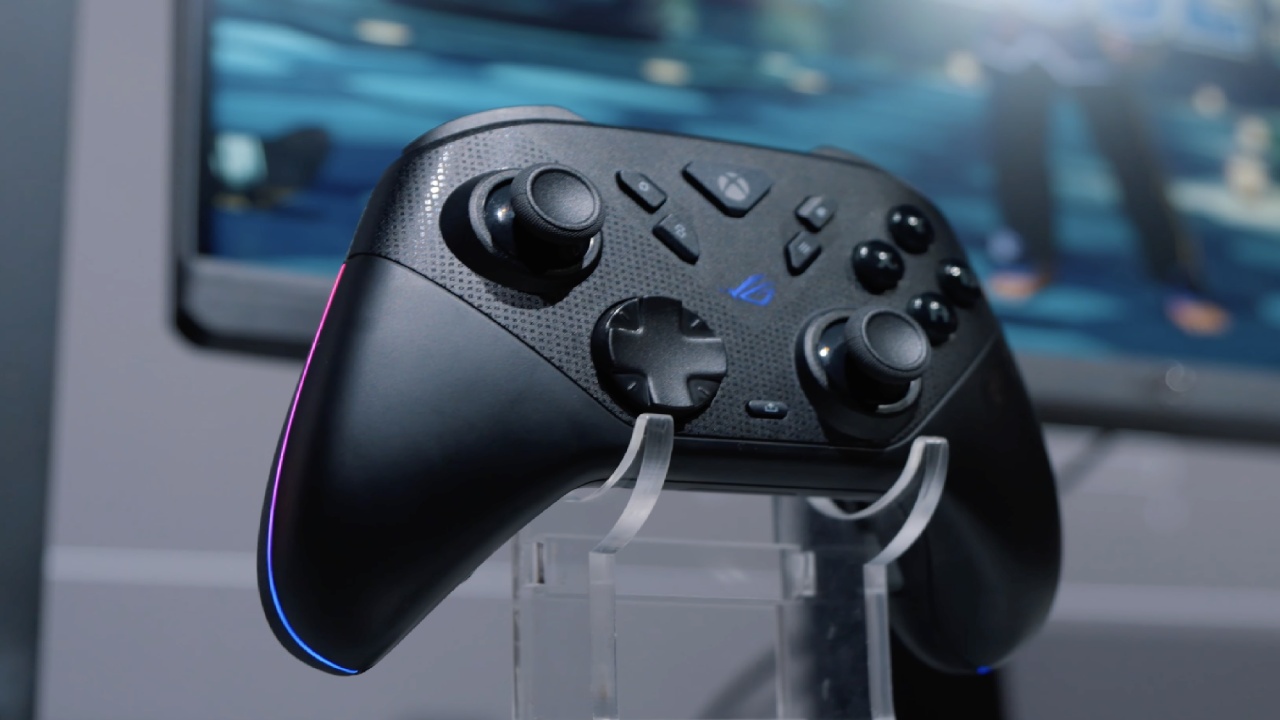
At launch, the Raikiri 2 has an Xbox-like shape, full tri-mode wireless support, drift-resistant TMR sticks, micro-switch buttons for almost every input, adjustable trigger stops, subtle RGB, and an expensive charging dock included in the box. And for many gamers, it could become their new daily driver. It's the most complex controller ASUS has ever made.
First Impression
ASUS puts more than just the controller in the box. The Raikiri 2 comes with a hard-shell case that holds both the controller and the wireless charging dock.
The dock can be placed inside the case or removed and placed on a desk with the help of optional feet that tilt the controller for easy placement. The dock can hold the device in place magnetically.
If you plug the dock into the Raikiri 2 once, you won't have to plug and unplug cables into and out of the remote. The controller also has a hidden slot for the USB wireless dongle.
This nice touch prevents you from losing the receiver while traveling. There are also extra-tall thumbstick caps included, which give players one more way to fine-tune comfort and accuracy.
Tri-Mode Connectivity Made for PC, Xbox, and ROG Ally
ASUS made the Raikiri 2 so that it can be used on more than one platform.
- 2.4 GHz wifi through the dongle that comes with it (with ROG SpeedNova low-latency tech)
- Bluetooth works with computers, phones, and most other devices.
- USB-C mode with a cord
Xbox Series X|S systems can use both 2.4 GHz and USB-C modes. There is a hardware switch on the back that lets players move between Xbox and PC modes. There is also a second switch that lets players choose between Bluetooth and dongle connectivity.
The controller has buttons for the ROG Ally's Command Center and Library, which are only available in the ASUS environment.
TMR Joysticks and Micro-Switch Buttons: A Major Upgrade in Feel
The biggest change from older Raikiri models is what's inside. The Raikiri 2 has TMR joysticks, which work like Hall effect sticks but use even less power and are more accurate.
ASUS says these sticks won't drift, which is one of the biggest problems with standard controllers over time. Almost all of the Raikiri 2's buttons don't use standard rubber domes. Instead, they use micro switches.
The ABXY buttons, D-pad, bumpers, back paddles, and even the triggers (when the trigger-stop mode is on) all respond quickly and clickily, making the controller feel more like a mechanical keyboard than a regular one.
This makes a huge difference in fast-paced games with a lot of repeated input, like Hades 2. The less travel and crisp feedback make the controls much more responsive.
Adjustable triggers, back buttons, and useful ergonomics
The rear of the controller includes:
- Four remappable back buttons
- Turn on the stop switches.
- The USB dongle can be stored in the
For quick shooting in shooters, the trigger stops turn the analog triggers into digital clicks that sound like microswitches. Within Armoury Crate, the back buttons can be changed or turned off completely.
The grips have a light anti-slip texture—not too much rubber, but just enough to keep your grip during long practices.
.jpg)
Battery Life and RGB Lighting
ASUS says that the Raikiri 2 can be used wirelessly on 2.4 GHz for up to 50 hours with RGB and rumble turned off. The real-world time changes based on your lighting and rumble settings, but the battery lasts a good amount of time.
The RGB lighting is meant to be subtle; it's placed along the inside frame rather than shooting outward. It makes a soft glow in a dark room that doesn't get in the way of playing games.
Designed for Xbox Players but Perfectly Suited for the ROG Ally
The form and asymmetrical sticks of this controller make it feel right at home for Xbox players from the moment you pick it up.
However, the fact that it works with the ROG Ally makes it even more appealing for owners of handheld devices who dock them for play in the living room. It is very helpful to be able to open Command Center and Library right from the controller, unlike other pads.
Release Timing and Availability
The US will be the first place to buy the Raikiri 2, and Best Buy is likely to have early stock. Soon after, other areas and more stores will follow suit. People are already asking ASUS to make a white version, but they haven't said anything about it yet.
Final Thoughts
The Raikiri 2 is the best remote that ASUS has ever made. The ROG Ally combines high-quality materials, controls that respond very quickly, deep software customization, three connectivity modes, and thoughtful ecosystem features.
It's a fast, clicky, modern controller experience that stands out from other options on the market, whether it's used on PC, Xbox, or in a living room setting powered by an XG Mobile.
The Raikiri 2 is the best controller for gamers who want mechanical inputs, a stick that doesn't move, and an Xbox-style setup. For many, it may become their new favorite controller.
Also, check our other ROG Xbox Ally articles below:
- ROG Xbox Ally X vs. Original Ally: Real-World FPS and Power Efficiency
- Next-Gen Xbox or No Console: Understanding the Impact on Games and Gamers
- Inside the ASUS ROG Xbox Ally: Power, Portability, and PC Gaming Without Limits
- ASUS ROG Xbox Ally Review: Ergonomics and Windows 11 Full-Screen Experience in 2025
- ASUS ROG Xbox Ally X Hands-on: Ryzen Z2 Extreme Power and Full-Screen Windows Experience
- Xbox Magnus: Next Generation Console with AI Power and PC Hybrid Design
- ROG Ally X Gets Xbox-Like Features with Latest Armoury Crate Update
- Future of Xbox: Cloud Gaming, Game Pass, and Hardware Exit Plans
- Xbox Series X vs. Xbox One X: Which Console Is Best for Backward Compatibility in 2025
- Xbox Full Screen Experience on the Lenovo Legion Go
Contributor, NoobFeed
Gaming Hardware Updates
No Data.