
SteamOS Update Adds Steam Machine Support and Major Performance Improvements
SteamOS beta update prepares for Steam Machine launch with performance fixes UI improvements and expanded hardware support.
Hardware by Nahe Yan on Apr 15, 2026
SteamOS is always getting better, with new features, more hardware support, and better performance on handheld gaming devices. Along with these changes, the prices of handhelds and the availability of new games are altering the entire player experience.
We're going to talk about three key things. First, there's a new SteamOS version that adds support for the Steam Machine and many new features. Some of these upgrades were already accessible in preview; the beta now has more functionality.
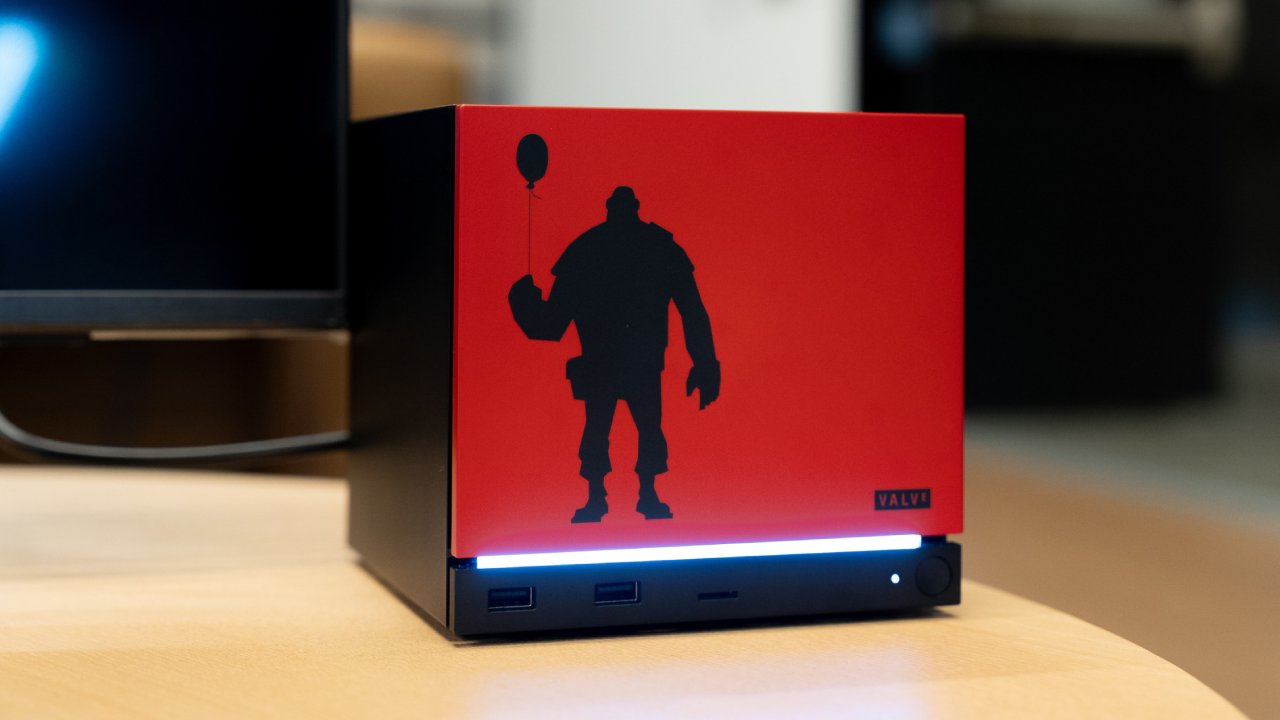
Update for SteamOS and Support for Steam Machines
The most important new feature is support for Steam Machines. The information is still limited, but early data mining suggests features such as better ways to set up controllers and navigate the system. We can now access a menu by pressing the power button, which lets us shut down, restart, or open the guidance menu. This fixes a problem where utilizing shortcuts on the controller would mistakenly turn it off and close the guide.
There are also signs of additional support features, such as connection visualizations and system-level changes for new hardware setups. These updates show that work is still going on and that the platform is making progress.
Better Performance on all Handheld Devices
The update adds performance-focused improvements, notably for newer handhelds. We tried out SteamOS on devices that had problems with older versions, such as unresponsive controls, unresponsive power buttons, missing lighting controls, and broken performance presets. Most of these problems have been fixed now.
Now is a good moment to install SteamOS on a handheld device if you've been waiting. To install the software, you need to download a recovery image and disable secure boot in the BIOS, both of which are easy to do.
Even though devices are getting better, we keep going back to the Steam Deck because it is easy to use. Other handhelds often have problems, including high-resolution displays that slow performance or controls that aren't as comfortable to use.
Fixes for the Frame Limiter and Lower Input Latency
When you use the built-in frame limiter, input latency has improved significantly. Before, the delay was easy to see, especially in intensive games running at 30 fps. People often preferred using external tools over the built-in limiter.
The delay has now been cut down to the point where it is no longer visible. This is vital, especially with new hardware coming out, where quick response times are quite important.
Changes to Desktop Mode and Improvements to the System
There is also better VRR compatibility, which makes frame pacing smoother, with no jitter or stutter. The problems with UI scaling have been fixed, so things that were too small or cut off on larger screens are no longer an issue.
The updated graphics driver improves performance. We saw a boost of 2 to 3 fps in demanding games during testing, and loading new sections was less stuttery.
Other changes include greater HDMI audio quality with full surround sound compatibility, enhanced Bluetooth microphone capabilities, and the ability to wake up LCD models via Bluetooth.
Worries About Lenovo Prices
We are also having problems with prices in the handheld sector. There have been delays with the Legion Go 2, and some pre-orders are still not filled. Prices have also gone up a lot, with the most expensive versions costing up to 2000.
We don't think you should pay 2000 for a handheld device. A gaming laptop at that price is a better deal and performs better. The fact that these devices are bigger also makes them less portable.
Even though there may be demand, the fact that so little is being made probably makes it seem scarce. Other companies are cutting prices, raising questions about where the market is headed in the long term.
Final Thoughts
We have played a lot of Road to Vostok. It is a single-player extraction shooter that emphasizes realism and progression. There are several maps in the game, and they get harder as you go.
Instead of skill trees, progression is dependent on gear, experience, and choices. This means you may improve by learning how the game works and how to play it.
At medium settings, the game plays at a steady 30 fps on Steam Deck. This frame rate is still fine because the game moves more slowly. One problem is that there are no cloud saves, so progress is bound to the device unless you back it up yourself.
The experience is overall solid and well-organized, with a consistent gameplay loop that emphasizes survival, exploration, and preparedness.
Also, check our other hardware articles:
- AMD Ryzen 9 9950X3D Review: Setting The Standard For 2025 Gaming CPU
- Amazon Luna 2025 Review: Is Prime Gaming's Cloud Service Your Go-To For Casual Fun?
- AMD RX 9070 XT Review: AMD's RDNA 4 Champion for 1440p Gaming
- GeForce Now Ultimate: Ditching Your Gaming PC For Cloud RTX 4080 Power?
- NVIDIA GeForce RTX 5080 Review (2025): Still A 4K Gaming Powerhouse?
- Intel Core Ultra 9 285K Review And Performance Breakdown (2025)
- AMD Ryzen 7 9800X3D Review: 3D V-Cache Goes God Mode with Stunning Gaming Performance
- Intel Core Ultra 9 285K vs AMD Ryzen 7 9800X3D: In-Depth Gaming Performance and Benchmark Comparison
- NVIDIA GeForce RTX 5080 Super Performance In Cyberpunk 2077: Path Tracing & DLSS 4.0 Tested
- AMD Radeon RX 9070 XT In Cyberpunk 2077: Ray Tracing & FSR 4.0 Tested
- Intel Arc B580 Review: The $250 GPU Revolutionizing 1440p Gaming
- Intel Arc B570 Vs. B580: Value, Specs, And Real-World Gaming Performance
- RTX 5090 Laptop Vs. M4 Max MacBook Pro: Ultimate Raw Performance Vs. Battery Endurance
- Intel Arc b580 Vs. RTX 4060: Game Performance And Value Analysis
- RTX5090 Hell Is Us Demo 4K Ultra Benchmark: DLSS Vs. Native Performance Guide
- NVIDIA RTX 5070 Review: Mid-Range Muscle or Marketing Hype?
- Nintendo Switch 2 Review: Handheld Performance, Features & Value Breakdown
- RTX 5070 Ti Review: Performance, Thermals & Power Efficiency Tested
- Samsung Odyssey OLED G81SF Review 2025: Ultimate 32-Inch QD-OLED Gaming Monitor
- AMD RX 9070 Performance Review: Thermals, Clocks, and Real-World FPS
- AMD Ryzen 5 7600 Review: Best Budget Gaming CPU of 2025?
- AMD Radeon RX 7800 XT Review: RDNA 3 Power For Midrange Gaming
- Asus ROG RTX 5090 Astral OC Vs. Founders Edition: The 4K Gaming Benchmark
Editor, NoobFeed
Gaming Hardware Updates
No Data.